Categories
Uncategorized

Salesforce Agentforce: The AI-Powered Future of Sales, Marketing, and Service 

Ask most department heads about their team’s tech stack, and you’ll hear them sigh. It’s not that the tech today isn’t useful – it’s that there’s so much to navigate. Sales is toggling between CRMs and prospecting tools. Support agents bounce from tickets to spreadsheets to Slack. Marketers have endless browser tabs and systems running at once. 

It’s all more complicated and expensive than people realize. According to a report by Qatalog and Cornell University, employees lose up to 59 minutes a day simply navigating between apps and tools, costing companies nearly $7,000 per employee per year in lost productivity. When companies try to boost efficiency by adding AI into the mix, they can’t just bolt intelligence onto confusion.  

This is what makes Salesforce Agentforce different. It’s not just adding AI to workflows, it’s using AI to connect the dots. Autonomous agents that actually do the work across ecosystems, and bridge common gaps. So, what is Salesforce Agentforce, and what can it do for your business? 

What is Agentforce by Salesforce? 

Salesforce has been gradually transforming from a traditional CRM provider into something much more dynamic: a platform that embeds intelligence into every corner of the customer journey. Agentforce is the natural outcome of that evolution.  

It’s an AI-first platform giving businesses tools for deploying intelligent, autonomous agents inside Salesforce tools. These agents automate tasks, resolve issues, and handle conversations, all while aligning with enterprise-grade data models and governance. 

At its core, Agentforce is powered by Einstein 1, Salesforce’s flagship AI engine. But what makes it special isn’t the AI alone. It’s the structure around it. Agentforce inherits all of your existing Salesforce metadata, user permissions, and data relationships. That means you can drop AI agents directly into your workflows without reinventing your tech foundation. 

Then there’s the Atlas Reasoning Engine – the component that gives each agent a kind of decision-making brain. Instead of following a rigid script, these agents analyze context, generate a goal-based plan, and take actions by calling on Flows, Apex code, or APIs.  

They’re capable of learning from outcomes and iterating in real-time, using a blend of large language models and retrieval-augmented generation (RAG) backed by Salesforce’s Data Cloud. 

Here’s a simple example. Imagine a support agent that receives a complaint via WhatsApp. Without human input, an Agentforce agent could identify the customer’s purchase history, detect whether a support case is already open, draft a personalized apology, and log all actions in the CRM.  

Plus, it can still flag the issue to a human supervisor if it crosses a defined threshold (like a VIP client or refund over $1000). 

How Does Salesforce Agentforce Work?  

You don’t have to be a data scientist to build or deploy an agent with Salesforce. That’s one of the big shifts Agentforce introduces. The process starts with enabling Einstein, then visiting Agent Studio, a visual interface where users can choose from pre-built agents or create their own from scratch. 

Each agent is composed of several core building blocks: 

  • Data Cloud: Harmonizes structured and unstructured data into a unified, real-time graph. It’s basically the central nervous system that fuels every agent with contextual understanding. 
  • Atlas Reasoning Engine: Enables goal-setting and dynamic planning. This engine evaluates outcomes and adapts actions based on what it learns. 
  • Einstein Trust Layer: Ensures safe and responsible AI usage by adding features like redaction, audit logs, toxicity checks, and policy controls. 
  • Digital Channels & APIs: Agents can operate across channels, Voice, email, Slack, WhatsApp, Web, or any integrated API endpoint. 
  • Agent Studio Tools: Includes testing environments, usage metrics, and behavior logs. Teams can experiment safely and optimize over time. 

Configuring Agents with Topics and Actions  

The configuration process relies on two key elements: Topics and Actions. Topics define what an agent is responsible for: summarizing a case, answering a billing question, reviewing contract renewals. Once the topic is selected, the user assigns Actions, which are modular skills. These include a few different options:  

  • Standard Actions: Preconfigured behaviors like fetching records, sending summaries, or updating fields. 
  • Flow Actions: Built from Salesforce Flows, letting agents execute business logic already embedded in your org. 
  • Apex Actions: Custom-coded behaviors for edge cases or advanced logic. 
  • API Actions: Outbound calls to external services, managed through MuleSoft or native API connectors. 

Salesforce Agentforce implementation partners can usually provide clients with libraries of reusable actions. Those help accelerate agent creation and standardize best practices.  

Bringing Agents to Life with Automation  

So, what happens when your agent goes live?  

Once deployed, the agent connects all these systems and workflows to act autonomously. It evaluates incoming data, formulates a plan, and acts across the Salesforce environment. If you define guardrails, such as requiring human sign-off on sensitive tasks, it honors those too. 

Here’s a real-world use case: a Salesforce Agentforce implementation might be designed to manage B2B deal cycles. The agent monitors engagement from key accounts, sends personalized outreach based on CRM data, books meetings directly in rep calendars, and triggers follow-up flows after each interaction. With the right design, one agent can do the work of multiple admin tools and still respond in real time to new context. 

Because Agentforce is part of the Salesforce platform, businesses also gain access to the Agentforce Partner Network: over 200 pre-integrated tools including Zoom, Google Workspace, DocuSign, and more. This means your agents don’t stop at Salesforce borders. They extend your operational reach across your entire digital ecosystem. 

Agentforce AI: Pre-Built Agents and Custom Solutions 

You don’t have to be an AI genius to benefit from Agentforce. One of its strongest features is the catalog of ready-to-deploy AI agents, designed for common workflows across sales, service, marketing, and internal operations. 

Salesforce calls this ecosystem the AgentExchange: a growing marketplace of industry-specific solutions that can be deployed in minutes. These pre-built agents come with topics and actions already configured, so companies can hit the ground running. A few examples include:  

  • Service Agents: AI assistants that handle customer support across web chat, WhatsApp, Facebook Messenger, and voice. They’re preloaded with intent recognition, case management actions, and follow-up planning. 
  • SDR Agents: For sales development teams, these agents respond to product questions, draft personalized emails, qualify leads, and even book meetings. They support multilingual interactions and learns from prior sales data to improve accuracy. 
  • Sales Coach: Unlike traditional playbooks, this agent runs live simulations based on real deal history. It scores reps against win-loss patterns and provides in-the-moment coaching for stronger closing strategies. 
  • Campaign Agent: Designed for marketing teams, this one automates the process of writing campaign briefs, building journey flows, and analyzing performance. If a campaign underperforms, the agent can recommend or trigger a pause. 
  • Employee Agents: These internal-facing bots handle task management, HR queries, and calendar coordination. They’re designed to reduce internal email load and improve workplace efficiency. 

Building Custom Agents with Agentforce 

Prebuilt agents are great for companies that want fast time to value or have limited technical bandwidth. But Salesforce also knows that no two businesses run the same. That’s why Agentforce includes a low-code Agent Builder and a full developer toolkit for custom agents. 

Let’s say your business needs a unique quoting assistant that pulls pricing from three systems, checks against contract terms, and sends a branded proposal, that’s entirely possible with Agentforce. Using a mix of Flow actions, Apex logic, and external API integrations, teams can build agents from scratch. Or they can modify templates to fit highly specific use cases. 

Salesforce also offers a Testing Center, usage explorer, and audit logs. This means developers and admins can experiment, monitor, and fine-tune agents without affecting production workflows. 

The Business Benefits of Salesforce Agentforce 

The most obvious question any business leader will ask is: What’s the actual impact? So let’s clarify. Agentforce delivers measurable value in three major areas: task automation, customer experience, and team productivity. 

1. Automating the Routine 

Admin work can quickly drag down team performance. According to a 2023 Asana report, knowledge workers spend 58% of their day on “work about work”, emails, updates, coordination, and searching for information. Agentforce directly addresses this by automating multistep workflows, especially the ones that span multiple systems.  

A customer reports an issue via voice call. An agent transcribes the message, links it to their purchase history, escalates the issue based on priority rules, updates the ticket, and schedules a service appointment. No human needed. Bring that value to hundreds of interactions a day, and the time savings become substantial.  

2. Improving Customer Experience 

Customers want fast, frictionless support. They don’t care which system holds the answer, they just want accurate information, now. Agentforce agents tap into the Data Cloud to deliver personalized, channel-agnostic responses in real time. 

Look at AAA of Washington, who built an AI agent that updates customers on roadside assistance ETA, suggests related services, and even triggers upsell prompts. Support resolution times dropped and customer loyalty rates soared.  

3. Boosting Team Productivity 

Behind every great experience is a team that doesn’t feel burned out. Agentforce gives sales reps, service agents, and marketers smarter tools to get more done, without adding more platforms to learn. 

The publisher, Wiley, for example, implemented multiple Agentforce agents to support their service operations. The results? A 40% increase in operational efficiency and a 213% return on investment for their Salesforce Service Cloud deployment. Sales reps benefit too. AI assistants surface key account data before meetings, suggest talking points based on deal stage, and even summarize calls.  

Scaling with Salesforce and Agentforce 

Automation doesn’t sit still. As your business evolves, the agents you deploy through Agentforce can grow right alongside it. You can tweak their roles, adjust how they respond to different scenarios, or teach them entirely new tasks as priorities shift. It’s a system built to flex, whether that means handling more complexity or managing higher volumes. 

And there’s structure behind the flexibility. Agentforce includes smart safeguards, so things don’t go off track. You can set up rules for when an agent needs to hand something over to a human, define approval limits, and monitor activity through detailed logs. That kind of visibility helps teams feel confident as they hand off more responsibility to AI. 

When used intentionally, Agentforce can make a real difference in how teams work. It frees up hours that used to disappear into repetitive tasks. It helps customers get quicker answers. And maybe most importantly, it starts tying all those disconnected systems together, so your team isn’t constantly playing tech interpreter. 

You don’t need a massive rollout to get started, either. A single support agent answering FAQs or a marketing assistant sending campaign follow-ups can create momentum right away. From there, the agents keep improving, learning more, connecting more dots, and helping your business move faster without adding more pressure on your people. 

Categories
Uncategorized

Breaking Away from Stock Footage: How Text to Video AI Creates Unique Visuals for Your Brand

It’s more important than ever to stand out in the crowded world of digital marketing. A lot of brands have used stock footage to make videos for a long time. It’s easy to use stock clips, but they don’t always show how a brand looks or sounds. This is where AI that turns text into videos comes in. It gives you a new way to make real, personalised images that connect with your audience.

Text into a video tool from Pippit AI helps brands get around the limits of stock footage by turning plain text into videos that are one-of-a-kind and interesting. Let’s learn how this technology works and how it can help your brand tell stories better with pictures.

The limitations of stock footage

Stock footage is easy to find and use, which is why marketers and content creators like it. Many brands use the same generic clips, which can make their videos feel like they’re the same thing over and over again. Stock videos almost never show the message, style, or personality that a brand wants to get across.

If your brand doesn’t have anything special about it, it’s harder for it to stand out and connect with viewers. People want content that looks new and real, like it was made just for them. A lot of the time, stock footage doesn’t do a good job of giving them that.

How text-to-video AI transforms content creation

Text to video AI tool is a big deal because it can turn things you write, like product descriptions, ads, and customer reviews, into videos that move. Text-to-video from Pippit AI lets brands use an AI generator to make videos that look like they were made by professionals without having to know a lot about how to make videos.

You don’t have to look for the right stock clip anymore. You just have to type in your text or product link, and the AI will make a video with the right voiceovers, images, and animations for your content. This method makes videos that are not only one-of-a-kind, but they also fit with your brand’s voice and message Linkhouse

Step 1: Input your text or product link

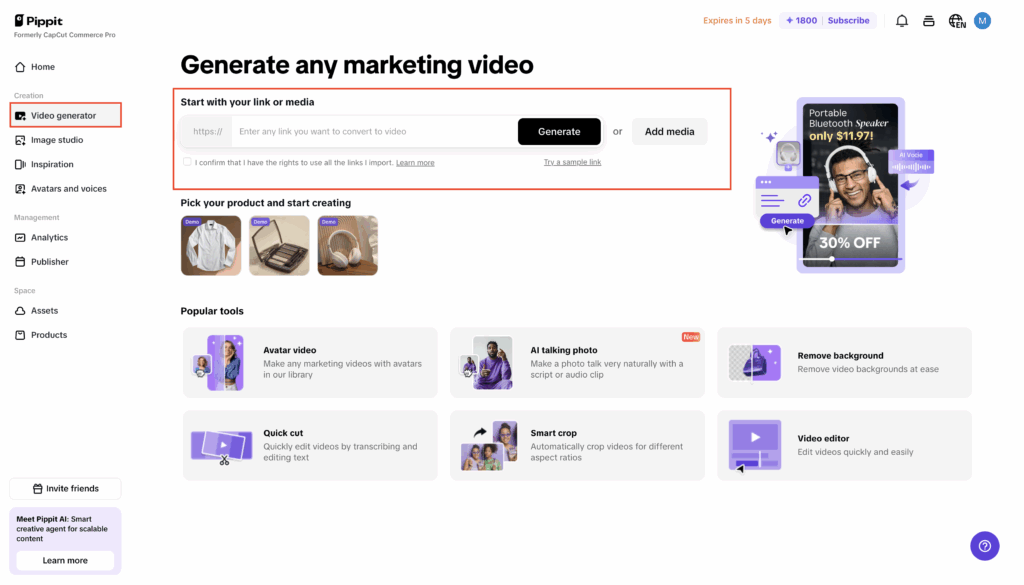
First, log in to Pippit AI and click the link that says “Video Generator.” You can either type in a link to a product or add text and pictures by hand here. The AI creates a script and any other visuals that go with it based on what you give it.

This step is very important because it makes sure that the content of your video is different from what other brands have to offer. You can also make the video even more unique by adding your own information.

Step 2: Customize video settings and generate

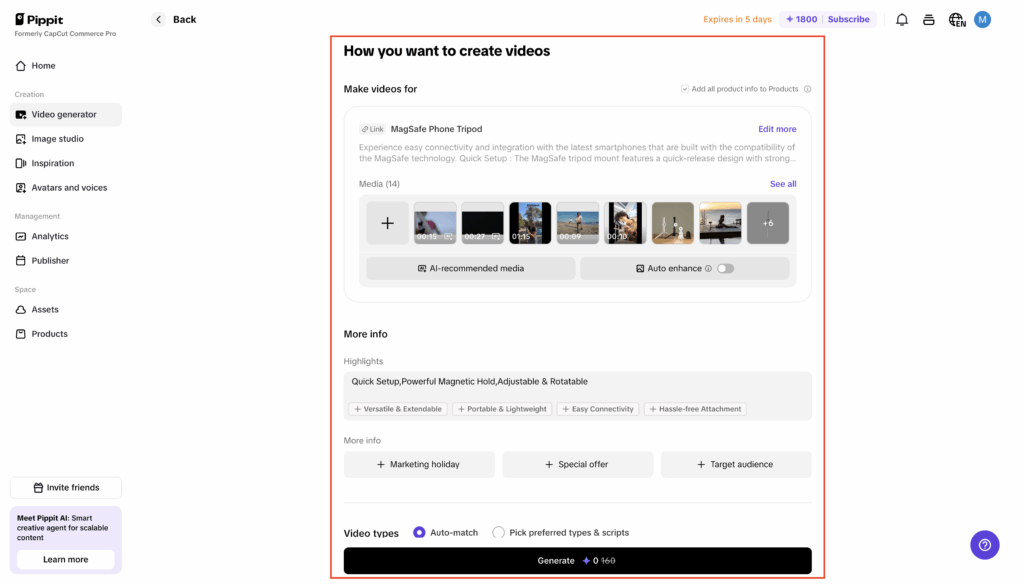
After you add your text or product information, you can change the settings for your video. You can change the length, aspect ratio, and language to fit the platform and audience you want to reach. You can pick from a lot of different avatars and ways to tell a story that fit your brand.

You can use the AI-generated script as it is or change it to better fit what you want to say. After you’ve made your choices, click “Generate” to create your video. The AI makes several versions, each one focusing on a different part of your content so you can pick the one you like best.

Step 3: Preview, edit, and export your video

Watch the videos after you make them to see how they turned out. With Pippit AI, you can quickly change the style of the video, the voices of the avatars, or the captions. You can make more complicated changes with the platform’s built-in professional video editor.

When you’re happy with your video, save it in the format and resolution you want. You can now share your unique video that fits with your brand on all of your marketing channels.

Why unique visuals matter for your brand

Your videos need to look good, but you also need to build trust and connections with people. One way to connect with your audience on a deeper level is to use unique pictures that show off your brand’s personality. They make your message stick in people’s minds by making it seem real.

AI lets you make a lot of these videos without having to spend a lot of money on equipment or hire a lot of creative people. This means that even small businesses can make videos that are interesting and unique enough to compete with those made by bigger brands.

Enhancing videos beyond visuals

The Pippit AI platform can do more than just show pictures. You can also change the style of the captions, remove the background, make the transitions smoother, and automatically reframe your videos so they look great on any social media site. No matter where your content is seen, these tools make sure it looks neat and professional.

Conclusion

In short, brands should stop using generic stock footage if they want to leave a lasting impression. You can use Pippit AI’s text-to-video AI generator to make one-of-a-kind, custom videos that really show what your brand is all about and how it works.

You can make videos that look professional and get people to buy by following these three simple steps: typing in text or product links, customising and making videos, and then previewing and exporting.

So, you can now stop using stock footage and make visuals that are just as unique as your brand with Pippit AI.

Categories
Uncategorized

7  Best Reverse Image Search Tools for Stunning Results

You can’t trust everything you see online. Not every image you find tells the true or at least the whole story. Images can be easily stolen, altered, edited, or misused without giving the creator any credit.

Thus, this results in the spreading of fake news.

Therefore, whether you’re sourcing visuals, fact-checking, or protecting your content, you need a way to dig deeper than just a glance.

But how? A surface look is not enough.

So, in such situations, using a reliable reverse image search tool can be a real help.

Let me explain how. 

These tools are designed to scan your image and identify potential matches across the web. Thus, they can help you trace the origin, spot duplicates, and verify authenticity in seconds. 

7 Best Reverse Image Search Tools You Need To Try

No doubt, there are many image search tools and methods available online, but let’s be honest, not all of them are reliable. As a content creator, if you want to protect your images from being stolen or ensure you only use visuals with verified sources, here is our pick of the 7 best reverse image search tools that you can rely on. So, without wasting any further time, just start reading to find the one that best matches your needs and requirements. 

1. DupliChecker – Image Search Tool

DupliChecker indeed offers one of the most efficient, reliable, and free reverse image search tools available, enabling users to check image context and background information.

The search by image tool is specifically designed to trace the source of an image, identify its duplicates, or verify its originality.

For this, simply upload the image directly to the tool or enter its URL in the designated box. The photo search tool will scan the image and search it across the web to find any potential matches.

The best thing about this image search tool is that it’s entirely free and doesn’t require any sign-up. Therefore, students, bloggers, marketers, and freelancers can use it to verify the authenticity of their images.

Key Features

  • Upload, paste URL, or drag and drop
  • Shows results from top search engines
  • No registration required

Pros

  • User-friendly interface
  • Instant results
  • 100% free

Cons

  • No AI or visual analysis
  • Basic results, no sorting or filters

What is it Best For?

Users who want a simple, free solution to trace image sources without advanced tools.

2. Reversely.ai

Reversely.ai utilises artificial intelligence to surpass the basics of reverse image search. Thus, its capability is not just limited to finding exact duplicates. You can also use the tool to detect similar, cropped, or edited images—all thanks to its advanced deep visual pattern recognition.

This indeed makes it an excellent image search tool for detecting plagiarism in visuals, verifying image authenticity, or uncovering where an image has been reused or repurposed.

What is the best part here?

You can upload images in various formats, and it analyses visuals based on object patterns rather than metadata. This flexibility and accuracy make it a top choice for designers, journalists, and digital content creators who want precision and accuracy in their search results.

Key Features

  • AI-powered visual recognition
  • Finds edited, cropped, or altered images
  • Supports multiple file formats

Pros

  • High precision
  • Modern interface
  • Great for content validation

Cons

  • Some features require a sign-up
  • Limited free searches

What is it Best For?

Professionals need AI-level accuracy to detect visual alterations and content reuse.

3. SearchByImage

SearchByImage is a web-based reverse image search tool that enhances your daily workflow. With just one click, you can upload an image, paste a URL, or even enter keywords to find similar images across the web. 

It integrates with multiple search engines and uses advanced algorithms to deliver quick and accurate results. 

The best feature of this tool is its support for facial recognition. Therefore, you can use it to image verify authenticity, trace sources, and even check the copyright. 

The versatility indeed makes it a perfect tool option for users who frequently deal with online visuals and need fast, reliable results on any device.

Key Features

  • Web-based tool for desktop and mobile
  • Multiple input options (upload, URL, keywords)
  • Facial recognition and advanced filters

Pros

  • Fast and easy to use
  • No sign-up required
  • Works on all devices

Cons

  • Requires an internet connection
  • No browser extension available

What is it Best For?

Users who want a simple yet powerful web-based image search with facial recognition.

4. TinEye

What makes Tineye a reliable reverse image search tool is the fact that, unlike most tools, TinEye doesn’t just rely on the image’s metadata or keywords to find similar visuals. Instead, it uses advanced image recognition to trace where an image appears online.

Therefore, you can conveniently use the tool to detect modified versions. This means the tool enables you to track images even if they are resized, cropped, or colour-edited visuals.

That’s not all.

Do you know what exactly makes it stand out?

Professionals mostly use the tool to protect their image copyrights, confirm image sources, or analyze image history.

Moreover, you can also sort results by oldest appearance, making it easy to find the source. Thus, it’s indeed a robust API for developers and image monitoring for businesses.

Key Features

  • Custom image detection system
  • Sort results by the oldest or newest
  • API and image tracking are available

Pros

  • Reliable and accurate
  • Tracks edited versions
  • No account required for basic use

Cons

  • Limited free searches
  • Doesn’t find similar-looking images

What is it Best For?

Professionals and developers need historical tracking and copyright protection.

5. Google Image Search

If you don’t want to do much experimenting and are looking for a globally trusted image search tool, then Google Image Search is indeed a reliable option for you.

It’s widely known for its simplicity and reach.

It’s easy to use—you just have to upload the image directly, drag it into the search bar, or paste its link. Google then provides visually similar images, web pages containing the image, and multiple image sizes.

However, it lacks advanced filtering or AI recognition, so it may not catch modified or fake visuals. Still, for general use, its speed and extensive index make it a reliable go-to tool.

Key Features

  • Drag-and-drop interface
  • Finds similar images and page links
  • Runs on all devices and browsers

Pros

  • Free and fast
  • Enormous search database
  • No login required

Cons

  • Doesn’t detect edited versions
  • Lacks precision for advanced needs

What is it Best For?

Every day, users need a fast and straightforward image search that is free from technical complexity.

6. Getty Images – Reverse Search

Getty Images is designed to provide users with licensed and royalty-free visuals. However, you can also conveniently use it to perform a quick reverse image search within its library.

For this, simply upload an image to the tool. It will help you find visually similar ones, often with better resolution and detailed licensing options.

Therefore, it is a competent and reliable tool option for designers and marketers to find usable visuals legally while matching a specific style or concept.

The reverse search ensures that what you find is high-quality and ready for professional use, though it only works within Getty’s content.

Key Features

  • Upload to find matching visuals
  • Focused on premium stock content
  • Detailed licensing information

Pros

  • High-resolution and curated results
  • Ensures copyright compliance
  • Trusted source for professionals

Cons

  • Only searches within Getty’s database
  • Not useful for web-wide image tracking

What is it Best For?

Professionals seeking licensed, high-quality visuals for commercial and creative use.

7. Lenso.AI

Lenso.AI is a next-generation reverse image tool specifically designed for professionals who want to verify the authenticity of each image they use in their content.

The feature that makes it a standout option among others is its integration of AI and computer vision technology. Thus, this enables the tool to detect AI-generated images, tampered content, and even the source history of an image.

The tool doesn’t just show matches; however, it also explains patterns, changes, and visual anomalies. Therefore, it is undoubtedly best suited for law firms, content verifiers, and tech-savvy users who need more than just surface-level results.

Key Features

  • AI-based forensic image analysis
  • Detects manipulation and fake content
  • Insightful metadata and visual breakdown

Pros

  • Strong accuracy
  • Detects deep edits
  • Useful for professional investigations

Cons

  • Not beginner-friendly
  • Some features may be premium

What is it Best For?

Advanced users and investigative deep forensic image verification.

Conclusion

Every image tells a story, like they say, a picture is worth a thousand words. However, that doesn’t mean every story it tells is true.

Images can spread misinformation and incorrect information faster than words. Therefore, you can blindly trust them. 

Thus, whether you are a content creator or simply someone who values accuracy, you must ensure that you only use authentic and credible visuals. Therefore, before using any image, verify it using the right reverse image tool. Once you are satisfied with its authenticity, you should incorporate it into your content or share it.

Categories
Uncategorized

What Makes an Educational Tool Secure and Privacy-Friendly Today

Classrooms these days are all about swimming in digital gadgets. However, here’s the kicker: despite all that technology, questions over security persist. It is no longer just about slapping a password on the teacher’s laptop and calling it safe.

Now you have got stuff like FERPA, COPPA, and a list of other privacy rules to worry about. Platforms need to be upfront about what they are doing with your data and build in some real safety nets, not just vague promises.

If you are a teacher, an administrator, or just a parent trying to figure out which learning app will sell your child’s information to the highest bidder, you need to know what to look for. This guide will help you distinguish between legitimate and suspicious platforms, so keep reading to learn more. 

Adherence to Data Privacy Regulations

When an edtech platform fails to comply with FERPA and COPPA rules, that’s a red flag. These rules are non-negotiable. They are ensuring that only the right people see your information, and nobody is sneaking a peek at what they should not.

Now, the platforms that actually follow these rules are not just ticking boxes—they are telling you straight up how your data is handled, ensuring teachers and parents do not have to worry about surprise data leaks.

And do not get fooled, even free AI tools do not get a hall pass. If it has student info, it better be following the same rules as the big guys. That is the bare minimum for keeping everyone’s information secure while still making learning cool.

Robust Data Encryption  

Sure, following the rules is a good start, but if your data is not locked down with solid encryption, you are basically leaving the front door wide open. You need tech that actually guards your info, whether it is flying across the internet or just sitting in storage. 

Encryption is like turning secret notes into total gibberish—unless you have got the right key, good luck making any sense of it. Imagine stuffing all those student records into a vault with a code only the right folks know. Not exactly something anyone would break into on a coffee break.

When apps and platforms use legit, up-to-date encryption, people notice. Teachers, parents, even the schools—they can breathe easier knowing nobody’s snooping around their stuff. 

Clear Data Usage Policies  

Encryption ensures data remains secure, but clarity on how that data is used further strengthens trust—transparent policies outlining what information is collected and why empower users to make informed choices.

A straightforward explanation of data practices avoids confusion and promotes accountability. Parents and educators appreciate tools that clearly specify whether student information will be shared, sold, or used solely for educational purposes. 

Platforms that help make privacy statements easily accessible allow users to feel respected and protected. 

User Authentication Controls   

Secure access begins with strong user authentication controls. Ensuring only authorized individuals can log in reduces the risk of unauthorized data exposure.  

Multi-factor authentication (MFA) is a reliable option that many platforms adopt. Requiring users to verify their identity through additional steps, such as codes sent to their devices or biometric scans, adds an extra layer of security.  

Role-based access further safeguards information by limiting access to specific data within the system. 

Regular Security Audits    

Authentication measures control access, but regular security audits ensure vulnerabilities are identified and resolved proactively. These evaluations involve assessing the tool’s entire system to detect potential weaknesses that hackers might exploit.  

Security audits test encryption strength, evaluate firewall performance, and review data storage methods. Frequent checks also help verify compliance with privacy regulations, such as FERPA or COPPA, as policies evolve over time.  

Engaging third-party experts adds credibility to this process while ensuring a fresh perspective on safeguarding student information. Educators and institutions enjoy peace of mind knowing that the tools they rely on undergo consistent scrutiny to maintain secure environments for both learning and collaboration.  

Incident Response Preparedness  

Security audits help prevent risks, but incident response preparedness ensures a quick and effective reaction if breaches occur. Tools with strong response plans minimize damage and restore functionality swiftly.  

Preparedness includes clear protocols for identifying, containing, and addressing security incidents. Platforms often employ dedicated teams to handle threats while maintaining transparency with users throughout the process. Regularly updated recovery plans ensure institutions face minimal disruption in the event of an issue.  

Ongoing User Education    

As a final consideration, a secure platform will have ongoing user education to ensure security measures are upheld in practice. Even the most advanced tools rely on users to follow safe practices and understand platform features fully.    

Educating teachers, students, and administrators about data privacy empowers them to recognize potential risks or mistakes that could lead to vulnerabilities. Informed users act as an additional layer of protection, complementing the tool’s built-in security measures while fostering a culture of responsibility within educational environments.   

Wrapping Up    

You want platforms that do not just toss around words like “security” and “privacy”—they actually walk the walk. So, consider practices like following the rules, encrypting your data, and having actual policies that you can understand, not just legal mumbo-jumbo; that’s the baseline.

Technology is only getting wilder; if these basics are not locked down, nobody is really safe. Do it right, and you get classrooms where kids can actually learn and grow, without worrying that their private information is going to end up on some random website. 

Categories
Uncategorized

How to Add Voiceovers to Presentations with CapCut Desktop

Are you a teacher, student, or presenter frequently? Including your voice in your slides can help others comprehend and remain attentive.

A clear voice can lead your audience and help make your message more comprehensible. It also helps if your audience is viewing the video without reading the entire word on the screen.

It’s simple to insert voice into your presentation using CapCut video editing software for computers. With it, you can record, position, and even modify voice without having a specific skillset.

Most tools are available to use for free, but premium tools could cost money. It is a useful way, nevertheless, to make presentations more understandable and more useful.

Why Voiceovers Matter in Presentations

Voiceovers make individuals grasp your message better. When you narrate in a video, it keeps the viewer more engaged than text. This is suitable for online lectures, corporate presentations, and school assignments.

Your tone, pace, and emotion in your voice can make the slides come alive. It makes it easier to comprehend the message.

The CapCut desktop video editor allows you to include your voice and sync it with every section of your video.

Alternatively, you can utilise the text to speech feature in case you do not wish to record. It is a swift means of introducing a clear voice into your slides.

CapCut Desktop Video Editor for Voiceovers

CapCut desktop video editor is an intelligent option if you need to introduce voiceovers in your presentations. It features a minimalist design and is simple to navigate.

You can put your video clips onto a timeline and then record your voice to synchronise with each section. It allows you to shift and modify your voice clips with easy drag and drop.

You can even add background music, adjust the volume, and silence other sounds. The CapCut desktop video editor is free to download and utilise, though certain voice tools and exportation will require payment.

It also contains AI features that are useful when you need to add voice quickly without recording. New and experienced users will have an easy time using the tools, and they are suitable for most types of projects.

Step-by-Step Guide to Add Voiceovers in CapCut Desktop

Step 1: Download and Install CapCut Desktop Video Editor

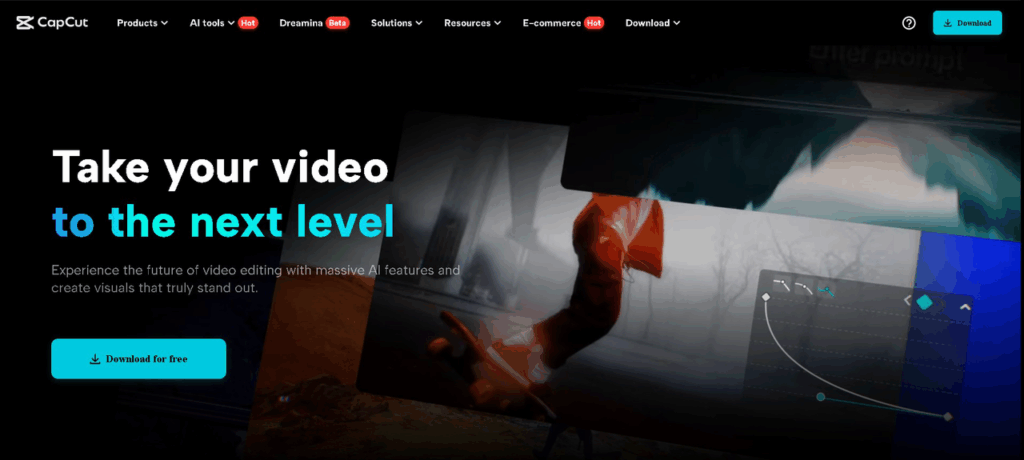
Visit the official CapCut website. Hit “Download for PC” to download the installation file for the CapCut desktop video editor. Once it’s downloaded, open it and install it following the instructions on your screen.

When it is installed, launch the editor. You need to sign up or log in to access all the tools. Ensure you use the CapCut desktop version for PC and not the mobile version.

Step 2: Import Presentation Slides as Video or Image Files

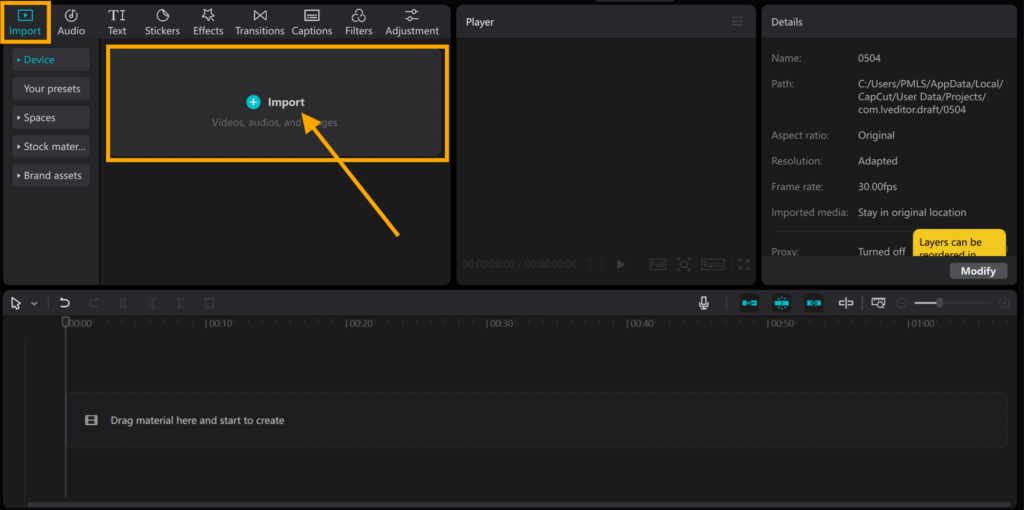
Launch the CapCut desktop video editor, and press “Import” under the media section. Insert your PowerPoint slides exported as images or a video file. You can also experiment with the AI video generator to insert useful visuals before inserting your voice.

Drag them into the timeline to define the order of the slides. You can tap and drag the edge of each slide to change how long it remains on screen. To make your slides more interactive, go to “Transition” and insert effects.

Step 3: Record or Upload Voiceover

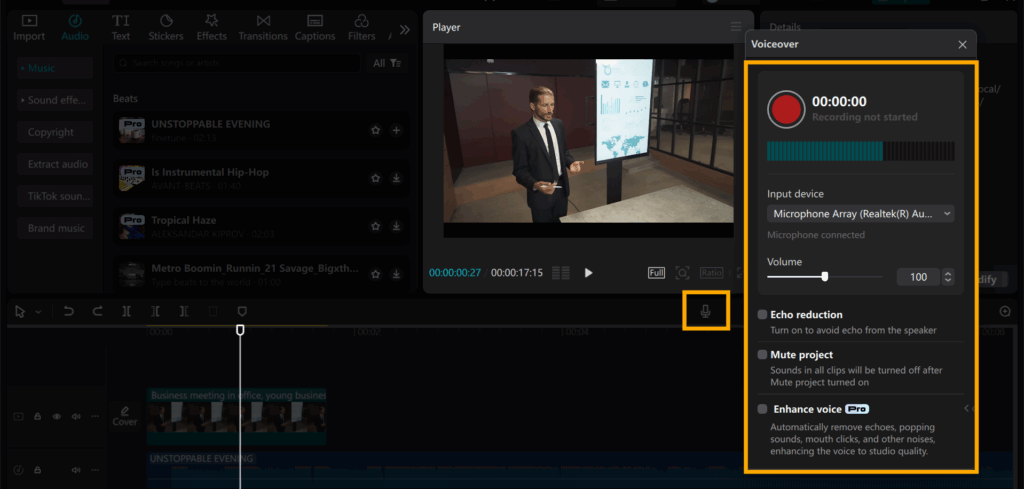
Go to “Audio” on the top menu, then select “Voiceover” to record live. Press the red “Record” icon and begin speaking while the slides run. Your voice goes directly into the timeline.

If you have an audio file already, tap “Import” to upload. Drag the voice clip below the slides to line up each segment.

You can move or clip the voice for a better fit. If desired, use the voice changer to alter the voice. You can pitch the voice higher, lower, or even reverse gender.

Step 4: Refine Voiceover with Tools

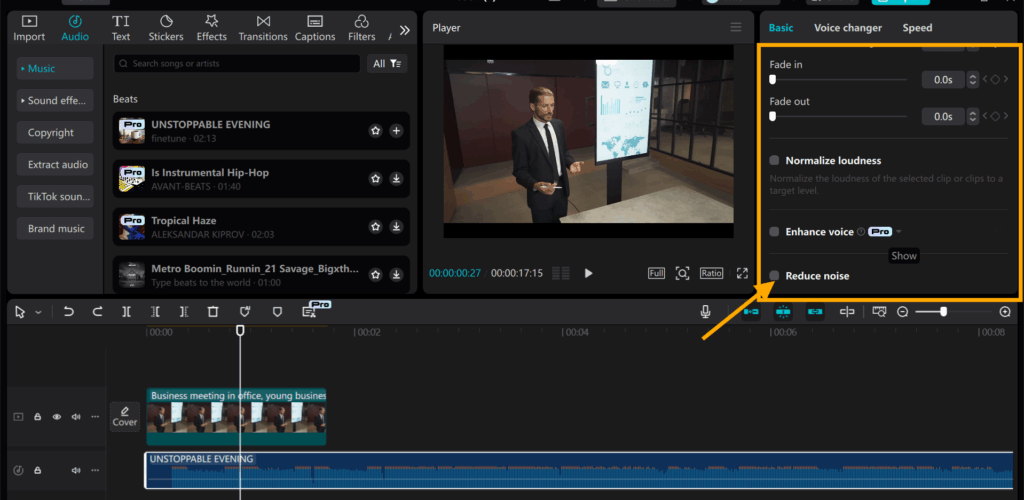
Click on the voice clip and proceed to the right panel. Utilise tools such as noise reduction, volume control, or fade-in and fade-out.

You can also modify the pitch or speed of your voice. Some additional tools, such as additional voice styles or filters, can require payment to access. Nevertheless, the default tools are fine for clean and clear sound.

Step 5: Export and Share

Click “Export” in the top right. Select a video resolution, format, and file name for your file. Click “Export” again to save it on your device.

Your presentation is ready. Share it on school websites, video platforms, or social media instantly with a simple click.

Conclusion

It’s easy and useful to crop voiceovers using the CapCut desktop video editor. It makes your presentations clearer, more engaging, and more understandable.

Teachers, students, and professionals can use it to enhance the way they present ideas. The editor is simple, even for novice users.

Although you can access most tools for free, some voice effects and exporting options require a paid upgrade. Nevertheless, the basic features are robust enough for most applications.

Give it a try for your next project. You might be surprised how much better your presentation sounds with a voiceover added.

Categories
Uncategorized

Top Free Ethical Hacking Tools to Improve Your Cybersecurity Skills

Cybersecurity is no longer optional—it’s a necessity. As digital threats grow more sophisticated, ethical hacking has become a crucial skill for protecting systems and data from malicious actors.

The best part? You don’t need expensive ethical hacking software to get started. There’s a wide range of free ethical hacking tools available to help you learn penetration testing, assessment of security vulnerabilities, and continuous monitoring defense.

Whether you’re a beginner or an experienced professional, this guide will introduce you to essential free tools that can sharpen your cybersecurity expertise. You’ll discover how to use them responsibly to identify weaknesses, strengthen security, and stay ahead of cybercriminals.

1. The Ultimate Operating System for Security Testing

One of the most widely used platforms for ethical hacking is a Linux-based operating system designed specifically for remote access penetration testing. It comes pre-loaded with hundreds of application security testing tools, eliminating the need for manual installations.

You can run it directly from a USB drive, use it in a virtual environment, or install it on your machine. It includes a wide variety of tools for network scanning, password cracking, and digital forensics focusing on dictionary attacks. All of those make it among the top red teaming tools for cybersecurity testing available.

2. A Powerful Framework for Exploit Development

If you want to understand how attackers exploit vulnerabilities, a popular open-source framework is an excellent place to start. It allows you to simulate cyberattacks from malicious hackers, test rogue access defenses on different IP addresses, and validate security weaknesses.

The tool includes a vast database of known exploits, helping you assess how systems can be compromised. It’s widely used in cybersecurity training and real-world penetration testing.

3. The Gold Standard for Network Scanning

A versatile network scanning tool is indispensable for ethical hackers. A wireless network detector helps you discover active devices, open ports, and running services on a network. With scripting capabilities, you can automate scans and detect potential entry points for attackers.

This tool is lightweight, runs on multiple operating systems, and is frequently updated by a dedicated community. Learning is essential for anyone serious about learning network security and social engineering attacks.

4. Analyzing Network Traffic in Real Time

To defend against attacks, you must first understand how data moves across networks. A packet analyser tool lets you capture and inspect live traffic, helping you detect anomalies and potential vulnerabilities.

It supports deep packet inspection, allowing you to examine protocols, troubleshoot connectivity issues, and identify malicious activity. Just remember—always use it ethically and legally.

Web applications are common targets for cyberattacks. A widely used security toolkit helps you test for vulnerabilities like SQL injection, cross-site scripting (XSS), and insecure authentication.

The free version includes a proxy for intercepting requests, a scanner for automated testing, and manual tools for in-depth analysis. It’s perfect for learning how hackers exploit web apps—and how to stop them.

6. Automated Security Scanning for Web Apps

An open-source web security tool from a well-known cybersecurity project makes automated testing accessible. It’s beginner-friendly but powerful enough for professionals.

You can run automated scans or manually probe for weaknesses like insecure APIs and session management flaws. Since it’s backed by a trusted organization, you know it’s reliable and up-to-date.

7. Testing Password Strength Ethically

Weak passwords and user credentials are a major security risk. A free password-cracking tool helps you audit password security by testing common and complex passwords against different encryption methods.

Use it to assess your own systems (with permission) and understand how attackers bypass weak credentials. It’s a wake-up call for enforcing stronger authentication policies.

8. Assessing Wireless Network Security

Wi-Fi networks are often vulnerable to attacks. A wireless security tool helps you test encryption weaknesses by capturing and analyzing network packets.

It’s useful for identifying flaws in older security protocols and ensuring your wireless networks are properly secured. Always use it responsibly—only test networks you own or have permission to assess.

9. Detecting Database Vulnerabilities

Many cyberattacks target databases through injection flaws. A specialized SQL injection testing tool automates the detection of database vulnerabilities, helping you find and fix security gaps.

It supports multiple database systems and can extract data for analysis. Learning how it works will help you defend against one of the most common attack methods.

10. Reverse Engineering for Malware Analysis

Understanding malicious software is key to defending against it. There are dozens of tools that reverse-engineer and dissect suspicious files, analyze their behavior, and uncover hidden threats.

Originally developed by a government agency, these toolkits are now publicly available and widely used by security researchers. They’re essential tools for malware analysis and cybersecurity training.

Final Thoughts

Ethical hacking is a rewarding and in-demand skill that helps make the digital world safer. With these free tools, you can gain hands-on experience in penetration testing, vulnerability assessment, and threat analysis—without spending a dime.

The key is consistent practice and responsible use. Set up a home lab, experiment with different tools, and keep learning. Over time, you’ll develop the expertise needed to protect systems and combat cyber threats.

Cybersecurity is a journey, not a destination. Start exploring these tools today, and take your first step toward becoming a skilled ethical hacker.

Categories
Uncategorized

How Zoho Workplace Secures Your Data: A Look at Encryption, Authentication, and Beyond

Today, businesses face regular challenges like data breaches and cyber threats. To protect their data, companies need to create a secure environment.

As more businesses rely on cloud-based tools, it’s important to have strong encryption, reliable authentication methods, and advanced security measures. Zoho Workplace is an integrated suite of applications that provides a secure workplace. It helps prevent data leaks, ensures compliance, and builds trust.

In this blog, you can read a detailed analysis of how Zoho Workplace safeguards your data through the use of advanced technologies and guidelines to guarantee that your organizational processes are safe and efficient.

Zoho Workplace Logo

The Importance of Encryption, Authentication, and Comprehensive Security

Confidentiality and data safety are the pillars of credibility in any platform, work, or connection. Zoho Workplace employs encryption, authentication, and various security features to ensure that data is safeguarded.

Why These Measures Matter:

  • Encryption

Protect information from unauthorized entities by encoding data into formats unreadable by unauthorized individuals.

  • Authentication

Authenticates the users so they would only access those programs and databases that are secured for specific employees only.

  • Comprehensive Security Measures

Secures information against various types of risks, such as viruses, cyber scams, and hacking.

When it comes to these core areas, Zoho Workplace affirms the foundation on which organizations have to stand in today’s world without the fear of being hacked.

Data Center and Physical Security Measures

​Physical security measures and various other methods are employed to protect data centers. The cornerstone of Zoho Workplace security is its industry-leading data centers offering physical as well as virtual security from different threats.

Key Features of Zoho’s Data Centers:

  • Controlled Access: Safe authentication techniques, such as biometric scans, and limited access to data centers.
  • Constant Monitoring: Constant monitoring aids in identifying and stopping any illegal activities.
  • Redundancy Measures: Multiple network connections and backup power sources provide continuous data access. 

Strong physical security measures are in place in Zoho’s data centers to guard against natural disasters and prevent unwanted access.

Network Security Architecture

Zoho Workplace’s network security architecture is painstakingly crafted to protect private data by identifying, stopping, and resolving potential intrusions. It guarantees a proactive strategy for reducing the likelihood of data leaks.

Features of Zoho’s Network Security:

  • Firewalls: Firewalls act as protective barriers. They protect security by filtering network traffic based on set rules, blocking harmful data, and allowing safe data to pass. Design enhances the security against attacks and reallocation of customers’ data within Zoho Workplace’s environment.

End-to-End Encryption

​Encryption is a fundamental aspect of data security, and Zoho Workplace employs end-to-end encryption for data in transit and at rest

How End-to-End Encryption Works:

  • Data in Transit: ​When data is transmitted between devices and servers, Zoho Workplace employs Transport Layer Security (TLS) to encrypt the data, preventing access by unauthorized third parties.
  • Data at Rest: All information stored on Zoho’s database servers is encrypted using industry standards, effectively protecting it from unauthorized access and use.

Zoho Workplace also encapsulates this principle in the sense that data is encrypted whenever it is transmitted across the network point.

Access Authentication Mechanisms

Often, access authentication needs to be strong to allow only a specific group of users to access confidential information. To strengthen security, Zoho Workplace provides the user with several approaches to authentication.

Authentication Features:

  • Two-factor authentication (TFA): Enforces a second factor of authentication by enforcing a user’s identification through a phone application or text code.
  • Single Sign-On (SSO): Enables users to log into multiple applications in Zoho Workplace using the same username and password, saves on passwords, and does not compromise security.
  • Role-Based Access Control (RBAC): It makes sure that a user is allowed to see and use only what they require in the job description of their firm.

These authentication methods make it possible for organizations to effectively address the problem of rogue users.

Real-Time Threat Detection and Prevention

Zoho Workplace uses an advanced threat identification and mitigation system that deals with threats as they occur.

Key Threat Detection Features:

  • AI-powered Monitoring: AI detects suspicious activity that deviates from normal behavior, triggering an alert for the security team to address.
  • Malware and Phishing Protection: In Zoho Workplace, the application scans for malicious links or attachments and prevents them from reaching the end user.
  • Automated Incident Response: Zoho instantly detects and contains threats, protecting all accounts with swift, automated actions.

In this way, Zoho Workplace incorporates ideas that will safeguard organizations from likely threats that are inherent to emerging cyber threats.

Remote Working Policies

Now that working remotely has become the norm, protecting the data of distanced employees is more relevant than ever. Zoho Workplace has comprehensive measures to safeguard remote employees and their equipment.

Remote Work Security Measures:

  • Secure Access: All Zoho apps are secure and accessible through encrypted links, allowing remote employees to work safely and confidently.
  • Device Management: Security concerns related to remote devices can be addressed by enforcing security policies, such as requiring passwords and encryption
  • Activity Monitoring: Administrators can monitor user activity to identify security threats and take appropriate action

They also help maintain data integrity when organizations transition to remote operations, ensuring security in a distributed environment.

Compliance with Data Protection Regulations

Zoho Workplace complies with data protection regulations based on the business’s location, ensuring it is prepared to meet global data protection laws.

Compliance Highlights:

  • GDPR: Zoho Workplace is GDPR compliant, ensuring that external data is kept secure and private for users within the European Union.
  • HIPAA: Zoho Workplace offers options to comply with the Health Insurance Portability and Accountability Act (HIPAA) regulations for healthcare organizations.
  • ISO Certifications: Zoho Workplace’s data centers and processes are certified with ISO 27001 and other safety standards.

By using Zoho Workplace, businesses can stay compliant with regulations, avoid legal penalties, and gain their customers’ trust.

Conclusion

The data security solution of Zoho Workplace demonstrates product security through end-to-end encryption combined with authentication standards and an active threat detection approach. Zoho Workplace maintains state-of-the-art data centers and advanced network security, together with legal and regulatory compliance, to provide organizations with a safe operating environment.

Essential capabilities like email, chat, file storage, meetings, and a password manager are all available to businesses using Zoho Workplace, all within a secure platform. Strong security procedures and functionality work together to protect vital assets while allowing organizations to effectively handle contemporary business demands.

Explore Zoho Workplace today to create a customized digital workplace that seamlessly blends efficiency and security while meeting your organization’s unique requirements

Categories
Uncategorized

How to Download Video from Website: A Simple Step-by-Step Guide

Watching videos online is amazing, but if you have limited internet then it’s best to download video once and watch anytime without internet.

Whether it’s a tutorial, music video, or your favourite vlog. That’s where tools like online video downloaders come in handy.

In this article we’ll show you how to download video from website.

Why Use an Video Downloader App?

A video downloader app is one of the best way to download video from any type of video streaming site.

App based downloaders like Vidmate offer more flexibility and power:

  • Faster download speeds.
  • Download video in high definition.
  • Built-in mp3 converter.
  • Ability to download videos directly to your phone or SD card.

What is Vidmate?

Vidmate is an online video downloader that lets users download videos from hundreds of websites, including:

  • YouTube
  • Facebook
  • Instagram
  • Dailymotion
  • Tumblr
  • Vimeo
  • TikTok and many more

You can download videos in different resolutions and formats, or even extract just the audio. It’s fast, easy to use, and lightweight.

Vidmate

How to Download Video from Website Using Vidmate

Here is how to download video from website using vidmate:

Here’s a quick guide:

  1. Download the Vidmate App
    Visit the official Vidmate website and download the APK file. (Note: Vidmate isn’t available on Google Play Store, so always download from the official site.)
  2. Install the App
    Enable “Install from Unknown Sources” in your device settings and install the APK.
  3. Open Vidmate and Use the Built-in Browser
    Launch the app and use the built-in browser to navigate to the website where your video is hosted.
  4. Play the Video
    Once you find the video, tap play. Vidmate will automatically detect the video and offer download options.
  5. Choose Format & Quality
    Select your preferred video resolution (e.g., 720p, 1080p, 2K, 4K) and format (MP4, MP3, etc.).
  6. Download and Enjoy Offline
    Tap download, and the video will be saved to your phone.

Final Thoughts

Using an app like Vidmate is one of the most effective ways to download video from website platforms. While online tools are useful for occasional downloads, the Vidmate app gives you more control, speed, and flexibility.

So next time you’re looking for an easy way to grab your favourite video, consider downloading the Vidmate app and start saving videos effortlessly.

A Note on Safety and Responsibility

Only download videos you have permission to save or for personal use.

Categories
Uncategorized

How to Integrate Email Marketing into Your Website for Maximum Growth

This comprehensive guide is geared toward businesses looking to enhance their website’s marketing power through email integration.

All too often our websites present extraordinarily well, but customers seem to be slipping away at a steady trickle. In this article, we go to great lengths to extol the virtues of your website and its marketing potential. Try to remember that your website is your business’s digital home. It’s the interface between your business and its customers. Want in on a little secret?  Email marketing platforms are key to turning casual website browsers into long-term, satisfied customers.

Let’s wind back the clocks for a moment to 2024. Back then, email marketing revenue surpassed $9.5 billion. Based on this steadily growing figure, email marketing is one of the most powerful tools available to us in digital marketing. Studies suggest that for every $1 spent, email marketing delivers an average return of $36. This is extraordinary. Based on this information, email marketing is a high-ROI strategy that everyone should pay attention to. (Porch Group Media).

But let’s not get too far ahead of ourselves just yet. Sending emails alone isn’t enough. Email marketing must be strategically integrated into your website to unlock its full potential. Business owners must consider high-converting opt-in forms, email-driven engagement strategies, and much more. Gather around marketing aficionados! It’s time to explore how to seamlessly merge all these pieces. It’s all about email marketing, web design, branding, and SEO. If you can blend these elements together, you’re on a winning wicket! 

Why Email Marketing is Essential for Website Growth

FACT: Email Converts Website Visitors into Long-Term Customers

Customers may discover your brand on your website.  But it’s the email marketing that keeps people returning. Here’s why it’s absolutely essential to your business interests:

Boosts Customer Retention – 59% of consumers say that marketing emails influence their purchasing decisions. (Porch Group Media).
Drives Repeat Website Traffic – Personalized email campaigns bring users back to your website.
Strengthens Brand Authority – Email keeps your business top-of-mind long after visitors leave.
Supports SEO – Increased website traffic through emails can lower bounce rates and improve search rankings. This boosts SERP results on Google. 

A well-integrated email strategy ensures every website visitor has a reason to return. It transforms engagement into conversions, loyalty, and revenue growth.

Tips to Optimize Your Website for Email Signups

Strategic Placement of Email Opt-In Forms

Visibility is sacrosanct when growing your email list. We strongly recommend placing signup forms in the right locations to increase conversions. Here’s where they work best:

📌 Header or Navigation Bar – These offer permanent visibility without disrupting the user experience.
📌 Pop-ups & Exit-Intent Forms – Try to engage visitors before they leave by offering incentives like discounts, coupons or guides.
📌 Sidebar or Footer Forms – This is a rather subtle approach, but it’s always accessible.
📌 After Blog Posts – A great way to capture engaged readers who want more content.

Professional Tip: Always keep signup forms simple. For example, HubSpot’s analysis of over 40,000 landing pages revealed that forms with fewer fields generally have higher conversion rates. You can’t argue with commonsense. 

Branding in Email Marketing

Your emails should always look and feel like extensions of your site. Consistency in colour schemes, typography, and tone builds trust and strengthens brand identity. These branding tips are battle tested, and they hold true today and every day. 

Use Website-Matching Designs – Email templates should mirror your website’s style.
Keep Messaging Consistent – The tone in your emails should match the experience on your website.
Mobile Optimization is a Must – 81% of people prefer to open emails on their smartphones.

Remember that maintaining seamless branding between email and website creates a familiar experience that reinforces credibility and customer loyalty.

Email Marketing and SEO: Have You Overlooked This? 

How Email Marketing Improves Search Rankings

Many businesses tend to overlook the connection between email marketing and SEO. Email indirectly boosts search engine performance in various important ways:

Drives Repeat Visits – Search Engine juggernaut Google rewards websites with returning visitors.
Encourages Social Sharing – Engaging emails tend to get shared, thereby increasing organic reach.
Reduces Bounce Rates – Visitors who return via email are far more likely to stay longer.
Generates Backlinks – High-quality content in emails encourages website referrals.

An integrated email and SEO strategy ensures several tactical objectives are met. For starters, your website ranks higher, attracts organic traffic, and sustains longer-term engagement.

Using Email Automation to Maximize Engagement

Automated Email Workflows Boost Conversions

Wait for it! Automation is the secret sauce of high-performing email marketing strategies. Email automation can generate 320% more revenue per email when done correctly compared to standard campaigns.

Listed here are essential automation sequences every business should use:

Welcome Emails – Engage new subscribers immediately and guide them back to essential website pages.
Cart Abandonment Emails – Recover lost e-commerce sales with reminders and incentives.
Behavior-Based Follow-Ups – Recommend products or content based on past user activity.

Example: Consider this business that was struggling with high rates of cart abandonment. By implementing a smart abandoned cart email campaign, the company saw a 19% recovery rate on previously lost sales.

We now know that by leveraging Automation, businesses can increase conversions, enhance customer relationships, and ensure no opportunity is wasted.

Case Study: Real Business Growth Through Email Marketing

Jack Rogers, a heritage shoe brand, faced multiple challenges with its previous email service provider (ESP): 

  • Technical Issues Affecting Revenue: Jack Rogers encountered prolonged wait times to resolve technical problems, directly impacting its revenue streams. ​ 
  • Insufficient Customer Support: A lack of dedicated customer support and hands-on expertise hindered the company’s ability to effectively coordinate marketing programs across SMS and email channels. ​ 
  • Complex Migration Processes: Previous experiences with migrating to new platforms were clunky, requiring significant internal effort and leading to operational disruptions. ​

The Results of the Study:

Jack Rogers experienced a 35% increase in their email program’s ROI after transitioning to a high-performing platform. The new platform boasted an average conversion rate of 14.7% across triggered emails. This surpassed the industry average of 13%. ​Once again, this proves that integrating email marketing into website strategy leads to measurable business growth.

Final Thoughts: Email & Website Integration is the Future

We can confidently state that a great website is more than design. It’s about building an ecosystem where visitors engage, return, and convert.

Key Takeaways:

Email marketing is a retention powerhouse – keeping visitors engaged after they leave your site.
SEO and email marketing work together – increasing rankings and traffic through return visits.
Automation ensures consistent customer engagement – driving revenue effortlessly.

Want to Take Your Website’s Growth to the Next Level?

Always ensure that email marketing is seamlessly integrated into your site. When they work together, businesses boom. The results are evident up and down the value chain. Improved ROI, customer retention, and stakeholder satisfaction are assured.

Categories
Uncategorized

3 Ways to Repair Corrupted Video Files on Mac – [SOLVED]

Introduction

Playing a video on your Mac with an error message is the worst. Damaged video files might cause playing difficulties, frame loss, or inaccessibility. You may encounter “QuickTime Player can’t open the file” or “The file is damaged and cannot be played.” These issues can result from sudden power outages during recording, file format, or compression concerns.

Physical damage to storage devices, incomplete downloads, and inappropriate format conversions can corrupt video data. No matter what the cause, you don’t have to lose your valuable videos permanently. Mac users can fix corrupted video files in many ways. This article covers three efficient methods: using EaseUS Online Video Repair for rapid and easy recovery, repairing with VLC Media Player, and changing file extensions. Follow these steps to fix your videos and have them play smoothly.

Reasons Behind Corrupted or Damaged Video Files

Having an important Mac video that is unplayable due to video file corruption is irritating. Knowing the common reasons for corrupted video files might help you fix them and avoid future problems. The most common causes of video file corruption are:

  1. Sudden Power Outages

A power interruption or abrupt system shutdown during video capture, transfer, or playback can corrupt it. When the power goes off, a video file written to the disc may not save properly, leaving a corrupted or incomplete file. This is frequent when editing or transferring huge video files.

  1. Physical Media Damage

Physical damage to an external hard disc, USB flash drive, or SD card can corrupt footage. Video files can appear corrupted or unusable due to DVD scratches, hard disc sectors, or memory card failure.

  1. Format issues

Not all media players support all video formats. Video files saved in unsupported formats may not play on your Mac or QuickTime Player. Trying to force playing in an incompatible media player can cause minor file corruption, glitches, or missing frames.

  1. Low-Quality Compression or Conversion

Unreliable video converters can degrade quality and corrupt files. Compression errors can cause missing data, choppy playback, or unplayable video files. Video data may be lost if compressed too much to reduce file size, making restoration difficult.

  1. Download Source Problems

Downloading videos from untrustworthy sources or interrupting downloads might also result in corruption. A network disruption may prevent a video file from downloading fully. Untrusted websites can also infect files with malware, destroying the video and your Mac.

Understanding these typical video corruption reasons will help you use a reliable power source, take care of storage devices, and employ high-quality conversion tools. There are techniques to fix corrupted video files. The next sections discuss three successful Mac video file repair solutions.

How to Repair Corrupted or Damaged Video Files on Mac

Corruption or damage to Mac video files, especially those with valuable content, can be irritating. Fortunately, various procedures can restore these files. We discuss three effective methods below:

Method 1: Repair with EaseUS Online Video Repair

EaseUS Online Video Repair is a simple, web-based tool that fixes corrupted videos rapidly. This program uses powerful algorithms to recover videos without reducing quality in many formats. If your videos were damaged during shooting, recording, transferring, or editing, EaseUS Online Video Repair can recover them.

Supported Formats and Features

  • Complete Format Support: The software can repair MP4, MOV, INSV, MTS, TS, M2TS, MKV, 3GP, AVI, FLV, MPG, MPEG, M4V, and other formats, giving customers freedom. 
  • AI-Powered Automatic Repair: EaseUS Online Video Repair uses advanced AI algorithms to detect and fix corrupted videos without operator intervention. 
  • Quality Preservation: The tool upholds clarity, colors, and details to fix videos as closely as possible to the originals. 
  • User-Friendly Design: The platform’s simple design lets users restore their movies with a few clicks, making them accessible to non-technical users. 
  • Secure and Confidential: Videos are handled securely during repair to protect user privacy. 

How to Repair Online Videos with EaseUS:

Step 1. Visit the EaseUS Online Video Repair website. Upload the corrupted video.

Step 2. Click the “Upload Video” button or drag and drop the corrupted video file into the relevant section of the webpage. Please provide a valid email address.

Upload video

Step 3. Fill out the form with a valid email address. This email will send you the extraction code required to download the corrected video.

Step 4. Click the “Start Repairing” button to start the automated repair procedure. The utility will upload and analyze the corrupted video and perform any necessary fixes.

select start repairing

Step 5. Give the tool some time to finish the repair operation. The length may vary according to the video file’s size and complexity.

Uploading and repairing video

Step 6. On the webpage, you can preview the repaired movie after repair. Click “Download Video” to obtain the repaired video. You will be requested to input the extraction code provided in your email. Entering the right extraction code starts the repaired video download.

Enter extraction code, download the repaired video

By following these simple steps, users may efficiently repair corrupted films with EaseUS Online Video Repair, taking advantage of its powerful features and user-friendly interface.

Method 2: Repair with VLC Media Player

VLC Media Player is a free, open-source multimedia player known for its ability to play a variety of audio and video formats. Aside from playback capabilities, VLC has functionality for repairing broken video files, particularly those in AVI format.

Steps  to Use VLC for Video Repair

Step 1. Launch the VLC Media Player on your Mac. From the menu bar, choose “VLC” > “Preferences.”

Step 2. In the Preferences box, select the “Input/Codecs” tab.

Step 3. Locate the “Damaged or incomplete AVI file” option. Choose “Always fix” from the adjacent dropdown option.

Set the option to “Always Fix”

Step 4. To apply the changes, click “Save”.

Step 5. Try playing the corrupted video file with VLC. The player will attempt to repair and play the file simultaneously.

Limitations of VLC for Certain Video Formats

While VLC’s repair tool is excellent for AVI files, there are several limitations:

  • Format Restrictions: The repair feature is intended especially for AVI files. VLC may not successfully repair corruption in other formats, such as MP4 or MOV.
  • Corruption Severity: While VLC can handle minor corruption, it may not repair highly damaged files.
  • No Permanent Fix: VLC tries to patch the file during playback but does not preserve a permanently corrected version.

Method 3: Repair by Changing the File Extension

Incorrect or malformed file extensions can cause video files to become unplayable. Changing the file extension may cause media players or repair software to recognize and attempt to fix the file.

Step 1. Find the video file you want to repair on your Mac.

Step 2. To avoid losing data, make a copy of the original file before making any modifications.

Step 3. Right-click the video file and select “Get Info.”

Picture background

Step 4. In the “Name & Extension” section, change the current file extension to “.avi” (for example, “video.mp4” to “video.avi”).

Step 5. Close the “Get Info” window.

Conclusion

Mac users can use EaseUS Online Video Repair or VLC Media Player’s built-in repair tools to fix corrupted video files. Simple changes like altering file extensions can fix repair corrupted video files mac issues. When one strategy fails, using additional ones boosts recovery chances. Data loss can be avoided using backups and dependable software. If all else fails, professional data recovery may be needed. These techniques help restore your crucial videos and prevent permanent loss.

FAQs

The following faqs answer the most common questions asked about how to repair corrupted video files on Mac:

  1. How do I fix a corrupt MP4 file on Mac?

Repair a corrupted MP4 file on your Mac using these methods:

Media Player VLC: Change MP4 file extensions to ‘.avi’ to use this flexible media player’s AVI repair capability. After renaming, open the file in VLC; it may ask for a fix.

Professional Video Repair Tools: EaseUS Data Recovery Wizard and Wondershare Recoverit have MP4 file repair features. Video file analysis and repair applications sometimes work better for badly corrupted files.

  1. How to fix a corrupt video on Mac?

The following Mac methods can fix general video corruption:

Change File Extension: Sometimes, changing the file extension fixes playing issues. Renaming a ‘.mp4’ file to ‘.avi’ may make it watchable in some media players.

Professional Video Fix Tools: EaseUS Video Online Repair can automatically detect and fix corrupted video files in many formats.

  1. How to fix video problems on Mac?

Mac video playback issues can arise from many causes. To fix these:

  • Ensure your internet connection is consistent when streaming videos to avoid buffering and playback issues.
  • MacOS and media player updates often fix compatibility and performance concerns.
  • Clear browser cache to fix online video loading or playback issues.
  • VLC’s wider codec support may fix a video file that won’t play in one player.
  • Specialized video repair tools can restore functionality to corrupted video files.