Categories
Education, Students & Careers

The Best Free Career Assessment Tools to Transform Your Career in 2025

So you’re at your desk on a Monday morning, staring at the screen, and you get that feeling again. Maybe it’s the job, maybe it’s the whole industry, or maybe it’s just this sense that you should be doing something that actually matters to you. Whatever it is, you know something needs to change. But figuring out what comes next? That’s the hard part.

The good news is you don’t have to drop a few thousand dollars on career coaches or fancy assessments to figure this out. In 2025, some of the best career assessment tools out there won’t cost you anything.

And this isn’t just a small problem. Look at the numbers:

  • 52% of workers are thinking about switching careers this year, compared to 44% two years ago
  • Most people will actually change careers (not just switch jobs) somewhere between 5 and 7 times in their working life
  • 65% of people who’ve used career assessments say they felt more confident about their decisions afterward
  • People who actually plan their career moves tend to earn about 20% more than those who just wing it

The problem is that with everyone changing careers these days, it’s really easy to feel overwhelmed or just make snap decisions without really thinking things through. That’s what makes career assessment tools valuable. They help you figure out what you’re actually good at, spot opportunities you might have missed, and make choices that line up with what you care about.

So which tools are worth your time? I’ve put together six of the best free career assessment tools that can help you make smarter decisions about where you’re headed. And no, these aren’t those silly personality quizzes that tell you what animal you are or whatever — these are actual practical tools that give you insights you can act on right away.

The 6 Best Free Career Assessment Tools

1. Career Aptitude Test — Best for Career Changers

Ever get that feeling that maybe you’re in the wrong field? The Career Aptitude Test helps you figure out what careers actually fit with your natural abilities, what interests you, and who you are as a person.

This isn’t one of those tests that asks you what your favorite color is and then tells you to be a graphic designer. It looks at your skills from a bunch of different angles—how you think through problems, how creative you are, how you work with people, that kind of thing. What you end up with is a real breakdown of career fields where you’d probably do well and actually feel good about what you’re doing.

Why it’s worth your time:

The test uses actual research to match you up with real careers. You won’t get vague stuff like “you’d probably like helping people.” Instead, you get specific career ideas along with info about whether those fields are growing, what you’d actually be doing day-to-day, and what skills you’d need to pick up.

Who should use it:

  • People thinking about changing careers but not sure where to go
  • Recent grads trying to figure out what to actually do with their degree
  • People who’ve been working for a while and feel like they’re stuck in place
  • Anyone who’s ever thought “I should be doing something else”

What sets it apart:

A lot of aptitude tests just focus on your personality, but this one also looks at the practical side of things—like what’s happening in the job market and what skills different careers actually require. It’s not only about what you might like doing. It’s about what paths make sense and are actually growing.

2. Career Fitter — Best for Understanding Your Work Style

Here’s the thing: not every career is the same, and more importantly, not every work environment is going to be a good fit for you. Career Fitter helps you figure out how you like to work and what kind of environments are going to make you productive and happy.

Career Fitter looks at your work style preferences. Do you do your best work when things are structured and organized, or do you need room to be creative and do your own thing? Are you better working on your own or with a team? Do you like getting into the details, or would you rather think about the big picture?

Why it’s worth your time:

You don’t just get job titles thrown at you. You actually learn about the kind of company culture, management style, and day-to-day work setup that fits how you naturally operate. And this matters a lot, because even a job that sounds amazing on paper can make you miserable if the environment’s all wrong.

Who should use it:

  • People who’ve taken jobs that seemed perfect but just felt off once you were actually doing them
  • Anyone who likes what they do but hates where they’re doing it
  • Job hunters trying to figure out if a company’s actually a good fit beyond just the salary and benefits
  • Anyone wanting to set up their work situation so they can actually do their best work

What sets it apart:

Most career tools are all about “what” you should be doing for work. Career Fitter is more about “how” and “where” you should be doing it. And honestly, that’s usually the thing people miss when they’re trying to figure out why they’re unhappy at work.

3. Pay Raise Calculator — Best for Salary Negotiations

Let’s talk about money. One of the most stressful parts of managing your career is knowing if you’re actually getting paid what you should be—and then having the guts to ask for more. The Pay Raise Calculator makes this whole thing a lot less scary.

This tool helps you figure out what kind of salary increase you should actually be going after. It looks at stuff like what you’re making now, what’s normal in your industry, how you’ve been performing, cost of living changes, and what’s going on in the market. It doesn’t just tell you “ask for 10% more.” It helps you put together a real argument for why you’re worth what you’re asking for.

Why it’s worth your time:

When you go into a salary conversation with actual data about what people in your position make and a solid calculation of what you bring to the table, you’re not just crossing your fingers and hoping it goes well. You’re negotiating from a place where you actually know what you’re talking about.

Who should use it:

  • Anyone getting ready for their annual review
  • Job seekers who need to evaluate an offer and figure out if they should push for more
  • People who have a feeling they’re not getting paid enough but don’t know how much they’re actually missing out on
  • Anyone trying to plan out their financial growth over the next few years

What sets it apart:

This isn’t just some basic salary calculator. It looks at your actual situation and helps you understand not just what number to ask for, but why that number makes sense. That gives you the confidence to actually speak up for yourself.

4. Job Burnout Test — Best for Career Health Check

Here’s something people don’t really talk about: sometimes the issue isn’t that you’re in the wrong career. Sometimes you’re just burning out. The Job Burnout Test helps you figure out if what you’re going through means you need to change careers or if you just need to change how you’re approaching your work.

This assessment looks at where you’re at across a bunch of different burnout signs: how emotionally drained you are, whether you’re starting to not care, if you feel like you’re actually accomplishing anything, your work-life balance, and how engaged you feel. The results help you see if you’re just dealing with regular work stress or if this is actual burnout that you need to do something about.

Why it’s worth your time:

Burnout can wreck your career, but you can actually deal with it if you catch it early enough. This tool helps you tell the difference between “I need a week off” and “I need to get out of here,” which can save you from either making a huge decision you’ll regret or staying somewhere that’s destroying you.

Who should use it:

  • Anyone who’s constantly tired, feeling negative about everything, or just checked out from their work
  • High achievers who usually just power through but know something’s not right
  • People thinking about quitting who want to make sure they’re doing it for the right reasons
  • Managers who need to check in with themselves or understand what their team’s going through

What sets it apart:

Most burnout stuff just lists symptoms. This tool actually assesses where you’re at and gives you specific things you can do based on your situation—whether that’s learning to set boundaries, getting help, or yeah, maybe looking for something new.

5. What Jobs Will AI Replace? — Best for Future-Proofing Your Career

Let’s just say it: AI is changing things fast when it comes to jobs. If you’re worried about whether your job’s going to be around in five years, you’re not being paranoid. You’re being realistic. The What Jobs Will AI Replace? tool helps you understand how at risk you are and, more importantly, what you can actually do about it.

This tool looks at different jobs and career paths to see how vulnerable they are to AI taking over. But here’s what matters: it doesn’t just tell you if your job’s in danger. It shows you which parts of what you do are most likely to get automated and which human skills are going to become more important.

Why it’s worth your time:

Instead of just freaking you out, this tool helps you make smart decisions. Maybe AI is going to have a big impact on your job, but once you know which parts, you can start building up the skills that’ll make you irreplaceable. Or maybe your role’s pretty safe, but knowing how AI’s affecting your industry helps you stay ahead of everyone else.

Who should use it:

  • Anyone whose job involves a lot of repetitive stuff or processing data
  • People planning out their career for the long haul
  • Anyone thinking about going back to school who wants to make sure they’re investing in skills that’ll still matter
  • Career changers who want to move into something more stable

What sets it apart:

This tool isn’t just trying to scare you. It’s based on real research about what AI can actually do, and it gives you realistic timelines and strategies for adapting. So it’s actually useful for planning, not just worrying.

6. Words and Adjectives To Describe Yourself — Best for Personal Branding

Whether you’re fixing up your resume, getting ready for interviews, or working on your LinkedIn profile, the way you describe yourself actually matters a lot. The Words and Adjectives Generator helps you find the right words to represent who you are professionally without sounding like everyone else.

This tool helps you get past the boring stuff everyone says like “hardworking” or “team player” and find specific, memorable words that actually capture what makes you valuable. It gets you thinking about your strengths in different ways and gives you vocabulary that actually sounds professional.

Why it’s worth your time:

The difference between an application that gets ignored and one that gets you an interview often comes down to how you’re wording things. This tool helps you explain what you bring to the table in a way that’s clear and actually catches people’s attention, whether you’re writing your LinkedIn summary, a cover letter, or just trying to nail your elevator pitch.

Who should use it:

  • Job seekers who are having trouble standing out from everyone else applying
  • Anyone working on building or updating their personal brand
  • People who go blank when someone asks “tell me about yourself”
  • Anyone who knows what they’re good at but has trouble putting it into words

What sets it apart:

Instead of just throwing a bunch of adjectives at you, this tool helps you think about how different words signal different strengths and what you care about. That way you can put together something that sounds like you and actually works strategically.

Comparison: Which Tool Should You Use First?

ToolBest ForTime RequiredBest Used When
Career Aptitude TestCareer changers15-20 minutesYou’re questioning your career direction
Career FitterUnderstanding work style10-15 minutesYour job fits but something feels off
Pay Raise CalculatorSalary negotiations5-10 minutesPreparing for review or job offer
Job Burnout TestCareer health assessment10 minutesYou’re feeling consistently drained
What Jobs Will AI Replace?Future-proofing your career5-10 minutesPlanning long-term career strategy
Adjectives GeneratorPersonal branding5-15 minutesUpdating resume or preparing for interviews

Getting the Most Out of Free Career Assessment Tools

Just having access to these tools isn’t enough. If you want them to actually help you, here’s how to use them:

  1. Don’t just take one. Each tool looks at things differently. Use a few of them together and you’ll get a much clearer picture of where you stand and where you could go.
  2. Answer honestly. I know it’s tempting to answer how you think you’re supposed to, but that defeats the whole purpose. These tools only work if you’re real about who you are and what you actually want.
  3. Actually do something with what you learn. Otherwise you’re just collecting interesting facts about yourself. After you finish an assessment, figure out at least one specific thing you can do based on what it told you.
  4. Check back in periodically. Your situation changes, your priorities shift. It makes sense to go through these again every six months to a year, or whenever you’re dealing with a big career decision.
  5. Trust your gut, too. These assessments give you useful information, but they’re not fortune tellers. Let them guide your thinking, but don’t let them make your decisions for you.

What It Comes Down To

You don’t need to spend a fortune or feel totally lost when it comes to your career. These six free tools can give you the kind of professional insights that help you make better decisions, whether you’re fresh out of school, thinking about a change, or trying to make the most of where you are now.

And here’s the thing: they don’t cost you anything except maybe an hour or two. When you think about how much your career affects everything – your income, your happiness, your whole life – taking a little time to get some clarity is probably one of the smartest things you can do.

So quit sitting there wondering if you’re in the right place, if you’re getting paid what you’re worth, or if your job’s even going to exist in five years. You can actually do something about this stuff. Just pick whichever tool addresses your biggest question right now and start there. You’ll be glad you did.

Because honestly, not planning your career ends up costing you a lot more than taking the time to figure it out.


Categories
Education, Students & Careers

The Evolution of Education: Harnessing Technology to Enhance Learning

Education has undergone a huge transformation over the years, with technology taking centre stage in how college students analyze, teachers educate, and moms and dads deal with their children’s educational development. The introduction of technological equipment such as smartphones, drugs and academic applications has helped to revolutionize the education sector, making learning at hand, interactive and efficient. This shift is exemplified by the use of systems such as UpStudy, which offer modern ways to enhance experiential knowledge acquisition and enable students to reach their full potential.

How technology is shaping education

Integrating the era into education has moved from novelty to necessity. With the rapid improvement of virtual tools, educators and institutions are constantly looking for new methods to improve the quality and quality of teaching. Here’s how an era shapes learning’s fate:

1. Access to information

One of the most transformative effects of time on schooling is the convenience with which students can access records. In the past, college students were reliant on physical textbooks and libraries to discover the information they wanted. Today, with the network and various digital structures, data is available at our fingertips. Online learning assets, which include e-books, study documents, and educational databases, allow college students to gather information from a variety of sources. Platforms like UpStudy further enhance this by providing tailored academic resources that meet the needs of each student and ensure students have up-to-date and relevant content.

2. Interactive learning

Traditional learning methods, which normally involve passive listening and rote memorization, are being changed by using interactive and engaging knowledge acquisition methods. The use of multimedia tools, simulations and interactive quizzes allows undergraduates to enjoy acquiring knowledge more dynamically. Education apps like UpStudy sell interactive learning through presentation features that include real-time problem-solving and engaging visuals that keep students engaged and help improve retention.

3. Personalized learning

Technology has paved the way for customized dating reviews to satisfy the desires and abilities of every scholar. Rather than a one-size-fits-all technique, learning generation allows college students to explore at their own pace and preferred learning style. With apps like UpStudy, college students can access resources specific to their learning gaps and their strengths. This customized method ensures that students receive on-the-spot notes on their performance, supporting them to perceive areas of improvement and the music of their development.

The role of educational applications in modern education

Educational apps have become a cornerstone of the modern studio, bridging the gap between conventional classroom coaching and in-person viewing. They offer a degree of comfort and versatility that was previously impossible. Students no longer want to be confined to a lecture hall or library to access study materials. Whether they are in an espresso, on the bus or at home, they can communicate with their research through mobile devices.

Among the countless tutorial apps available today, UpStudy stands out as a great tool for beginners of all levels. Available for both iOS and Android, UpStudy offers a wide selection of features to meet the needs of college students, making it a one-stop solution for academic fulfilment.

UpStudy: An educational tool for all students

UpStudy provides undergraduate students with a powerful set of tools designed to help them excel in research. Its intuitive layout and enormous functionality allow customers to easily solve even the most complex topics. The app is especially beneficial for college students who are going through challenges in subjects like arithmetic, where exact step-by-step solutions are important for proficiency.

UpStudy iOS

The UpStudy iOS is available for download on the Apple App Store and provides non-stop entertainment for iPhone and iPad customers. It provides a variety of features that ensure students have the resources they want, whether they’re correcting difficult math equations or preparing for tests. The app’s user-friendly interface makes it easy for college students to navigate through the various devices and features, which enhances their regular knowledge acquisition experience.

UpStudy Android

Similarly, UpStudy is offered to Android users through Google Play. This app model provides identical comprehensive features, ensuring that Android widget newbies can enjoy the extensive capabilities of the app. The platform is designed to accommodate students with special educational needs, making it a useful tool for a wide range of subjects that include mathematics, technological know-how and more.

Key features of UpStudy

One of the unique capabilities of UpStudy is its ability to help college students with complex math problems. For many newbies, topics like algebra and calculus are challenging, however, UpStudy simplifies the process by providing step-by-step answers that not only help students arrive at the ideal solution but also recognize the common sense behind it.

By breaking down complicated problems into practical steps, UpStudy ensures that students can build a solid foundation in their expertise in mathematical principles. This is important for long-term performance in mathematics and related fields.

In addition to math support, UpStudy can also be used for several other educational duties. The app offers tools for learning review, homework help and general educational support, making it a versatile tool for students. Whether they need help reviewing an upcoming exam or completing a tough homework assignment, UpStudy offers the help they want.

The impact of educational technology on student performance

The rise of the tutorial era had a profound effect on the performance of scientists. Numerous studies have shown that after students use virtual tools for learning, their engagement levels soar, which in turn improves their learning outcomes. Education apps like UpStudy play a huge role in this by giving students instant feedback on their progress, motivating them to stay on course, and giving them resources to excel at.

In addition, educational technology supports self-learning and allows students to take responsibility for their education. Instead of relying solely on instructors to offer all the information, college students can use apps like UpStudy to supplement their learning and delve deeper into topics they find interesting or challenging. This promotes the experience of independence and responsibility, which is vital for educational and personal growth.

The future of education

As the generation continues to improve, its function in education will grow simpler. Educational apps like UpStudy Android are just the beginning of what’s possible as the era is integrated into the study method. In Destiny, we count on even more customized mastering reports, with technology providing tailor-made answers for each student entirely based on their particular mastering fashion and wishes.

Artificial intelligence, as an example, can play a greater position in education, providing college students with excellent tools for customized cognition. AI platforms could examine how scholars learn about patterns, strengths and weaknesses, and offer customized resources and commentary to help them improve.

In addition, the use of virtual and augmented facts in education may want to offer college students immersive mastery reports that simplify understanding of complicated principles. Imagine being able to without a doubt explore historic landmarks or experiments in behavioural science in a virtual lab – these types of technologies will bring training to lifestyles in methods we simply begin to imagine.

The importance of accessibility in education

One of the greatest blessings of educational technology is its ability to make learning more accessible. In the past, students in remote or underserved areas may have struggled to gain admission to a great school due to the loss of assets. However, with learning apps like UpStudy, college students can gain knowledge of the material no matter where they are.

This accelerated accessibility is critical to ensuring that every college student has the opportunity to succeed, regardless of their region or background. By offering equal access to amazing learning resources, generating helps level the playing field and close the achievement gap.

Conclusion

Education is undergoing a world-class transformation in today’s growing number of virtual worlds. Tools like UpStudy are at the forefront of this change, providing resources for college students looking to excel in their educational pursuits. Whether solving complex math problems, helping with homework or preparing for exams, UpStudy empowers students to manipulate their studies and gain academic fulfilment.

With variations that can be had on both iOS and Android, UpStudy provides a handy and effective answer for students of all ages and backgrounds. As technology continues to shape the future of education, systems like UpStudy will continue to be critical in helping college students unlock their full potential and enable learning from the fascinating, personalized, and practical.

In conclusion, training has become more interactive, customized and achievable than ever before. With the right equipment and resources, college students can overcome academic challenges and thrive, ensuring that studying remains a lifelong and exciting adventure.

Categories
Education, Students & Careers

How Different Generations Perceive Technology

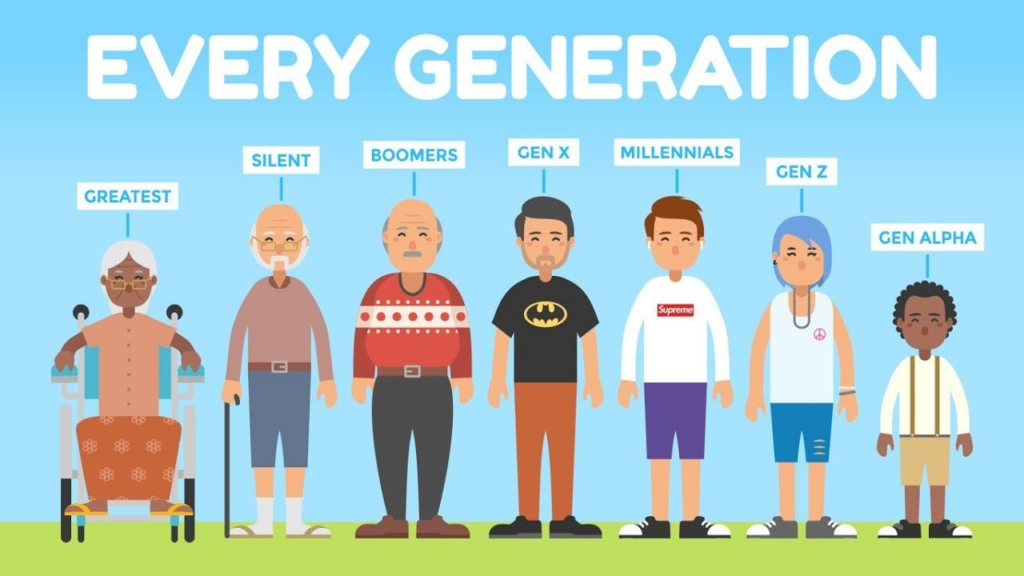
Every generation interacts with emerging technologies in unique ways based on what was available during their formative years. Those born in earlier eras had to adapt to continually advancing innovations, whereas youth today are “digital natives” for whom connectivity is second nature. Millennials stand out as pioneers embracing each new development, but even baby boomers are integrating applications and platforms and optimistically view technology’s benefits.


Delving into statistics on adoption trends and risks illuminates both motivators and barriers various people face. Recommendations for knowledge sharing and intuitive collaboration tools aim to lessen friction. Ultimately, prioritizing understanding over assumptions and emphasizing shared responsibility can strengthen cohesion between all.

Understanding Digital Generations

Technology adoption is personalized, but commonalities exist for each generation. With the help of ExpressVPN’s recent survey on how to teach your parents about technology, this section aims to provide valuable insight into the nuanced characterizations and variances in technology adoption seen between generations. Let’s begin!

Digital Natives and Digital Immigrants

Belonging to distinct eras during which technology evolved at different paces significantly impacts people’s comfort with innovations. Younger people who came of age with constant connectivity integrated into their daily lives are termed “digital natives,” while predecessors underwent a more incremental adaptation process to rising innovations and are described as “digital immigrants”.

Categorizing Generations

Birth-year groups are categorized based on the state of technological advancements present during their childhood and developmental years to better illustrate how this influenced adoption and the perspective differences seen between those people today. This framework includes generations referred to as Silent Traditionalists, Baby Boomers, Gen X, Millennials, Gen Z, and Gen Alpha.

Technology Adoption Rates Across Generations

Younger folks tend to be early adopters of the latest gadgets and platforms, while predecessors may be more selective or have slower uplifting patterns.

Over 63% of Silent Traditionalists communicate online with family, and over 56% use computers for socialization, demonstrating openness despite limitations. Still, only 40% utilize social media, preferring email.

Over 88% of baby boomers vow that pandemic-elevated tool incorporation continues to ease daily life. Studies show a 431% increase in grocery app/site use and a 469% boost in telehealth use for this cohort especially.

Around 74% of Gen X populated social media fastest digital immigrants, and nine in ten employ Facebook. True to their “MTV Generation” roots, this group still appreciates streaming and smart TV entertainment. As “Selfie Generation” pioneers, nearly 100% of millennials claim internet use, and over 68% socialize online. However, remote collaborations and financial exchanges demand vigilance regarding leaks.

For Gen Z, focused technology training and mindfully selecting helpful programs while bypassing dubious connectivity can sustain secure access supporting education and interactions. Gen Alpha families cite internet benefits for scholastic achievement yet note engagement hazards. Guidance equips these curious digital explorers to reap the rewards safely.

Overall, each era’s attitudes and interactions hold value. A strengths-based perspective embracing diversity inspires beneficial change.

Technology Use by Generation

Let’s explore how varying generational people interact with innovations according to statistics and habits. Key distinctions between age groups are investigated to provide helpful context on both motivators and barriers experienced relating to adoption behaviors.

Silent Traditionalists

Studies find that the majority of this earliest living generation opts to connect with loved ones through computers and email. They are cautioned to shield against technical assistance scams and fraudulent messages online through protected devices and verified email authenticity.

Baby Boomers

While traditionally embracing changes more than predecessors, baby boomers significantly relied on the tools of their youth, like home computers. Recent surveys demonstrate how pandemic-driven app and telehealth adoption continues alongside passwords and discretion over exposed information.

Gen X

Gen X, also known as the “MTV Generation,” was quick to adopt social media and streaming services. While this group previously favored electronics like the Walkman, they now heavily use platforms such as Facebook and streaming services, managing privacy settings and selectively engaging online.

The positive language, key points highlighted about each generation and recommendations for maintaining security showcase the benefits of technology while addressing challenges supportively. Transitioning smoothly between topics through a conversational yet informative tone as intended helps connect with readers on this relatable subject. Moving forward, delving into specific use statistics would further enrich understanding diverse user experiences across generations.

Generational Risks and Solutions

This section explores the cybersecurity hazards distinct cohorts may face relating to technology usage, alongside recommended mitigation strategies presented supportively.

Millennials

As “digital pioneers” who readily embraced connectivity innovations, Millennials fully benefit from networking and cloud-based applications. However, remote work environments relying on such mediums necessitate vigilance to potential information leaks, addressed astutely with encryption and multifactor verification preservation practices to maintain security and privacy. Adopting these measures allows Millennials to reap the rewards of technology freely.

Gen Z

For Gen Z, centred around social media platforms and omnipresent smartphones, public wifi risks require prudence due to less secure access points. Optimizing privacy settings carefully is crucial for secure participation in their connectivity-reliant lifestyles.

Gen Alpha

Gen Alpha benefits from internet-facilitated education yet remains at risk of online bullying. Equipping families through parental controls paired with imparting respectful digital citizenship ensures this future workforce can build resilience against online threats. Fostering responsible use bolsters Gen Alpha.

Bridging Divides with Technology

Implementing intuitive knowledge sharing and change management using collaborative technologies assists organizations in harmonizing multi-generational personnel by emphasizing innovations’ advantages over drawbacks and resolving issues. Adopting suggested solutions supports every cohort in mitigating hazards and thriving securely online. A cooperative spirit boosts all.

Conclusion

This informative guide has illuminated generational technology perceptions and statistics and offered options for mutual understanding. While some embraced innovations forthrightly as second nature, others preferred established habits but optimistically viewed potential. Overall, prioritizing respect over assumptions supports all beneficiaries.

Rather than constraints, emphasizing shared empowerment through suggested security practices inspires fuller participation, allowing each cohort to reap technology’s rewards safely. Harmonious collaboration across variations cultivates futures benefiting people of every era. United through diversity and inclusive strategies, communities thrive, as organizations leveraging recommended solutions strengthen cooperation across age groups.

FAQS

Q: What is the largest generational gap seen in technology adoption?

The widest divide is between Silent/G.I. Generation and younger cohorts like Gen Z. Those born before 1946 had far less formative technological exposure compared to today’s “digital natives”.

Q: Do all generations experience technical challenges?

Yes, while comfort levels vary, all generations can face issues like cybersecurity risks, info leaks, and device troubleshooting. The article recommends mitigation strategies to support users of any age in leveraging innovations safely and productively.

Q: How can organizations unify multi-generational teams?

Implementing intuitive collaboration platforms, knowledge databases, and change management can help highlight tech’s benefits and lessen friction. Focusing on understanding differences rather than making assumptions also strengthens cohesion.

Q: What are some technology adoption trends seen in newer generations?

Younger folks rapidly take to new devices and connectivity compared to predecessors. However, stats show Gen Z and Alpha increasingly prioritize security, and organizations collaborating cross-generationally see advantages in tailoring onboarding accordingly.

Categories
Education, Students & Careers

BranchTrack Vs. Skillsoft: Finding The Right Fit For Your Budget And Training Needs 

Ever started a new hobby? You get that excited, maybe slightly frantic, feeling, right? You spend ages looking up all the gear, comparing every feature, and trying to find the perfect thing that also fits your budget. Choosing an LMS (Learning Management System) for your company can be like that. An LMS is basically the central spot for all your employee training. It makes sure your team has the knowledge and skills they need to be excellent at their jobs.

But with a ton of LMS options out there, like BranchTrack and Skillsoft, how do you find the one that will really launch your business forward? Don’t worry; this guide will be your trusty advisor, helping you navigate the key features and considerations of both platforms to find the perfect fit for your budget and training goals. 

The LMS Selection Maze: Finding Your Way Out 

  • Option Overload: The LMS market is flooded with several platforms, all vying for your attention. Each has unique features and purposes, and determining the proper one may be as tricky as interpreting a highly complicated instruction manual. Imagine all the different learning management systems in front of you, each promising incredible benefits for your company. But which one has the features you need, fits your budget, and is easy to use for everyone? That’s the main challenge! 
  • Balancing Needs And Resources: Finding an LMS that hits all the right notes for your company can feel like a balancing act. You require something that addresses your individual training demands while still staying within your budget. While expensive, feature-packed platforms may appear appealing because they include several bells and whistles, they can also be costly. 
  • Future-proofing Your Choice: Do not get stuck in a dead-end! Consider the LMS’s scalability and adaptability. Can it grow alongside your organization and accommodate your evolving training requirements? 

BranchTrack: Streamlining Training, One Click At A Time 

BranchTrack appears as a user-friendly, cloud-based LMS designed to streamline the training process for organizations of all sizes. Consider a clean, straightforward design that even non-technical customers may use with ease. 

BranchTrack enables you to develop engaging courses, automate tiresome tasks, and obtain valuable insights through extensive analytics, all from a single, easy-to-use platform. 

Building Your Training Empire: BranchTrack LMS’s Strengths 

  • Effortless Course Creation: BranchTrack is a powerful content management system that allows you to upload current training materials or use the built-in authoring tools to create new courses from the start. Consider it your own digital course workshop, complete with all the tools needed to create exciting and instructive training content. 
  • Automation Army: BranchTrack’s robust automation capabilities eliminate repetitive activities. Automate procedures like enrollment, reminders, and credential issuing, freeing up critical time and resources for more strategic objectives. 
  • Data-Driven Decisions: BranchTrack’s extensive analytics package provides you with a wealth of data. Gain valuable insights into employee performance, discover knowledge gaps, and continually improve your training programs to ensure optimal efficacy. Consider it a window into your students’ brains, allowing you to personalize your teaching to their individual requirements. 

BranchTrack: Addressing Potential Shortcomings 

  • Content Library Considerations: BranchTrack provides course development capabilities, but its pre-existing material collection may be less extensive than that of its rivals. However, this is an excellent chance to utilize your own experience and tailor training content to your company’s culture and special needs. 
  • Pricing Puzzle: Pricing structures for LMS platforms might differ depending on the feature set and user volume. Carefully evaluate BranchTrack’s pricing plans to ensure they align with your budget and your organization’s size.  

Skillsoft: A Powerhouse of Content for Diverse Learning Needs

Skillsoft is a complete Learning Management System with an extensive and ever-expanding content base. Imagine a virtual library full of skillfully chosen courses on various topics catering to multiple skill sets and sectors. This is the core of Skillsoft: a one-stop shop for providing your team with the information they need to flourish. 

Unveiling Skillsoft LMS’s Strengths: A Learning Powerhouse 

  • Content Kingdom: Skillsoft’s claim to fame lies in its extensive content library. Consider it a feast of learning options, with courses ranging from software applications and compliance training to leadership development and corporate communication. This comprehensive collection ensures that you may locate the ideal training materials to meet your individual training requirements, regardless of industry or area of specialization. 
  • Integration All-Stars: Skillsoft collaborates smoothly with a variety of learning platforms and resources, enabling you to build an utterly unified learning environment inside your business. This removes the need to switch between platforms and streamlines the learning experience for your staff. 
  • Compliance Champions: Does your company need compliance training for specific regulations? Skillsoft has you covered. They provide a complete range of compliance courses to keep your personnel up to speed on industry rules and best practices. This reduces risk but also promotes an ethical culture inside your firm. 

Skillsoft: Weighing the Potential Drawbacks 

  • Price Point Ponderings: Skillsoft pricing is a bit tricky. The software’s huge content collection and feature set sometimes come at a higher cost than its competitors. While it provides variable price options, it is critical to thoroughly assess the cost-benefit analysis to ensure it is appropriate for your budget and organization’s size. 
  • Navigation Nuances: With such a vast library and array of features, Skillsoft’s interface might appear complex for some users. However, robust onboarding materials and user support can help bridge this gap and ensure a smooth learning experience for everyone.

BranchTrack Vs. Skillsoft: A Head-To-Head Showdown

Now that we’ve covered the merits and limitations of BranchTrack and Skillsoft, it’s time for the big event: a head-to-head comparison to help you choose your LMS champion. Here is a summary of some essential elements to consider:

Features BranchTrackSkillsoft
Content LibraryUser-built or limited pre-built contentExtensive pre-built content library across various industries and skill sets
Ease of UseUser-friendly interface, ideal for non-technical usersSlightly more complex interface, may require some initial training
PricingGenerally, more affordable, with plans catering to different sized organizationsPotentially higher price point, flexible plans available
Course CreationRobust content management system and authoring toolsLimited course creation capabilities, focus on pre-built content
AutomationPowerful automation features for streamlining workflowsFewer built-in automation features
AnalyticsComprehensive analytics suite for data-driven insightsRobust analytics capabilities for tracking learner performance
IntegrationsLimited integrations with other learning platformsSeamless integrations with various learning tools and platforms
Compliance TrainingLimited focus on compliance trainingComprehensive library of compliance courses across various regulations

Making the Winning Choice: It’s All About Your Needs 

Remember that the “perfect” LMS does not exist. The ideal option for your company depends on your unique requirements and budget. Here are some leading questions that can help you make an educated decision. 

  • Budget Constraints: Are you working on a tight budget, or do you have more room for a feature-rich platform? BranchTrack may be suitable for budget-conscious enterprises, but Skillsoft may be great if you want comprehensive material and integrations. 
  • Training Focus: Do you need to create custom training content, or are you primarily looking for pre-built courses? If customization is vital, BranchTrack offers robust content creation tools. If you prefer a vast pre-existing library, Skillsoft reigns supreme. 
  • Target Audience: Consider your target audience’s technical expertise. BranchTrack’s user-friendly interface could be more appropriate if you have a non-technical staff. However, if your employees are comfortable with technology, Skillsoft’s broader feature set can be explored. 

Conclusion: Finding Your Perfect LMS Partner 

Adopting a suitable LMS system is an investment in the long-term success of your organization. By carefully assessing your budget, training requirements, and target audience, you can confidently traverse the world of BranchTrack vs. Skillsoft.

Remember, both platforms offer unique strengths and functionalities. Be bold and take advantage of free trial periods or demonstrations to get a hands-on experience with each platform before making your final selection. Finally, the ideal LMS partner will enable you to develop a highly competent and informed staff, driving your firm to success.

Categories
Education, Students & Careers

Challenges of Online Learning and How to Overcome Them

The adoption of online learning is a game-changer in the education sector. It allows individuals to access education anytime, anywhere in the globe. The trend was accelerated by the COVID-19 pandemic as schools looked for solutions to facilitate learning. Presently, online education programs are the new normal in education. It has a few perks, such as accessibility, convenience, and flexibility. Despite the many advantages, it also presents a few challenges, significantly affecting students’ academic outcomes. Let’s take an in-depth look at the setbacks faced in online learning and how they can be solved or prevented to ensure students maximize the chances and perks provided by e-learning.

Distractions

Unlike traditional learning, where students are guided by strict classroom rules such as phone usage, e-learning has no such rules. E-learning utilizes the internet and technology such as a laptop or a phone. It exposes the learner to distractions installed in the gadgets. For instance, they can be in class while operating other internet and social media sites. Such distractions are one of the biggest challenges in learning. They delay the learning curve by reducing concentration. Reduced concentration means the student would not grasp the concepts taught. Such a student will struggle to write assignments because they would not know how to approach the assignment question. It’s one of the reasons a student might choose to use an essay writing service.

Avoiding distractions needs self-disciplined. You need to train your mind and body that class time means business. You can do this by setting timers. For instance, you can set 2-hour alerts where you focus on your academics within those two hours and restrict access to other sites. Also, get rid of unnecessary devices from your study area. For instance, you can choose only to use your laptop and keep your tablet and phone away.

Students who study from home can easily get distracted by family and household responsibilities. To avoid this, create a schedule on when to perform household chores and set aside time for learning. You can make a room or space for reading that is quiet and secluded to avoid distractions associated with home environment.

Reduced Interactions and Isolation

Online learning is characterized by reduced face time and one-on-one interaction with other students. The lack of physical interactions leads to a disconnection among students, diluting the sense of community and support experienced with physical learning. Besides, it often leads to some students feeling isolated. To curb the feeling of isolation and maintain a sense of community, tutors should create opportunities for students to interact, for example, through virtual sessions such as online meetings, online discussion groups, and virtual groups. On the other hand, students should make an effort to interact with other people; don’t sit in your room the entire day. Get out and catch up with friends.

Lack of Motivation

With e-learning, you are not subjected to accountability checks from your peers. In physical learning, you are always on your toes since you don’t want to be the last one in class, or you want to answer questions and be on par with classmates. There is a form of healthy competition and accountability. It’s not the case with e-learning, especially in self-paced learning. Nobody pushes or motivates you; hence, you must take the initiative to set your goals and follow through. 

Most online students suffer from avolition, which is a condition that prevents them from initiating and following through goal-oriented objectives. To remain motivated, you need to set SMART goals. At the beginning of every week and day, set objectives you need to achieve to keep you on your toes. You can also create time to engage with students online, such as class discussion boards and accountability groups. It will help to motivate one another.

Communication Breakdown

Effective communication is key to learning. Through communication, students can ask for clarifications and seek feedback from tutors on concepts they don’t understand. In physical learning, most communication is timely, and feedback is instant, boosting student’s understanding. Conversely, in e-learning, mostly there is a break in communication between students and tutors. To communicate, students have to send an email or a text and wait for feedback from the tutor. The waiting time depends on the schools’ systems and the tutors’ availability. This delay in feedback denies students the advantages that come with immediate feedback. 

For example, some courses have interrelated concepts that demand understanding basic concepts to solve more advanced ones later in the course. In such a case, immediate feedback is relevant since failure to understand means the student would have difficulty progressing with other topics. The result is poor performance, or a student might decide to pay for essay to safeguard their grades. 

Schools can ensure timely feedback to curb communication gaps. They can utilize systems such as chatbots where students use AI to enable virtual assistance. In case the problem doesn’t get solved, institutions should ensure that online tutors are present to attend to student queries.

Technical Issues

Technical disruptions are unavoidable when dealing with tech gadgets and systems. Once in a while, there will be technical glitches, for example, system disruptions and internet connectivity issues. Technical glitches disrupt learning and can be frustrating, especially when submitting assignments and exams. Institutions should perform regular checks to ensure their e-learning systems are operating well. Also, they should put a call line where students can call if they need technical assistance.

Lack of Effective Time Management

Most students prefer e-learning due to its flexibility, which allows them to study at any time while carrying out their day-to-day activities. Interestingly, this advantage can become a challenge. The freedom to choose when to learn may lead to laziness and procrastination. In such circumstances, students lag in curriculum coverage, completely forget their studies, or don’t prioritize academic work. To ensure effective time management, you should plan properly by making a schedule that sets aside study time. Otherwise, leaving everything open creates chances for “something popped up” type of activities.

Signing Off

Online learning is the new norm in education. However, it is associated with various challenges that may affect students’ performance. Such challenges include distractions, communication breakdown, isolation, and technical issues. However, these challenges can be solved with goal setting, time scheduling, improving systems to facilitate quick feedback, ensuring the availability of technical assistance, and creating time for interactions with learners.

Categories
Education, Students & Careers

4 Key Factors to Consider When Searching for Online Education Programs

Long gone were the days when people solely opted for conventional learning, when they actually had to go to a particular school in order to pursue their education. Nowadays, most people turn to online courses/schools.

Why is that? Well, that’s because they are generally way more flexible and practical, which is perfect for those who do not have a lot of free time on their hands. But does it mean that all online education programs are equally good?

Just like with everything else, you have great things and the ones that are not as much. Today, we are going to tell you what factors you must take into consideration if you want to ensure you select the best online education program.

Is It Flexible Enough?

As stated in the beginning, one of the biggest virtues of online schools is the fact that they are very flexible and are generally designed to fit almost everyone’s schedule. Even if you cannot find enough time throughout the year, you can always choose summer school online because that is the time of year when most people take their time off from work and other obligations. But the point is, you need to pick the school where you are fine with both its flexibility and the length of the program.

What we can tell you right now, is that fortunately, a vast majority of online education programs are quite flexible and provide people with very diverse learning models. The most common ones include:

  • Asynchronous Courses – This means that you can gain access to the learning material at any given moment. That’s all because these programs were primarily designed to fit around your schedule.
  • Self-paced Learning – They do not put any pressure on you, meaning that you can determine your own pace.
  • Blend Learning Models – This is intended for people who love both models of learning, an online version, as well as face-to-face interaction.

Accreditation Is Very Important!

In case you didn’t know, accredited institutions are obligated to comply with a couple of requirements, hence it’s critical to opt for an education program that’s accredited. Keep in mind that only programs that are accredited by the Department of Education can qualify for federal funds, meaning, that if you want to apply for any form of financial help, then you’ll be able to receive one, only if you choose an accredited online education program.

But does it instantly mean that every accredited school offers top-notch quality? Sadly, the answer is no. Even though that’s undoubtedly a major plus, there’s no guarantee that there’ll be no issues as far as this is concerned.

How come? Well, that’s because there can be a lot of holes during this whole accreditation process, which isn’t something that a typical student can uncover right away, or even ever. In other words, you should definitely prioritize accreditation, however, do not stop at this factor only while you are on your research journey.

How Much Time Do You Have For These Programs?

Although it was concluded previously that a lot of online education programs are generally very flexible, you can never tell whether you will select the one that isn’t as flexible when it comes to time and pace.

In these instances, you will have to deal with a bunch of classes, deadlines, and many other things that may be too much for some of you. Not to mention the fact that it is expected of you to make progress every single week.

Of course, this highly depends on the online education program you pick in the first place, however, do not forget that most of these programs require your time and effort. Therefore, it’s of huge importance to first ask yourself if you’ll have enough time for something like this.

In most online education programs, you will have to spend at least ten hours per week on classes, and other activities that are related to it. Consequently, it would be wise to first create a plan, that’s going to help you determine whether you are ready for this endeavor or not.

Great Learning Environment

There’s no progress, if a learning environment is not good enough and intended for all types of students. So what do we mean by that? It means that it’s supposed to have user-friendly interfaces that can easily be used by everyone and to come with features that will streamline communication between students and teachers.

The reality is that there are so many spectacular online education programs out there, however, if you want to be one hundred percent sure you selected the right one, then you need to follow all these steps that were mentioned today.

Categories
Education, Students & Careers

Mastering Languages with Tables: A Strategic Approach to Efficient Learning

In the realm of language learning, efficiency is key. Learners often face challenges in retaining new vocabulary, understanding grammatical structures, and developing language skills. One underutilized tool in this journey is the humble table, a simple yet powerful means to organize, visualize, and reinforce language learning. This article explores how tables can be used to make language learning more efficient and effective.

Structured Vocabulary Acquisition

Tables are excellent for organizing vocabulary. Instead of random lists, learners can categorize words into thematic or grammatical groups. For instance, using a table maker, learners can divide vocabulary into nouns, verbs, adjectives, and adverbs, or group words by topics such as food, travel, or business. This structured approach helps in better retention as it creates mental associations and context.

Moreover, tables can incorporate additional columns for synonyms, antonyms, or example sentences, providing a more comprehensive understanding of each word. A well-structured vocabulary table not only aids in memorization but also in understanding the nuances and usage of different words.

Grammar Made Simpler

Learning grammar can be daunting due to its complexity and the multitude of rules. Tables can simplify this process. For example, verb conjugations can be neatly laid out in a table, showing different tenses and forms. This visual representation helps learners quickly grasp patterns and irregularities. 

Tables can also compare grammatical structures across languages, assisting learners who are bilingual or learning multiple languages simultaneously. By placing side-by-side comparisons of sentence structures, tense usage, or prepositions in different languages, learners can easily identify similarities and differences, accelerating their understanding and application of new grammar.

Enhancing Pronunciation and Listening Skills

Tables can also be designed to focus on pronunciation and listening skills. A table could list down common sounds or phonemes in the target language, along with examples and perhaps IPA (International Phonetic Alphabet) notations. This would aid learners in mastering the nuances of pronunciation.

For listening skills, a table might include common phrases or words and their phonetic transcriptions. By regularly reviewing this table while listening to native speakers, learners can improve their ability to recognize and understand spoken language.

Tracking Progress and Setting Goals

Efficient language learning also involves consistent tracking of progress and setting clear goals. Tables can be used to track objectives, such as the number of words learned, grammar concepts mastered, or hours spent practicing speaking or listening. This not only provides motivation but also a clear roadmap of what needs to be accomplished.

Enhancing Cultural Understanding

Tables can be extended beyond just language elements to include cultural nuances. For instance, a table could compare idiomatic expressions, proverbs, or sayings in the target language with their equivalents or explanations in the learner’s native language. Understanding these cultural elements is crucial for achieving fluency and can make the process more engaging and enjoyable.

Integrating Technology for Interactive Learning

In today’s digital age, the use of tables in language learning can be enhanced through technology:

  • Interactive digital tables can include audio clips for pronunciation, links to online resources, or even quizzes for self-assessment. 
  • Apps and language learning software often utilize tables in a dynamic format, allowing learners to interact with the material in a more engaging way.

Customization for Personalized Learning

Every learner has unique needs and learning styles. Tables offer the flexibility to be customized according to individual preferences. Learners can create their tables focusing on areas where they need more practice or on topics of personal interest. This personalized approach ensures that the learning process is more relevant and effective for each individual.

Collaborative Learning with Tables

Tables can also facilitate collaborative lessons. Language learners can work together to fill in a table, discuss its contents, and even quiz each other based on the information. This not only solidifies the learning but also adds a social element, making the process more enjoyable and less isolated.

Conclusion

In conclusion, tables are a versatile and effective tool in language learning. They bring structure, clarity, and efficiency to the learning process. Whether it’s vocabulary acquisition, grammar understanding, pronunciation practice, or cultural immersion, tables can significantly enhance the learning experience. 

By incorporating tables into their study routine, language learners can achieve their goals more quickly and with a deeper understanding of the language. The key is to use tables creatively and consistently, tailoring them to individual learning styles and needs. In doing so, learners can transform their journey into a more organized, enjoyable, and successful endeavor.

Categories
Education, Students & Careers

7 Qualities You Will Need to Stand Out When Working as a Freelance Web Designer

The use of digital media constitutes a crucial component of daily life and is used for everything from socializing and shopping to information and enjoyment. And if you have the capacity to combine technical know-how with artistic vision, you might just possess what is necessary to develop websites and applications that draw users in.

The key competencies required to become a good freelance web designer will be covered in this essay. From understanding what UX (user experience) entails and how to incorporate responsive design and visual components into every project, we will go on to develop the project management and communication skills necessary to adhere to a brand’s guidelines and client requirements.

What Is the Job of a Web Designer?

Both aesthetics and functionality are equally vital when developing websites and applications, and it is the duty of a web designer to offer both. This applies to both freelance web designers and web designers working in a firm. In a nutshell, they need to know how to guarantee that an online platform is both attractive and simple to use. 

Now, this can be done in an easier way, which does not require a “schooled” web designer. There are pieces of software that assist people in building websites called website builders, some of which are even free giving users access to the most cutting-edge design tools, a bespoke domain, or adequate storage. Yet, sites created this way are perfect for niche newcomers who are attempting to expand their company given they do not give much freedom in terms of functionality and design; they come with pre-made templates. On the other hand, because constructing websites in this fashion needs web designers who know how to code and are able to create websites of various forms and sizes, there is web design. It functions most effectively for medium-to-large businesses that can afford to spend more. Here we talk about the second type of creating a website.

A freelance web designer begins by meeting with their client, whether they are a locally-based company or a large multinational brand, to go over the brief in order to accomplish this. Following these discussions, the next step is to create layouts, designs, color schemes, and fonts – in other words, all of the visual components of a website or app – that effectively communicate the client’s message and appeal to the target audience. They must think about usability elements like site navigation, load speeds, and mobile compatibility in addition to creating a look and feel that reflects the personality of the company or brand.

Web designers are frequently needed to provide continuous maintenance by routinely optimizing and upgrading the platform in order to give the greatest UX in addition to building new websites or revamping old ones. So, choosing to be a freelance web designer does not alleviate your duty to maintain the web page you created – unless you made a different kind of deal with a client.

How to Start a Web Design Journey as a Freelancer

Consider formal training, such as enrollment in a degree program or seminar that will instruct you on many of the principles of digital design, to jump-start your web design career. 

You may also use an apprenticeship to supplement your education, regardless of whether you go to school or learn on your own. That can include working at a web design agency or with a mentor who has already established a lucrative freelancing career. The reality of customer briefings, design demonstrations, and the different steps required in building and distributing an app or a website in the actual world will thus be revealed to you.

It will be worthwhile to establish a website and a web design résumé as you progress toward this position. Consider it a graphic business card that presents your abilities right away.

What Talents Are Necessary for Web Design?

A web designer, whether freelance or not, has to be rational and creative in their thinking, as well as proficient in a variety of technical abilities, such as UX design. These abilities could appear difficult at first, but with practice, they will become clear. 

Similar to this, if you have a passion for design and want to build platforms that are aesthetically beautiful, you will continue to hone the soft skills necessary to be a web designer throughout the duration of your career.

Tech Skills for Freelance Web Designers

Gaining knowledge in these areas will set you solidly on the road to being a prosperous independent web designer.

# 1 Visual Design

Any web designer must possess technical proficiency in visual or graphic design. Based on the brand or company you are working with, the use cases for the platform, and the platform’s target market, you will be able to determine the most aesthetically acceptable design options for a website or app.

Learn how to use design tools like Illustrator and Adobe Photoshop to experiment with various visual design strategies, and stay current with design trends to make sure your work stands out.

A grasp of visual design is crucial since effective web design depends on creating and communicating a company’s or brand’s look and feel, or its “voice”, across digital communication channels.

# 2 UX

After considering how important it is to design an aesthetically beautiful website or app, it is now time to consider how to make it functional, entertaining, and accessible. This necessitates emphasizing the user experience, or UX.

This technical ability calls for web designers to do research, gather data, and establish a strategy that prioritizes effectiveness and user-friendliness in order to comprehend what people desire.

During a UX audit, a site designer spots possible issues or usability issues and suggests fixes. They transform the user, company, and brand needs into valuable online experiences. For a smooth user experience, they also create wireframes, prototypes, and sitemaps.

# 3 Responsive Design

Responsive design, which is closely related to UX design, focuses on delivering a uniform user experience across all devices and browsers. It is crucial to the web-building process because of this and, when done effectively, may significantly enhance a website’s SEO; however, we will cover that in greater depth later.

Web designers that possess this technical competence must create a master layout that adapts to the size of the screen it is loaded on and make sure that HTML, JavaScript, and CSS components like menus, buttons, and text are legible and useful anywhere they appear.

Soft Skills for Freelance Web Designers

Next, we examine the soft skills, sometimes known as people skills, that are crucial for managing client interactions and web design projects.

# 4 Communication

You should make an effort to communicate with customers in a way that fosters confidence, assures comprehension, and proves your capacity to finish their design assignment to brief and on schedule, whether it be through in-person meetings, video conferences, or emails. Give them an easy-to-understand explanation of the procedure for creating a website and walk them through each stage of the task so they will understand what to expect.

However, you do not have to talk all the time; being able to listen to a customer and comprehend their specific wants and requirements is essential if you want to provide a website or app that not merely meets but also surpasses their expectations. To ensure that you are on the optimal path, ask questions, make sure you have understood their responses accurately, and give frequent updates.

A freelance web designer may also need to collaborate with other online professionals, such as graphic designers and web developers, and communicate with outside firms. As a freelancer, you will be able to get the maximum out of these connections if you are clear about your job and look for opportunities to cooperate.

# 5 Client Management

Speaking about meeting client expectations, constant follow-up is key in this expertise. It is crucial to offer technical assistance and training following the delivery of a finished website or app. It has a lot in common with project management, which entails segmenting the job into phases, creating realistic timeframes, and setting up catch-up schedules. In essence, the goal is for the job to move forward while making sure the customer is at ease and that their requirements are being addressed.

Remember that many web design companies will have a specific client or account manager to handle this task; thus, get in touch with these teams for any suggestions or project management tools they may utilize to simplify and expedite the process, such as Trello, Asana, and ClickUp.

# 6 Attention to Details

There are a ton of little details that web designers need to take into account from the first brief to the final product, including the creation of a contract and the delivery of a fully operational app or website that is prepared for launch.

Making a style guide is one technique to make sure your work follows the client’s specifications and is in line with your vision. The aesthetic approach for the website and app will be documented here, along with guidelines for important components like color schemes, logo use, and typefaces. Your commitment to detail will not only maintain consistency but will also be a significant resource you can share with the client and colleagues to guarantee the continuation of their visual identity.

Avoid allowing deadlines to prevent you from examining the details; focus on correctness and readability, and make sure each component has a purpose. For the optimal user experience, keep testing and verifying your work, and be ready to make adjustments.

# 7 SEO and Digital Marketing

Realizing how an app or a website fits into a company’s or brand’s broader marketing plan can help you test your work more successfully and see any areas that may require improvement. Similarly, keeping up with current digital marketing trends may make your design more appealing to consumers and help you achieve the marketing equivalent of the proverbial “more engagement”.

You will spend a lot of time considering a site’s speed, layout, structure, and performance, all of which may assist in making sure that it is SEO-friendly (search engine optimization-friendly). However, there are other options. You may improve your site’s ranks by learning how to create and use meta titles and descriptions, keywords, URLs, and alt tags that are geared for search engines like Google.

Wrapping up

You may quickly excel as a freelance web designer by fusing technical expertise with self-assurance while dealing with clients. And bear in mind that the only means by which to keep getting better is to always evaluate and improve your strategy. 

Ask yourself, at the conclusion of each project, what went smoothly and what are those areas in which you might improve or expand your skill set?

Categories
Education, Students & Careers

HealthTech Apps Every Student Should Have: Enhancing Wellbeing and Productivity

In today’s fast-paced world, taking care of one’s health often takes a backseat, especially for busy college students. Between rigorous academic schedules, social obligations, and personal chores, maintaining a well-rounded lifestyle can seem like a herculean task. But, what if we told you that you could manage your health and productivity efficiently, right from your smartphone?

Welcome to the world of HealthTech apps – a booming sector that combines healthcare and technology to help individuals maintain their well-being. From meditation to diet tracking, these apps are designed to help you manage your physical and mental health while improving your productivity as well. Even if you’re consumed with writing that term paper or choosing an essay helper from Essaypro, there’s an app that can help you handle your health needs efficiently. And the beauty of it is that they’re all just a few taps away.

Mental Health Apps

Stress and Anxiety Management Apps

Stress and anxiety are common among students due to the pressures of college life. Thankfully, several apps are specifically designed to help manage these conditions. Apps like ‘Calm’ and ‘Headspace’ provide various mindfulness exercises and guided meditations that can help you relax and cope with stress. Using these apps regularly can reduce anxiety, improve mood, and promote overall mental wellness.

Mindfulness and Meditation Apps

Mindfulness and meditation are scientifically proven to improve mental health. Apps such as ‘Insight Timer’ and ‘Smiling Mind’ offer a variety of mindfulness practices and guided meditations tailored for different purposes – sleep, stress relief, focus, and more. Regular use of these apps can help enhance your concentration, encourage positive thinking, and even improve sleep.

Physical Fitness Apps

Workout and Exercise Apps

Fitness is more than just a trend; it’s a lifestyle. But for a college student, going to a gym might not always be feasible. This is where fitness apps like ‘MyFitnessPal’ and ‘7 Minute Workout’ come into play. These apps provide personalized workout plans that you can do in your dorm room or anywhere convenient. You can monitor your progress and stay motivated to achieve your fitness goals.

Nutrition and Diet Tracking Apps

Maintaining a balanced diet can be a challenge, especially with the tempting options available on campus. But with apps like ‘MyPlate’ and ‘Lifesum,’ you can track your food intake, measure calories, and receive customized diet plans. This way, you’ll make more informed choices about what you eat and ensure a balanced and nutritious diet.

Sleep Monitoring Apps

The importance of sleep for students cannot be overstated. It affects your learning, memory, mood, and overall health. Apps like ‘SleepCycle’ and ‘SleepScore’ can help monitor your sleep patterns, provide insights into your sleep quality, and offer tips for better sleep.

Study and Productivity Apps

Time Management and Organization Apps

As you juggle various tasks, managing your time effectively becomes crucial. Apps like ‘Google Calendar’ and ‘Todoist’ can help you organize your tasks, set reminders for deadlines, and efficiently plan your day. This is even more important when working on significant projects like dissertations, where the best assignment writing services could be one of the resources you might consider.

Focus and Concentration Enhancing Apps

Distractions are everywhere, but some apps can help you stay focused. ‘Forest’ and ‘Focus Keeper’ use various techniques to keep you concentrated on your tasks. These apps work on the principle of rewarding users for not getting distracted, thereby training your brain to focus better.

Telemedicine Apps

Telemedicine is a game-changer, especially in the current pandemic situation. Apps like ‘Teladoc’ and ‘MDLIVE’ allow you to consult with healthcare professionals virtually. Whether you need urgent medical advice or a regular check-up, these apps make it easy and convenient.

Conclusion

In conclusion, HealthTech apps can make a significant difference in managing your health and productivity as a student. These tools offer easy and convenient ways to look after your physical fitness, mental health, sleep, and even help with time management and focus. While these apps are not a replacement for professional medical advice or services, they serve as excellent resources to help you maintain a balanced lifestyle during your college years. So, go ahead and give these apps a try, and experience the transformation in your health and productivity.

Categories
Education, Students & Careers

The Impact of Technology on Education and Student Learning

In the fast-paced digital age we live in now, technology has crept into every part of our lives, including schooling. Technology’s effects on education and how students learn have been nothing short of life-changing. From online study tools to platforms for interactive learning, technology has changed how students learn and how teachers teach. In this piece, we’ll look at the different ways that technology has changed education and how it has helped students learn.

How technology is used in the classroom

Technology has become an important part of the modern classroom. It gives teachers and students a wide range of tools and resources to help them teach and learn better. Students now have a lot of information on their hands thanks to computers, tablets, and smartphones. They can do things like study, work together, and interact with educational content that wasn’t possible before. There is no doubt that technology has changed education and how students learn.

Engaging students in a digital world through interactive learning platforms

One of the significant strides in technology applications in education has been the development of interactive learning tools specifically designed for children. These platforms often engage young learners with dynamic content that not only educates but entertains. For example, engaging animal-themed games for kids learning can significantly enhance their understanding of biology and nature through the gamification process. You can explore such educational games here, providing a fusion of amusement and knowledge perfect for early childhood education.

How Online Tools Can Help You Do Research

Students no longer have to spend hours digging through library shelves to find materials for study. Students now have access to a wide range of online study tools that make it much easier to find information thanks to the internet. Students have instant access to academic articles, journals, and study papers through search engines like Google and academic databases. This easy access has given students the chance to learn more about different topics, broaden their minds, and improve their ability to think critically.

How technology is making learning easier for students

Thanks to innovations like online platforms and tools, technology has made it much easier for students to learn. With the rise of same day essay writing services, students can now get help from professionals to get their work done quickly. These services help students in a fast and reliable way, so they can turn in their essays on time and stop worrying about approaching deadlines. By using the power of technology, students can easily get in touch with experienced essay writers who can do good work quickly. The fact that there are now same day essay writer services has changed the game, making it easier for students to handle their schoolwork and keep a good work-life balance. Students can get personalized help and expert advice through these services, which helps them understand different topics better and improves their writing skills. 

Technology has also made online learning platforms and digital materials that help people learn at their own pace possible. Students can access learning materials, interactive lessons, and practice tasks from anywhere and at any time. This gives them flexibility and convenience. Students can access a wide range of information with just a few clicks, which helps them study and learn more. The use of technology in education has made it more interesting and dynamic, and it can now be adapted to different ways of learning. By using technology, students can take charge of their learning, get access to helpful tools, and get feedback right away. This makes the learning process faster and more fun.

Technology and distance learning: Filling in the Gaps

In recent years, technology has helped close the gap between students and education, especially when it comes to learning from a distance. The COVID-19 pandemic made online learning platforms, video conferencing tools, and virtual classes even more popular. Students could keep learning from the safety of their own homes thanks to these tools. Remote learning has proven to be a useful option that keeps education going even when there are problems.

Conclusion

You can’t say enough about how important technology is to schooling and how much it helps students learn. It has changed how students learn, work together with their peers, and interact with educational material. Interactive learning platforms, online study tools, and learning from afar have all become important parts of modern education. Technology has its pros and cons, but its ability to improve education and help students get ready for the future is unmatched. Using technology in education is not only important but also necessary if you want to give students more power and create a more open and creative learning atmosphere.