Categories
Uncategorized

How File Servers are Still Relevant in the Age of Cloud Computing

With cloud computing becoming more and more popular, it’s hard to imagine a time when we needed to rely on old-fashioned file servers. But many firms still rely on them for solutions like backup and storage.

File servers are often overlooked in the world of technology because they aren’t flashy or expensive. But their reliability is what makes them so valuable. They’re the workhorses that keep everything running smoothly while less important systems are being updated. It’s not that simple to just get rid of an entire system without consequences. The point is, don’t discount file servers just yet!

Read on to find out how they’re still relevant in the age of cloud computing.

Before choosing the right cloud computing make sure you know everything about cloud computing and for this you can go with cloud consulting companies

The Importance of File Servers

Without a doubt, the main reason we need file servers is to ensure we can access data no matter what. Not only do these servers keep your backup data in order, but they also hold all the company’s important documents.

Many firms have become accustomed to remote access these days. This means they use public services like Google Drive, Office 365, and OneDrive, but cloud services only go so far. We still have to manually handle our data to make sure everything stays secure.

While cloud storage provides a convenient option for transferring data between computers, there are numerous security concerns that remain. It’s best to use a file server solution that can only be accessed by people with appropriate permissions. This is where on-premise file servers come in.

Why Companies Still Use File Servers

Most file servers are installed on a server farm or in a separate room in a building. This may seem like a little detail, but it actually makes a big difference when it comes to security.

For starters, an on-premise file server reduces the attack surface for malicious actors. Public-facing file storage is at risk for brute force hacks and denial of service attacks. An on-premise server’s biggest attack vector is physical tampering, but this can easily be mitigated with on-site security measures.

Here are some of the reasons why companies still use file servers today:

Reason #1 – Security

All the major cloud platforms like Dropbox and Google Drive have been hacked. The ramifications of these breaches can be devastating to your company.

On-premise servers don’t have this issue because users aren’t granted access to other systems or the internet when using a file server, and you can formulate disaster recovery protocols to mitigate downtime in the event of a server failure.

A company can also perform internal audits on how many downloads or uploads are occurring, to make sure the server is still being used correctly. These audit logs can be helpful when assessing performance problems.

There are certain safety measures companies must take before giving out access to a file server to their employees. This is especially true when you’re discussing private data that can’t be accessed by outsiders.

Reason #2 – Performance

File server performance isn’t just limited to reducing the attack surface. It also means you’re able to serve large amounts of data at faster speeds. When using a cloud service, transfer speeds can be very slow. Cloud providers often throttle transfer speeds, as they’re servicing a large number of users, and aren’t able to keep up.

An on-premise file server will only be limited by its hard drive, processing power, and network connection.

Data transfer speeds are typically much faster than cloud services because the service isn’t being shared with other people. This means you can transfer large files to your employees as quickly as possible, which could be a huge advantage when uploading videos or presentations.

Reason #3 – Storage Capacity

Cloud storage providers offer storage options in tiers – if you need more storage capacity, you’ll need to upgrade to the higher tiers. With an on-premise file server, your storage capacity is limited only by the hardware you install.

Physical storage is generally pretty cheap nowadays, so it’s practically a drop in the bucket to outfit your file server with several terabytes of storage space.

Categories
Uncategorized

Tools and frameworks needed to create a REST API

The process of building an API can vary wildly depending on the goals you set yourself and the resources you have at your disposal.

Even so, you will still need to leverage tools and frameworks which are well suited to this task, and comparing them against one another to see whether they mesh with your aims is also essential.

With that in mind, let’s go over a handful of the top contenders in this space and explore what they offer and why you might consider using them to create a REST API of your own.

Image Source: Pixabay

JavaScript solutions

For developers with a background in JavaScript, it makes sense to implement an API using this language as the underpinning.

A typical combination for putting together an API in this context is the Node.js runtime environment, paired with the Express framework. This will be appropriate for both web app and mobile apps alike and offers decent performance combined with a relatively lightweight infrastructure.

A whole host of additional frameworks branch off from the Node.js and Express ecosystem, including well-known solutions like LoopBack, Kraken, and NestJs.

Be aware that learning JavaScript is arguably trickier than some of the other programming languages out there, but its ability to take on a range of duties outside of REST API building means that it will be a skill worth acquiring.

Python solutions

Python is another of the languages that can be put to work when forging your own API, and of course, there are frameworks that are geared towards doing just that.

Flask is among the best known of the bunch, and like JavaScript, it can respond to JSON objects with ease. If you are planning to utilize multiple APIs, then it is worth leveraging an API integration platform for this purpose, but Flask is a good starting point if you just want to work with one for the time being.

In terms of the amount of community support and documentation available, Python-oriented frameworks are definitely well served. And again, if you already have lots of experience with this language, then it makes sense to stick with it for your REST API needs, rather than starting from scratch with JavaScript or any other alternative.

Outside of Flask, there are frameworks such as Django and FastAPI which have their own Python-powered approach to REST API creation. If you work as part of a team, talking to other members to see if they have experience with any of these platforms could help shape your decision.

PHP solutions

Another of the widely used scripting languages in the world of web development, PHP is an option for API creation thanks to frameworks like Laravel.

There may be more of a learning curve to overcome, but once you have got to grips with Laravel, it should empower you to knock up a REST API in a handful of hours.

Other advantages of Laravel include the comprehensive documentation, which is obviously important given the aforementioned complexity that newcomers have to contend with, along with native support for all sorts of SQL databases.

Flexibility is also part and parcel of what Laravel provides, so irrespective of your preferred approach to structuring your API project, it should be able to accommodate your intended design without forcing you to adhere to rigid standards.

There is a range of other PHP-based frameworks and tools aside from Laravel, including Slim and Symfony, so you are not tied to just one. Indeed you might find that through experimentation, your preference becomes clear. You can also beautify your PHP code if you are struggling.

Java solutions

Continuing to cover the various programming languages which can be put to use in an API creation context, Java stands apart as an attractive option that is also deeply ingrained with web development on the whole.

There are frameworks that facilitate its use for REST API initiatives, with Spring Boot being one of the major choices in this market niche.

Catalyzing development and enabling rapid prototyping of apps is what Spring Boot is all about, and its batch processing power in combination with its REST endpoint management chops makes it a productive, efficient service.

A point to make is that not all of these frameworks support every OS environment which you might choose to use.

Spring Boot is cross-compatible with most modern platforms, so you can work with it in Windows, Linux, and even on Mac if you prefer. Be sure to check this before you commit, as compatibility issues can come back to bite you.

Ruby solutions

In terms of accessibility, Ruby has commonly been portrayed as a more approachable programming language thanks to its unfussy syntax. So if you don’t want to face the uphill struggle of becoming a Java expert, turning to Ruby for your app development and API needs makes sense.

Ruby on Rails is the open-source framework of choice for development using this language, and it has been harnessed for all sorts of well-known software services including Shopify, Airbnb, and Twitch.

As well as being all-encompassing, this framework is free to use and boasts a bountiful community of users who are always on hand to answer questions and assist you in conquering any conundrums you encounter.

Performance is flagged as not quite up there with the best of the rest of the frameworks out there, and it might lack the polish of its better-supported peers, but Ruby on Rails is worth considering for REST API creation and all-round app development.

Conclusion

We have only scratched the surface in terms of the options you have available to you as you start down the path to putting together a REST API. You can even go the whole hog and write in C++ if none of the programming languages mentioned above are appealing.

Whatever the case, your choice of framework and tools can only be informed and shaped by what you want out of your API, as well as the expertise you have to hand. Choose wisely and the process of building and launching an API will be less taxing.

Categories
Uncategorized

Best Ways to Make Your Google Chrome Faster

Back in the day, Google Chrome was a lightweight and mean browsing machine that will load everything instantly. However, after a couple of years and countless updates, they’ve made this browser heavier and more complex.

This means that Google Chrome uses more of your PC’s resources, and sometimes the process gets slower.

In today’s article, we will go through some of the best ways to make your Google Chrome faster. There is no need to change between browsers, as these tips can help you bring your Chrome back to life.

1. Clean up Apps and Extensions

Currently, Chrome is basically its own platform, which enables you to install additional apps and extensions that run within.

There are many useful apps and extensions that can improve your overall browsing experience, but you have to understand that every single one of those apps and add-ons requires more resources in order to operate.

So, the more extensions and add-ons you have installed, the more bogged down and slowed your Chrome will operate. Additionally, most Chrome apps require access to some of your browsing activity. This means that over time you must check your list of installed extensions and remove everything you don’t use.

2. Examine The Apps You Decide to Keep

If you choose to hold on to some of the extensions, you should look closely at what sort of access they’re claiming. Some apps might need too much information from you, so you are better off removing them.

If you see an app listed as having access “on all sites,” it usually means that it can see and sometimes even modify what’s in your browser at all times. This is a potential danger for your privacy, and it slows down your browsing experience.

3. Avoid Opening too Many Tabs at Once

Some of us are more disorganized than others. If you are that person that keeps millions of tabs open, you should know that that action significantly slows down your browser performance. Try to improve your tab management. The best option is to develop a habit of closing all the tabs that you don’t use, but if that’s not the answer, you can download an extension that will manage them for you.

4. Allow Chrome to Preload Pages for You

The most frustrating thing when it comes to browser performance is waiting for a page to load. Can you imagine trying to load BetAmerica Extra MMA odds and it taking ages?

However, Chrome found a solution to this problem.

The solution is more like a cover-up, but at least it will take some of the pain away. The preload system works by looking at every link within a page that you’re viewing.

Google is using a magic algorithm to predict which link you are likely to click on, and it preloads the page before you actually click the link.

5. Clean Up Your Computer

Obviously, Chrome takes a significant part of your computer performance. This means that freeing up space on your computer might give your Chrome a better chance for improving its performance. If you haven’t cleaned up your computer for a long time, it is time to do that.

6. Start Fresh

Since Chrome is storing up cache data from websites, extensions and might get infected by malware, it is time to start fresh. You can uninstall Chrome from your PC and install it again.

That way, you’ll have a clean, fresh start with basic Chrome without anything to weigh it down.

Final Words

These are some of the ways you can improve your Google Chrome performance. Since browsers are becoming more complicated, sometimes your PC’s hardware performance can be an issue.

If you have outdated components, you cannot expect to run as smoothly as a couple of years ago.

Categories
Uncategorized

10 Best Online Video Downloading Sites using URL for Free

Are you looking for the best online video downloading sites? If yes then this article is especially for you because in this article I will tell you the Best Online Video Downloading Sites.

YouTube is one of the widest platforms for streaming video. This is, one of the most used and watched streaming websites all across the globe.

You will find tv shows, music videos, films, gaming content, news, educational videos and also personal entertainment vlogs.

If you have a slow or weak web connection, then it can be problematic for video streaming, and this is why we would recommend you save your favorite content from YouTube to your local storage.

Technically it looks impossible because YouTube or any other site for that matter does not allow you to download their content. But in this source, we are going to list out the ten best tools that can help you save videos using URLs!

In addition, in case you have some content or scenario for your video to keep it on Youtube, there is also no problem to hire someone to deal with writing your content, ideas or scenario like, as an example, typing buy phd thesis to work with a reliable writing expert, and even if you are a student to be freer while studying. 

Before we tell you about the top ten tools, we want you to know the percentage of availability of videos on different platforms all across the globe!

  • YouTube covers 72% of the video content on the Internet.
  • 5% of content belongs to Netflix
  • 5% of content belongs to Vimeo
  • 4% of content belongs to Dailymotion
  • Hulu takes 3% of the total share
  • Vibe comes next with a 2%
  • Twitch comes with 2% as well
  • Liveleak has 2%, and Vine has 1%
  • All other websites contain the remaining 4% of videos

Best video downloader tools for URL downloading

We have gathered all this information after great research on hundreds of free and paid tools on the web. Read the below-mentioned details and use the tool that triggers your instinct!

1. SmallSeoTools

Online video downloader by Small seo tools is one of the best online tools you can find. This is the easiest tool that would help you save videos from every website on the Internet. You need to copy the URL of the video that you want to download and paste it into the input box given by the tool. This video downloader is a well-reputed tool that can be used for free. You can download videos unlimited with this online downloader.

2. 4k video downloader program

This online video downloader tool can be used for free and without any trouble. It is considered to be the perfect one for downloading complete batches or playlists of videos and that tool in high quality. There are two plans available with this program. The first plan is the basic and free one which can be used to save high-quality content with some limitations. The second plan is the one in which you have to get a personal or business license based on your requirements.

3. WinX video downloader

Another online video downloader tool that can be used to save videos from the Internet based on URLs. This is said to be one of the Deluxe tools that you can find online; this is an ideal platform that can help you in saving high-quality as well as low-quality content. The operation of this program is easy and understandable. You can not only download videos with this tool, but you can also convert formats to your desired ones.

4. Snap downloader

This is one of the best video downloader tools that you can find online if you want to save content in 8k quality. You can save videos based on their URLs may they belong to YouTube or any other website. This is a downloadable tool that you can have on your device for free. This video downloader also has different packages concerning different limitations. It has one of the friendliest interfaces you will find on the web.

5. Video procs

This is a fast video downloader tool that can be used by anyone who wants to save content in their local storage. This downloader can help you save content from more than thousands of websites and that too for free. You have to copy the link/URL of the video from its origin and paste it in the designated box in the tool. It will find the content and download it in your desired quality. You can get special discounts on the paid packages of the tool.

6. Y2 Mate

Y2mate is a website tool that can help you in saving content from the Internet. It has an easy-to-use interface which can help you understand the working of the tool for sure. You can not only find and download videos via URL, but you can also do it with the help of keywords and links to the pages on which the video exists. There is no limitation in the use of this tool, and you can save as much content as you want.

7. YouTube video downloader

This is a great platform that can help you save content directly from YouTube using the links to the videos. This tool allows you the unlimited downloading of HD and SD videos from not only YouTube but also Facebook. It supports multiple document formats and is compatible with all browsers.

8. Savefrom.net

This is another video downloader website tool that one should know about. This website tool is compatible with not only pcs but also with smartphones. The tool is integrated with more than dozens of websites and video streaming applications and can help you in unlimited downloading of content in your desired quality. It would be best if you had the URL of the video, and you are good to go.

9. Itubego

This video downloader tool is compatible with all devices and has strong integrations with almost every video streaming website. This online tool is usually used to save content of lower quality as it doesn’t support the saving of HD content. You can also download or save the complete batch of files with this online tool. This is also a URL-based grabber program

10. Bit downloader

This is a free video downloader tool that can save content from all the major platforms hosting video content on the Internet. You can also download the application on your device or can use it online. You don’t have to worry about any copyright issues and restrictions with this program. Just keep inputting the URL of the video and saving it on your device!

Categories
Uncategorized

A quick guide to understanding the concept of coding test

Do you know there is no connection between Java and Javascript? And this python is a programming language of a high standard? Let us have a look at the different things you can enjoy when you have a professional coder by your side.

It is challenging to decode those skills while employing a creator, a codec, or even a programmer with a non-technical context. The IT world is a complete and continually changing ecosystem. It’s hard to grasp the whole paradigm with an excellent technological experience, which makes it overwhelming to recruit the right guy. You can hire the best expert by conducting a coding test.

Many experts from different Allied Tech Recruiting and Retention completed an informative poll that found that 50% of managers are worried about the best technological talent. Thus it is essential to hire a coder. 

Many recruiting managers ask about retaining a programmer when coding or scripting is not a useful competence. It is a concern even when you use a traditional hiring technique to hire a developer/coder/programmer. Conventional recruitment strategies do not work for a developer.

A coder needs to understand the nook and corner of the organization.

A typical error by recruiters when recruiting a coder is that they don’t grasp the job description. Thus you need to prepare a proper coding test to check their efficiency before you hire a coder. If a programmer is recruited, it may seem a manageable company, but you must consider the company’s correct position. The program the company is going to create must be known. Need anyone for the front end or an administrator of a database? Will a programmer back-end or is the developer in a full-stack fit? Each function has a particular combination of ability, technology, architecture, and language. Therefore it is a simple challenge not to find out the exact specifications of the business. You must ensure that your decision-making does not represent your non-technical experience.

A coder can be your best companion.

Online recruiting was a groundbreaking method developed by specialists to enable workers to recruit effectively quickly. To ensure market and organizational success, the appearance of various careers and specializations has gained sophistication hires the best expertise within a fixed period. This includes many recruiting practices such as screening, face-to-face interviews, reviews, and appraisal of the applicants, depending on their performance.

Online code training aids recruiters test and assesses their applicants based on exam results accompanied by online assessments.

It’s a programmer who will be the reason for constructing certain products that mobilize the process by using technologies to resolve the most complex solutions for a company.

Useful in evaluating

There are critical questions about the leading Java, C, C, C++, Python, R, OOPs, fundamental coding problems, and more in the Online Programming Exam. Assess candidate code expertise for seasoned applicants via the Java Coding Exam. Virtual machine-based simulations from Talview deliver the cloud-based virtual machine environment, assessing their performance in a business environment. The recruiters will assess the programmers in real-time and provide advice and suggestions to simplify the process.

Saves time

A programmer might still have time in the world in a perfect world, but market constraints must be investigated. The standard is non-negotiable with the deadlines to be reached. An online code test lets the recruiters assess the time required to overcome more challenging challenges, which can be readily calculated from the interviews’ outcomes and performance, providing recruiters with an insight into the abilities and core competencies of the applicant.

Cost-saving

The typical means of recruiting are incredibly costly, where the businesses incur external consulting fees, travel returns, infrastructure, stationery expenses, etc. Internet video interviews and reviews allow Talent Heads to reduce recruitment costs and simplify the process efficiently.

Talents ought to be in the right place in any region of the country. The recruiter should never be obsessed with judging them. Online code training and video interviews allow you to philter the company’s best candidate without the full expense of recruiting.

We are recruiting for available vacancy costs around $15,000. The cost of recruit can be lowered by TTI 50%.

The skilled team at work

Online coding testing allows recruiters to combine their company’s professionals and best programmers. Manual assessments may lead to mistakes leading to marginal jobs and research. In the following business sectors, the specialist programmers would be responsible for important decisions like:

  1. The developer of the Mobile App
  2. Specialist in cloud integration
  3. Specialist in computing
  4. SAAS experts

The online code test allows recruiters to assess the ability to code along with other team play considerations of the applicant, which are of considerable importance to the cultural fit. Hence Talview provided an assessment engine for the code and other resources, such as asynchronous interviews, live interviews, psychometric testing, and more.

Testing

The aspect of programming is another significant and forgotten component. Project managers are also keen to complete the tasks, resulting in released products without adequate checking for defects and glitches. The consequence is a lot of market reworking and failure that has recently been done. With online code evaluation, the test cases may be configured to test the code’s consistency, which implies explicitly the sustainable application of the software generated by the programmer, in compliance with real-time business issues. It would also allow recruiters to determine how simple the programmer knows the software or code.

Also Read – 5 key software testing steps every engineer should perform

Conclusion

If your marketing or writing skills like HTML and CSS are your new best mates, you must remember to use a standard newsletter template. You will mark the material according to the exact format and style that you or your manager is looking for with the opportunity to build models from scratch.

You will function separately, best of all. You are trying to remove all the hours wasted on research and design departments. You are not going to wait for other people to make edits. And if resources and budget are minimal, you will retain this sharp and fresh vision of your content. This is all about the importance of hiring a coder. He can help stay connected with the trends and maintain the right pace of development.

Categories
Uncategorized

5 Best Free OCR Tools to Convert Images into Text Easily

Optical character recognition is how the world is changing these days. With an increased need of processing data every day, it is hard to keep track of everything and catch up with the pace.

This article introduces the 5 best OCR tools free to use by anyone.

No one has time anymore to write go through all the old documents and write them down again so they can be editable instead of just being a hard copy of something.

Converting them into a text again would require hard labor which will not just cost the company money but a lot of time as well.

All of these problems are now solved by the OCR tools who convert your images into text and let you focus on important things.

It can be a picture from the internet that has some text on it, your old files that you want to be rewritten in a soft copy, or any other form of an image.

You can directly copy-paste the images from the internet or scan your documents. You can also take the picture of the papers that you want to convert into text and the tools will work as long as the text is still readable.

Here are the top 5 free OCR tools that you can make use of:

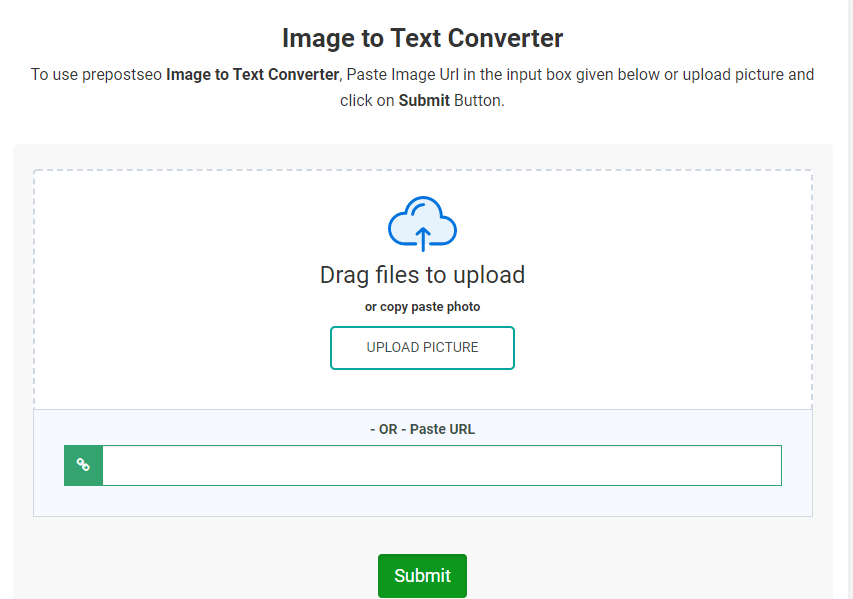
1. Prepostseo.com

Prepostseo is one of the most famous tools when it comes to optical character recognition. You can upload the image in different forms and all the text is written in that specific file will be extracted and you will be given a normal text file as the result.

While it was just a dream to do so a few years ago, it is a reality now that you can use in your favor.

All you have to do is upload an image from your computer, mobile, or any other place, crop the area out where you don’t want to use the software to search for any text, and let the software do its work.

You can also upload a URL of any image that you want to extract text from, and it will do exactly the same with it. It can be a link from Google, Pinterest, Instagram, or any other social.

If the text in the images is in some other language than English, then you can choose the other languages option in the side menu and convert the whole text into that language instead.

2. Myfreeocr.com

This platform allows you to not only convert images to text one file at a time but converting a whole bulk of pictures at once.

Instead of uploading one image at a time, downloading it, and uploading one again, you can now simply upload a bulk of pictures and you will receive documents after the conversion of those pictures.

This tool is the most reliable as it has multiple built-in engines which makes it easier for you to have a text file without any data loss.

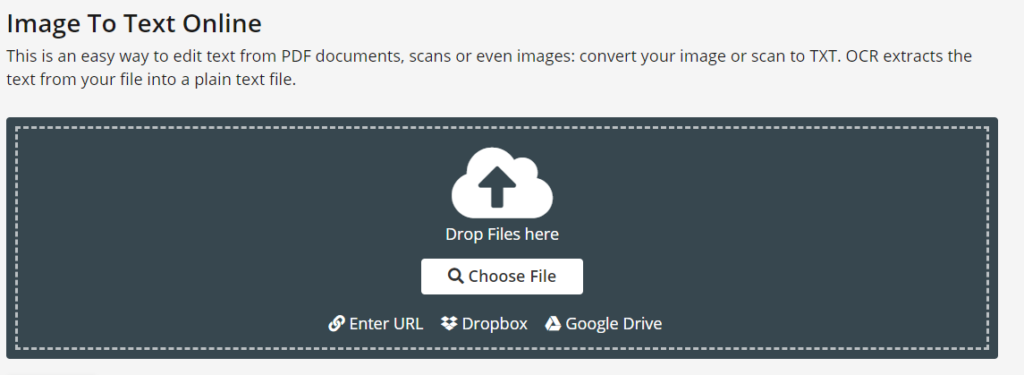
3. ocr2edit.com

This tool helps you differentiate between even the file that you want to create in the end.

While it is flexible with the kind of file you will be uploading on the platform for processing, it also lets you decide what kind of file you will be downloading from it.

Whether you want a normal text file or want a proper word document, you can just choose the option that suits you the best and you will be served accordingly. It is to make sure that you will be able to make use of the file after you convert the image to text right after you get it.

It also helps you choose your files from different platforms and is not just limited to your computer. If the pictures are on a google drive, uploaded on a platform like Pinterest, or in your dropbox, you can just connect that source with the tool to convert image to text. You can use this option if there are multiple pictures and you cannot keep downloading them on your computer to convert the text. Simply attach your platform to the tool and keep uploading all the images directly from there.

Also read – Best Youtube Video Downloader

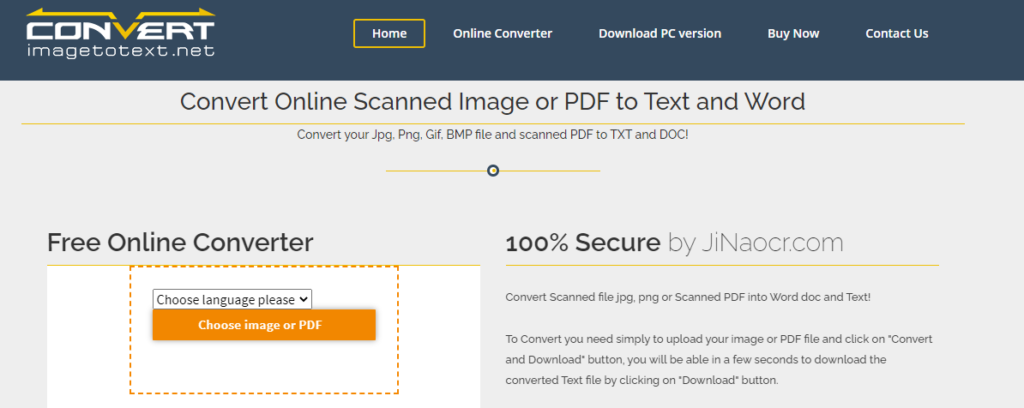
4. Convertimagetotext.net

If you are a student who is trying to copy the previous work or just trying to get away with an essay pre-written in a book, you are aware of how hard it is to convert images to text manually. This tool provides you with the special functionalities at not just a low price, but absolutely free.

You can use this tool online to convert image to text without having to pay anything and without losing any time. You can just upload the images which contain your data and all of it will be converted to a Word file which you can then download.

This tool also lets you either directly upload the image from your computer or just provide a path from the internet which can be followed by the tool to reach the real image.

You can convert your textbooks, the invoices that you need to make changes to, or old company documents which you want to reuse now.

The cloud system is taking over the world and it is hard to deal with any of the papers in the hard form anymore. You can save time, money, and resources by using this small SEO tool.

5. i2ocr.com

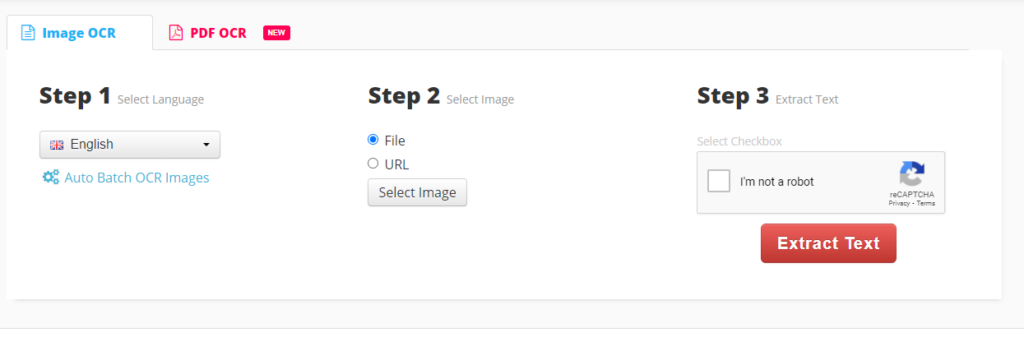
There are three languages involved in using this tool when you want to convert images to text. The first step is to select the language your image has been written in so the text output can be in the same language as well. There is a wide range of languages in which you can convert your image to text for free.

The second step is informing the system whether or not your file a regular file or if it’s a URL. In the third step, you can just simply click on the converted image to text button, and your image will be automatically and magically converted into text.

Categories
Uncategorized

4 Steps to Optimize Images for Your Blog

If you want to know how to optimize images for your blog then this article is especially for you.

Image Optimization: What? Why? How?

What is image optimization? Actually, it’s a process of resizing and compressing images to the smallest possible size and weight without reducing the overall image quality.

So, why is image optimization so important for your blog? Here are some facts and statistics to demonstrate why it’s vital for your site. The very first thing to know is that delays are killing. Really. Thus, according to the studies, even a 1-second delay in page load can harm and result in:

  • 11% fewer page views;
  • 16% decrease in user satisfaction;
  • 7% loss in conversions.

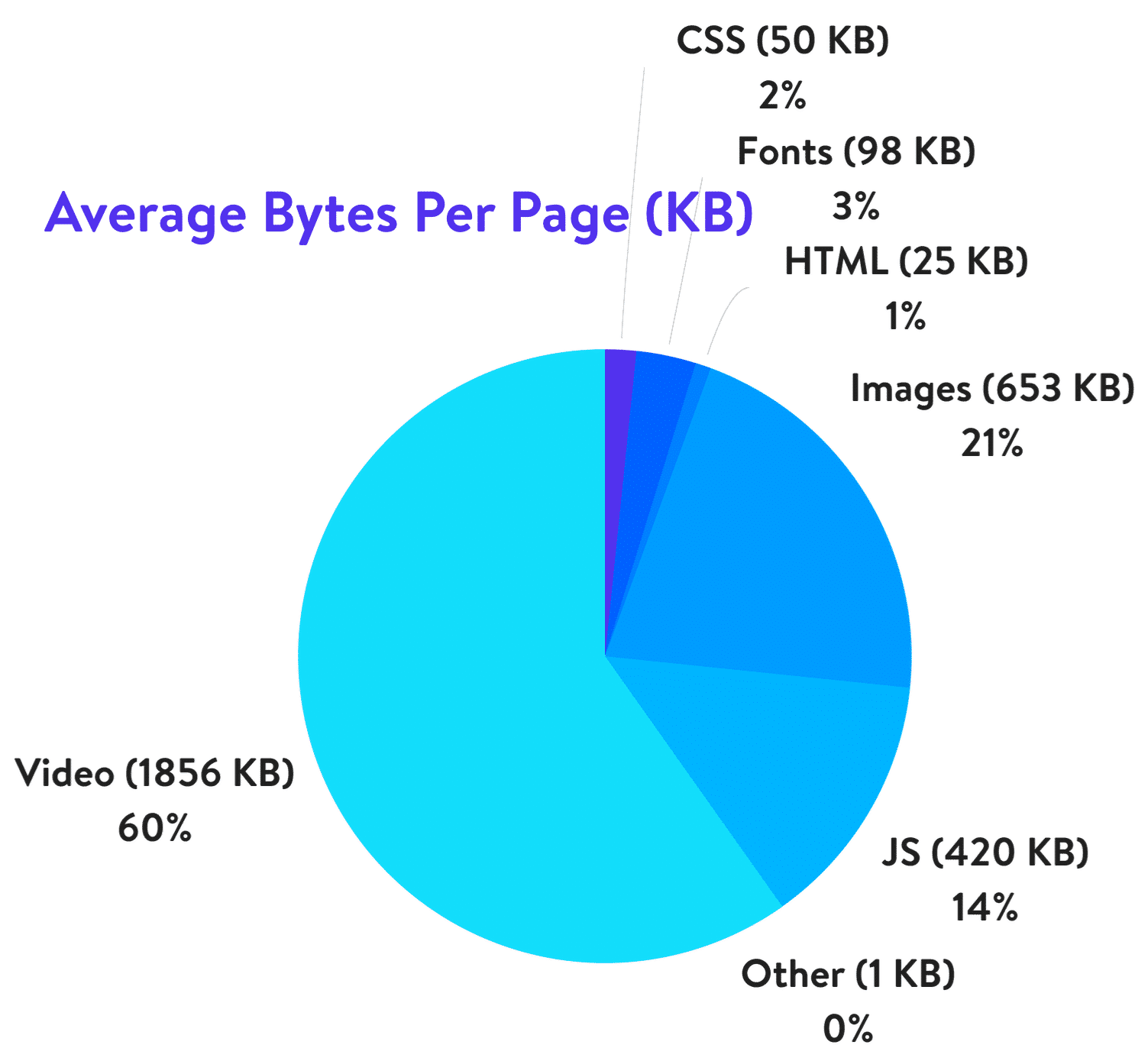
In its turn, 21% of a total webpage’s weight averagely is made up of images. Yes! Thereby, when it comes to optimizing your blog, it’s the images to start with.

Yes, big and bright visuals properly used can boost your blog but they can make things even worse if using them wrong.

How to optimize images? Below you’ll find 4 easy steps to do for image optimization and improving your blog, making it faster and much more user-friendly. 

Step 1: Acquire Imagery Legally

The very first thing is to get high-quality images and photos for your blog. Another crucial thing is that you should do that legally. There are 2 ways to choose from:

  1. Make a photo/image by yourself;
  2. Go to the photo stock or photo editors.

Today there is no need to grab any images because there are such services as Crello.com with millions of ready designs, images, photos of any themes, purposes on offer. Using it, you can also create your own visuals for any event and goal. The highlight of the service is that there you can find tons of free visuals along with paid imagery. Choose an option that suits your blog and use it for your site.

Step 2: Choose the Right File Format

There are 3 file formats commonly used for web sites. Here they are:

  • PNG is the best for logos, graphics, text-heavy designs, screenshots. Also, the format is used for images with transparent backgrounds. It has a larger file size, but it produces higher quality images.
  • JPEG is used for photographs and images with people, places, etc. Images and photos of the format can be adjusted with the perfect balance of quality and file size.
  • GIF uses 256 colors only and is the best for animated images.

Herewith, remember 2 things that JPEG is used for photos and PNG for graphics/text, GIF — animations. Definitely, besides the aforementioned formats, there are a lot of others, but not all the browsers adequately support them. So, it’s better to choose out of these 3 options. Also, before you start to modify blog images, check the format, and change it if needed.

Step 3: Mind Image Dimensions

There is always the temptation to use the best of the best and the largest of the largest. But you should be careful with your image dimensions. The truth is that there is no point in adding enormously large and heavy photos to your blog. It’s reasonable to choose the size of the images depending on the CMS and the theme used for your site. Commonly, the following sizes are used for blog websites:

  • 1,200 px X 630 px for blog graphics; 
  • 500 px X 500 px for headshot; 
  • 250 px X 300 px for sidebar.

So, when you download the image or photo with high resolution and large dimension, make sure to scale it to the proper size and weight. Thus, you can optimize the image 94% from 1.8 MB up to 103 KB only, for example.

Step 4: Compress Images

The next thing to do is to compress your images. Compression plays a critical role in image optimization. However, you should be careful when compressing images not to overdo it. Let’s see the widespread ways to compress images for blog sites. Mind that the settings depend a lot on a tool you use for the purpose.

Way 1. The most common ones like Adobe Photoshop, GIMP, On1 Photo, Affinity Photo, and others have built-in compression features — all you need to choose the option that suits you most of all.

Way 2. Also, you can save the needed images as usual and go to third-party services like TinyPNG, JPEG Mini, and others for much easier compression.

Way 3. Use the plugins of your CMS. If you use WordPress, for example, there you can install the plugins that will compress all the images loaded automatically.

Bottom Line

It’s no secret that the visuals and images included are crucial for your blog. Due to the fact that the human brain processes visuals 60,000 times faster than text, images are perfect for attracting attention and boosting user engagement. However, without optimization, large and heavy images can bring to nought all your efforts. Now you know how you can solve the problem in 4 easy steps:

  1. Go to the trusted photo stocks;
  2. Choose the right file format;
  3. Size your image;
  4. Compress the visuals without a quality loss.

Follow the advice and watch how visuals do magic with your blog!

Categories
Uncategorized

7 Tips For Landing Page Design By Industry – Leading Expert

When designing a landing page, it’s crucial to use the best practices recommended by experts. This can serve as a great means of increasing conversion rates, if done right.  

In this article, we dive deep into the matter and share with you seven landing page design tips as suggested by some of the leading UX design experts.

Let’s dig in!

1.  Integrate Discounts And Coupon Codes

This is one of the most effective ways to drive sales because it prompts the user to take action quickly, instilling the fear of missing out (FOMO), especially when accompanied by a countdown timer that highlights the discount.  

Another way to integrate coupons, discounts, and special offers into your landing page design is by creating exit-intent pop-ups. Whenever a user hovers the mouse to leave, a pop-up will appear, communicating this FOMO message and instilling a sense of urgency.

2.  Display Social Proof  

One of the first things you want your visitors to understand when entering your landing page is that you’re trustworthy. Don’t hesitate to make use of badges, trust marks, client testimonials, and user reviews.

People need reassurance, and because of that, they’ll most likely search for product reviews before they make a purchasing decision. So why not include them within your landing page?  

The average consumer reads 10 reviews before buying a product. So don’t make them postpone their decision. Give them the ability to read reviews right then and there to help move them toward conversion.  

3. Encourage Sharing On Social Media

Here’s the thing: if people love what you offer, they will most likely share it with their friends. That will increase traffic and ultimately get you more conversions.

The first step a brand identity agency takes in order to encourage people to share your page is adding social media buttons to it. This ensures a greater degree of engagement but also improves brand recognition as your brand’s logo design, recognisable copy, and other elements on the page will appear directly in people’s feeds.

4.  Keep Your Landing Page Structured  

The structure of your landing page matters. You can’t just scatter all sorts of elements throughout the page randomly. Everything needs to be placed logically so you can lead the user in going further down the page.

A landing page usually starts with a catchy headline that attracts the user’s attention, followed by a suggestive image, which has the role of maintaining the user’s attention. Next, a contact form is displayed.  

Afterwards, features of the product or service will be presented and finally, social proof will be displayed at the bottom of the page.  

5.  Focus On Page Loading Speed  

Let’s talk about the more technical side of things. The page loading speed matters a lot. In fact, this will make the user decide to either leave or stay on the page.  

Google conducted a study and found out that 53% of users will abandon a page if it doesn’t load within three seconds. In other words, you’ll be missing out on a lot of potential conversions if your landing page is not fast enough.  

To improve your page loading speed, make sure that your landing page includes a minimum amount of heavy elements. Compress all of the images before uploading them to your page, and crop the images to the correct size.

Remember. When scaling down the size of the image, cropping is your go-to method. Don’t use parameters. If you’re doing the latter, the page will load the full image first, then adjust to the size you actually want, meaning that your page will load slowly.  

6.  Create A Responsive Design

Considering that over 50% of all web activity comes from mobile devices, opting for a responsive design is crucial, especially for landing pages.  

Why? Well, devices come in all shapes and sizes, meaning that in order to increase conversions, your website needs to adapt to these changes.

Responsive design does just that, ensuring that your website looks natural and intuitive. Therefore, you’ll create a better user experience, which leads to increasing the chances of generating conversions.   

7.  Perform A/B Testing  

After you’ve finally got your landing page up and running, you still need to find out whether it can drive conversions. And the only way you can do that is through A/B testing.  

What’s A/B testing? Well, it’s the comparison of two different versions of the same piece of content, with one item changed in variation.  

Keep in mind, “one item changed” is the key here. The reason why you should do A/B testing is that it shows you what’s working and what’s not.  

For example, when doing tests on a landing page, you might create a variation of the existing one, but with a different headline. You’ll be able to see exactly which headline generated a better click-through rate and more conversions.  

Besides headlines, you can also do A/B tests on CTAs, images, buttons, navigation links, and more. 


Conclusion

Creating multiple landing pages catered toward different segments of your audience may be more effective, so always consider your audience.  

Keep things simple. Having too much going on can confuse the user and cause them to leave the page.

Emphasise the headline, subheader, and call to action.  

Furthermore, try to find ways to make the user buy your products/services on the spot. Creating a limited-time offer and offering multiple reviews within the landing page can be a great way to achieve this.

And finally, regarding the technical side of things, make the page load as fast as possible, go for a responsive design and don’t forget to do A/B testing.