Categories
Uncategorized

The AI Guardians: 5 Ways You Can Use AI to Boost Your Cybersecurity Defenses

You’re working late one evening when suddenly a pop-up appears on your screen: “RANSOMWARE DETECTION – FILES ENCRYPTED”. Your heart sinks as you realize malicious software has infected your systems and is currently encoding all documents, spreadsheets, and other data. Without paying the ransom fee, you may lose access to all these files completely.

It’s a nightmare scenario, but unfortunately, it’s one that’s becoming increasingly common. Ransomware attacks surged in 2023, extorting over $1 billion last year from helpless victims drawn in by psychological tricks and technical exploits.

Thankfully, artificial intelligence has arrived as a powerful new defense against these attacks (and many others). And yes, while you may associate AI with flashier applications like self-driving cars, Chat GPT, or even Alexa’s new witty banter, AI is proving invaluable for shoring up cybersecurity and thwarting digital threats.

Now, for some people, AI still seems abstract when it comes to real word applications – especially in security. Terms like “machine learning” and “neural networks” don’t mean much unless you see specific ways this technology guards against real-world attacks.

That’s exactly what we’ll outline in this guide – five concrete applications of AI security for preventing sophisticated cyber attacks targeting your business. Let’s dive in.

1. Use Machine Learning to Keep Up With New Threats

Staying secure against cyber threats feels like an endless game of whack-a-mole. Just when you think you’ve squashed one type of attack, a new more advanced one pops up to take its place. That’s because traditional security tools relying on rigid rules struggle to keep up.

They scan for known dangers but miss novel threats evolving right under their noses.

The good news is that artificial intelligence offers a better way to stay a step ahead. Specifically, machine learning algorithms that automatically surface suspicious activity that could signal breaches.

Here’s the brilliant thing about machine learning – it continuously learns by ingesting massive amounts of network data and adapting its threat detection capabilities based on new patterns. Like a vigilant guardian constantly improving its skills.

  • Anomaly detection – Anomaly detection flags activity deviating from normal behavior baselines. This allows catching unusual threats you weren’t even screening for previously. The system knows your regular patterns and rings the alarms when anything suspicious occurs.
  • Behavioral analytics: Behavioral analytics understands what’s normal for individual users and devices. If someone in accounting suddenly accesses engineering files or foreign IPs attempt strange connections, it triggers investigations into potential insider problems.
  • IP reputation monitoring: IP reputation monitoring blacklists suspect IPs and whitelists trusted ones based on associated risk factors. By blocking traffic from IPs with dodgy reputations, you avoid letting them sneak through the gates in the first place.

2. Use Natural Language Processing for Security Forensics

If (and more likely when) attacks penetrate your perimeter, every second matters in tracing the damage and plugging the breach. But making sense of tons of fragmented security logs feels like finding needles in a haystack. Thankfully, artificial intelligence lends a hand here too – specifically natural language processing (NLP). NLP parses messy textual data to automatically surface key forensics that human analysts would easily miss.

  • Pinpoint attack characteristics – It pinpoints attack characteristics by digging into firewall and system logs to extract crucial details like timelines, locations, devices and accounts related to the incident. This accelerates response.
  • Surface affected assets – It uncovers affected assets by scanning extensive logs to reveal all endpoints and data touched by attackers. This allows accurately scoping compromise even months later.
  • Accelerate audits – It expedites audits by instantly correlating events across data sources to determine root causes, downstream impact and ideal remediation steps.

3. Tap AI to Orchestrate Threat Response Workflows

When under attack, disorganized reactions can hand the advantage right back to hackers exploiting confusion. Every minute adversaries maneuver freely on your systems, the worse off you become. Artificial intelligence flips the script through security orchestration, automation and response (SOAR) platforms that enact swift, strategic countermeasures.

Powered by AI, these tools automatically initiate complex response workflows with proper context, such as:

  • Device lockout – Isolate compromised credentials and endpoints tagged malicious until given the all-clear. This instantly blocks attackers’ access.
  • Network segmentation – Dynamically quarantine vulnerable subsystems to prevent adversaries’ lateral movement into broader infrastructure. This limits their blast radius.
  • Evidence gathering – Targeted, organization-wide data collection retains forensic artifacts apropos to the incident without contamination. This aids future investigation.
  • False alarm dismissal – Filter out bogus alerts unrelated to the real breach to avoid draining resources chasing ghosts. This prevents attention diversion.

Essentially, AI-powered SOAR platforms allow decisively executing intricate, coordinated actions that would overwhelm manual efforts. This barricades attackers into small pockets of the environment while freeing up personnel to focus on strategic recovery initiatives.

4. Generate Synthetic Training Data

Training AI to catch threats requires tons of data. But getting sufficient real-world attack samples is a difficult task due to things like privacy laws and regulations. Thankfully, there’s a slick solution – generative adversarial networks (GANs).

Here’s how GANs work their magic: They pit two neural networks against each other. One generator GAN creates synthetic data resembling actual incidents. And one discriminator GAN tries determining the real from fake data.

These AI adversaries battle in cycles – the generator keeps producing more realistic synthetic cyber attacks while the discriminator keeps getting better at sniffing out subtle giveaways they’re simulated. Eventually, the generator prevails – producing AI training data mimicking live attacks so closely even experts can’t differentiate them from the real deal.

By tapping massive GAN-produced datasets, you can train defensive models cost-effectively without licensing issues or contamination threats. These models will spot both existing and exotic zero-day attacks with high accuracy since they’ve seen myriad simulated versions.

5. Deploy Chatbots to Aid Threat Hunters

On the threat hunting side, conversational chatbots aid ethical hackers probing infrastructure for weaknesses. These intelligent assistants catalog insights through natural conversation without the grunt work bogging down human creativity.

  • Catalog hunter insights – Chatbots create hierarchical notes, timestamps and metadata so hunters have total recall of exposed attack surfaces and entry points.
  • Send real-time notifications – Alerts security analysts instantly when significant vulnerabilities or malware come to light instead of waiting for reports.
  • Aid information retrieval – Pulls up specific dialog snippets, access linked research content and answer questions through seamless voice or text interactions.

Getting intelligent assistance for organizing findings lets hunters focus purely on creative breach scenarios to help boost defenses.

Final Word

AI is fast becoming an integral part of cybersecurity defense against ever-evolving attacks. As we’ve seen, AI-driven solutions like user behavior analysis, automated threat hunting, and intelligent response systems can help security teams work smarter and faster. Machine learning algorithms enable us to spot anomalies early and seal off vulnerabilities before bad actors exploit them.

Now of course, AI isn’t some kind of cyber silver bullet that makes all other security measures obsolete. You still need the basics – strong passwords, data encryption, regular software patches, and good cyber hygiene habits among employees. But by augmenting human capabilities with AI’s untiring data processing skills, we give our cyber defenders a real advantage over would-be hackers.

Categories
Uncategorized

Guide to Cost-Effective Hosting for Startups

Startups as well as small businesses try to meaningfully invest every little sum of money. This also relates to the choice of the hosting solution and reliable web provider. The diversity of hosting providers is immense that’s why it might be challenging to find a stable solution and at the same time save money.

That’s why we decided to share some recommendations according to the choice of cost-effective hosting for startups. Also, we will give a top list of the most affordable and reliable providers, if that is what you are searching for.  

What to pay attention to when selecting cost-effective web hosting?

Probably the most crucial thing for all startups is the price of the services. Of course, budget is important and you should not overpay, but except for the low pricing you’d better check available resources and the support level of the hosting provider.

To get the most reasonable hosting plan, review the pricing rates of several providers and make sure that you will not get hidden expenses when you decide to switch to another provider. Contact the support team and ask about additional payments for transferring or upgrading the hosting plan. Also, you can review the users’ feedback about the web provider on the review sites and get real insides about a chosen company.

A great decision is to check the availability of discounts for new clients or special offers during some holidays and other discounts. Sometimes, the payment for an annual package will be cheaper than per month’s transactions. You can save so much more, just by reviewing the discounts and using them.

One more crucial factor when talking about prices is resources. When you choose a shared hosting, the price can be really low but what about DDoS VPS protection and possible switch to a package with more resources? Check whether you won’t need to overpay for the upgrade or downgrade of the chosen hosting solution. As a startup can quickly grow you should also be informed about other available hosting packages and their price.

Important factors to consider

Uptime and reliability.

In addition to financial factors, high uptime is needed to attract more users, improve reputation, and develop trustworthy relations with customers. Usually, the percentage of uptime is mentioned in the plans’ description section so you can easily check this information.

Scalability.

Lots of startups might experience unexpected growth, that’s why it is essential to select only hosting solutions that are really scalable. Find out whether the chosen hosting provider offers quick scalability or the addition of resources in case you have higher traffic volumes.

Support.

Customer support should not only be professional and friendly, but also available all the time. New clients might need assistance with lots of questions starting from the purchasing of the required package and ending with some management processes. Responsiveness is a crucial factor and luckily it can be quickly tested even before you have ordered your hosting solution. If the web provider offers assistance from technical experts, this is even better so that users will have no issues with security, configuration, or performance.   

The most affordable solution for startups

To simplify the searching process for a stable and reasonably priced service, let’s discuss a couple of reliable web hosting providers so you don’t waste a ton of time searching and testing. We have already done the difficult part by checking the diversity of web hosting, reviewing the users’ feedback, and more. Now, you can just select among 3 offered variants rather than wasting your efforts in vain.  

HostZealot

  • Professional support 24/7.
  • Reasonable pricing. The basic plans are only a couple of dollars for a month.
  • Unlimited resources and easy scalability.
  • Awesome reputation in the industry.

Interserver

  • High-performance characteristics.
  • Competitive pricing rates.
  • Great security features.
  • Stability of all hosting solutions.

FastComet

  • The simplest setup processes.
  • Easy website management even for new users.
  • Security measures.
  • Diversity of hosting plans

Final recommendations

Cost-effective hosting is extremely important for new businesses that don’t want to overpay and at the same time get reliable solutions. When searching not only for a cheap option but also a scalable one, you can be sure that a reliable hosting provider can offer more resources or other plans if your business grows in the near future. Just by following a couple of standard recommendations such as monitoring discounts, choosing scalable hosting solutions, and paying attention to uptime – you can help your business to have a stable website and that will be a perfect foundation for future perspectives.

The ideal hosting is not the cheapest option, it is a complex solution where everyone gets what they need in terms of resources, functionality, flexibility, and of course the appropriate price. The choice of a stable hosting solution will definitely give a great foundation for success and confidence.  

Categories
Uncategorized

Social Media Scheduling Tools for Busy Students Running Businesses

Starting and running a business as a student isn’t easy. You have to put in a lot of effort, like aggressively marketing your venture to win clients. Social media can be an excellent tool in this respect.

However, your success in promoting your business on social platforms will depend on how frequently you post. If you are a busy student, you may not have the time to post content or be online when most of the audience is browsing social media.

Tools for social media scheduling come in handy in such situations. These tools also boost the consistent social media engagement your business deserves due to their automation and analytical capabilities. Here are some excellent ones for the job. 

1. Buffer

Balancing academics and managing a business is daunting. If you focus too much on business and neglect your studies, your academic performance will take a hit. For instance, you might struggle to complete assignments in good time or fail to do them, which will result in low grades.

Likewise, if you focus a lot on studies and neglect managing your business’s social media pages, the business will be affected. So, when you are at a crossroads and wondering, “Who can help write my essay UK so I can focus on my business?” Buffer can be useful. This tool will help you maintain a robust online presence amidst your busy schedule. With a single dashboard to manage all of your business’s social media accounts, it can assist you in scheduling posts for various platforms. 

Besides scheduling posts, the tool gives you a comprehensive analysis of how your posts perform on all the platforms. It helps you determine the platform you should mainly focus on to get favorable results. What’s more, you can determine the optimal times to post to get the most interaction.

2. Hootsuite 

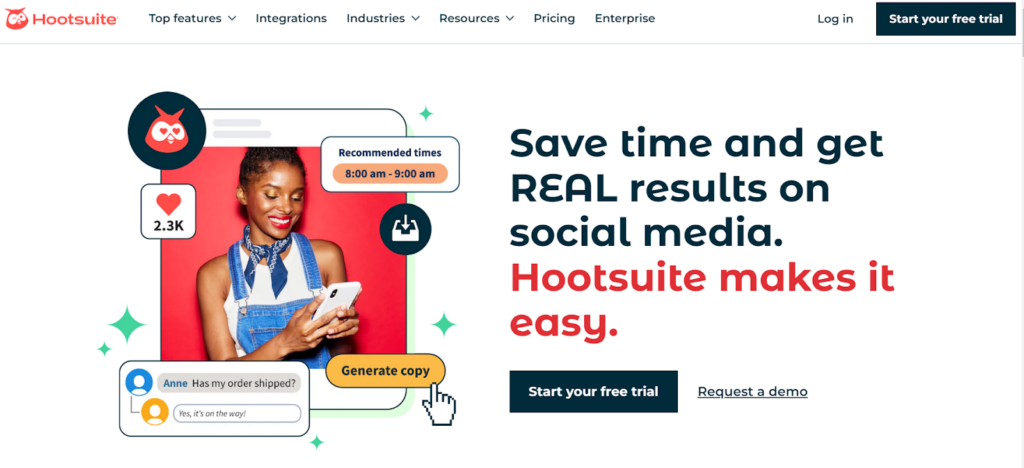
Just like its counterpart Buffer, Hootsuite can help you schedule posts on multiple platforms. It is a fantastic tool if you’re trying to reach potential customers through a variety of platforms. It offers a ton of cutting-edge features to support your social media marketing. For instance, you can create posts in bulk and then arrange a timetable for their sequential posting. With this feature, you can have a multi-channel, consistent social media presence, which can help your business succeed more quickly.

The tool also measures the different KPIs of your posts, including click-through rates and follower growth. It also has advanced security features such as 2FA to ensure your social media channels are safeguarded from unauthorized people.

3. Sprout Social

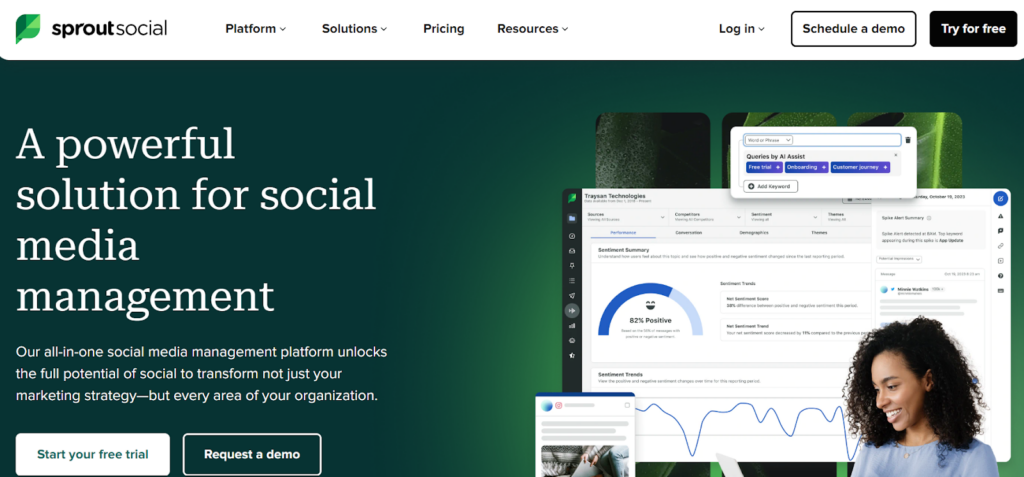
The tool is known for its ability to present comprehensive performance analysis, in addition to its ability to schedule posts on different platforms. Its performance analysis reports go beyond just figures. The reports incorporate attractive visuals that help you make appropriate decisions for social media marketing. Besides, the reports can be sent to stakeholders, such as the main decision-makers of the business.

A cool feature is that the data from this tool can only be accessed by those you give permission. So you can keep your business data and that of your customers safe. Sprout Social is a suitable option for managing your business’s social accounts while adhering to strict data security guidelines. 

4. Later

Some businesses require the posting of visual content as samples of your finished work. For instance, when running a graphic design or a fashion business, potential clients may want to see samples of what you have created to judge your prowess. When operating such businesses, the right scheduling tool to use is Later. This scheduling tool could make a big difference in the success of your business because it allows you to post cohesive and visually appealing posts that boost your brand identity. 

A media library is also included with the tool. You can utilize it by storing your business images there – you can easily access them when you want to schedule them for posting. Moreover, it is possible to manage your various social accounts using the tool’s single dashboard.

The only downside you will notice with this scheduling helper is that its analysis of the posts’ performance is not as comprehensive as what you’ll encounter in some tools. However, the data is still enough to make appropriate marketing decisions for social media. Another advantage of this scheduler is that it has a free version that can serve well if you do not have adequate money to pay for scheduling tools. 

5. MeetEdgar

Evergreen content plays an important role when marketing on socials– this is content that is still useful regardless of how much time has elapsed. A tool that is perfect for evergreen content recycling is MeetEdgar. You can place the content into different categories and schedule their recycling as you want. For instance, you might want to post a promotional post every Friday for a month. In that case, MeetEdgar can automatically post it for you as and when you want.

The tool also provides data on the performance of your evergreen content. Thus, it allows you to notice when engagement on a post is reducing. With such insights, you can make the requisite changes to boost engagement on socials – you can edit the content or drop the post. 

The tool is also known for its user-friendliness – you do not require prior knowledge of scheduling tools. This fantastic tool has an intuitive dashboard, making it easy for busy students to use. 

Shutting Down

Effective management of your business’s social pages can be facilitated by using social media scheduling tools. Buffer, Hootsuite, Sprout Social, Later, and MeetEdgar are excellent options. They have advanced analytical capabilities, helping you make appropriate decisions, such as identifying posts that require improvement and the social platform to focus on. Thoroughly analyze the various tools by scrutinizing their features and advantages, then pick the right one and maximize its use to boost your venture’s social media presence.

Categories
Uncategorized

How Generative AI Development Services Are Transforming Businesses

In today’s technological world, every businessman wants to take their businesses to high levels and look for ways to boost growth and efficiency.

They must optimize their processes, enhance productivity, and reduce costs to improve performance. In recent years, generative AI has opened up new possibilities for achieving the goals of businesses.

Generative AI is a powerful technology for creativity, allowing for the creation of unique content and ideas. It enables more detailed and personalized communication that brings the customer experience to new heights.

This technology lets businesses respond to customer needs and preferences in real time, resulting in a stronger and more loyal customer base.

This article will explore how generative AI development services are transforming business and the benefits of generative artificial intelligence. Let’s dive into the topic with a quick introduction to generative AI!

What is Generative Artificial Intelligence (AI)?

Generative AI development services focus on producing new content or information. It refers to deep-learning models that can produce high-quality images, text, and other content depending on the information they were taught.

Generative AI applications include ChatGPT, Gemini, and Copilot, among others. The landscape of AI tools has expanded dramatically over the last two years, reflecting generative AI’s growing prominence.

Importance of AI Technologies

We are all living in an era of technological change that was fiction ten years ago. But now it has become a reality. As you can see, things are rapidly changing with technological advancement. Thus, everybody must embrace change and adopt advanced technologies to remain competitive.

Generative AI has great importance in today’s world because the other side is all about suffering. If you don’t adapt and learn, your business will suffer.

How Can Generative AI Help You Improve Your Business Operations?

Next, we are going to discuss some benefits of generative AI that you must know:

Enhance Customer Experience

Generative AI plays a critical role in improving customer support. For example, you can use AI-powered chatbots, visual assistants, and virtual assistants to answer questions, provide information, and troubleshoot problems.

It will enhance the overall customer experience by providing instant responses and freeing up support teams to focus on more complex and personalized customer interactions. They can boost customer engagement by offering custom deals and communicating uniquely.

Automating Content Generation

Content creation is a part of any company’s marketing and branding strategy. However, consistently producing high-quality content can require a lot of resources. Generative AI provides a solution by automating the content generation process.

AI-powered tools can quickly and efficiently generate engaging content, such as blog posts, product descriptions, and social media posts, freeing human resources for more strategic tasks.

Improving Decision Making with Predictive Analytics

In today’s data-driven business environment, making sound decisions is critical to success. Businesses can use generative AI algorithms and predictive analytics to analyze historical data, identify patterns, and forecast future trends.

Whether predicting customer behavior, optimizing supply chain management, or mitigating risks, AI-powered predictive analytics provide valuable insights that enable businesses to make better decisions and capitalize on new opportunities.

Optimizing Design And Innovation

Product development and branding rely heavily on design, influencing consumer perceptions and purchasing decisions. Designers and innovators can use generative AI tools to quickly explore different design options.

AI-driven design tools streamline the creative process and spark innovation, allowing businesses to stay ahead of competitors in changing markets.

Uncovering Hidden Opportunities

By analyzing massive amounts of data and identifying emerging trends, generative AI helps businesses discover new opportunities. Its algorithms can provide valuable insights into customer behavior, market dynamics, and competitive landscapes by identifying patterns and correlations.

Businesses can use this information to identify untapped markets, develop innovative products, and create targeted marketing strategies. Generative AI works like a strategic tool, allowing businesses to make informed decisions and capitalize on market opportunities.

Common Applications of Generative AI

Generative AI allows you to use machine learning for your business more quickly and across a wider range of use cases. It can be used in any line of business, including engineering, marketing, customer service, finance, and sales. Numerous applications for generative AI can significantly improve the customer experience, employee productivity, business efficiency, and creativity.  

Examples of generative AI capabilities that can be used to improve the customer experience include chatbots, virtual assistants, intelligent contact centers, personalization, and content moderation.  You can also increase your employees’ productivity by using generative AI for conversational search, content creation, and text summarization, among other things.  

Intelligent document processing, maintenance assistants, quality control and visual inspection, and the generation of synthetic training data can all improve the efficiency of your business. Finally, generative AI can be used to accelerate the creation of all types of creative content, including art, music, text, animation, video, and image generation.

Final Thoughts

Generative AI is changing how businesses approach strategy and innovation. Organizations can use its capabilities to drive growth, optimize operations, and open new opportunities.

Here, we discussed how generative AI development services are transforming businesses. I hope you found our article informative and now understand more about how technology changes business strategies.

Categories
Uncategorized

How to Play DVDs on Mac Without Problems

How to play DVDs on iMac, MacBook Air/Pro? Playing a DVD on a Mac computer may require different tools depending on your specific Mac model, disc type, and playback needs. This guide will show the 3 best ways to play a DVD on your Mac: using the native DVD Player, using a third-party DVD player, or digitizing DVDs on Mac to play them with any player. We will also address some common questions to help you troubleshoot any potential issues.

Hardware and Software Requirements

  1. DVD Drive: Ensure your Mac has a built-in optical drive or an external DVD drive connected, such as Apple USB SuperDrive, Verbatim Slimline, etc. If you want to play Blu-ray discs as well, buy a Blu-ray drive that supports both DVD and BD discs.
  2. Software: 
  • DVD Player: included in all macOS, strict copyright protection.
  • DVD ripping software for Mac: bypass region codes and other protection to digitize your DVD. So you can save the DVD to Mac and watch it with QuickTime or any other player.
  • VLC media player: third-party DVD player, free and open-source, lower image quality than the native player

Choose from the three options and follow the detailed steps below to easily play any DVD on your Mac.

Method 1. Play DVD With Native DVD Player on Mac

Playing a DVD on Mac using the built-in DVD Player app is quite straightforward with necessary requirements. But if you want to play the DVD at any time without the drive, it’s best to store the DVD on your Mac so you can play it without an the external drive and physical disc. 

Step 1. Insert the DVD into your Mac’s DVD drive, label side up. If you’re using an external DVD drive, make sure it’s plugged directly to the USB port of your Mac. 

Step 2. The DVD Player app should launch automatically when your DVD is recognized, and a DVD icon will appear on the desktop.

*If the DVD Player doesn’t start, find it in the Applications folder in Finder, and open it manually.

Step 3. Once the DVD Player opens, it should detect the DVD and start playing it in the player window. You can click the Menu button to access the DVD menu and select titles. Drag the progress handle or click a point to fast-forward or rewind. 

To eject the DVD, right-click on the DVD icon and select “Eject”.

Restrictions:

  1. Regional issues.

If you insert a DVD that doesn’t match your Mac DVD drive’s region code, e.g., a region 2 DVD from Japan, you must change the drive’s region in order to play it. Note that you can only set the DVD drive region 5 times. If you reach the maximum DVD region change limit, DVDs that don’t have a compatible region code will be ejected.     

  1. Airplay, screen mirroring and screenshot blocks.

The DVD Player blocks screen mirroring and screenshot due to Apple DRM protection, so you’re not allowed to cast the DVD content to a TV, even if it’s a self-made disc with no copyright.

  1. No DVD-RW support.

If the DVD is burned on a DVD-RW (rewritable) disc, DVD Player on Mac won’t recognize it.

  1. DVD wear.

Playing the DVD from the optical drive many times may damage the disc, leaving scratches. If it’s a homemade DVD, you can copy the DVD Video_TS folder on Mac in Finder and play it without the drive, but commercial DVDs with copy protection cannot be copied without dedicated software. See the second method to learn more.

Method 2. Digitize DVD on Mac for Unrestricted Playback

To resolve region code limit and other restrictions, the best way is to convert your DVDs to digital formats using a DVD ripper. Then you can play your favorite DVD movie anytime with any player on Mac, without an optical drive. 

Of all the DVD ripping software for Mac I’ve used, Cisdem Video Converter is the most balanced one, powerful and yet easy to use. It lets users convert region-locked, copyrighted DVDs and all types of discs to popular video formats like MP4, offers a built-in DVD player, and supports audio track & subtitle selection. It helps you to save the DVD in a smaller size with better compatibility, without losing video quality.

How to save DVD on Mac for easy playback:

Step 1. Install Cisdem Video Converter for Mac from its official website

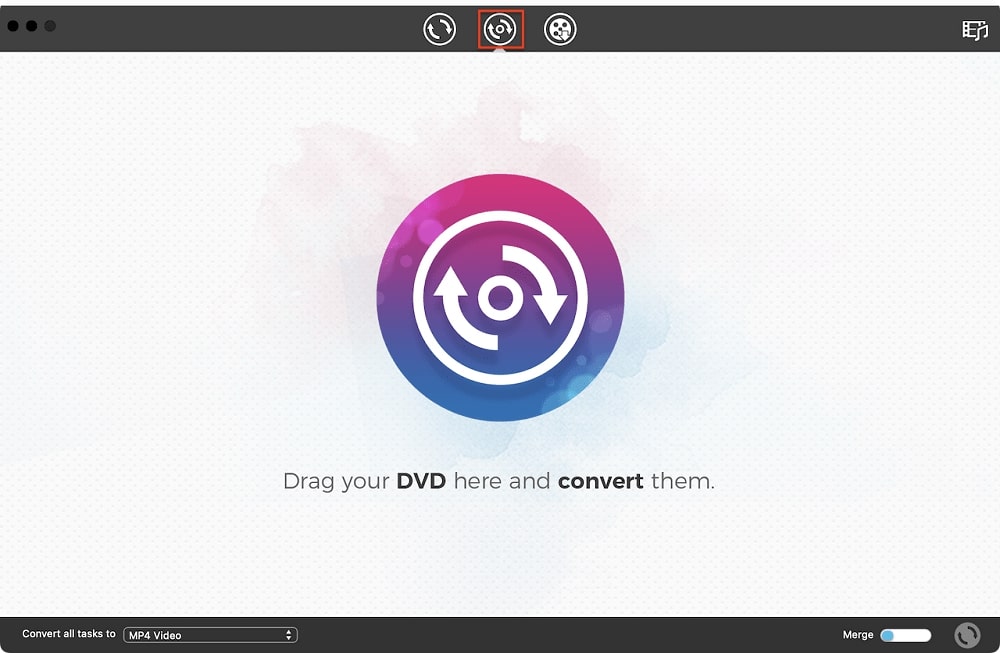
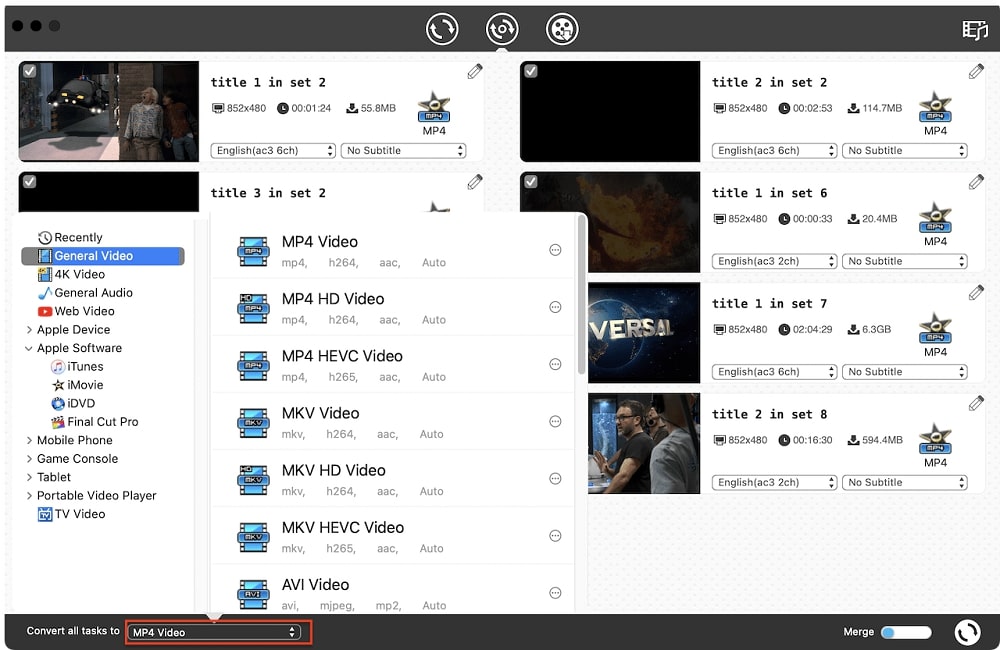
Launch the app and click the second tab at the top to access the DVD ripping module.

Step 2. Add DVD to the ripper

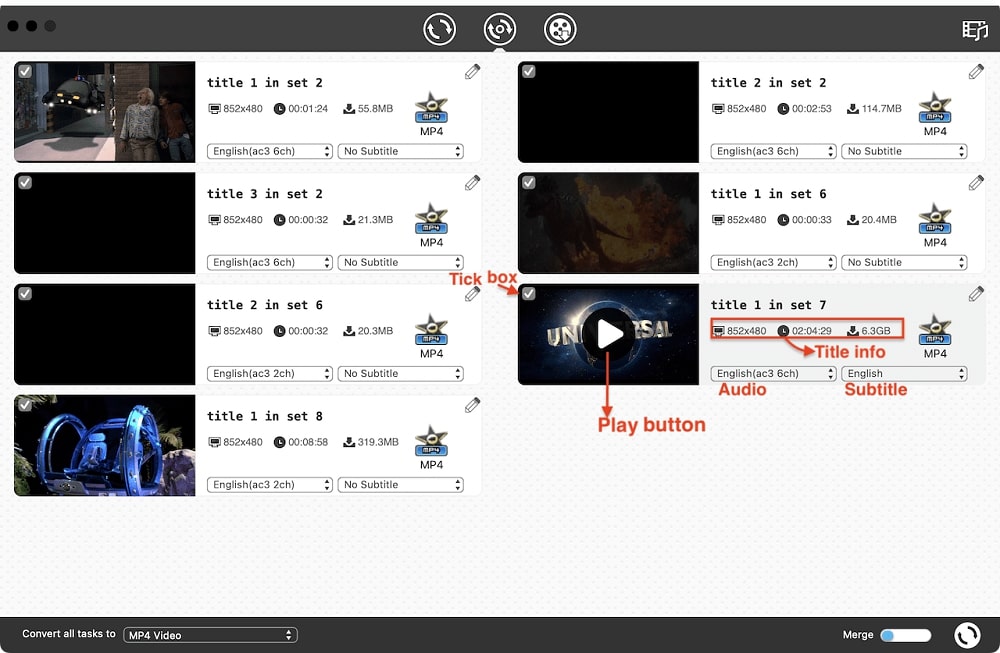
Insert your DVD into the drive, then drag-n-drop the DVD icon to the app interface. Alternatively, click “File > Open DVD” from the top menu bar. It will soon display all DVD titles, including bonus content.

Step 3. Customize output settings

Click the “Convert all tasks to” pop-up menu to select an output format, MP4 and MOV are highly compatible options for Mac.

If it’s a movie DVD, I suggest converting only the main title, the longest and largest file. It allows you to play the title and check the DVD contents. You can also click the pencil-like icon to trim and crop the title.

Select the audio and subtitle language you want to keep.    

Step 4. Start the conversion

Click the Convert icon at bottom right to begin converting, enable the Merge option if you want to combine several titles into one file.

Step 5. Play DVD on Mac using QuickTime

When the conversion is complete, click the check icon to quickly locate the DVD video file in folder, then you can double-click on it to play it.

Then you can eject the disc and continue watching the DVD clips. The converted DVD file is also easier to transfer for Plex, TV, and portable devices.

Note: For commercial DVDs, it’s usually OK to rip your own collection for personal use, but do not distribute copies for profit.

Method 3. Watch DVD on Mac With VLC Media Player

If you want to avoid the limitations of the built-in DVD Player, but no intend to digitize the DVD, consider using a third-party DVD player. VLC is a popular universal video player that can play DVDs and Blu-rays, and allows you to cast to TV. However, it may take longer time to load the DVD than the native player and the video quality might be degraded.

How to play DVD with VLC on Mac:

  1. Install VLC media player. You can download it from videolan.org/vlc/
  2. Insert the DVD and wait a few seconds for your Mac to detect it.
  3. Launch VLC, click the “File” menu and select “Open Disc”.
  1. In the pop-up window, the DVD just inserted should be selected automatically. Click on the “Play” button to start playing the DVD.
  2. Enjoy your DVD. Go to Video, Audio, Subtitle on the top menu bar to adjust settings.

Conclusion

To sum up, the native DVD Players on Mac is a straightforward solution for immediate playback, VLC is an alternative player in case of failure. Digitizing DVDs allows you to play them without limits of Apple DRM protection and free of the drive. If you have any other problems playing DVDs on your Mac, check out the troubleshooting section below.

Troubleshooting Tips:  

  1. Mac not recognizing the DVD?
  • Check if the DVD is listed in the Finder sidebar, maybe it just doesn’t show up on the desktop.
  • Check if the DVD is damaged, scratches and cracks can make it unreadable. Test with another DVD.
  • Ensure the DVD is inserted correctly with the image side up. If using an external DVD drive, check the connection and make sure it’s connected directly to your Mac, not through a hub. 
  • Try restarting your Mac and reinserting the DVD.
  1. Need to enable or disable DVD Player auto startup?

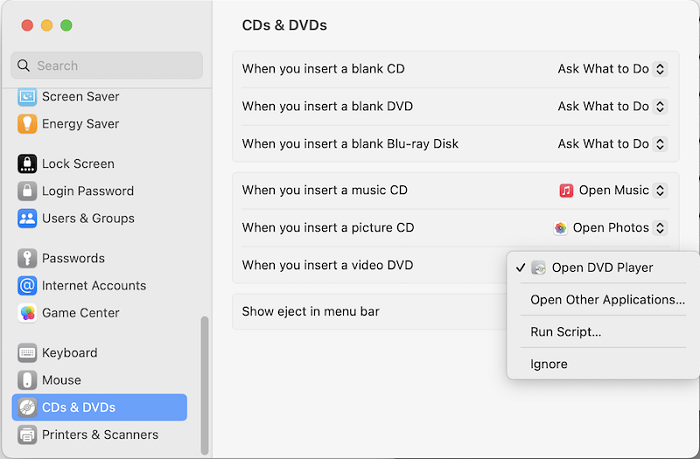
First, make sure you have an optical drive connected to your Mac, then open the System Settings from Apple menu, and click “CD & DVDs” in the sidebar. Click the drop-down icon of “When you insert a video DVD”, and choose “Open DVD Player”, “Ignore”, or “Open Another Application” depending on your needs. Note that you’ll need to restart the computer for the settings to take effect.

  1. DVD playback is choppy, skipping or stuttering?
  • Clean the DVD disc with a cloth to remove fingerprints or other dirt.
  • Try a different DVD player.
  • Ultimate solution is to rip the DVD to digital format with a ripping software(method 2), also applies to scratched DVD. 
Categories
Uncategorized

Efficient Collaboration with Microsoft SharePoint

Microsoft SharePoint is a powerful tool that helps organizations improve collaboration and efficiency. With its extensive features, SharePoint provides a central platform for document management, team collaboration, and business process automation. In this article, you will learn how to make the most of Microsoft SharePoint to advance your business.

The Basics of Microsoft SharePoint

Microsoft SharePoint is a web-based platform that enables organizations to store, organize, and collaborate on documents. SharePoint offers a variety of features, including document management, intranet portals, social networks, enterprise search engines, and business intelligence.

SharePoint can be deployed both in the cloud and on local servers, offering flexibility and adaptability for various business needs. One of SharePoint’s key strengths is its integration with other Microsoft products such as Office 365, Teams, and Power Automate, significantly enhancing efficiency and productivity. To optimize the implementation and use of SharePoint, a Swiss SharePoint Consulting Service can provide valuable support.

“Microsoft SharePoint is the central platform for collaboration and document management that companies need to succeed in today’s digital world.”

Benefits of Using Microsoft SharePoint

Using Microsoft SharePoint brings numerous benefits that improve collaboration and productivity within the company. One of the biggest advantages is the centralized storage and management of documents. With SharePoint, employees can access the necessary documents anytime and from anywhere, increasing efficiency and flexibility in daily work.

Another advantage is improved team collaboration. SharePoint allows documents to be co-edited in real-time and changes tracked. This optimizes communication within the team and reduces misunderstandings. Additionally, SharePoint offers extensive security features to protect sensitive company data.

Key Benefits:

  • Central Document Management: Easy access and management of documents.
  • Improved Collaboration: Real-time editing and change tracking.
  • High Security: Protection of sensitive data through extensive security features.

Furthermore, SharePoint supports the automation of business processes through workflows and integration with Power Automate. This allows companies to automate recurring tasks, saving time and resources.

Use Cases for Microsoft SharePoint

Microsoft SharePoint offers a variety of use cases that can be tailored to the specific needs of an organization. A common use is creating intranet portals that serve as a central information and communication platform for employees. The intranet can provide important company news, documents, and resources.

Another important use case is document management. SharePoint allows for the structured storage and management of documents, making it easier to search and reuse information. Thanks to version control, changes to documents can be tracked and earlier versions restored if necessary.

Key Use Cases:

  1. Intranet Portals: Central platform for corporate information.
  2. Document Management: Structured storage and management of documents.
  3. Workflows and Automation: Increased efficiency through automated business processes.

Additionally, SharePoint can be used as a platform for project collaboration. Teams can create project sites where all relevant information and documents are collected and collaboratively edited. This promotes transparency and efficiency in project work.

Integration with Other Microsoft Products

A major advantage of Microsoft SharePoint is its seamless integration with other Microsoft products. SharePoint can be easily connected with Office 365, Microsoft Teams, and Power Automate to create a unified and efficient work environment.

With Office 365 integration, documents can be saved and co-edited directly from applications like Word, Excel, and PowerPoint in SharePoint. This facilitates collaboration and improves productivity. Microsoft Teams enables sharing and editing of SharePoint documents directly in Teams channels, further enhancing communication and collaboration.

Integration with Power Automate allows the automation of workflows and processes, increasing the efficiency and accuracy of business operations. Companies can create custom workflows that automatically perform various tasks and processes, minimizing manual intervention.

Integration with Microsoft Products:

  • Office 365: Co-edit documents directly from Office applications.
  • Microsoft Teams: Share and edit SharePoint documents in Teams channels.
  • Power Automate: Automate business processes and workflows.

This integration offers companies a comprehensive and efficient solution for collaboration and information management.

Optimization with the Swiss SharePoint Consulting Service

Implementing and optimizing Microsoft SharePoint can be a complex task, especially for companies without extensive IT resources. A professional Swiss SharePoint Consulting Service like that offered by Innobit can provide valuable support.

These consulting services help companies make the most of SharePoint by developing and implementing customized solutions. This includes adapting SharePoint to specific business requirements, training employees, and providing ongoing support to ensure the platform is used effectively.

Benefits of the Swiss SharePoint Consulting Service:

  • Customized Solutions: Adapting SharePoint to specific business needs.
  • Employee Training: Training and support for effective use.
  • Continuous Support: Ongoing consulting and support for optimal results.

By working with an experienced consulting service, companies can ensure they fully exploit the potential of Microsoft SharePoint and sustainably improve their business processes.

Conclusion

Microsoft SharePoint is an indispensable tool for companies looking to improve their collaboration and efficiency. With its extensive features for document management, team collaboration, and process automation, SharePoint provides a central platform that can be tailored to the individual needs of a company. By integrating with other Microsoft products such as Office 365, Microsoft Teams, and Power Automate, SharePoint becomes an even more powerful solution for digital transformation and productivity enhancement.

Although SharePoint offers numerous benefits, its implementation and customization can be complex. This is where a Swiss SharePoint Consulting Service like that from Innobit can help. They provide professional consulting and support to ensure SharePoint is optimally integrated into your business and all potentials are utilized.

With the right strategy and support, Microsoft SharePoint can help optimize business processes, improve collaboration, and ultimately increase your company’s success.

Categories
Uncategorized

SEO Automation: Why Does It Matter and How to Boost Your SEO Efforts With Automation?

In simple terms, search engine optimization is a cumulative practice aimed at making your site and content match search engine standards and, hence, appear higher in search engine result pages (SERPs). Today, it’s one of the most efficient ways of boosting brand visibility on the Internet. After all, more and more people now begin their experiences with new brands in search engines, and you want them to be able to find you organically.

Since it spans multiple activities and approaches, effective search engine optimization is never a once-off process. It’s an ongoing commitment that requires plenty of time and attention. And it’s also a very dynamic field. With search engines releasing new algorithms and demands every once in a while, it requires even more focus to stay up-to-date with your strategy.

The solution? SEO automation is a trick that can help you get the most out of your efforts without spending too much time. Read on, and we will tell you more about it!

What Is SEO Automation?

SEO automation is the process of putting your search engine optimization efforts on autopilot. It implies using specialized automated SEO software and tools to systematize your day-to-day tasks, streamline data collection and analysis, and otherwise increase the efficiency of your workflow by cutting down the amount of manual work and speeding up your SEO tasks.

SEO Automation Benefits: Why Do You Need It?

Since search engine optimization is a long-running endeavor, it involves plenty of big and small tasks. Some of them might be performed once in a fairly long time. However, others require ongoing results monitoring and strategy refining to acquire the best outcomes.

That’s when leveraging SEO automation tools can really help. The top perks that you can gain from streamlining your efforts include:

  • Time savings – Cutting-edge automated SEO tools can save you a bunch of time every day, boosting the speed of work and overall productivity.
  • Improved accuracy – Accuracy is a big thing in many SEO tasks. For example, in keyword research, accuracy can help you determine the most searched queries that can take your site higher in SERPs. Specialized tools can help you receive the accuracy that nearly can’t be received manually.
  • Streamlines monitoring and reporting – Keeping an eye on your core SEO metrics is a surefire way to detect working tactics, find mistakes, and determine areas for improvement in your strategy. Optimization tools can help you monitor metrics seamlessly and accurately and organize your findings in convenient reports. Automated SEO reports might be even more beneficial for agencies as they can save you a lot of time and help visualize the value of your efforts to clients.
  • Enhanced optimization results – With your SEO expertise empowered by the accuracy, time efficiency, and data-drivenness of automation tools, you can achieve greater goals in less time. This could mean not only higher rankings but also better conversions and revenues.

5 SEO Tasks Worth Automating

So, you already know what SEO automation is and how it can change your game. Next, you might be wondering which tasks you can streamline, in particular.

The following search engine optimization tasks can be put on autopilot with the right tools:

1. Keyword Research

Keywords are the search queries that help you indicate your content’s relevance to a specific user request and appear in search results for it. They play a pivotal role in establishing your visibility, which means that handling keyword research requires special care.

To detect your target keywords manually, you need to go through enormous amounts of data to see what your prospects are looking for, analyze the competition, and pick the most promising keywords. This can take a lot of time. But you can do it faster and more efficiently with the right tools.

Keyword research software lets you scan thousands of keywords with their search volumes, competition, and other metrics and makes this time-consuming process effective. Some popular platforms that can be used for this task are SE Ranking and Ahrefs. You can find a detailed and objective SE Ranking vs Ahrefs review by Top 10 to pick an option that suits you.

2. Content Creation and Optimization

While keywords work as markers of relevancy, your content is what plays a major role in SEO. With its help, you can emphasize your credibility, gain backlinks, drive traffic to your site, and, most importantly, engage your visitors and convert them. Hence, content creation and optimization are big tasks that you will have to deal with frequently.

Smart SEO automation tools can hold many features for streamlining your content-related tasks. For example, they can:

  • Help you create briefs for your future articles in no time;
  • Suggest relevant keywords and phrases to use in every piece;
  • Assist with editing;
  • Help you evaluate the quality and optimize your content.

With such solutions at hand, you can handle content creation easier and ensure better rankings.

3. Link Building

High-quality backlinks that drive users to your pages from external sources can multiply your traffic and make you look more trustworthy in the eyes of your prospects and search engines as well. Hence, it can also increase your positions in SERPs. But getting all these perks requires lots of hard manual work.

With the right software, you can streamline a variety of tasks involved in link building, such as:

  • Link opportunities search;
  • Bulk email outreach;
  • Link status tracking.

Also, these tools can help you keep an eye on the quality of your backlink profile and quickly detect and disavow broken links or reclaim your links.

4. Site Audits

Every good search engine optimization strategy begins with identifying your site’s current performance and detecting areas for improvement. This is what the site audit is meant for. It’s the process of analyzing the website and assessing how well it is optimized to rank high in SERPs.

Needless to say, evaluating your site against lots of different metrics can be draining. Automation tools, on the contrary, can scan your site in no time and provide an all-rounded review of its current performance, mistakes, and recommended improvements.

5. Performance Monitoring

Watching your rankings and other SEO metrics can tell you which aspects of your strategy work well for you and which don’t. By streamlining this process with the right tools, you can not only save plenty of time but also receive more accurate and in-depth insights into your performance.

What’s more, some tools can provide you with full overviews of your performance and metrics in the form of reports with structured data. This is very convenient for visualizing your data.

A person looking at the workflow automation concept illustration
Source: Freepik

How to Adopt Automated SEO Tools for Your Success

Implementing the right automated solutions for streamlining your SEO tasks requires attention and time. Here’s how you can do it step by step:

  1. Define your goals and needs – Understanding your needs will help you detect which areas of your workflow you want to streamline. For example, if your top-priority goal is to attract more traffic, your optimization strategy should prioritize rankings. From the automation viewpoint, you will want to leverage an automated rank tracker to continuously monitor your rankings and make strategic improvements in your approach to appear higher in SERPs.
  2. Pick suitable tools – Based on your specific goals, you should determine which SEO metrics you want to keep an eye on and which tasks require optimization. Using this data, you should make a list of features and possibilities you need to have in your software. Use this list to research and compare automated SEO tools to pick the right one for you.
  3. Set up the workflow – Mapping out a detailed workflow with your new tools is crucial for productivity and success. To do this, follow these simple steps:
    1. Note down the software that you will be using;
    2. Outline the processes that will be automated, for example, keyword research;
    3. Determine stakeholders;
    4. Map out who will be performing each task, as well as how and when they will do it;
    5. Test the new workflow to assess convenience and efficiency (and make respective changes in the process if needed);
    6. Deploy the designed workflow;
    7. Train your users.
  4. Track the results and improve – Once your newly designed workflow is in its full swing, don’t stop improving it. Encourage feedback and suggestions for improvement from users, analyze them, and optimize the workflow for maximum success. Also, keep an eye on the key performance indicators that align with your goals to determine whether new solutions help you achieve them faster and easier. And make strategic improvements.

Workflow Automation Best Practices

Adopting automation tools and deploying a new workflow can be quite challenging. There are many risks that may hamper your success. But here are the two core best practices that should help you achieve success:

Avoid Over-Automation

While automation can bring you many benefits, overdoing it can lead to certain drawbacks too. Namely, there are potential issues like AI bias, tech errors, and more. Most importantly, relying on tech solutions too much in your daily operations can make you lose the “human touch” with your audience.

So embrace innovations moderately, avoiding over-reliance on them.

Keep Up With Current SEO Trends

Keeping abreast of emerging SEO trends is pivotal for retaining and enhancing your position in SERPs and traffic flow. Search engine optimization is an ever-changing field in which the rules and demands are adjusting rapidly. Every Google trend or algorithm update can turn the way it ranks sites upside down. For example, one of its updates released in the past 5 years – mobile-first indexing, has forever changed the role of mobile versions of a website for SERP rankings.

So keep up with Google search trends, algorithm updates, and other innovations that can affect the outcomes of your optimization efforts and adopt them quickly to stay ahead of the competition.

Conclusion

SEO automation is a handy auxiliary tool that can take your productivity to the next level and help you attain your goals in less time and with less effort. Implementing it isn’t hard today when there are plenty of handy tools out there. You just need to consider a few tips to make the transition smooth and make the most out of it.

So don’t wait and start optimizing your workflows right now. Use this guide and the tips we shared here as a roadmap to success!

Categories
Uncategorized

How to Optimize AI Content for Search Engines: 2024 Guide

No matter what we upload to the Internet, we hope to attract as many visitors as possible. You may sell hand-crafted jewelry, attract new readers to your latest science-fiction novel, or support your business’ brand personality.

Chances are, you’ve already discovered one or more artificial intelligence (AI) tools to improve your content. This means you’re ready to discover one or more additional tools that will help you draw more traffic to your site and increase user engagement.

Since these two tasks require different strategies, skills, and tools, we’ll first look at search engine optimization (SEO). We’ll begin with the basics and explain how they’ve improved over the years.

A Short History of SEO

While Google was the first search engine to introduce an algorithm that performed basic page ranking tasks, now-obsolete search engines like AltaVista once provided a full-text database as far back as 1998.

Later, an increasing number of content-focused and local SEO applications were launched. As social media’s influence expanded, programmers focused more on quality content and natural link profiles. 

Over the past 15 years, techniques such as mobile and voice search optimization have been constantly refined, with user experience becoming a major ranking factor within these types of algorithms. 

Today, the latest and greatest AI-driven optimization tools are available to all users…so let’s spend the next few minutes familiarizing ourselves with a few of them.

From Keywords to Content

Yesterday’s keyword research methods were often unable to pick up popular trends and nuances of today’s web surfers and searchers, falling short in capturing the nuances of user intent and emerging trends. AI-powered tools offer a more sophisticated approach.

Here are descriptions of the newest tools and the problems they can solve.

  • Semantic analysis: Tools with this feature search and analyze online content to identify terms and phrases that a) have a specific meaning and b) are closely related to your content. Semantic function differs from SEO as, instead of using keywords and backlinks, it emphasizes the context and meaning of the content. This shouldn’t be confused with sentiment analysis, which identifies emotional value.
  • User intent mapping: This identifies keywords based on searchers’ intent helping you tailor your content to meet specific audience needs. An intent mapping tool recognizes different types of intent, such as informational, navigational, and transactional. Examples of intent mapping tools include Keyword Insights and Optimo.
  • Predictive trend forecasting: AI tools with machine learning algorithms can accurately forecast upcoming trends based on historical data and current patterns. This enables you to identify and create content that’s “ahead of the curve” and ahead of the competition.
  • Competitor analysis: Don’t have time to check out your competitors’ content? Nobody really does. However, several AI tools can do this for you, identifying opportunities for you to fill in one or more keyword gaps.
  • Humanizing: Does just what it says. It transforms your content so it’s genuinely reader-friendly. If you think your content is stuffy or sounds excessively technical, you can humanize your text quickly at Undetectable.AI online. After you’ve optimized your content with your choice of these tools, you may want to put one or more additional AI tools to work. This depends on your subject matter, your audience knowledge, and personal tastes.
  • Outline generation: These can analyze the top-ranked content for the keywords you specify, then provide you with headings and subheads to help pull in more traffic.
  • Content gap analysis: By comparing your draft to top-performing articles, tools like The Hoth can identify what you’ve left out.
  • Jargon detection: If your writing contains industry-specific phrases, this may discourage some readers. This tool can identify these and suggest replacements that appeal to a broader audience. 

After you’ve polished your content for maximum search results, you may want to add some final touches to maximize search results. The following tools make this easy.

Enhance Your Site’s Looks

Image and video recommendation tools can save time by analyzing your content and suggesting relevant images, videos, and graphics. 

If your content is part of a marketing campaign or is working to build a brand, you may want to check out a tool like Lumen5. This tool enables you to convert blog articles, voice-overs, and even talking head clips into high-quality videos. 

For example, Lumen5 can generate scripts for social videos after a user simply pastes a link to one or more blog posts. 

Other AI tools enable you to add interactive elements, such as quizzes and infographics after a specialized AI tool analyzes your user engagement data and suggests one or more items.

Conclusion

As we’ve explored, AI tools have revolutionized the way we approach SEO and user engagement. 

From semantic analysis to predictive trend forecasting, these intelligent solutions offer unprecedented insights into user behavior and content performance. 

The truth is, by you leveraging AI-powered tools, you can create content that performs well and ranks higher in search results, while being deeply relatable to your audience.

But keep in mind, the key to success lies in blending these advanced technologies with your unique voice and expertise

Whether you’re enhancing your content’s readability, or filling keyword gaps, or creating engaging multimedia elements, AI tools can be utilized to amplify your efforts, but aren’t a replacement for your creativity.

As the digital frontier grows, learning how to create AI-optimized content is more important than ever before. 

Don’t hesitate to experiment with AI tools and find the perfect combination that works for your brand. Implementing and using AI tools with human creativity will help you not only improve your search rankings but also create a more engaging, valuable experience for your users – and that should be the ultimate goal of any content creator in 2024.

Categories
Uncategorized

Top Digital Marketing Tools to Help Grow Your Business

Startups must leverage digital marketing to attract a large customer base and grow. The right digital marketing tools will help your business develop a competitive strategy that will help you track its performance in real time while also enjoying greater revenue.

There are many digital marketing tools, but you don’t need to incorporate all of them in your business to help it grow; you only need to select a few that can allow you to achieve results efficiently. Here are some of the most effective ones.

1. Sprout Social

Sprout Social helps in achieving authentic social media connections. It is a robust online marketing platform that allows a business to manage social media and increase its brand awareness. It has the right time to post feature, which allows you to post at a time when you’ll get maximum engagements. 

A bonus advantage of this feature is that it allows you to focus on other things and only get online at the right time. It’s thus an excellent marketing tool for business owners studying and running businesses concurrently. It allows you to arrange your schedule properly and give your schoolwork the attention it deserves. Thus, you’ll not worry about lagging in academics or being pressured by assignment deadlines and make you look for someone to pay to write essay.

2. Google Ads

Google Ads is one of the best platforms for reaching your customers. It provides you with control when bidding for your ads. You can test your bids and effectively strategize.

It is a must-have marketing tool that will help you tailor ads for your specific audience. You can choose the specific demographics and devices where your ads appear.

3. Mailchimp

Mailchimp is an email marketing tool that allows you to create and send professional emails to your subscribers and customers. You can use it to segment your audiences and customize personalized messages to every demographic group.

The tool also allows you to track how your email campaigns are performing. You will be able to measure the open rates to see whether an adequate number of customers is opening the emails or whether the strategy is failing.

4. Buzzsumo

Buzzsumo is a popular marketing tool that is useful for businesses that want to undertake market research to learn about the type of emerging marketing content in a certain field.

The tool showcases the trending content on different social media platforms. It offers users features like influencer search and brand monitoring. These features allow business owners to have a better understanding of their competitors and the audience they are targeting.

5. Crazy Egg

Crazy Egg is a platform with a variety of tools that help businesses improve their customers’ experiences when using their sites.

It helps a business have a better understanding of customer interactions and identify areas where customers are experiencing frustrations and how online visitors interact with the product pages.

The platform has an A/B testing interface, which provides a straightforward approach to optimizing the performance of a website. You can define your business goals and monitor results effortlessly.

6. Canva

Canva is a tool used to design social media posts, professional-looking graphics, and different marketing materials.

It provides many templates you can choose from; the templates allow you to create outstanding designs even if you do not have any professional experience.

An advantage of using it is that it is cost-effective and can be used to create high-level marketing campaigns.

7. Email Octopus

Email Octopus is an email marketing tool with different responsive email templates. If you struggle to create captivating emails for your customers, this is the tool for you.

You can customise the templates or design your own from scratch. Also, you can import emails to Email Octopus and use their templates.

8. Hotjar

Hotjar provides a business with what it needs to optimize revenue and provide customers with a better experience. The platform allows you to understand your customers’ behavior better by providing playbacks of their recordings of their interactions on your site.

You can hear the recordings from the voice of customers survey, allowing you to make more informed decisions.

9. Agorapulse

Agorapulse is a social media management tool that helps small businesses to adequately handle their social media platforms.

It is usually challenging to monitor all the social media platforms of a business, and having everything managed on one platform can make work easier. The platform has a unified inbox to access all the conversations and mentions. It also has a calendar for scheduling posts.

This feature is useful to business owners who have other commitments, such as school. It lets you prepare posts in advance and schedule when they will be posted. Thus, you will not use your study time to do business-related tasks, postpone schoolwork, or be forced to hire academic writers such as those described in the PayForEssay review to create time to post content on your business social pages.

10. Facebook Ads Manager

Facebook Ads Manager lets you start ad campaigns and manage them in one place. With this tool, the only tasks you will worry about are choosing a good ad format, creating a budget, and setting up your campaign.

You can also view real-time data and monitor how your ad campaign is performing on the different meta platforms.

11. Upfluence

Upfluence is an influencer marketing platform that boosts sales through collaboration with creators and ambassadors.

The platform fosters organic influencer partnerships, and using it helps in driving online sales. It also has a live capture tool that collects social information for existing customers to identify potential future brand ambassadors.

12. Audiense

An integral aspect of digital marketing is understanding your target audience and identifying trends, and Audiense helps you achieve that.

The tool uses demographics and user interests to segment and identify the different audiences on social media.

Using it will enable you to run a social media campaign specific to your audience niche and have a clearer understanding of your customer personas.

Closing Remarks

The Internet age has made digital marketing an integral aspect of any business that wants to grow and capture more customers. Leveraging the tools discussed above will help your businesses improve on social media and email marketing. They will also help improve your business’s online visibility. Pick those that can work for business, use them well, and see your business grow.