Categories
Uncategorized

Best Ways to Make Your Google Chrome Faster

Back in the day, Google Chrome was a lightweight and mean browsing machine that would load everything instantly. However, after a couple of years and countless updates, they’ve made this browser heavier and more complex.

This means that Google Chrome uses more of your PC’s resources, and sometimes the process gets slower.

In today’s article, we will go through some of the best ways to make your Google Chrome faster. There is no need to change between browsers, as these tips can help you bring your Chrome back to life.

1. Clean up Apps and Extensions

Currently, Chrome is basically its own platform, which enables you to install additional apps and extensions that run within.

Many useful apps and extensions can improve your overall browsing experience, but you have to understand that every single one of those apps and add-ons requires more resources to operate.

So, the more extensions and add-ons you have installed, the more bogged down and slowed your Chrome will operate. Additionally, most Chrome apps require access to some of your browsing activity. This means that over time, you must check your list of installed extensions and remove everything you don’t use.

2. Examine The Apps You Decide to Keep

If you choose to hold on to some of the extensions, you should look closely at what sort of access they’re claiming. Some apps might need too much information from you, so you are better off removing them.

If you see an app listed as having access “on all sites,” it usually means that it can see and sometimes even modify what’s in your browser at all times. This is a potential danger for your privacy, and it slows down your browsing experience.

3. Avoid Opening too Many Tabs at Once

Some of us are more disorganized than others. If you are that person that keeps millions of tabs open, you should know that that action significantly slows down your browser performance. Try to improve your tab management. The best option is to develop a habit of closing all the tabs that you don’t use, but if that’s not the answer, you can download an extension that will manage them for you.

4. Allow Chrome to Preload Pages for You

The most frustrating aspect of browser performance is waiting for a page to load. Can you imagine trying to load a site and it taking ages?

However, Chrome found a solution to this problem.

The solution is more like a cover-up, but at least it will take some of the pain away. The preload system works by looking at every link within a page that you’re viewing.

Google is using a magic algorithm to predict which link you are likely to click on, and it preloads the page before you actually click the link.

5. Clean Up Your Computer

Obviously, Chrome takes a significant part of your computer performance. This means that freeing up space on your computer might give your Chrome a better chance of improving its performance. If you haven’t cleaned up your computer for a long time, it is time to do that.

6. Start Fresh

Since Chrome is storing cache data from websites, extensions and might get infected by malware, it is time to start fresh. You can uninstall Chrome from your PC and install it again.

That way, you’ll have a clean, fresh start with basic Chrome without anything to weigh it down.

Final Words

These are some of the ways you can improve your Google Chrome performance. Since browsers are becoming more complicated, sometimes your PC’s hardware performance can be an issue.

If you have outdated components, you cannot expect to run as smoothly as a couple of years ago.

Categories
Uncategorized

A quick guide to understanding the concept of coding test

Do you know there is no connection between Java and Javascript? And this python is a programming language of a high standard? Let us have a look at the different things you can enjoy when you have a professional coder by your side.

It is challenging to decode those skills while employing a creator, a codec, or even a programmer with a non-technical context. The IT world is a complete and continually changing ecosystem. It’s hard to grasp the whole paradigm with an excellent technological experience, which makes it overwhelming to recruit the right guy. You can hire the best expert by conducting a coding test.

Many experts from different Allied Tech Recruiting and Retention completed an informative poll that found that 50% of managers are worried about the best technological talent. Thus it is essential to hire a coder. 

Many recruiting managers ask about retaining a programmer when coding or scripting is not a useful competence. It is a concern even when you use a traditional hiring technique to hire a developer/coder/programmer. Conventional recruitment strategies do not work for a developer.

A coder needs to understand the nook and corner of the organization.

A typical error by recruiters when recruiting a coder is that they don’t grasp the job description. Thus you need to prepare a proper coding test to check their efficiency before you hire a coder. If a programmer is recruited, it may seem a manageable company, but you must consider the company’s correct position. The program the company is going to create must be known. Need anyone for the front end or an administrator of a database? Will a programmer back-end or is the developer in a full-stack fit? Each function has a particular combination of ability, technology, architecture, and language. Therefore it is a simple challenge not to find out the exact specifications of the business. You must ensure that your decision-making does not represent your non-technical experience.

A coder can be your best companion.

Online recruiting was a groundbreaking method developed by specialists to enable workers to recruit effectively quickly. To ensure market and organizational success, the appearance of various careers and specializations has gained sophistication hires the best expertise within a fixed period. This includes many recruiting practices such as screening, face-to-face interviews, reviews, and appraisal of the applicants, depending on their performance.

Online code training aids recruiters test and assesses their applicants based on exam results accompanied by online assessments.

It’s a programmer who will be the reason for constructing certain products that mobilize the process by using technologies to resolve the most complex solutions for a company.

Useful in evaluating

There are critical questions about the leading Java, C, C, C++, Python, R, OOPs, fundamental coding problems, and more in the Online Programming Exam. Assess candidate code expertise for seasoned applicants via the Java Coding Exam. Virtual machine-based simulations from Talview deliver the cloud-based virtual machine environment, assessing their performance in a business environment. The recruiters will assess the programmers in real-time and provide advice and suggestions to simplify the process.

Saves time

A programmer might still have time in the world in a perfect world, but market constraints must be investigated. The standard is non-negotiable with the deadlines to be reached. An online code test lets the recruiters assess the time required to overcome more challenging challenges, which can be readily calculated from the interviews’ outcomes and performance, providing recruiters with an insight into the abilities and core competencies of the applicant.

Cost-saving

The typical means of recruiting are incredibly costly, where the businesses incur external consulting fees, travel returns, infrastructure, stationery expenses, etc. Internet video interviews and reviews allow Talent Heads to reduce recruitment costs and simplify the process efficiently.

Talents ought to be in the right place in any region of the country. The recruiter should never be obsessed with judging them. Online code training and video interviews allow you to philter the company’s best candidate without the full expense of recruiting.

We are recruiting for available vacancy costs around $15,000. The cost of recruit can be lowered by TTI 50%.

The skilled team at work

Online coding testing allows recruiters to combine their company’s professionals and best programmers. Manual assessments may lead to mistakes leading to marginal jobs and research. In the following business sectors, the specialist programmers would be responsible for important decisions like:

  1. The developer of the Mobile App
  2. Specialist in cloud integration
  3. Specialist in computing
  4. SAAS experts

The online code test allows recruiters to assess the ability to code along with other team play considerations of the applicant, which are of considerable importance to the cultural fit. Hence Talview provided an assessment engine for the code and other resources, such as asynchronous interviews, live interviews, psychometric testing, and more.

Testing

The aspect of programming is another significant and forgotten component. Project managers are also keen to complete the tasks, resulting in released products without adequate checking for defects and glitches. The consequence is a lot of market reworking and failure that has recently been done. With online code evaluation, the test cases may be configured to test the code’s consistency, which implies explicitly the sustainable application of the software generated by the programmer, in compliance with real-time business issues. It would also allow recruiters to determine how simple the programmer knows the software or code.

Also Read – 5 key software testing steps every engineer should perform

Conclusion

If your marketing or writing skills like HTML and CSS are your new best mates, you must remember to use a standard newsletter template. You will mark the material according to the exact format and style that you or your manager is looking for with the opportunity to build models from scratch.

You will function separately, best of all. You are trying to remove all the hours wasted on research and design departments. You are not going to wait for other people to make edits. And if resources and budget are minimal, you will retain this sharp and fresh vision of your content. This is all about the importance of hiring a coder. He can help stay connected with the trends and maintain the right pace of development.

Categories
Uncategorized

4 Steps to Optimize Images for Your Blog

If you want to know how to optimize images for your blog then this article is especially for you.

Image Optimization: What? Why? How?

What is image optimization? Actually, it’s a process of resizing and compressing images to the smallest possible size and weight without reducing the overall image quality.

So, why is image optimization so important for your blog? Here are some facts and statistics to demonstrate why it’s vital for your site. The very first thing to know is that delays are killing. Really. Thus, according to the studies, even a 1-second delay in page load can harm and result in:

  • 11% fewer page views;
  • 16% decrease in user satisfaction;
  • 7% loss in conversions.

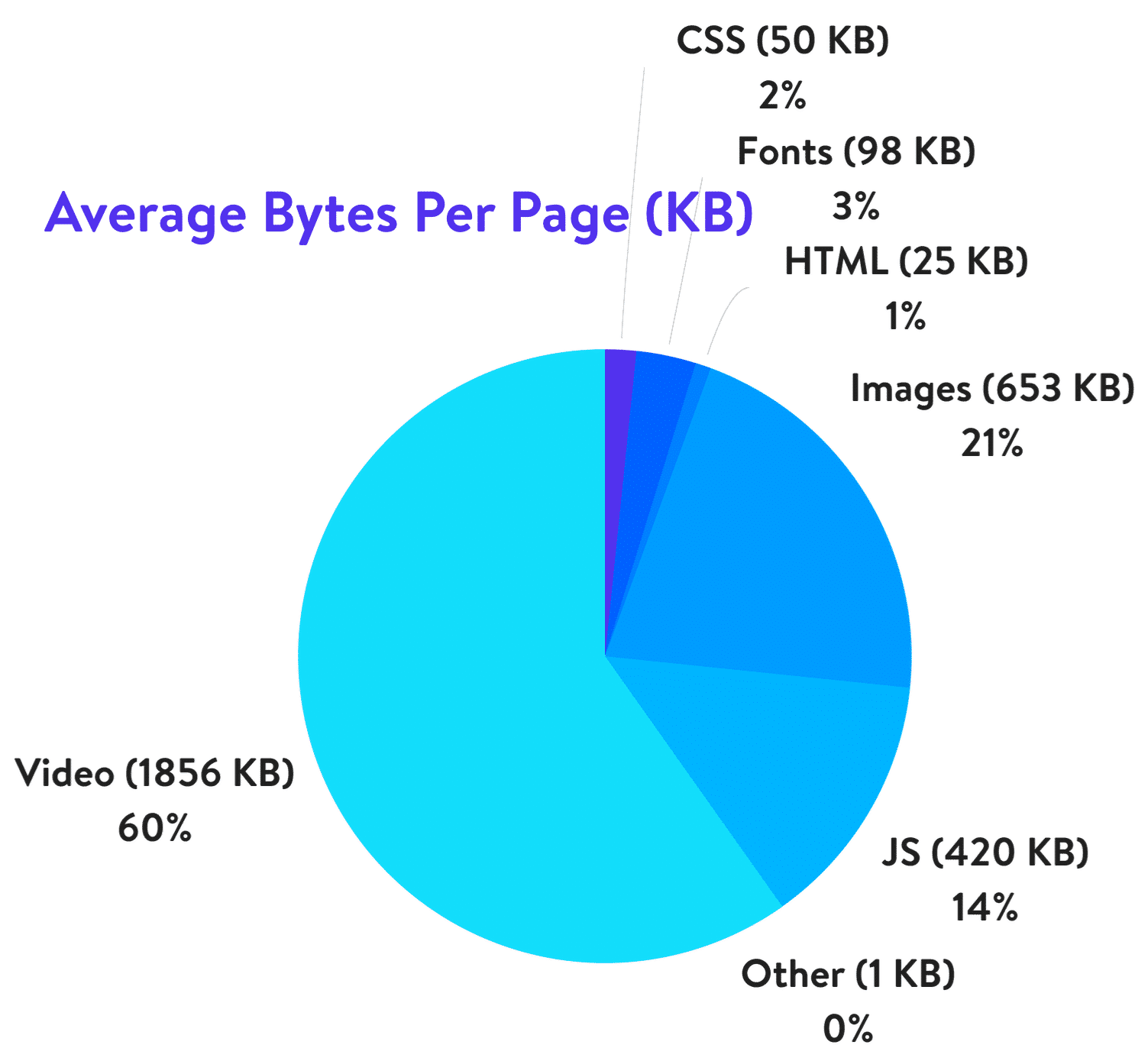
In its turn, 21% of a total webpage’s weight averagely is made up of images. Yes! Thereby, when it comes to optimizing your blog, it’s the images to start with.

Yes, big and bright visuals properly used can boost your blog but they can make things even worse if using them wrong.

How to optimize images? Below you’ll find 4 easy steps to do for image optimization and improving your blog, making it faster and much more user-friendly. 

Step 1: Acquire Imagery Legally

The very first thing is to get high-quality images and photos for your blog. Another crucial thing is that you should do that legally. There are 2 ways to choose from:

  1. Make a photo/image by yourself;
  2. Go to the photo stock or photo editors.

Today there is no need to grab any images because there are such services as Crello.com with millions of ready designs, images, photos of any themes, purposes on offer. Using it, you can also create your own visuals for any event and goal. The highlight of the service is that there you can find tons of free visuals along with paid imagery. Choose an option that suits your blog and use it for your site.

Step 2: Choose the Right File Format

There are 3 file formats commonly used for web sites. Here they are:

  • PNG is the best for logos, graphics, text-heavy designs, screenshots. Also, the format is used for images with transparent backgrounds. It has a larger file size, but it produces higher quality images.
  • JPEG is used for photographs and images with people, places, etc. Images and photos of the format can be adjusted with the perfect balance of quality and file size.
  • GIF uses 256 colors only and is the best for animated images.

Herewith, remember 2 things that JPEG is used for photos and PNG for graphics/text, GIF — animations. Definitely, besides the aforementioned formats, there are a lot of others, but not all the browsers adequately support them. So, it’s better to choose out of these 3 options. Also, before you start to modify blog images, check the format, and change it if needed.

Step 3: Mind Image Dimensions

There is always the temptation to use the best of the best and the largest of the largest. But you should be careful with your image dimensions. The truth is that there is no point in adding enormously large and heavy photos to your blog. It’s reasonable to choose the size of the images depending on the CMS and the theme used for your site. Commonly, the following sizes are used for blog websites:

  • 1,200 px X 630 px for blog graphics; 
  • 500 px X 500 px for headshot; 
  • 250 px X 300 px for sidebar.

So, when you download the image or photo with high resolution and large dimension, make sure to scale it to the proper size and weight. Thus, you can optimize the image 94% from 1.8 MB up to 103 KB only, for example.

Step 4: Compress Images

The next thing to do is to compress your images. Compression plays a critical role in image optimization. However, you should be careful when compressing images not to overdo it. Let’s see the widespread ways to compress images for blog sites. Mind that the settings depend a lot on a tool you use for the purpose.

Way 1. The most common ones like Adobe Photoshop, GIMP, On1 Photo, Affinity Photo, and others have built-in compression features — all you need to choose the option that suits you most of all.

Way 2. Also, you can save the needed images as usual and go to third-party services like TinyPNG, JPEG Mini, and others for much easier compression.

Way 3. Use the plugins of your CMS. If you use WordPress, for example, there you can install the plugins that will compress all the images loaded automatically.

Bottom Line

It’s no secret that the visuals and images included are crucial for your blog. Due to the fact that the human brain processes visuals 60,000 times faster than text, images are perfect for attracting attention and boosting user engagement. However, without optimization, large and heavy images can bring to nought all your efforts. Now you know how you can solve the problem in 4 easy steps:

  1. Go to the trusted photo stocks;
  2. Choose the right file format;
  3. Size your image;
  4. Compress the visuals without a quality loss.

Follow the advice and watch how visuals do magic with your blog!