Categories
Best

5 Best Scheduling Software for Tattoo Artists

Those working in the beauty service industry are no exception to knowing the stress that comes with managing client bookings.

Some customers expect to receive multiple reminders because they are prone to forgetfulness. Others prefer not to visit salons in person or make phone calls. Instead, they’d much rather book an appointment via an app, just like they’d order a food delivery online.

And then there are last-minute cancellations, double bookings, or an endless exchange of messaging just to lock a booking.

Sounds like a nightmare, right? Thankfully, there is a way to minimize these problems by eliminating some redundancy and streamlining scheduling-related tasks. 

Let’s take a look at the 5 best scheduling software for tattoo artists. If you haven’t tried incorporating such a tool into your business, you should not hesitate to try it.

1. Goldie

Goldie is one of the best booking apps for tattoo artists. It stands out as a universal scheduling solution for wellness businesses, including those running tattoo parlours.

The software works great regardless of whether you are an individual artist or a large tattoo salon.

Key Features:

  • Appointment scheduling: flexible calendar views and color-coding, sync with Apple and Google calendars, and real-time info at a glance.
  • Reports: track income and expenses, see business performance, highlight in-demand services, identify loyal clients, and spot the most popular products.
  • Payments: collect booking deposits to reduce no-shows, accept payments anytime, and go for contactless payments if you want.
  • Inventory management: ensure products are in stock, track revenue from sold products, and allow customers to browse and purchase products.

Pricing:

Goldie has a free plan that offers 20 bookings per month. As far as paid options go, there are two. Both have unlimited bookings with a plethora of additional features. The Pro plan costs 29.99€/mo, and the Pro Plus costs 59.99€/mo.

2. Misfit Tattoo

Misfit Tattoo is another solid choice for a booking solution for tattoo artists. Use it by integrating the tool with iCloud, Outlook, or Google Calendar.

Clients book a convenient appointment time, and the platform sends automated reminders with clear instructions.

Key Features:

  • Messaging: social media integration support to unify client interactions.
  • Instructions: pre-care and after-care instructions to provide the best experience for the customers.
  • Consent forms: digital forms and waivers for clients to complete before getting a tattoo.
  • Reminders: automated reminders to alert customers in advance and reduce no-shows.

Pricing:

The software has three plans. Solo, which is ideal for self-found artists, costs $47/mo. The Duo plan is $97/mo. And the final Shop plan made for larger shops is $197/mo.

3. YouCanBookMe

With YouCanBookMe, artists are free to customize their booking page. The platform also has a feature to screen for age limits or set how many appointments you can do per day.

As an artist, you have pretty much full control over your schedule, so it becomes much easier to manage the client work.

Key Features:

  • Payment system: receive payments via Apple Pay, credit cards, Stripe, etc.
  • Flexible scheduling: limit booking numbers, set restrictions, enable cancellation rules, and add buffers where necessary.
  • Individual pages: create booking pages for individual artists to encourage variety and more for clients to choose from.

Pricing:

The platform offers a free plan to get started with one calendar connection and one booking page. From there, it’s about the scale of operations. The Individual plan costs $9/mo, the Professional is $13/mo, and Teams is $18/mo.

4. Venue Ink

Venue Ink sends unique links to clients for booking. The customers see available slots on their end and can choose the most convenient time.

As expected, the platform also automates other booking-related tasks to help tattoo artists be more productive.

Key Features:

  • Flash uploads: sell your flash, set pricing, and book clients instantly.
  • Automated booking: send reminders, confirmations, and other information regarding bookings.
  • Custom forms: gather information about tattoo size, placement, or reference images before making an appointment.

Pricing:

The pricing for Venue Ink is a bit tricky. Independent artists can use it for free, but each client gets charged 10% to process deposits or card payments. To avoid this, there is a Solo Pro plan for $50/mo and Studio Pro $150/mo.

5. Porter

Porter is the last tool to round up the list. To use it, artists have to customize the booking form and share the link on Instagram, website, or another channel.

Once customers click on the link, they can submit the booking information and arrange the appointment.

Key Features:

  • Marketing campaigns: send emails and texts to promote sales and other available services.
  • CRM: clients who book appointments leave details, which you can use for personalization and retargeting.
  • POS: let customers pay by swiping or tapping their cards.
  • Automated deposits: the platform collects deposits during the booking.

Pricing:

The software offers a 30-day free trial. After that, artists can choose between two paid plans. The Essentials plan costs $35/mo, and the Pro plan costs $65/mo.

Conclusion

To sum everything up, tattoo artists looking to streamline their booking process and improve workflow in other areas should look no further than these five best scheduling software.

Check each individually and determine which one makes the most sense in terms of price and available features.

Categories
Uncategorized

Craft Ultra-Real Skincare Ads Using an AI Image Generator Fluidly

Realism in skincare visuals is more significant today than ever before in the competitive beauty market. The fact that consumers are attracted to real images of skin health, texture, and shine draws them in. Flawless or excessively stylized images are no longer a source of trust. For these brands it is necessary to communicate visible hydration, natural glow, and natural skin texture to appeal to audiences. The high demand of hyper-real images has compelled advertisers to seek new technologies that are creative and precise. Marketers can now use advanced tools to capture minute details of the skin, and at the same time maintain compositions in a visually appealing way. This change is redefining the production and consumption of skincare campaigns.

The Skincare Visuals of Ultra-Realism

The image of ultra-real skincare depends on the visual details. The presence of pores, hydration, slight reflections, and the light diffusion create authenticity. Even minor things such as how light plays with skin, or minor differences in texture, affect the perception in a meaningful way. The accuracy of the models is also important; realistic facial features, coloring and micro-textures increase credibility. AI technologies, particularly the AI image generator, now allow artists to recreate these nuances digitally. As AI models are trained on thousands of example skin samples, it becomes much easier to obtain realistic expressions and textures. This degree of faithfulness makes each image convey credibility and effectiveness of the product without excessive editing.

Design Principles of Effective Skincare Ad Imagery

Good skincare images should show the benefits of the product visually. Every composition should be hydrated, clear, bright and soft. The color choices are central; soft pastels, soft gradients, clean whites are used to create a sense of purity and freshness. The focus on composition should be on the skin itself and the integration of products should be made natural. Positioning, lighting, and framing all play a role in the perception of quality to the viewer. The visuals must be immersive and approachable, communicating both effectiveness, which is supported by science, and aesthetics. The visual is designed to take the eye through the skin to the product in a smooth flow, which makes the entire process more interactive.

Selecting the Proper AI Model for Hyper-Real Skin

The choice of the AI model is the key to obtaining realistic outcomes. Image 4.0, Image 3.1, and Image 2.0 Pro have different benefits. Image 4.0 and Seedream 4.0 perform well in the depiction of pores, soft reflections, and realistic diffusion of light. Image 3.1 works well with slightly stylized yet believable images whereas Image 2.0 Pro is used in high level conceptual designs. CapCut will enable you to add reference images to align with the exact skin tones, lighting and product situations. By incorporating these sources, the visuals created will be in line with branding objectives. Even more sophisticated users can stack several AI models to create a balance between realism and creativity.

Steps to Craft Ultra-Real Skincare Ads Using an AI Image Generator Fluidly

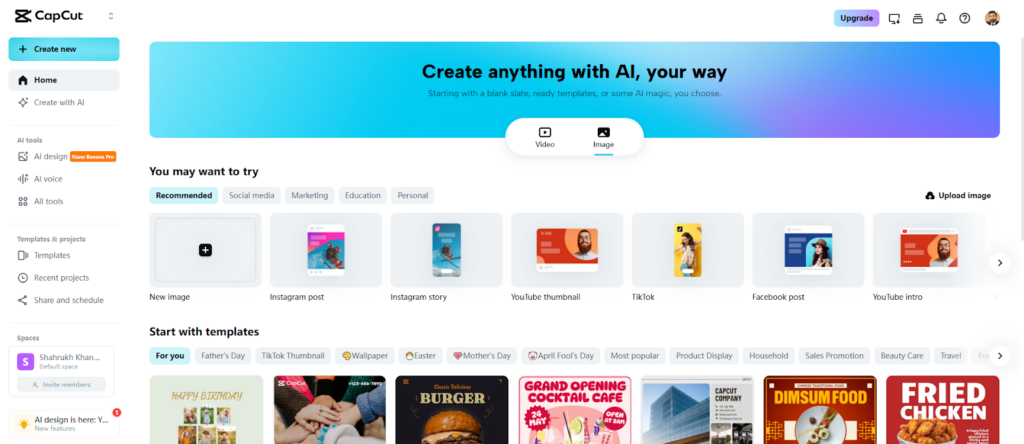
Step 1: Enter the Image Creation Space Open CapCut’s online image editor and select the “Image” tab from the top menu. Click on the “New image” tab to launch the editing interface, preparing to design high-quality skincare visuals.

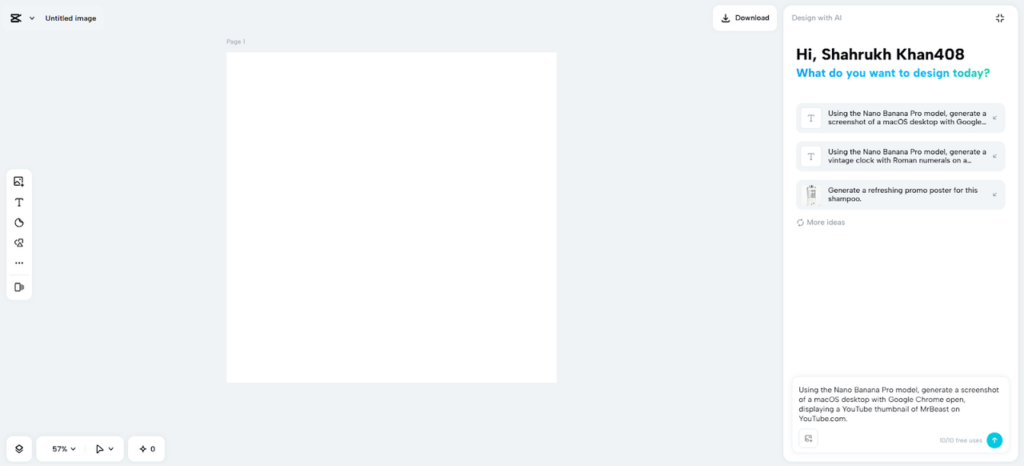
Step 2: Choose Your AI Model and Layout In the prompt box, describe the skincare ad in detail, specifying textures, lighting, and product focus. Pick an AI model such as Seedream 4.0, Image 4.0, Image 3.1, or Image 2.0 Pro to achieve the level of realism needed. Select an aspect ratio suitable for your platform, like 9:16 for Instagram Stories or 16:9 for YouTube ads. Upload a reference image if needed to guide the ad’s visual style.

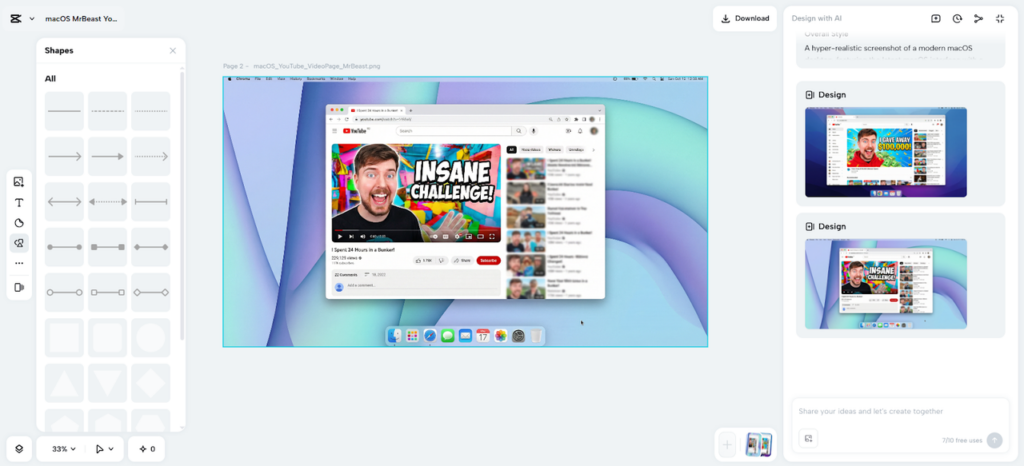
Step 3: Generate and Polish Your Ad Click the “Send” button to let CapCut’s AI produce the design. Fine-tune it using tools for color correction, AI upscaling, background replacement, and more. You can also add elements, text, or stickers to enhance the ad’s appeal.

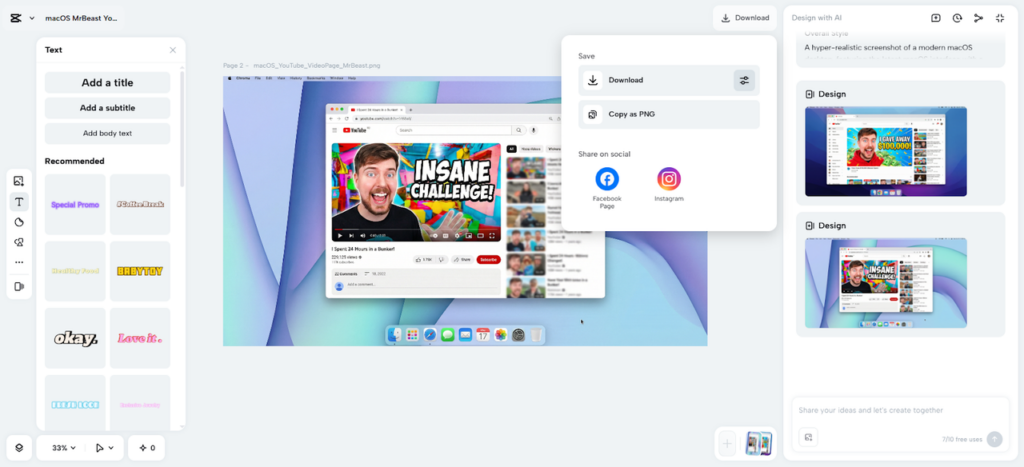
Step 4: Save and Share Your Skincare Visual Once satisfied, click the “Download” tab at the top right. Use the adjacent filters icon to adjust format, size, and quality, or copy the image as PNG to your device for immediate use.

Sharpening Skin Texture to the Nth Degree

CapCut provides the instruments to improve all the aspects of skin appearance. Tune color to get natural tones, and sharpen the glow and reflections to get a natural touch. Minor flaws can be ironed without losing authenticity. AI amplification refines pores, fine lines and faint textures. All the adjustments are aimed at creating a feeling of realism, so the viewers can view the product and the skin as believable. More sophisticated edits, like micro-light adjustments, may emphasize the hydration or luminosity without being noticeable.

Combining Product Packaging and Branding

Smooth integration of packaging into images enhances brand memorization. CapCut gives the capability to position bottles, droppers, or jars with exact placement, shadows and reflections. The use of color and light manipulation can be used to convincingly show gel, cream, or foam textures. The packaging alignment, proportions, and context should be an extension of the skin and not superimposition. The perceived quality of the product is carefully integrated so that the product has the realistic feel of the skin, which helps in strengthening the trust and desirability.

Maximizing Ads across Platforms

Both platforms and their aspect ratios are maximally impactful. The 9:16 and 16:9 formats are recommended on TikTok and Instagram Reels and on YouTube and banners on websites, respectively. Exporting of up to 8K resolution is supported by CapCut to create billboard-quality pictures. The image-to-video features in the platform can be used to transform still images into short animations. This allows platform-optimized content without additional production work. Flexible designs are consistent throughout all the campaigns, and every viewer sees the brand the way they were meant to.

Mid-Article Note on AI Tools

Alongside realistic images, branding elements like logos can be generated using a AI logo generator. The use of logos always strengthens identity in images and videos. CapCut enables the integration of created logos with product-oriented images to create effective ad campaigns.

Conclusion

The creative cycle is greatly reduced thanks to AI-driven tools, and the fidelity is also high. The hyper-realism in skincare imagery produces consumer confidence and brand awareness. CapCut is a whole ecosystem of designing, polishing and sharing of images effectively. Small details such as skin textures and flawless integration of products are all aspects that make up a professional, smooth ad. Marketers can create high-impact skincare images shorter than conventional workflows, with the help of AI models, and browser-based editing. Hyper-realistic advertising can be made possible by any brand due to accuracy, speed, and creative flexibility.

Categories
Uncategorized

5 Best Age Verification Software Service Providers

The current digital landscape calls for enterprises to ensure legal age requirements. And it’s not just the case for some obvious industries like gambling.

Ecommerce and social media are no exceptions, either. Plus, the fintech sector is emphasizing strict regulations. Those who fail to ensure their compliance face significant consequences.

A lack of a proper age verification process leads to penalties, reputational damage, and, ultimately, customer trust.

Key Considerations When Choosing the Software

Before you choose a software, there are some things to take into consideration. First of all, what verification method do you prefer? Is it document scanning, AI-based, or hybrid?

Industry compliance is also important. It’s crucial to ensure that the service provider meets certain regulations. 

The overall user experience is not to be scoffed at either. User drop-off might occur if the onboarding process is too complicated.

Finally, there is integration with third-party services and existing systems. Double-check for easy-to-use APIs and compatibility.

With all that said, let’s take a look at the top five age verification software service providers to help enterprises pick the most suitable one.

1. iDenfy

iDenfy is an all-in-one identity verification solution, with the goal of onboarding more users. Age verification is part of the overall package.

Age verification software is the go-to solution nowadays. It’s a tool to confirm a user’s age before granting access to content, products, or services.

Key features and pros:

  • iFrame, Dashboard, and mobile SDKs support, with further support for Shopify, WordPress, and other third-party applications.
  • An age verification success rate of 99.99%. 
  • Fits into other compliance procedures
  • Hybrid AI plus human review
  • International coverage for document verification

2. AgeChecked

Yoti gives users the tools to prove age. Selfies, mobile numbers, or ID card verification are among the most popular methods. No data other than the age is shared.

Key features and pros:

  • A central hub for an age verification gateway
  • API and browser plugins
  • Takes a short time to set up
  • Approved by the UK authorities
  • Age estimation and ID check

3. Yoti

Yoti emphasizes a privacy-first approach. It’s a document-free age estimation solution that is quite popular among the UK media and more.

Key features and pros:

  • Works great in real-time
  • Offers a facial age scan
  • Doesn’t have PII storage
  • Works fast and feels frictionless
  • Excellent for media and retail enterprises

4. Identomat

Identomat combines real-time biometric verification with other features on the platform. The solution feels tailor-made for crypto, iGaming, and other high-compliance industries.

Key features and pros:

  • Quick and reliable onboarding
  • Extensive compliance coverage
  • Compatible with web and mobile
  • Video verification
  • API/SDK integrations

5. Sumsub

Sumsub is a powerful age verification solution that offers a multi-layered check pyramid to make sure businesses are keeping up with the evolving compliance regulations.

Key features and pros:

  • ID document verification
  • AI-powered facial recognition
  • Reliable and powerful back-end automation
  • International coverage

Closing Thoughts

If an enterprise is looking for a way to stay compliant with an ever-changing regulatory landscape, an age verification solution is a must.

Hopefully, the options listed above should give you enough to choose from. Don’t hesitate to try out as many as you can and reach out to the sales team of each to get a better idea of what deal you can make with them.

Categories
Uncategorized

How Small Site Maintenance Habits Prevent Big Problems Later

Running a website can feel overwhelming, especially for those without a technical background. The truth is that you do not need to be a developer to keep your site healthy and functioning. Instead of waiting for major problems to happen, you can adopt simple, consistent maintenance habits that protect your website and keep it running smoothly.

Small actions add up over time, and ignoring routine maintenance can turn tiny issues into expensive or time-consuming challenges. This guide explains what small website habits matter most, how they protect your site, and how modern tools such as AI-powered testing solutions can automate the hardest parts.

Whether you run a blog, online store, portfolio, or small business site, these practical habits help you avoid downtime, user frustration, security vulnerabilities, and performance drops.

Why Small Website Maintenance Habits Matter

When people think of website maintenance, they often imagine complicated code, server configurations, or technical work. In reality, most problems come from small issues that go unnoticed until they become serious.

Here are examples of problems that grow when ignored:

  • A plugin that needed an update several months ago can become incompatible and break important parts of your site.
  • An untested form can suddenly stop sending submissions and cost you leads.
  • A slow-loading page can negatively affect search rankings.
  • A minor typo in a link can cause a broken user journey and increase bounce rates.
  • A forgotten security patch can make your site vulnerable.

Small tasks done consistently help you prevent these situations. They also make your website more reliable for users and easier for you to manage.

Common Website Issues Caused by Lack of Maintenance

Before we get into the habits you should build, it helps to understand what happens when maintenance is ignored.

1. Slow loading pages

Unoptimized images, unused scripts, or outdated plugins can slow down your site. Slow pages annoy visitors and reduce conversion rates.

2. Broken links

Internal or external links often stop working over time. Broken links hurt user experience and can impact SEO.

3. Outdated content

Incorrect or old information reduces credibility. Search engines also prefer fresh content.

4. Forms that stop working

Contact forms, signup boxes, and checkout workflows can break without warning. If you never test them, you may not learn about issues until users complain.

5. Security risks

Outdated themes, plugins, or platform versions can expose your site to attacks. Regular updates lower the risk.

6. Poor mobile experience

Mobile updates or design changes can cause elements to look misaligned or behave incorrectly.

All of these problems can be prevented with simple habits that take only minutes per week.

Small Maintenance Habits That Make a Big Difference

The goal is to keep your website running smoothly without spending hours managing it. Below are the easiest habits that produce long-term benefits.

1. Check your website on both mobile and desktop weekly

Open your homepage and a few key pages at least once a week. Look for visual layout issues, missing images, forms that do not submit, or links that do not work.

Even two minutes of checking can catch problems long before visitors see them.

2. Update plugins, themes, and software regularly

If your site is built on platforms such as WordPress, Wix, or Shopify, updates are essential. These updates improve performance, fix bugs, and patch security vulnerabilities.

Do not skip them. Keeping everything updated reduces your chance of encountering compatibility issues later.

3. Remove plugins and scripts you no longer use

Unused tools slow down your site and can create security openings. Review your tools once a month and remove anything unnecessary.

This speeds up your site and makes maintenance easier.

4. Backup your website frequently

Always keep recent backups of your content and files. If something goes wrong, you can restore your site quickly.

You can use hosting tools, backup plugins, or cloud-based systems. Aim to back up your site weekly or before any major update.

5. Scan for broken links regularly

Broken link tools help you find outdated or incorrect URLs. Fixing links improves user experience and strengthens SEO.

It is better to check once a month than wait until users report errors.

6. Review analytics and performance metrics

Google Analytics and similar tools tell you how users navigate your site. Look for traffic drops, high bounce rates, or slow pages. These are signs that something needs attention.

7. Regularly test important user flows

This includes:

  • Contact form submissions
  • Checkout workflows
  • Registration and login
  • Newsletter signup
  • File downloads

Testing these flows helps prevent lost leads or broken sales paths.

However, manual testing takes time, and this is where AI-powered tools can help.

How AI Tools Simplify Website Maintenance for Non-Technical Owners

AI is transforming how websites are built, optimized, and maintained. Today, you do not need deep technical knowledge to use advanced automation.

One of the most helpful categories is AI-powered website testing. These tools simulate user behavior and check your website for errors or broken flows after updates are made.

Generative AI testing tools like testRigor can automatically verify user journeys using plain English. They help non-technical owners catch issues early, reduce the need for manual testing, and ensure website reliability with minimal effort.

These tools are especially helpful if you:

  • Frequently update your website
  • Use third-party plugins
  • Run an online business
  • Do not have a full-time developer
  • Want to reduce user complaints

By automating repetitive testing, you avoid unexpected failures. You also catch issues before your users do.

How Automated Testing Works for Regular Site Owners

AI testing tools analyze your site using natural language instructions. For example, you can tell the system:

Go to the home page, click the contact button, fill out the form, and verify that the success message appears.”

The system repeats these checks automatically after updates. This makes maintenance much easier and prevents flow disruptions.

This is a major time saver if you rely on forms, checkouts, or signups to generate income.

Why AI Testing Complements Manual Maintenance Habits

Even with AI tools, you still need basic habits. Automation does not replace human judgment, but it catches things you might miss.

Here is how they work together:

  • Your manual checks handle visual and content issues.
  • AI testing handles functional issues.
  • Regular updates prevent bugs and vulnerabilities.
  • Backups protect you from accidental mistakes.
  • Performance checks keep your site fast.

Together, these habits create a powerful and simple maintenance routine.

When to Consider Other Testing Solutions

If you want to compare AI testing platforms, you can review Testim as an alternative that offers various approaches to test automation. These solutions may provide other features for different business needs, although many users prefer AI-powered tools for their ease of use.

Exploring your options ensures that your testing strategy matches the specific needs of your website or application.

How to Build Your Simple Maintenance Schedule

To make things easier, here is a sample routine:

Weekly:

  • Visit your homepage and key pages
  • Check forms and navigation
  • Review analytics
  • Update plugins or content

Monthly:

  • Scan for broken links
  • Review unused scripts or plugins
  • Test full user flows manually or with AI
  • Check site speed

Quarterly:

  • Refresh outdated content
  • Review design or usability issues
  • Audit SEO fundamentals

This schedule is easy for anyone to follow.

Final Thoughts

Small habits help prevent big website problems. You do not need to be a developer to maintain a healthy site. With simple routines and the help of automated tools, your website can remain fast, safe, and user-friendly.

By combining basic checks with AI-powered testing, you can catch issues early, avoid downtime, and protect your online presence. These habits ensure long-term stability and create a better experience for your visitors.

Categories
Uncategorized

Cloud Hosting vs Shared Hosting: Pros and Cons Explained

The right hosting can make or break a website and its ability to grow. Among the TWC hosting types, cloud hosting and shared hosting are two common options to be considered based on pros and cons. By being aware of these distinctions, users can discern what’s best for them and their unique use case. In this article, we compare the pros and cons of cloud hosting vs shared hosting based on features, reliability, costs, and scalability.

Understanding Shared Hosting

Beginners and small businesses often choose shared hosting or cloud hosting for their affordability and ease of use. Shared hosting refers to multiple websites using the same physical server and its resources. Each site receives a portion of bandwidth, storage, and processing power. This setup keeps expenses low and management simple. The host manages server maintenance, security updates, and technical issues, reducing the need for advanced knowledge. 

Pros and Cons of Shared Hosting

With an understanding of what shared hosting entails, let’s proceed to explore its advantages and disadvantages.

Pros of Shared Hosting

Cost-effectiveness is one of the most notable advantages. You can pay less for shared hosting than pretty much anything else, which is only part of the reason it appeals to new projects and personal sites. Server management, security patches, and hardware maintenance are all taken care of by the service provider. CMSs are all about getting users to focus on creating content rather than dealing with technical challenges. Integration is also typically uncomplicated, necessitating only a little setup before going live.

Cons of Shared Hosting

When multiple sites share resources, it can negatively affect performance. If you host another website on the same server, the website with heavy traffic may slow others down. Security becomes more vulnerable when a break-in in one account can affect sites next door. Customization is still rife; hosts usually limit access to crucial server settings. But this limited flexibility and scaling potential can become a barrier for users with more complex or increasing traffic needs.

Understanding Cloud Hosting

Cloud hosting is where a website is hosted across multiple remote servers, with each server containing portions of the website’s data and other information. These servers collaborate to provide you with rapid and dependable access, rather than being tied to a single physical machine. Cloud hosting leverages a network of interconnected systems. It provides flexibility, better uptime, and withstands such a sudden rise in traffic spikes. 

Pros and Cons of Cloud Hosting

With an understanding of what cloud hosting entails, let’s proceed to explore its advantages and disadvantages.

Pros of Cloud Hosting

Scalability is a major advantage. Websites can scale resources up during peak times and back down again when the demands are lower. This increases reliability, as a website shall have a set of servers, so if one goes down, others will cover to keep it up. Slowdowns and interruptions during traffic spikes are a rarity. Resource allocation is dynamic and provides good performance under load.

Cons of Cloud Hosting

Costs can rise as a website grows, especially with pay-as-you-go billing. Users may pay more during periods of high activity. The technical setup may feel more complex than shared hosting, requiring a basic understanding of resource allocation. While providers maintain security, users must monitor configurations to protect sensitive data. Some businesses might find cloud hosting features overwhelming if their needs remain simple.

Cloud Hosting vs Shared Hosting: Comparisons 

Let’s now explore a comparative understanding of the features of these two hosting platforms.

Comparing Performance

For small sites with low to medium traffic, however, shared hosting provides stable performance. Though during the busy rush hour, resource-sharing sometimes leads to slower loading times as well. The best part is that it is a great solution for easily handling a traffic spike without negatively affecting speed or uptime. Cloud-based hosting results in minimal downtime for websites because requests are served on multiple servers. For businesses to grow quickly, cloud solutions could better deliver a seamless user experience.

Evaluating Security

Both types of hosting have some security measures. The biggest worry about shared hosting comes from too many accounts using the same server. One site could be compromised and then be able to compromise others. Website hosting services like cloud hosting isolate accounts, with less risk of cross-site breaches. Providers will implement new security tools and monitor them. Even so, users still need to be vigilant, change passwords often, and re-verify settings in software and user accounts.

Cost Considerations

The most affordable type is shared hosting, which is the best choice for new websites with a narrow budget. The monthly fees are also still predictable and stay low. Cloud costs vary according to the resources used. The flexibility is attractive for expanding businesses, but it may catch some users off guard if they are not anticipating costs that vary. For users of cloud-based solutions, it becomes extremely important to plan your budget.

Suitability for Different Users

Shared hosting is suitable for personal blogs, portfolios, and small businesses with moderate traffic. It is known for basic needs because it is simple and has low expenditures. Cloud includes hosting geared toward online stores, media-rich platforms, and businesses that are growing. Users in this category care about performance, uptime, and controlling sudden spikes in traffic. The right hosting is determined by the goals and expectations for each hosting project.

Conclusion

Both cloud and shared hosting present unique benefits and drawbacks. Shared hosting offers simplicity, affordability, and ease of management. Cloud hosting provides superior scalability, reliability, and performance. Evaluating specific requirements, budget, and potential growth helps determine the most suitable hosting solution. Selecting wisely ensures a strong foundation for any online presence.