Categories
SEO & Search Optimization

The Four Pillars of a Successful SEO Audit

You need a solid technical foundation to ensure search engines can find, read, and rank your content. 

This is where an SEO audit comes in. It’s the diagnostic tool that tells you exactly what’s working, what’s broken, and where you’re losing potential visitors.

In this guide, we’ll break down the four critical pillars of an SEO audit and show you how to fix the issues that matter most.

What is an SEO Audit?

An SEO audit is a comprehensive health check for your website. 

It analyzes your site’s ability to rank in search engine results pages (SERPs) by looking at technical infrastructure, on-page elements, and off-page authority.

Think of it as a report card. 

A good SEO audit tool, like SEOptimer, scans over 100 data points across your entire website in just seconds. 

It doesn’t just look at the code; it evaluates how users and search engines experience your site in real time. 

The result is a prioritized list of issues giving you a clear roadmap to better rankings.

Why Audit Your Site?

Websites are living, breathing entities. You add new pages, update plugins, and change content regularly. 

Over time, these changes can accidentally break links, slow down load times, or create duplicate content.

Regular auditing is essential because:

  • Algorithms change: Search engines update their ranking criteria thousands of times a year.
  • Competitors move fast: Your competitors are likely optimizing their sites right now. An audit helps you stay ahead.
  • Errors are invisible: You might not notice that a critical landing page has been accidentally set to “noindex,” but an audit will catch it immediately.

Four Pillars of an SEO Audit

To make the auditing process manageable, we categorize checks into four distinct pillars. Each plays a vital role in your overall SEO performance.

1. On-Page SEO Signals

On-page SEO refers to the content and HTML source code of individual web pages. 

This pillar ensures that search engines understand exactly what your content is about and which keywords you should rank for.

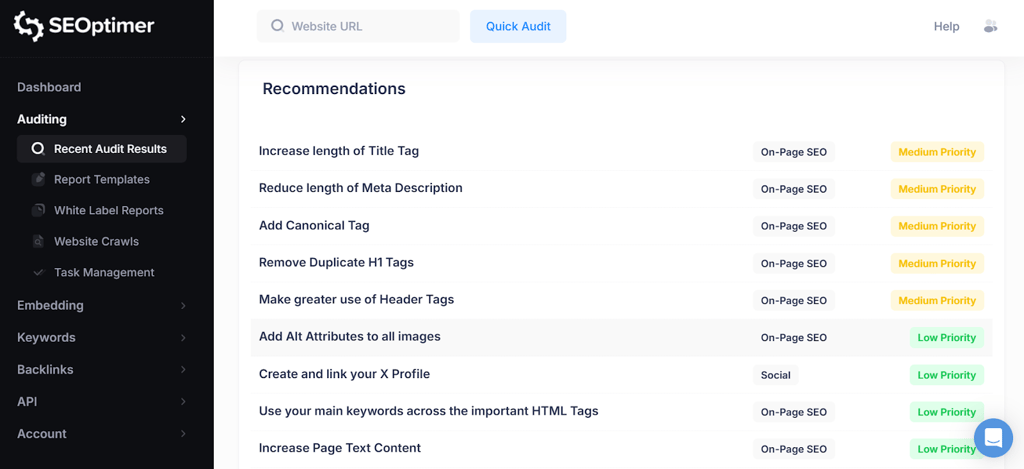
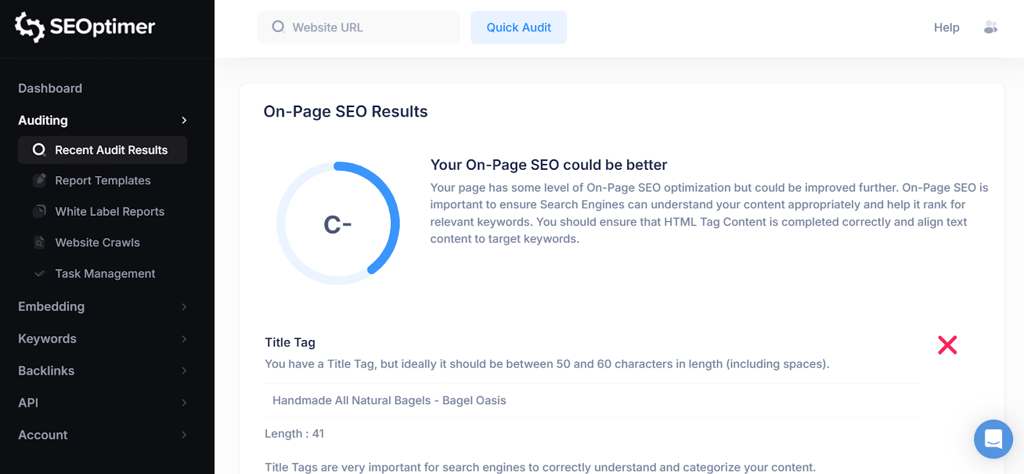
When you run an audit with SEOptimer, it checks critical on-page elements, including:

  • Title Tags and Meta Descriptions: Are they unique, of the correct length, and optimized with target keywords?
  • Header Tags (H1-H6): is your content structured logically? Search engines use headers to understand the hierarchy of your information.
  • Keyword Consistency: Are you using your target keywords naturally throughout the content, image alt text, and headers?
  • Content Volume: Do you have enough high-quality content on the page to satisfy user intent?

If your on-page signals are weak, search engines will struggle to connect your content with relevant search queries, no matter how great your writing is.

2. Technical SEO Foundations

Technical SEO is often the most intimidating pillar, but it is arguably the most important. 

It involves the backend structure that allows search engines to crawl and index your site effectively. 

If Google can’t crawl your site, you won’t rank. Period.

A robust audit looks for:

  • Indexability: Are you accidentally blocking search engines with a misplaced “noindex” tag or a restrictive robots.txt file?
  • XML Sitemaps: Do you have a valid sitemap submitted to search engines so they can find your pages?
  • Canonical Tags: Are you properly handling duplicate content to ensure the right version of a page is indexed?
  • SSL Security: Is your site secure (HTTPS)? Security is a confirmed ranking factor.

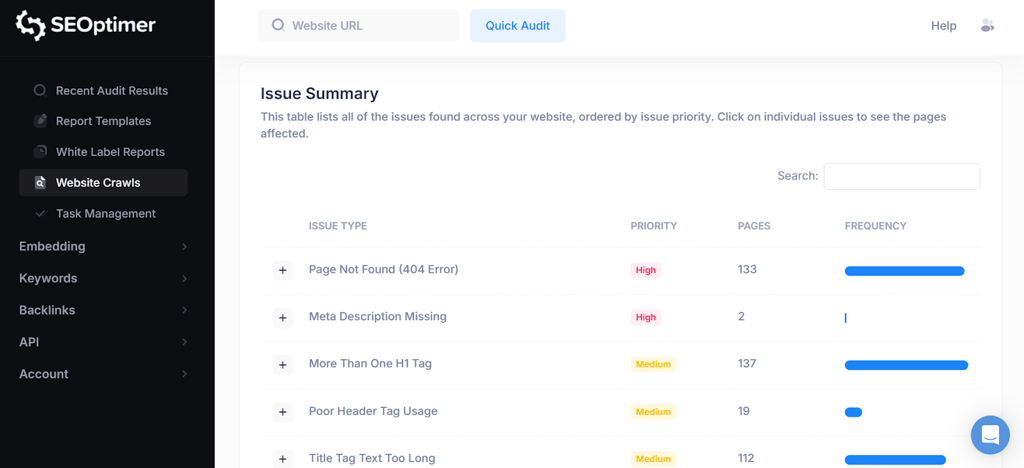
For a deeper dive, SEOptimer’s SEO Crawler scans every page of your site to uncover hidden technical issues that a standard surface-level check might miss. 

It uses advanced JavaScript rendering to load your site exactly like a real user (and modern search bots) would, ensuring no dynamic content or broken scripts go unnoticed.

3. Backlink Profile

Your backlink profile is a measure of your website’s authority and trustworthiness. 

When other reputable sites link to you, it acts as a “vote of confidence” in the eyes of search engines.

An audit should analyze:

  • Quantity and Quality: How many websites link to you, and do they have high domain authority?
  • Toxic Links: Are there spammy or low-quality links pointing to your site that could trigger a penalty?
  • Anchor Text: Is the text used in links relevant to your content?

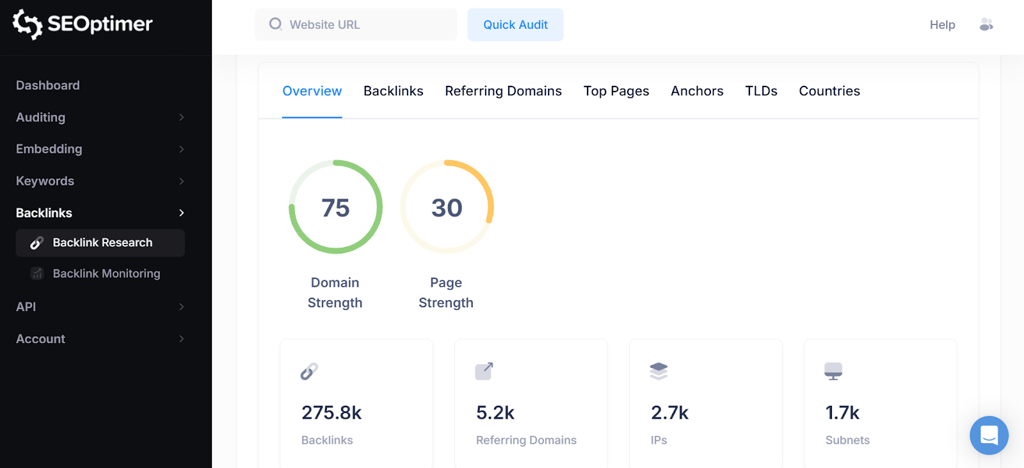
For this, SEOptimer offers specialized Backlink Research and Backlink Monitoring tools. 

These features allow you to track new and lost links over time, view your top referring domains, and identify opportunities to build more authority in your niche.

4. Usability

Search engines prioritize the user. If your site is frustrating to use, your rankings will suffer. The Usability pillar focuses on the experience of the person behind the screen.

Key usability checks include:

  • Mobile Responsiveness: With mobile-first indexing, your mobile site is now the primary version search engines use for ranking. Your audit must verify that viewports are set correctly and content renders perfectly on smartphones and tablets.
  • Core Web Vitals: These are specific metrics related to speed, responsiveness, and visual stability.
  • Page Speed: How fast does your content load? Slow sites lead to high bounce rates.
  • Safe Browsing: Ensuring your site is free from malware and intrusive interstitials.

SEOptimer provides immediate feedback on these usability metrics, helping you identify if large images or unoptimized code are slowing down your user experience.

How Regular Should You Run SEO Audits?

SEO is not a one-time task; it is an ongoing process.

For most businesses, monthly audits are the standard recommendation. 

A monthly cadence allows you to catch issues before they significantly impact your revenue, while giving you enough time to implement fixes between reports.

However, if you manage a large ecommerce site or publish content daily, you may need to audit weekly.

Fortunately, you don’t have to do this manually. 

Most SEO auditing tools allow you to set up automated reporting. 

Looks for tools that can schedule PDF reports to be generated and emailed to you (or your clients) daily, weekly, or monthly. This ensures you never miss a critical drop in health score or a new technical error.

Conclusion

Ignoring your website’s technical health is a risk you can’t afford to take. 

By focusing on these four pillars, On-Page, Technical, Backlinks, and Usability, you build a website that is not only friendly to search engines but also enjoyable for your visitors.

Don’t wait for your traffic to drop before you take action. 

Use a comprehensive SEO audit tool to see exactly where you stand. It’s the fastest way to turn hidden errors into ranking opportunities.

Categories
SEO & Search Optimization

Measure Your Website’s Authority: A Guide to Free Domain Rating Tools

TL;DR:

  • Measure your website’s authority through comparative scores that approximate backlink strength and competitive trust.
  • Authority metrics rely primarily on referring domains and link quality rather than rankings or revenue signals.
  • Conflicting authority scores reveal differences in weighting, link diversity, and topical concentration.
  • Free tools provide directional insight suitable for audits, prospecting, and early competitive analysis.
  • Semrush provides a composite authority score that blends backlink data, traffic signals, and spam indicators.

Website authority acts as a proxy for how search engines perceive trust, relevance, and competitive strength. Metrics such as Domain Authority and Domain Rating compress complex backlink graphs into interpretable scores, allowing SEO professionals to assess relative positioning without direct access to ranking algorithms. Free domain rating tools play a specific role here. They offer directional insight, pattern detection, and comparative context without locking teams into paid platforms.

Authority metrics do not replace rankings, crawl data, or revenue signals. They function as diagnostic instruments, useful when interpreted with restraint and technical understanding. Used correctly, they help answer a narrow but valuable question: how strong does a domain appear compared to others competing for similar search demand?

Why does website authority still matter?

Authority scores influence decision-making because backlinks remain one of the strongest external signals search engines evaluate. A domain with consistent, high-quality referring sources tends to rank faster, recover quicker after volatility, and sustain visibility across algorithm updates.

New domains typically sit below 20. Movement above 30 signals early traction. Scores above 50 usually indicate editorial trust at scale, often supported by years of earned links, brand mentions, and content depth. These thresholds are contextual rather than absolute, yet they remain useful for competitive analysis and expectation setting.

Authority becomes most valuable when paired with intent-level evaluation. A domain rated 35 can outperform a domain rated 60 if it concentrates relevance tightly within a narrow topic cluster. Free tools help surface these contrasts without heavy instrumentation.

What do domain rating scores actually measure?

Most authority metrics derive almost entirely from backlink profiles. They analyze the number of referring domains, the strength of those domains, and how link equity propagates across the web graph.

Domain Authority applies predictive modeling across dozens of inputs, including spam patterns and link velocity. Domain Rating narrows the scope to referring domain strength and distribution, ignoring most on-page signals. Scores rise logarithmically. Gains slow as domains mature, which explains why moving from 60 to 65 often requires more effort than moving from 20 to 30.

No free tool measures authority precisely. They approximate it. The value lies in directional accuracy and comparability, not numerical precision.

How free authority tools fit into real SEO workflows

Free checkers support three practical use cases. They establish a baseline when auditing a site for the first time. They allow fast comparison during prospecting, outreach, and partnership evaluation. They help validate whether link acquisition activity produces structural impact rather than noise.

Their limitations also matter. Free tools rarely expose historical deltas, link-level weighting, or decay modeling. Scores update with lag. That lag requires patience and correlation with crawl data and impressions rather than reactive decisions.

Where Semrush fits into early-stage authority analysis

Some teams prefer a blended authority signal rather than a purely link-based score. In that context, Semrush offers a free single-domain option through its domain authority checker by Semrush, combining backlink strength with traffic signals and spam indicators.

Used sparingly, this type of composite view helps identify which pages concentrate authority, not only whether authority exists. The tool works best near the beginning of an audit cycle, before deeper technical or content diagnostics narrow the scope.

Which free tools are worth using?

Several free tools remain reliable when expectations stay realistic. Moz-based checkers surface Domain Authority, Page Authority, and spam probability. They work well for identifying toxic patterns and weak internal distribution. Ahrefs-style checkers emphasize referring domain strength and top-linked pages, offering a cleaner view of external trust. Bulk checkers trade depth for speed, allowing quick scans across competitor sets or outreach lists.

The strongest results emerge when multiple tools converge on a similar signal. Divergence usually indicates either niche concentration or uneven link distribution, both worth investigating further.

How should you interpret conflicting scores?

Conflicting scores rarely indicate error. They indicate weighting differences. A higher Domain Rating than Domain Authority often suggests strong external links but weaker internal structure or topical dispersion. A higher Domain Authority with lower Domain Rating can signal broad link volume without depth or diversity.

The goal is not reconciliation. The goal is inference. Authority metrics behave like financial ratios. Each highlights a different property of the same system.

Using authority metrics without overfitting decisions

Authority metrics tempt teams to chase numbers. That habit leads to misallocation. The better practice treats authority as a constraint variable, not a target. Authority explains why ranking ceilings exist. It does not prescribe tactics in isolation.

When evaluating link opportunities, compare the referring domain’s authority to the topical proximity and editorial context. Ten highly relevant links from moderate domains usually outperform dozens of irrelevant placements from stronger ones.

Track authority monthly. Interpret trends quarterly. React only when movement contradicts expectations.

How to improve authority without manipulating signals

Authority grows through accumulation rather than optimization. Publishing assets that attract citations, solving problems that communities reference, and earning inclusion within authoritative ecosystems drive durable growth. Disavowing harmful links reduces drag but rarely produces growth alone.

Avoid artificial acceleration. Search systems penalize unnatural patterns more aggressively each year. Short-term authority spikes often precede long-term suppression.

The most consistent gains come from earning fewer links of higher contextual value, then reinforcing those links with internal architecture that distributes equity efficiently.

Common mistakes professionals still make

Many teams overestimate score precision. Authority metrics do not predict rank positions. They predict relative strength.

Others compare domains across unrelated verticals. A score of 25 may dominate a specialized niche while 60 struggles in a broad market.

Another error involves ignoring time. Authority responds slowly. Measuring weekly encourages false conclusions and unnecessary changes.

Free tools amplify these risks when used without analytical discipline.

When free tools stop being enough

Free tools fail when historical analysis, link decay modeling, or large-scale monitoring becomes necessary. They also struggle during migrations, penalty recovery, and international expansion.

At that stage, authority metrics shift from directional insight to operational dependency. That transition justifies paid instrumentation. Before that point, free tools remain sufficient.

FAQs

What is domain authority used for?

Domain authority estimates how competitive a domain appears relative to others based on backlink signals. It supports comparative analysis rather than ranking prediction.

How often should authority be measured?

Monthly measurement captures meaningful trends. More frequent checks introduce noise without improving decision quality.

Are free authority tools accurate?

They approximate relative strength well for single domains and comparisons. Precision and historical depth remain limited.

Can authority improve without new backlinks?

Structural improvements and content consolidation help marginally. Significant gains still depend on earning new, relevant links.

Which metric matters more, Domain Authority or Domain Rating?

Neither dominates. Using both reveals differences in link diversity, distribution, and structural balance.

Categories
SEO & Search Optimization

Preventing Google Penalties: How an AI Check Protects Your SEO Content

The rapid growth of AI writing tools has changed how businesses produce online content. While these tools can speed up production, they also raise a major concern about authenticity.

Search engines like Google have made it clear that they value original, helpful content written primarily for people, not algorithms.

That’s why using an AI check has become an essential step for marketers, editors, and SEO professionals who want to avoid penalties and keep their content ranking high.

Why Google Penalizes AI-Generated Content

Google’s algorithms have evolved to identify patterns in content that suggest automation. While the company doesn’t penalize AI writing just because it’s AI-generated, it does penalize content that feels thin, repetitive, or unoriginal, common signs of low-quality automation.

When websites publish large amounts of AI-written text without proper editing or fact-checking, they risk being flagged for issues such as:

  • Duplicate or low-value content: AI tools often paraphrase existing web material, leading to repetition and minimal originality.
  • Keyword stuffing: Some automated systems overuse keywords unnaturally, triggering spam filters.
  • Lack of expertise or authority: AI often struggles to demonstrate first-hand experience or credible insights, both of which are vital for Google’s E-E-A-T standards (Experience, Expertise, Authoritativeness, and Trustworthiness).

These red flags don’t just harm rankings — they damage credibility. A consistent decline in search visibility or traffic is often the first sign that a site’s content may have been over-optimized or flagged by quality algorithms.

How an AI Check Helps Protect Your Website

An AI check tool acts as a digital safeguard, scanning text to determine whether it’s been generated or influenced by artificial intelligence. But its value goes beyond mere detection — it’s about ensuring that what you publish aligns with Google’s expectations for human-centered, trustworthy writing.

1. Detecting AI Patterns Before Publishing

AI writing tends to leave recognizable patterns — repetitive phrasing, predictable sentence structures, and a lack of stylistic variation. Running an AI check before publishing helps identify these patterns, allowing you to rewrite or refine problem areas. This keeps your brand’s tone consistent and your content organic.

2. Maintaining Editorial Integrity

For agencies or teams managing multiple writers, ensuring quality control is critical. An AI check helps editors confirm whether content was produced ethically and matches client guidelines. This step not only protects your SEO strategy but also upholds professional standards across the board.

3. Avoiding Duplicate or Spin Content

Some AI tools use existing online text as training data, occasionally resulting in content that closely mirrors published material. This duplication can harm SEO and even cause copyright issues. AI check tools can detect overlaps early, giving teams the opportunity to rewrite or properly cite sources before publication.

4. Supporting Google’s Helpful Content Update

Google’s Helpful Content Update prioritizes articles written with a clear purpose, depth, and user benefit. Running an AI check ensures your content meets this requirement by highlighting robotic or filler-like sections that don’t contribute real value. Editing these sections improves readability, engagement, and ranking potential.

Best Practices for Using AI Check Tools in SEO Workflows

An AI check is most effective when integrated into a structured content workflow rather than used sporadically. Here’s how to make it part of your SEO process:

Integrate Checks During Editing, Not After Publishing

Running AI detection after an article is live is reactive. Instead, build the AI check step into your editing process. This ensures only approved, verified content reaches your audience.

Combine Detection With Human Review

AI tools can’t always interpret nuance or context accurately. Pair automated detection with a human editor who can evaluate tone, logic, and readability. This combination produces the best-quality content and minimizes the risk of false flags.

Use AI Responsibly

AI-assisted writing isn’t inherently bad — it can be a helpful drafting tool. The key is transparency and oversight. Use AI to brainstorm ideas or generate outlines, but rely on human writers to develop insights, add data, and craft final versions. Then, use an AI check to confirm the end product aligns with search standards.

Keep Your Content Diverse

Google rewards unique perspectives. Mix expert interviews, original data, and real-world examples into your articles. This human touch is something AI can’t replicate — and it’s what makes your content stand out.

Real-World Impact: Why Authentic Content Wins

Websites that rely too heavily on unedited AI writing often experience temporary traffic spikes followed by sharp declines. In contrast, sites that prioritize authenticity and verification maintain steady growth.

For example, marketing agencies that adopted AI check tools early reported improved engagement metrics. Their bounce rates dropped, average session time increased, and client trust improved. This is because authentic, reader-first content naturally performs better across search and social channels.

Another advantage is brand protection. When your audience trusts that your content is human-verified, it enhances your authority. Google rewards that kind of credibility over time, especially in competitive niches like finance, health, or education.

Moving Forward With Smarter SEO

As AI-generated text becomes more sophisticated, detection tools will continue to evolve. But the principle behind using an AI check will remain the same: protecting your brand’s voice, maintaining search compliance, and building trust through genuine writing.

For SEO teams and content creators, the solution isn’t to reject AI but to manage it responsibly. By combining creative human insight with careful verification, you can maintain both efficiency and authenticity, keeping your site safe from penalties while delivering content that truly matters to readers.

Categories
SEO & Search Optimization

Top SEO Mistakes And How To Avoid Them

Introduction: Why SEO Mistakes Are Costly

SEO is not a one-time setup but a long-term strategy of precise actions. A single mistake can erase months of work. Lost search rankings quickly turn into lost traffic and revenue.

Many companies spend money on ads to compensate for organic decline, not realizing the problem is often internal – incorrect optimization.

This article will break down the key SEO mistakes even experienced specialists make and explain how to avoid each, so your site grows steadily, without roller-coaster ranking swings.

Mistake #1. Ignoring Technical SEO

Many start SEO with content and keywords, forgetting that the technical foundation determines everything. If a site is slow, poorly indexed, or has duplicate pages, no content can fix it.

Problems often start with basics – loading speed, URL structure, redirects, and internal linking. Search engines see the site as a system, and any flaw lowers trust.

Technical SEO is like a building’s foundation: invisible but critical. It includes configuring robots.txt, sitemaps, proper meta tags, and mobile adaptation. Without these, even quality content won’t reach the top.

To align your approach with modern standards, review the recommendations in the article SEO best practices 2025. It highlights the key elements of a technical SEO foundation today.

Mistake #2. Over-Optimizing Content

Sometimes, the desire to “please” the search engine turns into keyword stuffing. The article loses its natural flow, readers lose interest, and search algorithms lose trust.

Over-optimization looks like a template: repetitive headings, repeated phrases, artificial synonyms. Instead of adding value, content becomes a mechanical keyword dump.

Google algorithms – especially the Helpful Content Update – now value naturalness and usefulness over keyword density. Content created for SEO, not humans, loses ranking.

To see the difference visually, here’s a table:

FeatureOptimized ContentOver-Optimized Content
Keyword UsageModerate, naturally integratedRepeated every 1–2 sentences
HeadingsContain keywords but sound naturalLoaded with keywords, losing meaning
ReadabilityEasy to read, maintains styleHard to read, text feels robotic
PurposeSolve the reader’s problemManipulate search algorithms
ResultTrust and time on page increaseCTR drops, bounce rate rises

Tip: Always write for humans first, then check SEO structure afterwards. Good content should read like an expert speaking, not a generated template.

Mistake #3. Duplicate And Conflicting Pages

Duplicate pages are silent SEO killers. They dilute link equity, confuse canonical signals, and mislead search engines. As a result, none of the copies ranks steadily.

This often stems not from negligence but from technical nuances: product filters, URL parameters, forced “/index.html”, or language versions without hreflang. Even default CMS settings can create duplicates.

Common sources of duplicates:

  • Versions with and without “www”
  • HTTP and HTTPS
  • Pages with trailing slash and without
  • Identical category or product descriptions

To fix duplicates:

  1. Implement canonical tags.
  2. Check 301 redirects between versions.
  3. Use Search Console to detect duplicates.
  4. Ensure content across sections is unique.

A clear URL hierarchy maintained without overlaps is essential. One query – one page. Search engines must know which version is primary.

Mistake #4. Ignoring User Intent

SEO has long gone beyond keyword matching. Today, understanding user intent–why someone searches–is crucial. Misinterpreting intent leads to ranking loss, even if content is technically perfect.

Examples:

  • Query “buy a laptop” expects a commercial page, not a review.
  • Query “best laptop 2025” requires a comparative analysis, not a product page.
  • Query “why is my laptop slow” seeks instructions, not ads.

Pages misaligned with intent lose relevance signals. It’s as if the site talks about the wrong thing for the user.

Types of user intent:

Intent TypeExample QueryContent Format That Works Best
Informational“how to speed up website”Guide, tutorial, article
Commercial“best SEO agencies”Comparison, review, ranking
Transactional“buy SEO tool”Landing page, product page
Navigational“svitla blog”Homepage or relevant internal page

To avoid this mistake, analyze SERPs manually. See which page types rank for your query, and create content in the same format. This is the most reliable way to match intent.

Mistake #5. Not Updating Content

Content loses value over time. Algorithms, trends, and user expectations change. An article that drove traffic last year may stagnate and drop in rankings today.

Many site owners publish material and forget it. Search engines, however, value freshness. They notice when pages are updated, new data or links are added, and adjustments are made. This signals that the resource is alive and useful.

Outdated content can fail in three ways:

  1. Outdated data: numbers, links, or tools no longer work.
  2. Algorithm changes: recommendations lose relevance after Google updates.
  3. New competition: fresher content overtakes old pages.

To prevent this, establish a content review cycle. Every 6–12 months, revise key articles, check data, and update outdated advice. Sometimes just updating a few paragraphs can restore lost rankings.

Maintaining content freshness is not cosmetic. It’s a strategic tool to retain traffic and trust.

Mistake #6. Ignoring Analytics And User Behavior Metrics

Without data, SEO becomes guesswork. Many optimizers publish content, adjust meta tags, and stop there. But without analyzing user behavior, you can’t know what works.

The main mistake is focusing only on rankings and ignoring how people interact with the site. Metrics like CTR, time on page, and bounce rate provide more insight than average position alone.

Examples:

  • High rankings with low CTR indicate weak titles.
  • Long time on page with low conversions signals unclear calls to action.
  • Quick exits show the content doesn’t match expectations.

Use Google Analytics, Search Console, and heatmaps. Track not only numbers but behavior – clicks, scrolls, drop-offs. Analytics turns SEO from craft into science.

Optimization without analysis is like navigating without a compass. You move but don’t know where.

Mistake #7. Lack of a Cohesive Strategy

Many companies approach SEO chaotically: one specialist writes articles, another builds links, and a third optimizes speed. The result is fragmented work without a clear direction.

SEO requires systematic planning. Every action should follow a unified plan: goals, target audience, priority queries, and content structure. Without this, even correct steps lose impact.

A cohesive strategy answers three questions:

  1. Why are we doing SEO – for leads, brand, or traffic?
  2. Who is the content for – experts, buyers, beginners?
  3. How do we measure success – clicks, rankings, or sales?

When answers are clear, optimization becomes a step-by-step system, not a set of random actions.

Conclusion: SEO As The Art Of Precision

SEO mistakes are not fatal, but they are costly. Lost traffic and credibility take months to recover.

The main takeaway is simple: SEO success is discipline in details. From loading speed to word choice, from link structure to content updates, every detail works like a cog in a machine.

SEO is not a race to the algorithm. It is the art of understanding users, speaking their language, and providing search engines with a clean, logical structure. Then rankings come naturally – as a result of precise work, not luck.

Categories
SEO & Search Optimization

How To Rank Higher With SEO For Home Service Contractors

A strong online presence is essential for home service contractors looking to attract more customers. If your business isn’t ranking high in search results, potential clients are likely choosing competitors instead.

SEO helps build credibility and trust, making it easier for people to find and hire your services. A well-optimized website ensures your business stands out in a crowded market.

With the right approach, you can improve your rankings and turn online searches into steady leads. Keep reading to learn how to boost your visibility and grow your business.

Optimize Your Google Business Profile

Your Google Business Profile is a key factor in improving your online visibility and attracting potential customers. A well-optimized profile increases your chances of appearing in Google Maps and organic searches, making it easier for potential clients to find your business.

Below are essential steps to enhance your profile and improve your search rankings:

  • Complete your profile: Make sure your business name, address, and phone number (NAP) are correct and consistent across all online platforms. Include your business hours, a description, and a list of services to give potential customers clear and reliable information about what you offer.
  • Encourage positive reviews: Customer feedback plays a critical role in your search rankings. Ask satisfied clients to leave positive reviews, as higher ratings improve trust and increase your search engine visibility.
  • Respond to negative reviews: Handling negative reviews professionally shows that you care about customer satisfaction. A well-thought-out response can improve your online reputation and even encourage customers to revise their feedback.
  • Post regular updates: Sharing blog posts, promotions, and service announcements signals to search engines that your business is active. Consistent updates can also keep your target audience engaged and informed.
  • Use relevant keywords: Optimizing your business description with relevant keywords and location-specific keywords helps your profile appear in relevant search results. This improves your search engine optimization efforts and brings in relevant traffic.

A well-managed Google Business Profile strengthens your SEO strategy and increases search visibility. Working with an SEO agency specializing in SEO for home service contractors ensures your profile is well-optimized and reaches the right customers. This helps improve search rankings, attract more leads, and grow your business.

Use Relevant Keywords Strategically

Effective search engine optimization depends on the right use of relevant keywords to improve search rankings and attract relevant traffic. People looking for service providers often use specific terms, and your website should align with those search queries.

Below are the ways to integrate keywords effectively:

  • Focus on target keywords: Choosing long-tail keywords related to your services and location helps attract potential customers looking for specific solutions. These keywords tend to have lower search volumes but drive higher conversion rates. Matching keywords to user intent increases the chances of converting visitors into customers.
  • Optimize page titles and meta descriptions: Including target keywords in these areas improves search engine visibility and helps search engines understand your content.
  • Use keywords naturally in content: Incorporate relevant keywords in blog posts, service pages, and FAQs, but avoid keyword stuffing, which can hurt search rankings and make content hard to read.
  • Leverage keywords in image optimization: Adding relevant keywords in image file names and alt text enhances search engine rankings, improves user experience, and makes your site more accessible.
  • Include keywords in URLs: Using clear, keyword-rich URLs improves search visibility and helps both search engines and users understand the page’s content.
  • Track keyword performance: Using tools like Google Analytics and Google Search Console helps monitor keyword rankings and refine your SEO strategy over time.

Using relevant keywords effectively strengthens your online visibility, improves organic search rankings, and ensures your content reaches the right target audience.

Improve Your Website’s User Experience

A well-designed website keeps potential customers engaged and encourages them to take action. A positive user experience helps reduce bounce rates, which can improve your search rankings and increase conversions.

To create a seamless browsing experience, consider the following:

  • Ensure fast loading speed: A slow website can frustrate visitors and hurt search engine rankings. Compress image files, reduce unnecessary scripts, and optimize file sizes to enhance load speed.
  • Make it mobile-friendly: Many potential clients browse on mobile devices. A strong mobile optimization strategy ensures your site adapts to different screen sizes without losing functionality.
  • Simplify navigation: Visitors should find what they need quickly. Organize menus logically and avoid clutter to improve user experience and search visibility.
  • Use clear call-to-actions: A well-placed call-to-action (CTA) guides visitors toward booking services or requesting a quote. Strong CTAs improve engagement and boost organic traffic.
  • Fix broken links: Dead links disrupt user experience and negatively affect search engine visibility. Regularly check and update links to maintain a smooth browsing experience.

Optimizing technical elements improves how visitors interact with your website while supporting your overall SEO strategy.

Create High-quality Content Regularly

A steady flow of high-quality content strengthens your online presence and attracts potential customers. Search engines favor websites that provide fresh, useful information, making consistent content creation essential for improving search rankings.

To ensure your website remains useful and up to date, keep these points in mind:

  • Write engaging blog posts: A well-crafted blog post can position your business as a trusted service provider. Cover topics such as industry insights, common problems customers face, and solutions your business offers.
  • Use location-specific keywords: Incorporating location-specific keywords helps improve your search engine rankings, especially for service businesses targeting local customers.
  • Include customer testimonials: Showcasing feedback from satisfied clients builds credibility and enhances your online visibility. Detailed testimonials add trust and make your services more appealing.
  • Offer practical how-to guides: Step-by-step guides address common customer concerns and demonstrate your expertise. These guides not only add value but also boost organic traffic by matching relevant search queries.
  • Refresh older content: Updating outdated articles ensures they remain relevant and aligned with current SEO strategies. Adding relevant keywords and new insights keeps the content valuable.

A well-planned content strategy improves search engine visibility, attracts relevant traffic, and positions your business as a reliable service company in your industry.

Final Thoughts

Improving your SEO helps your home service business attract more customers, build credibility, and stay ahead of competitors. A strong online presence ensures potential clients can easily find and trust your services. Consistent effort in optimizing your website, refining your content, and enhancing user experience leads to long-term success.

Categories
SEO & Search Optimization

Why User Intent Matters More Than Keywords in Modern SEO

Have you noticed how technology is keeping up with the level of knowledge humans have? Don’t get us wrong here—it only means that technology is ready to be a companion of humans in the future, and not to replace us.

Search Engine Optimisation, or SEO, has evolved too and is why search engines have become smarter and maybe a bit more attuned to the user’s culture.

This is because search engines nowadays focus on understanding why someone is searching for something rather than just what they are searching for. According to Impressive Digital SEO agency, this is what we call user intent.

What is user intent?

User intent, or what is sometimes known as search intent, refers to the reason behind the search query of a user, and the search engine prioritises what matches best for your query. There are main types, and these are:

  • Informational intent, or when someone is asking for answers, guides, and even explanations to what they are looking for, makes valuable content a good way for users to trust your website.
  • Navigational intent, or those who already know where they want to go—that’s why they are specific to the search so your users can find you easily.
  • Transactional or commercial intent is for when users are looking to buy products and compare their options with one another, which is a plus when you are a business that sells products or services.

Why User Intent is More Important Than Keywords Alone

User intent gives meaning to searches in lots of different ways, and here’s why:

Search engines prioritise relevance over exact keywords. Today’s algorithms are not just about finding the exact match of words or phrases, and they understand related topics and synonyms as well, just like how our language is. This is why businesses are highly encouraged to use the natural language of the target audience.

Better engagement and lower bounce rates. Having the intent means knowing the importance of value—and this goes for contents as well. Surprisingly enough, when users feel that your website is useful and relevant to them, they are interested in engaging for longer periods.

Higher conversion rates. Conversion rate means that you are not only helping the users answer the questions they seek, but you are also making your users into customers that can purchase the products and services you offer.

Voice search and AI are changing the game. User intent is also what fuels voice assistants because it makes searches more conversational and natural.

How to Optimise for User Intent

User intent is easy to understand; however, the challenge comes in technology because they are not naturally taught to be human-like. Here is how you can optimise it for your business:

  • Your audience will be your customers in the long term if you know what they want and how they want it.
  • The content of your website should match the intent of the user. Things like blog posts, contact pages, and products with prices are things that can be of great convenience to your users.
  • Natural phrasing and related terms beat exact-match keywords. This means that the search engines will recognise your content as something relevant to what the user is looking for, especially when you shuffle the terms and make posts about one single topic.
  • User experience is crucial as it creates the impression of good intent to your users. To do this, just keep your website mobile-friendly and organise your content in a concise way so that the load times are fast and efficient.
  • Always keep track of what’s working and what’s not on your website so that you’ll know where you need to adjust and where you need to sustain your content.

Why user searches are more important than knowing what they search for.

Valuable, relevant, and engaging. Users are getting more and more curious about the world they live in, and understanding this idea would make your website genuine, natural, and sensitive to the needs of the users.

In the real-world setting, this is not what we call “strategy” but socialising and engaging with the community. In the real-world setting, this is easy, but most of your business’ target users will be coming from the online world and it would be hard for them to know what your business really is. User intent bridges the connection gap that your brand and the users have. So the next time you plan your SEO strategy, why not shift your focus to making engaging and relevant content like this?

Categories
SEO & Search Optimization

Dead-End Pages: What They Are, Why They Hurt SEO, and How to Fix Them

In a search engine optimization (SEO) campaign, identifying and addressing dead-end pages is a crucial yet often overlooked step. While dead-end pages may not incur a direct search penalty, they can limit your site’s potential rankings and impact user experience. So, what exactly are dead-end pages, and why are they an issue for SEO?

What Are Dead-End Pages?

A dead-end page is a web page that lacks outbound links to other pages. While dead-end pages might receive links from elsewhere on the site, they don’t themselves link to any other pages. This lack of outbound links effectively ends the navigation path for both users and search engines, which is why they’re called “dead-end pages.”

Most web pages include a variety of links, such as contextual links within the content and navigation links embedded in menus, to guide users smoothly through the site. Dead-end pages, on the other hand, lack these features, creating an isolated experience for users and crawlers alike.

Dead-End Pages vs. Orphan Pages

It’s essential to distinguish between dead-end pages and orphan pages. Orphan pages are pages that have no inbound links pointing to them, making them inaccessible from the site’s main structure. Dead-end pages, however, are accessible, but they offer no onward navigation path due to their lack of outbound links.

Some pages may even be classified as both dead-end and orphan pages. If a page lacks both inbound and outbound links, it becomes entirely isolated from the rest of the site, diminishing its usability and SEO potential.

Why You Should Avoid Dead-End Pages

Dead-end pages pose multiple problems for user experience, site navigation, and SEO performance:

  • User Experience and Navigation: Dead-end pages can create a frustrating user experience, as visitors are forced to use the back button or close the page. For many, this unconventional and restrictive navigation is a deterrent. When users expect a clear navigation path and find none, they’re more likely to leave.
  • Search Engine Crawling and Indexation: For search engines, dead-end pages create roadblocks. Search engine crawlers navigate websites by following links. When they reach a dead-end page, they cannot continue navigating through other parts of the site. This can reduce the crawl depth and frequency for your site, limiting the indexation and potential ranking of other important pages.
  • Link Equity Flow: Link equity, or the SEO value passed through links, is crucial for strong rankings across your website. While link equity can flow into a dead-end page, it cannot flow out due to the absence of outbound links. The restricted flow of link equity across your site can negatively affect ranking potential, even for pages with links if your site has too many dead-end pages.
  • Bounce Rate and SEO Impact: Dead-end pages often lead to a higher bounce rate. According to a study by Backlinko, websites with lower bounce rates tend to rank higher. Dead-end pages can increase bounce rates because they restrict navigation, causing users to leave after viewing just one page.

Using Dr. Link Check to Identify Dead-End Pages

Before you can fix dead-end pages, you need to identify them. Tools like Dr. Link Check can help you audit your website’s link structure, providing insights into both broken and dead-end pages. Although Dr. Link Check is primarily a broken link checker, it also performs a full crawl of your website and offers a comprehensive overview of all links found.

Here’s how Dr. Link Check can support your efforts to identify dead-end pages:

  • Comprehensive Link Overview: Dr. Link Check scans every page on your site, allowing you to see the overall link structure. By reviewing this report, you can spot pages that are missing outbound links or that seem isolated within the site.
  • Filter by Link Depth: Dr. Link Check’s filtering options allow you to sort links by depth—the distance of each page from the homepage. Pages with an unusually high link depth may indicate isolated or dead-end pages, as they are less integrated into your site’s navigation.
  • Ongoing Site Audits: Dead-end pages can arise as you add new content or update old pages. By regularly using Dr. Link Check, you can proactively monitor your site for new dead-ends, ensuring your site’s link structure remains optimized for both user experience and SEO.

How to Fix Dead-End Pages

Once you’ve identified dead-end pages on your website, there are several straightforward ways to address them and improve SEO:

  • Add Contextual Links: For content-heavy pages, such as blog posts or articles, consider adding contextual links—relevant links embedded naturally within the text. Linking terms or phrases to related pages helps users navigate and improves your site’s overall structure.
  • Implement Site-Wide Menus: Site-wide menus or sidebars with links to key pages help prevent dead-end pages by embedding navigation across all pages. Even minimal content pages like landing pages benefit from a site-wide sidebar or menu, providing a navigational path for users and crawlers alike.
  • Link the Logo or Header to the Homepage: Many users intuitively click the logo to return to the homepage. Linking your logo or header image to the homepage enhances usability and helps prevent dead-end pages. Since the header appears on every page, this approach maintains a consistent navigation path throughout your site.

Conclusion

Dead-end pages can hinder your SEO efforts by creating a poor user experience, restricting search engine crawling, limiting link equity flow, and increasing bounce rates. Addressing these pages by adding links and using tools like Dr. Link Check to maintain a healthy link structure can improve your site’s SEO performance and user engagement.

Categories
SEO & Search Optimization

How to Skyrocket Your Website Traffic: Mastering the Art of Engagement

In the digital age, where every click tells a story and every page visit paints a picture, the art of attracting visitors to your website. Write it as informative article, every element on your website, from the headline that catches the eye to the subtle hues in your design, working together to create a masterpiece that appeals to the senses of your audience.

The homepage serves as the vibrant introduction, a preview of the uniqueness within, while each next page reveals another chapter of your story, building engagement with every scroll.

We will uncover the compelling content that delights, the strategic precision of SEO that ensures visibility, and the your reach.

Strategies to Increase Website Traffic

To begin the engaging and informative content that resonates with your audience’s interests and needs, understanding the core principles of SEO is essential, ensuring your website is easily discoverable through search engines.

It is necessary to understand the core principles of SEO, ensure your website is easily discoverable through search engines. Incorporating visually appealing design elements, intuitive navigation, and compelling calls to action further enhances user experience, encouraging visitors to explore more deeply.

Social media channels and email marketing campaigns can serve as powerful source, driving traffic back to your site and fostering a community of engaged followers. you create a vibrant digital presence that attracts visitors and retains and converts them into loyal users. This comprehensive approach ultimately helps to increase website traffic.

Like a comprehensive masterpiece, creating an online experience that attracts, retains, and converts visitors into loyal patrons of your brand.

Artful Tip: Infuse your narrative with storytelling—paint pictures with words that captivate and educate. Spice up your canvas with various mediums, such as e-books, infographics, and videos, each complementing the other.

The Symphony of SEO

Search Engine Optimization (SEO) is the musical score that guides the reader’s journey through your website. Like the meticulous notes in a symphony, every keyword, meta tag, and header must be in harmony.

Artful Tip: Choose your keywords like a composer selecting instruments. Ensure they resonate throughout your content, but avoid a cacophony—relevance and readability are key. Use tools like Google Keyword Planner, SEMrush, and Ahrefs for keyword research.

The Social Media Mural

Social media platforms are the public murals of the digital world, showcasing snippets of your artistic vision to passersby. Each post, story, or tweet is a brushstroke that contributes to the grand mural of your brand’s online presence.

Artful Tip: Create visually stunning posts and engaging captions. Engage your audience with interactive elements like polls, live videos, and stories. Each interaction is a potential pathway to the main exhibit—your website.

The Scroll of Email Marketing

Email marketing as an ancient scroll containing precious knowledge. This direct line of communication allows you to share your story with a captivated audience eager for the next chapter.

Artful Tip: Write compelling subject lines that tease the content within. Include visual elements and a clear call to action, guiding the reader to your digital gallery. Use platforms like Mailchimp or Constant Contact for effective email marketing campaigns.

The Guest Blogging Gallery

Euest blogging as exhibiting your art in another gallery. Collaborating with reputable blogs opens new doors to forum spaces where a broader audience can admire your artistry.

Artful Tip: Offer pieces that are so engaging and informative that readers can’t help but follow the breadcrumbs back to your primary collection. Consider guest blogging on high-authority sites like Forbes, HubSpot, or Moz.

The Community Collage

Online communities and forums are like a collaborative art project—each contribution adds something valuable to the collective masterpiece.

Artful Tip: Be an active participant. Share your expertise, link relevant content politely, and become a trusted voice in the community. Engage in forums like Reddit or Quora.

The Dance of PPC Advertising

Pay-per-click (PPC) advertising is the elegant dance of the digital realm, where each movement (or click) brings the viewer closer. It’s a performance that requires investment but rewards with a focused spotlight on your key pieces.

Artful Tip: Create visually appealing ads with solid messaging. Target your audience precisely to attract those genuinely interested in your offerings. Utilize platforms like Google Ads and Facebook Ads.

The Mobile Masterpiece

A mobile-friendly website offers a versatile masterpiece that users can appreciate from any angle. With significant web traffic from mobile devices, your digital exhibit must provide an exceptional mobile viewing experience.

Artful Tip: Simplify navigation, optimize images, and ensure fast loading times. Your mobile visitors should experience the same brilliance as desktop users. Test your mobile performance with tools like Google Mobile-Friendly Test and PageSpeed Insights.

The Speed of Light

A fast-loading website can captivate and hold the attention of even the most impatient visitor. Each second saved in loading time feels like a brushstroke perfected.

Artful Tip: Optimize your website’s performance by compressing images, reducing server response times, and minimizing redirects. A fluid experience keeps visitors engaged. Utilize tools like GTmetrix and Pingdom.

Conclusion

Mastering the art of increasing website traffic is a journey of creativity and precise execution, much like creating a timeless masterpiece. This endeavor isn’t simply a checklist of tasks but a dynamic and evolving process that demands both an artist’s touch and a strategist’s mind. It requires passion, the driving force that breathes life into your work; patience, the virtue that allows for refinement and growth over time; and an array of tools and techniques, each adding its unique flair and function to your digital oeuvre.

Consider this journey akin to painting on a vast and versatile canvas, where each stroke, color, and texture represents a different tactic to engage your audience. The passion fueling this endeavor is the same enthusiasm an artist feels when envisioning the final piece—each line and shade considered and meticulously crafted detail.

Continually refining your strategy embodies patience. Just as a sculptor meticulously chisels away at the marble to reveal the beauty within, you must analyze and adjust, learning from every success and setback to perfect your approach.

Your toolkit is rich with diverse mediums: SEO acts as the primary sketch, outlining visibility and structure; engaging content is the vibrant palette that brings your story to life; social media strategies serve as the dynamic, vibrant color splashes that catch the eye; and analytics are the finishing touches that bring clarity and depth, ensuring every element works in harmony.

By painting your digital canvas with these artful and strategic strokes, you’ll transform a static website into a living, breathing gallery that attracts curious wanderers and captivates their attention, drawing them deeper. Each piece of content, every interactive element, and all the strategic crossroads guide visitors, converting them from casual observers into dedicated patrons who return repeatedly.

As visitors immerse themselves in your thoughtfully curated digital gallery, they aren’t merely passing through—engaging, interacting, and building a connection with your brand. This transformation from visitor to loyal patron signifies the true masterpiece of your efforts, a testament to the power of blending creativity with strategy in the digital age.

Categories
SEO & Search Optimization

How to Optimize Rich Snippets for SEO and Boost Your Click-Through Rates

Search engine optimization has long proven itself to be one of the most powerful marketing approaches for driving growth and sales. With its help, businesses can grow their online visibility and make sure that their prospects find them organically. So, without any doubt, SEO is a must for every company today.

Now, while most of us are well-familiar with conventional optimization tactics, such as keyword research, content optimization, link-building, and others, what about rich snippets SEO?

In this guide, we’ll tell you what rich snippets are and how you can optimize them for greater search engine optimization results!

What Is a Rich Snippet?

Rich search snippets are standard links displayed in Google’s search engine result pages (SERPs) but extended with additional data attributed to them. The extra information is shown under the link’s meta description and can include many types of data, such as:

  • Ratings and reviews;
  • Product details like availability and prices;
  • Recipe info like cooking time, ingredients, and other;
  • Event details;
  • Links to important related pages;
  • Frequently asked questions;
  • How-to instructions;
  • Business/person info, etc.

How Do Rich Snippets Work and Affect SEO?

The extra info displayed in enhanced results is drawn from the site. However, while pretty much every site provides relevant additional information about its business, products, services, events, or content, not all of them implement structured data markup. Structured markup is made of bits of code that Google uses to better understand the website and its content. The information Google pulls from the site, thanks to markup, is then used to give it a richer appearance in SERPs.

Okay, but how does this affect your SEO? While enhanced results don’t directly affect your rankings, rich snippets SEO optimization is important for a reason. To understand why, answer a simple question – how much traffic does your site receive? You can easily track it using a reliable website daily traffic checker to tell whether your site drives enough visitors to help your business grow. 

And what about your click-through rate (CTR)? How many people who see your link in SERPs actually click on it?

If both your daily traffic volume and CTR are reasonably low, your SEO isn’t working to its best ability. Moreover, Google measures a website’s click-through rate to assess the overall quality of the result. So, both traffic and CTR matter to your rankings. They can be improved with the help of search snippets that give users additional info and thus make your links look more appealing and click-worthy.

Implementing Structured Data Markup

So you already know how to create rich snippets – with the help of structured data markup.

Before we move on to specific snippet optimization tips, let us briefly guide you to implementing markup on your site:

  • Open Google’s Structured Data Markup Helper Tool to handle the process easier.
  • Pick a specific type of data you want to mark up from the offered list (e.g., an article, event, product, Q A page, etc.).
  • Paste the URL of the page you want to mark up.
  • Go through your page and mark its different elements with relevant tags.
  • Click the “Create HTML” button.
  • Copy and paste the generated HTML code into the <head> section of the specific page’s HTML.
  • Go to Google’s Rich Results Test tool and enter your URL to test newly added markup. The tool will show you detected markup, as well as errors and warnings that you might want to fix.

Rich Snippets SEO Optimization by Type

Once you add markup, Google will be able to understand your pages better and pull extra information to enhance your results in SERPs.

Now, let’s see how you can optimize each particular type of Google snippet for more clicks:

Product

Enhance your product pages with up-to-date and accurate product property data, such as:

  • The exact product name;
  • High-quality and appealing image (no less than 1200px wide);
  • Indicate the price and currency;
  • Specify the availability status (i.e., in stock, out of stock, or available for pre-order);
  • Specify the product’s rating and the number of reviews.

Review

Ensure the availability of the key review properties:

  • Review rating (can only be from 1 to 5);
  • Product or service that was reviewed;
  • Author’s name;
  • Publishing date;
  • The entire body of the review.

Recipe

Optimize your page to include the following elements:

  • A descriptive and clear recipe name;
  • Author;
  • Relevant recipe category and cuisine;
  • Serving size;
  • A brief list of ingredients;
  • Average cooking time and total time (including preparation);
  • Nutritional value table;
  • Step-by-step instructions for preparation and cooking;
  • High-resolution image of the dish (a video instruction would be a plus);
  • Recipe rating and the number of reviews;
  • List of keywords that describe the recipe.

FAQ

To get FAQ rich snippets, pick the FAQ page as a type of data when creating markup. To prepare your page for getting into FAQ rich snippets, implement the following tips:

  • Brainstorm relevant questions that your prospects might be interested in;
  • Check your competitors’ FAQ pages for inspiration;
  • For every FAQ element, provide a short and straightforward question and give a detailed but brief answer (and mark it up accordingly).

Event

To make your page eligible for this kind of result, make sure to include and mark up the following key data:

  • Event name;
  • Location and venue (for online events, too, use the “VirtualLocation” tag);
  • Event mode (i.e., online, offline, or mixed);
  • Start and end dates with time;
  • Organizer name and other information;
  • Event status (e.g., scheduled, postponed, or canceled);
  • Featured performers and their details (if applicable);
  • High-resolution associated image;
  • Detailed description that gives users more information about the event;
  • Ticket-related details, such as ticket availability, prices, and currency.

CTR SEO: Content Improvement Tips

If you aim for higher CTR, simply getting into search snippets is not enough to encourage more people to click on your link. To do this, you need to strategically improve your content.

Here are a few tips that can help:

  • Regularly audit and update the data on your pages to ensure its accuracy. This is especially crucial for product results that demonstrate prices and availability – these should always be up-to-date.
  • Optimize your pages with high-quality visuals (at least 1200px). Use popular image formats like WebP or JPEGs and provide descriptive alt text for greater accessibility and image SEO.
  • Craft compelling, unique, and intriguing meta tags and descriptions that encourage users to click. Keep them under 60 characters for titles and under 160 characters for descriptions to ensure full visibility on all devices. And don’t forget to integrate your primary target keywords both into titles and descriptions.

Continuous Monitoring and Improving

Once you get into enhanced results and handle the first stages of snippet SEO, don’t stop there. Continuously monitor your key performance metrics, such as organic traffic and CTR, as these can hint at the effectiveness of your links in SERPs.

Generally, a good click-through rate for a business site (regardless of the result type) is between 11% and 12%. If your CTR is lower, consider adjusting your meta tags and descriptions to gain more clicks.

If you are optimizing enhanced results for videos, you need to measure the results slightly differently. Besides monitoring the general CTR, you should also track impression click-through rate (a metric that assesses how frequently users watch a video after seeing a registered impression). What is a good impression click through rate, you may wonder? – The average impression CTR (considered good) is between 2% and 10%.

Source: Freepik

Conclusion

Though getting into a Google snippet won’t directly affect your ranking, it can help your search engine optimization and overall business growth in multiple ways. First of all, it implies that search engines can understand your pages better, which is important for appropriate ranking. Secondly, rich snippets give users more information about your page, increasing the likelihood of them clicking on it from SERPs.

All in all, optimizing your enhanced results can help you boost your traffic, CTR, and rankings. Use the CTR SEO tips we shared with you here to get started!

Categories
SEO & Search Optimization

How to Increase Your Website’s Google Ranking

We all want our website to be at the top of search results. It’s as obvious as wanting a sunny day for a beach trip. But how do you get a higher search engine ranking? 

That’s the million-dollar question.

One that we’ll answer in this article; with practical and actionable steps that can take your site from the shadows to the spotlight.

Get comfortable, here’s how to rank higher on Google.

On-page SEO optimization

The first step to ranking higher is optimizing your website itself. This is on-page SEO and it involves adjusting your content and structure to signal to search engines that your site is relevant and valuable to users.

Some important ways to optimize your website pages include:

1. Keyword research and integration

Find specific phrases and questions that your users type into search engines. 

  1. In Google Keyword Planner
  2. Click Discover new keywords
  3. Enter the products or services you offer
  4. Enter your website in the input field below it
  5. You can tweak your language or location
  6. Click Get results
Google Keyword Planner page
Source: Google

Exclude brands/products you do not offer, filter your results, and select keywords with high search volume but lower competition.

Google Keyword Planner page showing keywords for “running shoes”
Source: Google

If you’re interested in your competitors’ keywords—and you should be—use the “Start with a website” feature instead.

Google Keyword Planner page showing ‘Start with a website” feature.
Source: Google

Pro tip: Don’t focus on single-word “head terms” with high competition. Pick long-tail keywords too. These are more specific phrases users add to their search.  

For instance, instead of just “running shoes,” a long-tail keyword could be “best lightweight running shoes for women.” These keywords often have lower competition and higher conversion rates since people who search for them are further along the buyer journey.

2. Target topic clusters

Structure your content around topic clusters. These are groups of interlinked pages that comprehensively address a central theme. 

You can actively target topic clusters by weaving in Latent Semantic Indexing (LSI) keywords throughout your content.

A good way to find low-hanging topic clusters is through the “People also ask” section on Google search.

Screenshot of People also ask section for the “running shoes” search term

3. Match user intent

Create articles that align with your users’ search goals. 

For instance, a Google search for “best running shoes” shows that most websites focus on educational content and product comparisons—not a sales pitch for their brands ❌

Search results for best running shoes

You should do the same. However, you can differentiate by providing evergreen content like “Best Running Shoes for Beginners.” 

Bottomline is, if people cannot find what they need quickly, Google will assume your site is not useful, so it’ll be demoted.

4. Add internal links

Internal linking involves connecting relevant pages on your website with hyperlinks.

For instance, on your product page for “running shoes,” you could link to a blog post titled “Choosing the Right Running Shoes for Your Needs.” 

You can find your internal links through a site search (site:domain.com “[keyword]”)

Finding internal links through a site search

Internal linking helps users discover deeper content, improves website navigation, and distributes “link juice” (ranking power) throughout your site.

5. Optimize images

High-quality, relevant images engage the reader, yes. But, they also contribute to a high search engine ranking. 

Screenshot of Google’s image results for the keyword “running shoes”

Here’s how to optimize them:

  • Make them meaningful (infographics, workflow screenshots, charts, etc)
  • Optimize image sizes for faster loading times.
  • Add descriptive alt text and relevant keywords. This helps search engines understand the image content and improves accessibility for visually impaired users.
Instead of "picture1.jpg," use "Red running shoes for women on a mountain trail."

6. Provide helpful content

The heart of on-page SEO lies in offering content that’s genuinely valuable to your users. We’ve covered a bit of this in User Intent, but to be more specific, your content should follow Google’s E-A-T principles

No, they’re not burgers. It stands for:

  • Expertise
  • Authoritativeness 
  • Trustworthiness
How to write E-A-T content for Google

Pro tip: Remember to regularly update your website with fresh content to keep users engaged and signal to search engines that your site is active and relevant.

Technical SEO considerations

Technical SEO involves optimizing the technical aspects of a website to help search engines crawl, index, and understand your site. Some often overlooked aspects of technical SEO include:

  • Site speed: Fast-loading pages provide a better user experience.
  • Mobile responsiveness: All elements of your site should load accurately on mobile.

Pro tip: You can test site speed and mobile-responsiveness with Google’s PageSpeed Insights.

PageSpeed Insights showing a failed assessment.

Source: Google

  • Secure sockets layer (SSL): Site security contributes to your page experience, which is an important ranking signal for Google. So, be sure to use an SSL to secure your site.
Screenshot of Google Developer documentation on Page Experience. 
Source: Google
  • Duplicate content: Avoid duplicate content issues by setting up canonical URLs and using the `rel=canonical` tag properly.

Off-page SEO strategies

Off-page SEO are activities outside your website that influence its search engine ranking and credibility. It’s primarily focused on building the authority of your website through links, social media, and mentions from other sites—backlinks.

How to build backlinks

The more high-quality websites linking to you, the more authority you gain in Google’s eyes. Some ways to build strong backlinks include:

Broken link building

  • How to do it: Find relevant websites with broken or outdated links on topics related to yours. You can search for a website’s deadlinks with Deadlinkchecker.
Screenshot of Deadlinkchecker’s homepage. 
Source: Deadlinkchecker
  • Action: Contact the website owner and suggest your high-quality content as a replacement in exchange for a backlink.

Guest blogging

  • How to do it: Identify high-authority blogs in your niche that accept guest posts.
  • Action: Pitch them a well-written and informative guest post idea that aligns with their audience’s interests.

Brand building & online reputation management

  • How to do it: Submit your websites to trusted platforms like Google My Business, G2, or Yelp. 
  • Action: Encourage customer reviews on those platforms and on social. Respond to both positive and negative reviews professionally.

Multilingual SEO for international businesses

Regular SEO focuses on optimizing your website for search engines in one language. While this is important, international businesses have the potential to reach a much wider audience by implementing multilingual SEO.

And here’s how to do so.

  • Conduct language-specific keyword research: Remember that direct keyword translation may not capture the right intent.
  • Choose a good website structure: Decide on a structure (country-code top-level domain, subdomain, or subdirectory) for each language version of your site.
  • Make locally relevant content: Localize content beyond translation by considering cultural context and regional trends.
  • Add hreflang tags: Implement hreflang tags to specify the language and geographical targeting of a webpage
  • Implement local link building: Get links from websites in the target language region to improve local search relevance.
  • Optimize metadata: Translate page titles, meta descriptions, and alt text for images.

Juggling all these elements and their translations is difficult, especially when done in a rush. Consider using a website localization platform to streamline the process and ensure consistency across all languages. It’s also important to build your multilingual SEO strategy while you’re developing your local website.

Pro tip: You can simplify your multilingual SEO process with a translation management tool that doubles as a project manager. It’ll do all the checks, manage your translations, and keep you on track.

A screenshot of a translation management tool/project manager (Centus)

Parting thoughts

We’ve explored various strategies to help you improve your website’s Google ranking. They can be summed up in 4 simple sentences.

  • Create high-quality, informative content that answers your target audience’s search intent.
  • Ensure your website is mobile-friendly, loads quickly, and has the appropriate keywords.
  • Build backlinks from reputable websites to your content and establish your website’s authority in your niche.
  • Prepare for multilingual SEO if you want to expand to other markets.

Remember, SEO is not stagnant. Track your website’s performance using analytics tools and see what’s working and what’s not. Don’t be afraid to experiment with different tactics and see what drives the most traffic.