In today’s world, remote work has become increasingly popular due to technological advancements. During the COVID-19 pandemic, remote work became necessary, and many employees were forced to work from home. While working from home has benefits, it can also be challenging for many people to stay productive. If this is something you have been struggling with, this simple guide will provide you with the tips and strategies you need on how to stay productive at home.
How to Be Productive at Home
Here are some simple strategies and tips for working from home.
Create a Routine
Establishing a routine is one of the most important things to do when working from home. This means setting a specific time to wake up, start work, take breaks, and finish work. Having a routine helps your brain to understand that it is time to work, which improves focus and productivity. Moreover, routine helps to establish a work-life balance and avoid overworking.
Set Up a Dedicated Workspace
Having a dedicated workspace is important to remote workers. Your workspace should be comfortable, quiet, and free from distractions. Also, avoid working from your bed or sofa. Ideally, you should have a desk and an ergonomic chair. Additionally, ensure that your workspace is well-lit, has good ventilation, and is well-organised. This will help you to stay focused and avoid distractions.
Use Technology to Your Advantage
Technology can be a blessing for remote workers. There are various apps and tools that you can use to stay organised and focused. For example, using Google Meet to communicate with colleagues is an excellent way to collaborate remotely. You can join Google Meet on Mac and communicate with your team effectively. The app is easy to use and has excellent video and audio quality.
Other useful tools include task management apps such as Trello or Asana, time-tracking apps such as Toggl or RescueTime, and communication apps such as Slack or Microsoft Teams.
Use these apps to stay organised, track progress, and communicate effectively with your colleagues.
Take Regular Breaks
Taking breaks is crucial for remote workers. It can be tempting to work for long hours without a break. However, this can lead to burnout and decreased productivity. It is important to take regular breaks to recharge your brain and avoid complications like eye strain, back pain, among other health issues. Take short breaks every hour or so and a longer break for lunch. This will allow you to get up from your desk, stretch, and move your body.
Minimize Distractions
Distractions can be a significant barrier to productivity when working from home. There are various forms of distractions that you may encounter when trying to figure out how to be productive at home. These include things like social media, household chores, or family members. Establish boundaries with your family to minimise them and let them know when you are working. Use noise-cancelling headphones to block out noise and avoid checking social media during work hours.
Additionally, turn off notifications on your phone and computer to avoid interruptions. It is also a good idea to avoid watching TV or engaging in other non-work-related activities during work hours.
Stay Connected
Staying connected with colleagues and other people is essential since working from home can be isolating. Use technology to your advantage and schedule regular video calls or virtual meetings with your colleagues. By doing so, you can use these meetings to collaborate, discuss work-related issues, and catch up on each other’s lives. Also, consider joining virtual networking groups or attending virtual conferences to stay connected with others in your field.
Watch your Mental Health
More importantly, it is recommended that you always take care of your mental and physical health when working from home. Exercise regularly, eat healthy, and get enough sleep to stay energized and focused. Also, take breaks to relax and recharge your brain. You can maintain your productivity and well-being by working remotely by taking care of yourself.
Conclusion
Working from home can be a challenge. But you can stay productive and efficient with the right tips and strategies. By following these tips for working from home, you can maximise your productivity and achieve your goals without many problems. Remember, working from home requires discipline and focus, but it also offers flexibility and comfort. With the right approach, you can enjoy the benefits of remote work while staying productive and efficient.
When you create new projects or plan to update existing ones, you often think about many details. Unfortunately, people overlook some of them. For example, choosing a design for an online store or a WordPress site, not all people even know about the existence of different page builders. The famous examples we can count in one minute. It’s worth studying this question. This point affects how easy it’ll be to work with the new design. The Elementor theme is a frequent request on TemplateMonster. We asked the support service for basic information and looked for articles online. Please read our short review below.
What Is Elementor Theme
This product is a pre-designed website design. At the same time, it is compatible with the most famous software Elementor. So, it facilitates the simplification of editing and is needed. Please note this product isn’t compatible with another web builder.
The Elementor theme features are as follows.
Quick result
You get a ready-made version of the site’s appearance in a few minutes after installation.
Full customization. The installed design is editable as you like. The better the quality of the web developer’s work, the more settings you have in your arsenal. It’s worth using verified marketplaces for purchases — for example, the same TemplateMonster or similar websites with many years of experience.
Ease of use
If you are well-versed in WordPress, you cope with all the settings. Web developers always complete their layouts with detailed instructions to facilitate the process. You can find absolutely everything in the documentation – from changing the background color to carefully editing each page.
Free support
Again, this point depends on which web developer and marketplace you buy from. Most solid, proven, long-standing companies offer six months of free, highly qualified support. This time is enough to use and fully customize the purchased design. Unfortunately, most free Elementor themes don’t have such a service.
Constant updates
The security of the web resource depends on it. However, by purchasing templates on TemplateMonster, you relax and completely forget about this issue. After all, they are exceptionally high-quality and well-maintained. Moreover, the products receive the necessary updates. This point ensures the website’s uninterrupted, stable, and reliable operation.
Low costs
The cost of a high-quality layout is small. At the same time, you get an exceptionally high-quality result. It’s similar to a unique design ordered individually from a web developer. At the same time, you must pay a massive amount for individual work and wait a long time for its appearance. After all, you need to create a project and test it. It takes a lot of time and money.
All Elementor theme buyers get these advantages. Now let’s take a look at the alternatives you may have.
What Is A Page Builder
This product is a unique tool. It’s responsible for the entire process of creating and editing sections.
There are several successful options for this tool for WordPress from different manufacturers. Among the available, in addition to the one discussed today, there are:
WPBakery.
Beaver.
Divi.
Spectra.
Each of the listed web builders has its advantages and some shortcomings. Delving into each of the page builders is a topic of a separate conversation. Today we discuss the Elementor theme and the main benefits of this page builder.
Main Pluses Of The Elementor
First of all, it’s both free and premium at the same time. So, many businesses worldwide use its free version. After all, such a cooperation option gives you many opportunities. However, if you buy the paid version, the power becomes even more significant. So, for projects with a small budget, this tool is what you need. After all, you may expand your functionality by switching to premium.
Secondly, all sections become fully adaptive. That is, they adjust immediately to any screen size. A person can open your website on a smartphone, tablet, or a large computer monitor. At the same time, there are both vertical and horizontal gadgets. One thing remains unchanged – the sections adjust to any screen parameters. This feature is available even during free use.
Thirdly, you do all the editing by dragging blocks and elements. This point is crucial if you plan to customize the purchased template for the site. After all, moving the block to the right place is much easier than doing it by editing the site code. And only some buyers of a ready-made layout have coding skills. Therefore, this feature is precious.
Fourthly, it’s perfect for people with minimal experience. The simplicity of management is terrific. Some users may say the interface needs to be updated. However, it’s precisely in this simplicity that absolute benefit. Actions are intuitively clear, and the structure is easy to remember.
Fifth, there are a vast number of templates. For example, when you go to TemplateMonster, you see many options. They are segmented by type of business, color, update date, rating, and more. Therefore, no one limits your imagination and goals.
Conclusions
It’s pretty simple to choose this particular page builder. After all, popularity indicates the product is worth it. Specialists around the world have already created more than 10 million websites. Such mass application is worth your attention and close study. We recommend reading this article by following the link to expand your horizons.
Elementor Theme FAQ
How to choose a template?
It would help if you first filtered out only the designs that suit you. Among the valuable parameters on TemplateMonster is the type of business and color scheme. You may also filter by bestsellers and see the best hits on the marketplace. Finally, watch the demo to see how the site looks after installation. Remember, the demo content only sometimes comes with the purchase of the layout. Read the description to find out all the details.
What are the disadvantages of Elementor?
There are not only positive responses among users. For example, some talk about an outdated interface. However, this point will never break your web resource’s productivity and appearance. There are also people’s reviews of a limited number of templates from the manufacturer of the builder. However, in the example of TemplateMonster, we are convinced of the opposite. It would help if you searched a little.
How to customize the Elementor theme?
The process is quite simple. Some web developers even do the so-called one-click installation. In any case, the instructions for the paid template always help.
Where to buy the Elementor theme?
You can purchase on the TemplateMonster marketplace we mentioned or any other website. Be sure to use verified sources. So you can buy a product that lasts a long time without failure.
Are you constantly struggling to stay on top of deadlines? Does a pile of work piling up seem like an inevitable fact of life? If so, it’s time for a change! Being well-organized is essential for succeeding in any venture – and we’ve got just the thing to help.
In this blog post, we’ll introduce you to 7 must-have organization tools that can help get your deadlines under control and keep you organized. From actionable reminders and list-making apps to digital calendar solutions and more, these tools will ensure productivity wherever you go. Read on for all the details!
The concept of an online organization system for staying on top of deadlines
In a world that’s constantly on the go, staying organized can be a challenge. And when it comes to deadlines – whether they’re for work, school, or personal projects – it can be downright stressful.
But what if there was a way to keep all of your tasks and due dates in one convenient place? An online organization system could be just the thing you need. By using digital platforms, you can set reminders to get $100 instantly app or write to the team leader about completing the task, track progress, and even collaborate with others on projects.
Plus, you can access your information from anywhere, making it easier to stay on top of your to-do list. Say goodbye to missed deadlines and hello to stress-free productivity with online organization systems.
Google Calendar: a tool for organizing due dates and appointments
Google Calendar has revolutionized the way we manage our schedules. With its user-friendly interface and convenient features, it is a great tool for organizing due dates and appointments.
The calendar allows you to create multiple calendars, color-code events, and set reminders for important deadlines or meetings. One of the standout features of Google Calendar is the ability to sync with other devices and share calendars with others.
This is particularly useful for group projects or coordinating schedules with family and friends. With Google Calendar, you can simply add an event or due date and trust that it will be there when you need it.
No more missed deadlines or double bookings. If you haven’t yet tried Google Calendar, it’s time to join the millions of people who have already discovered its benefits.
Evernote: a tool for checking off tasks as they are completed
In today’s fast-paced world, it’s becoming more and more important to stay organized and on top of things, both in our personal and professional lives. That’s where Evernote comes in.
This nifty app allows you to store all your important documents, notes, and to-do lists in one convenient place, accessible from almost any device. Need to jot down a quick idea for a work project? No problem. Want to keep track of your grocery list? Evernote has got you covered.
Plus, with the ability to check off tasks as you complete them, you’ll find yourself feeling more accomplished and productive than ever before. With Evernote, staying organized has never been easier.
Trello: a tool for creating to-do lists and collaborating on projects with others
Trello is a powerful tool that can help you stay organized and on top of your work. With Trello, creating to-do lists is a breeze. You can create boards for each project and use cards to represent tasks, ideas, or even people.
Trello also allows you to collaborate with others on your projects. You can invite team members to join your boards and assign tasks to them. This way, everyone knows what they are responsible for and what they need to accomplish.
Plus, Trello lets you add due dates, checklists, and attachments to your cards, making it easy to stay on top of everything. Whether you’re working on a small project or a big one, Trello is a great tool for keeping track of your to-do list and collaborating with others along the way.
Asana: a tool for tracking progress on multiple tasks at once
With so much to do every day, managing numerous tasks can be challenging, to say the least. Fortunately, Asana has simplified the task management process by providing an efficient platform to track progress and stay on top of multiple tasks simultaneously. The Asana platform allows you to create, assign, and track tasks in real time, making it an exceptional tool for project management.
One of the most significant benefits of using Asana is the ability to collaborate with your team in real time, ensuring everyone is up-to-date on the project’s progress. Other benefits include streamlined communication, increased productivity, and the ability to prioritize and delegate tasks more effectively.
Overall, Asana is a game-changer for those looking to manage multiple tasks at once and streamline their workflow in the process.
Slack: a tool for conversations between team members and updating project status
Slack has revolutionized the way team members communicate with each other and stay updated on project progress. With its easy-to-use interface and real-time messaging feature, Slack has replaced the need for endless email chains and time-consuming meetings.
Team members can quickly and efficiently communicate with each other, sharing ideas, asking questions, and updating project status as needed. Moreover, Slack allows users to create channels dedicated to specific projects or topics, providing a centralized platform for all team communications.
This not only saves time but also ensures that everyone is working towards a common goal.
Slack has become a staple in the workplace since its introduction in 2013. Its user base has been growing steadily over the years, and the numbers speak for themselves. With 10 million daily active users as of January 2019 and 88,000 companies paying for its services, Slack is certainly proving to be a valuable tool for organization and communication during the workday.
Overall, Slack is an essential tool for any team looking to streamline communication and optimize their workflow.
Conclusion
To sum up, an online organization system is essential for staying on top of deadlines and delegating tasks to team members. Google Calendar and Evernote are great options for storing documents, creating due dates and appointments, and keeping track of tasks that have been completed.
Trello is designed for easily creating to-do lists, sorting items into categories, or collaborating with others on a project. Asana provides a great tool for keeping track of multiple projects and personal tasks at once.
Lastly, Slack can be effectively used as an efficient way to communicate with team members in real-time and update the status of a project. With the help of all these platforms, anyone can organize their work more efficiently and stay up-to-date with all deadlines!
When we start working with SaaS companies, it’s not uncommon for us to discover that their landing pages have extremely low conversion rates.
The after-effect is that it’s significantly more difficult to get the right customers to connect with your message and ultimately convert. And a poorly converting landing page at the beginning of the customer journey hurts sales. In this article, we’ll look at some ideas for getting these results for our customers.
Ensure your value message is clear and easily visible on the landing page
A value message is a short statement that concisely and clearly describes your product or service’s main benefit. When writing a value message, it is important to keep the following in mind:
Focus on the benefit: instead of talking about the features of your product or service, focus on how it can improve your customers’ lives or work.
Be specific: instead of saying “click here,” state exactly what will happen when the visitor clicks, such as “download our free report.” It is also essential to have correctly and competently written text, so if you do not have a copywriter, applying to the “write my paper for free” type of service makes sense.
Make it easily visible: make sure your value message is prominent and easily visible on your landing page.
Keep it short: avoid using flowery or technical language; instead, use clear and simple language.
Experiment with different designs: test a variety of sizes, colours, and placements for your value message to see what works best for your landing page.
Use a strong, clear call to action so visitors know exactly what they should do
A strong, clear call to action is essential for any landing page, as it tells visitors what to do next. Here are some tips for writing an effective call to action:
Use an action verb: use verbs like “get,” “discover,” and “learn” to encourage visitors to take action.
Be specific: instead of saying “click here,” state exactly what will happen when the visitor clicks, such as “download our free report.”
Use a tone of urgency: use words like “now,” “immediately,” or “quickly” to create a sense of urgency and encourage visitors to take action right away.
Make the call to action prominent: make sure the call to action is easily visible and doesn’t get lost among the rest of the page content.
Experiment with the design: test different sizes, colours, and locations for the call to action to see what works best for your landing page.
You might be interested to know what a Call to action is and how to generate impactful CTAs. We know that with this, you will be able to make your SaaS landing page a success.
Make navigation easy and clear, so visitors can easily find what they are looking for
Clear and easy navigation is essential for any landing page, as it allows visitors to easily find what they are looking for and navigate your site. Here are some tips to make your landing page navigation easy and clear:
Use a simple, user-friendly navigation menu: make sure the navigation menu has a clean design and use clear titles for the different sections of your site.
Use clear text links: avoid using generic text links such as “click here” and instead use descriptive titles that indicate exactly where the links will lead.
Use icons and graphics to supplement navigation:Icons and graphics can be useful, but ensure consistency and provide text labels for those that may not be intuitive.
Provide a search function: if your site has a lot of content, it is helpful to include a search bar so visitors can easily find what they are looking for.
Make navigation consistent throughout the site: ensure it is consistent throughout the site so visitors know how to find what they are looking for on any page.
Add customer testimonials and reviews to demonstrate the reliability and value of your product
Customer reviews and testimonials are important on landing pages for several reasons:
Help visitors make a buying decision: Customer reviews and testimonials provide an unbiased perspective on your product or service, which can help visitors make a buying decision.
They increase trust: customer reviews and testimonials can help increase visitors’ confidence in your product or service by providing evidence that others have had success with it.
Help improve your SEO: customer reviews and testimonials can help improve your site’s SEO by providing unique and relevant content for search engines.
Improve user experience: Customer reviews and testimonials can improve the user experience by providing valuable and useful information to visitors.
Customer reviews and testimonials are an important part of any landing page, as they can help increase visitor trust and improve your site’s SEO and user experience.
Use images and videos to make your page more attractive and easy to understand
Images and videos can go a long way in making your landing page attractive and easy to understand. When choosing images and videos for your landing page, it is important to keep the following in mind:
Choose high-quality images: high-quality images can help enhance your landing page’s appearance and give visitors a good first impression.
Use relevant images: make sure to use images relevant to your product or service to help visitors better understand your offer.
Use videos to demonstrate your product or service: videos can be very useful to demonstrate how your product or service works and provide a more detailed view of your offer.
Use subtitles for videos: if you use videos on your landing page, be sure to provide subtitles so visitors can understand what you are saying without turning the volume up or using audio.
Use images and videos consistently: make sure to use images and videos consistently throughout your landing page to keep the visitor’s attention and avoid distractions.
Test different versions of your landing page using A/B testing techniques to see which one works best
Remember that A/B testing is a tool that will help you know what works best for your users. According to figures, 58% of marketers use this technique to make informed project decisions.
To carry out an A/B test, follow these steps:
Choose a hypothesis: determine which element of your landing page you think might affect conversion and hypothesise how to improve it.
Create two versions of the landing page: create two versions of the landing page, changing the element you selected in the hypothesis.
Test: use an A/B testing tool to randomly show each version of the landing page to a portion of your audience and record the results.
Analyse the results: compare the results of the two landing page versions and determine which was more effective in terms of conversion.
Implement the changes: if one of the landing page versions had a higher conversion rate, implement those changes on your main landing page.
Offer a free trial or a trial version so visitors can test your product before committing
Offering a free trial version of your product or service can effectively increase conversion on your SaaS landing page. Some ways you can make the free trial version help conversion are:
Make the free trial offer prominent: make sure the free trial offer is easily visible on your landing page, either in a prominent banner or an eye-catching button.
Provide a clear description of what the free trial includes: Be sure to provide a clear and detailed description of what the free trial includes so visitors know exactly what they are getting.
Emphasise the non-commitment of the free trial: be sure to emphasise that the free trial has no commitment and that visitors can cancel at any time at no cost.
Provide an easy-to-complete sign-up form: make it easy for visitors to sign up for the free trial by providing an easy-to-complete sign-up form.
Follow up with visitors who sign up for the free trial: use an email tracking tool to send visitors who sign up for the free trial follow-up emails to keep them interested and encourage them to try your product or service.
Make sure your landing page is optimised for mobile devices
Your landing page must be optimised because more and more people are accessing the Internet through their phones. So, a landing page optimised for mobile devices can increase the conversion of your SaaS landing page for several reasons:
Increased reach: more and more people are accessing the Internet through their mobile devices, so a mobile-optimised landing page will allow you to reach a wider audience.
Better user experience: A mobile-optimised landing page improves user experience, as it loads faster and is easier to use on a smaller screen.
Higher conversion rate: landing pages optimised for mobile devices tend to have a higher conversion rate, providing a smoother and more seamless user experience.
Higher search engine visibility: Search engines, such as Google, prioritise mobile-optimised landing pages.
Use remarketing techniques to reach visitors who have abandoned your landing page without converting
Remarketing is an online advertising technique that allows you to show ads to visitors who have passed by your website at some point. By using remarketing to show ads to visitors who left your SaaS landing page without converting, you can increase your site’s conversion rate in several ways:
Stay top of mind: remarketing allows you to stay top of mind with visitors who leave your site without converting, which can help increase the likelihood that they will return to your site and convert.
Offer relevant content: use remarketing to display ads with relevant content to visitors who left your site without converting to keep them interested and encourage them to return to your site.
Offer an incentive: use remarketing to offer an incentive to visitors who left your site without converting, such as a discount or special offer, to increase the likelihood that they will return to your site and convert.
Track your performance: Use a tracking tool to measure the performance of your remarketing campaign.
You already know what to consider when making your landing pages for Saas companies. Put them into practice and see what you can achieve.
See you in the next post with very practical tips!
Lately, educators have been increasingly making use of digital resources. Increasing student responsibility is a crucial advantage of online education.
College kids will be responsible for their own learning. The reason is that they have more say over the subjects and the methods by which they learn them. The use of these tools also improves the quality of education. Students have access to more materials and can make the whole process personalized, regardless of it being a master’s degree, a bachelor’s, or a doctoral program. Read on to learn about the top e-learning tools and the benefits they can bring.
What Is The Effective Use Of Digital Learning Tools?
Efficiency implies achieving the desired results. At the same time, the use of resources should be appropriate. For example, you need to write an essay or research paper. In this case, it will be reasonable to familiarize yourself with examples of such works on the Internet. Then one needs to use Eduzaurus or another plagiarism checker to ensure your assignment is unique. Before giving the final version of the paper to the teacher, you want to proofread too. Programs like Grammarly can help with that. All these tools save you time while enhancing the quality of your writing. It is the definition of efficiency. What does this mean in the context of digital tools for education? Let’s figure it out.
It’s easy to feel overwhelmed by the magnitude of the work of integrating digital technologies in the classroom. How to achieve the effective use of modern tools? It’s crucial to have an open mind. Try the new and be ready to draw conclusions about the use of a particular tool just for your case.
Also, the instructor should ensure that pupils can follow courses and learn to utilize new digital tools at their speed. Schools don’t have to make the switch to e-classrooms overnight. Instead of making sweeping changes all at once, it’s best to focus on enhancing some foundational procedures. Assuming they are now a part of your daily lesson plans, you may move on to more complex solutions.
What Are Digital Learning Tools?
Educators at every experience level may discover plenty of useful digital materials online. Even though many valuable materials are freely available, some schools may choose to pay for digital textbooks or other necessities. Here are examples of digital learning tools that may be incorporated into classroom instruction.
In the case of mathematics and science, simulations and interactive models may be very beneficial.
An average student may benefit greatly from the use of visual aids like charts, graphs, and public-domain pictures and photos.
Videos on the Internet may be used to illustrate points better. If schools use a filtering system, then students may safely utilise YouTube.
Using podcasts and other forms of audio, like music, helps engage students and reaches those who study in a variety of ways.
Furthermore, it’s possible to learn while having fun using online educational games.
Of course, the list does not include all possible options. However, this is sufficient to form a general view of the topic.
What Are Digital Tools In An Online Class?
The format of online learning is becoming increasingly popular. And it is not surprising. This way, you can get new knowledge regardless of time and place. The best platforms also allow individuals to study at their pace. Teachers and students also use special programs for this purpose. Here are the most popular types of such tools.
LMS
An instructor can get timely feedback on students’ progress via formative and summative online tests. A learning management system (LMS) is a virtual classroom that allows instructors to track and evaluate their students’ progress in real-time. iSpring Learn LMS is the most comprehensive platform for online education.
iSpring Learn LMS, GoSkills LMS are the most comprehensive platforms for online education.
GoSkills LMS
GoSkills LMS offers a dynamic online learning platform designed to empower individuals and teams with essential skills for success. From business to technology and beyond, our curated courses are crafted by experts to ensure practical, engaging learning experiences. Join thousands of learners worldwide who trust GoSkills to master new skills, advance their careers, and achieve their goals efficiently and effectively.
Curated courses crafted by industry experts for practical, real-world application.
Personalized learning paths that adapt to individual goals and pace.
Flexible, on-demand access to high-quality content anytime, anywhere.
Experience the future of learning with GoSkills LMS and unlock your full potential today.
Instruments Of Discourse
Communication tools are digital mediums that facilitate interaction between learners and teachers. These programs often focus on facilitating group conversations. Therefore, they provide more options for setting up online communities and holding discussions than other types of educational software.
Online Learning Tools
This type of tool usually refers to a website where students can access a variety of educational info. There can be articles, tests, and games. Providing students with access to different learning resources is a top priority. So, such instruments are always in demand. A student’s interest and motivation to study and grow may increase in this setting.
Conclusion
Because of their proximity to the students and their ease of use, digital tools improve classroom practice. Through inquiry-based teaching, they encourage natural curiosity and help individuals develop their analytical thinking and creative problem-solving capacity. In addition, students may utilize digital tools to develop and complete projects. Different programs can be used for online learning and also materials to improve students’ studying experience. Evaluate the benefits of a particular program and compare them to your needs. If these indicators are the same, use the tool.
If you are opening an online store, You undoubtedly want to sell the merchandise that will make you the most money. You want to create unique and attractive shirts, mugs, tote bags, and novelty items that look great in ads and get people to visit your site.
There are virtually hundreds of types of merchandise that people create and sell on the internet. You can see many of them if you read the blog here. Unfortunately, there are plenty of online merchants out there. You need a way to make your merchandise stand above the competition. You should use the best tools on the internet to create and promote the items you will sell in your store.
Use a Top Quality On-Demand Printer
In order to make merch online, you will need to use an on-demand printer. You simply upload your design to the company website and select the item on which you want it to appear. The on-demand company prints it and sends it to the customer.
Whether you are making inspirational wall plaques, big cozy blankets, or humourous t-shirts, you want the images to be easy to see and the lettering to be easy to read. You also want your customers to enjoy your merchandise for a long time.
Make sure that the on-demand company you select uses a top-quality name-brand printer. Msitaly and Epson printers are considered the best in the business.
The company should offer a variety of different printing techniques based on the type of item You are creating.
Embroidery Tools
If your online store offers clothing, home decor, or fashion accessories, you should find an on-demand printer that offers embroidery. The company will have a state-of-the-art sewing machine that can create your design with perfect stitches. Make sure they offer a large selection of top-quality thread.
Embroidery adds a touch of elegance to any outfit. Although flowers and logos are the most popular embroidery designs, there are plenty of other designs that look great in thread.
You can use embroidery on a baseball cap or wool hat. It also looks fantastic on a tote bag.
Automated sewing machines allow you to create fabulous designs with thread even if you cannot sew a stitch.
Logo Creating Tools
If you are going to put your logo on the products you make, you want to make sure that the logo is memorable, simple, and relevant to your company. Hiring a logo designer can be expensive and frustrating. You may not get your design for a long time. When you are presented with the artwork, you may not like it, but you will have to pay for it anyway.
Fortunately, there are tools online that you can use to create the perfect logo for your company. A logo-making tool will allow you to combine stock images to make a custom design. The best logo-making tools will be user-friendly and customizable. These tools are not free but should be less expensive than hiring a designer.
Merch Research
Creating a great product will not mean anything if there is no demand for it. It is important to make products that people actually want. There are internet research tools that will show you what kind of merch is trending and what is on the way out.
DS Amazon Quick View is a tool that shows you what products are selling well. Merch Ninja lets you research what is trending in over 400 niche markets. These tools will save you time and money in the long run.
Design Inspiration
Some things on the internet are free of charge and make great “tools” for creating merch. If you are trying to think of the perfect photo to put on a poster or blanket, look at the photos on Pinterest. Many great photographers display their artwork on this helpful platform.
If you want your products to make people think, you can search the many famous quotations websites on the internet. You will find inspirational sayings, sarcastic quotes from great authors, and obscure references that only people in the know will understand.
Running an online store is hard work. If you use the right tools, it can pay off.
Instagram Stories are a feature on the social media platform Instagram that allows users to post temporary photos and videos that disappear after 24 hours. These Stories can include a variety of features such as filters, stickers, text, and music. Users can view Stories from the people they follow by tapping on their profile pictures at the top of the Instagram app. Additionally, users can reply to Stories with messages or by sharing them to their own Stories. Instagram Stories are a popular way for users to share more casual, candid, and behind-the-scenes moments with their followers.
What is Anonymous Instagram story viewer tool
Anonymous Instagram story viewer tool is a powerful tool that allows users to view and access Instagram stories without having to follow the user or be in contact with them. It is an effective way for people to keep up with content posted by people they do not know, even if they are not connected on Instagram.
This tool works by allowing users to search specific stories on the platform through hashtags or keywords. It then displays all relevant results which can then be viewed privately and anonymously. Users can also access stories that have been shared publicly by other users who they do not follow. Additionally, the Anonymous Instagram Story Viewer Tool also enables users to monitor popular trends and topics related to their interests and areas of expertise.
The Anonymous Instagram story viewer tool provides a variety of features such as story preview, story saving, and sharing abilities. This means that users can take screenshots of stories before viewing them in full detail or save stories for future viewing without having to log into their own account every time. Furthermore, this tool also includes features like analytics which allow users to track metrics such as how many people have viewed their story or how far it has spread across the platform.
Overall, Instagram Story Viewer Tool offers an incredibly useful and convenient way for users to explore content posted on the platform without having to follow anyone or be connected with them in any way. It is a great resource for those who want to stay up-to-date with news, trends, and entertainment without needing an account on the platform.
TOP-10 Instagram story viewers: Pros and Cons
InstaStories.watch
Pros:
Easy-to-use interface
No login or registration required
Can view and download both photos and videos
Supports multiple languages
Offers a bookmark feature to save stories for later viewing
Cons:
Ads may be present on the site
May not work with private accounts
StoriesIG.me
Pros:
Can view and download both photos and videos
No login or registration required
Supports multiple languages
Cons:
Can be slow to load and may require multiple attempts to view a story
Ads may be present on the site
May not work with private accounts
InstaDP.com
Pros:
Can view and download both profile pictures and stories
No login or registration required
Offers a search feature to find users and stories
Cons:
Ads may be present on the site
Limited functionality compared to dedicated story viewers
IgAnony.com
Pros:
Can view and download both photos and videos
No login or registration required
Cons:
Ads may be present on the site
Limited functionality compared to dedicated story viewers
May not work with private accounts
InstaStory.net
Pros:
Can view and download both photos and videos
No login or registration required
Cons:
Ads may be present on the site
Can be slow to load and may require multiple attempts to view a story
May not work with private accounts
Insta-Stories.ru
Pros:
Can view and download both photos and videos
No login or registration required
Offers a search feature to find users and stories
Cons:
Ads may be present on the site
Limited functionality compared to dedicated story viewers
May not work with private accounts
InstaStoryViewer.com
Pros:
Can view and download both photos and videos
No login or registration required
Cons:
Ads may be present on the site
Can be slow to load and may require multiple attempts to view a story
May not work with private accounts
Storiesdown.com
Pros:
Can view and download both photos and videos
No login or registration required
Cons:
Ads may be present on the site
Limited functionality compared to dedicated story viewers
May not work with private accounts
StoryDownloader.net
Pros:
Can view and download both photos and videos
No login or registration required
Cons:
Ads may be present on the site
Limited functionality compared to dedicated story viewers
May not work with private accounts
StorySaver.net
Pros:
Can view and download both photos and videos
No login or registration required
Cons:
Ads may be present on the site
Limited functionality compared to dedicated story viewers
May not work with private accounts.
How to use Instagram story viewer for viewing stories
To use InstaStories.watch for viewing Instagram stories, follow these steps:
Open the InstaStories.watch website in your web browser.
Enter the Instagram username of the person whose story you want to view in the search bar and press “Enter” or click on the magnifying glass icon.
The website will load the user’s recent stories, and you can view them by clicking on each one.
To view older stories, click on the “Load More” button at the bottom of the page.
If you want to download a story, click on the “Download” button beneath the story.
How to use Instagram story viewer for downloading stories
To use InstaStories.watch for downloading Instagram stories, follow these steps:
Go to the InstaStories.watch website using your preferred web browser.
Enter the username of the Instagram account whose story you want to download in the search bar.
Click on the “Download” button next to the user’s profile picture.
The website will then show you all the stories available to download.
Click on the “Download” button next to the story you want to save.
The story will be downloaded to your device in MP4 format.
As a student, you want to be as productive and efficient as possible, so that you’ll have enough time for all your plans. Sometimes, to be productive and focused stays solely in your power; other times, your devices and gadgets can boost them. This is the case with Macs, some of the most popular and user-friendly laptops for students and not only. There are some Mac tips and tricks for students that will help them use all the features a Mac comes with that will make them more productive.
10 Tips on How to Optimize Student’s Mac
Are you the proud owner of a Mac computer and trying to figure out how to get the most out of it? Whether you’re a student navigating your studies or just want to make sure your computer is running as efficiently as possible, check out these 10 Mac productivity tips.
#1 Dark Mode
University life is full of academics and late-night studying. To protect your eyes from the strain of blue light, enable ‘Night Shift’ on your Mac which will automatically adjust screen luminosity according to time – regardless if it’s for essays or freelance writing!
#2 Use Specialized Fonts
Fonts play a big part in communication – not only do they add style, but the right font can also affect readability and information retention. Sans serif fonts like Arial, Calibri, or Roboto are ideal for electronic devices as they provide greater clarity than other variations when viewed on-screen. To maximize success proofreading wisely you should use DP Sans Mono; this specialized typeface was designed specifically to achieve just that! Remember too ‘Sans Forgetica’ which has been scientifically proven to help retain knowledge by making it difficult to read: an innovative concept developed at RMIT University Australia!
#3 Install a VPN
Don’t underestimate the importance of a VPN in learning. On the one hand, the VPN extension provides access to any material in the world that might otherwise be blocked by the site’s regional restrictions. On the other hand, VPN protection allows you to study safely even when connected to public Wi-Fi. To better understand how does a VPN protect you, you should know that any public Wi-Fi network can intercept your data and then use it against you. VeePN uses 256-bit encryption – the best technology in the VPN world, guaranteeing a secure connection. This is a no-lag VPN, meaning you can even watch high-definition videos without any problems. To sum it up, a VPN is all about security, easy access to any site, and high connection speed. It has everything you need to improve student productivity.
#4 Sync Your iCloud Account
College students, don’t let your laptop crashing or breaking leave you stranded! By syncing with iCloud, all of your documents will be safely stored online and accessible across any Apple device. So sign up today to protect yourself from potential data loss – it’s as easy as connecting an existing account if you already have another Apple product in your life. With the convenience of being able to access Mac files wherever you are anytime, get ahead on safeguarding important notes and projects now!
#5 VoiceOver
With macOS VoiceOver, you can transform any text into an auditory experience! This feature makes studying course material a breeze and even allows students to multitask while reading lengthy portions of the content. It’s also helpful for proofreading texts; the robot voice will help catch errors that may have been missed after multiple readings. Accessible with just two clicks (or one quick key combination) in System Preferences > Accessibility > VoiceOver, this technology lets us hear our work read aloud so we don’t have to strain our eyes – perfect for late-night cram sessions or endless research projects
#6 Clean Up Your Desktop
Having a cluttered desktop can be distracting and overwhelming. Instead of relying on folders and icons to manage your files, consider taking an active approach by sorting them into different areas in your home folder. You could also use Finder windows for quick drag-and-drop file transfers when needed – all while foregoing the extra visual clutter caused by having a wallpaper or too many objects on screen at once!
#7 Create Separate Users
Keep your digital life organized by creating separate user accounts for work and home. Downloading Slack with a specialized business account and Messages with another private one will help you stay on top of all tasks without the clutter of unnecessary information polluting each other’s space. In addition, setting up different fingerprints in System Preferences > Touch ID will make fast switching between users quick & easy!
#8 PDF Webpages
College students can take their research to the next level with just a few clicks! By exporting articles as PDFs, they can keep track of useful resources without cluttering up their bookmarks – resulting in simpler studying and smoother course planning. Just remember about security, so as not to accidentally get on a virus-infected site. It is especially important to remain vigilant when downloading something. This is where a VPN can help. If you still doubt the usefulness of such an application, just see at the VPN reviews and you will understand how many dangers there are around. In fact, a VPN is more important than you think.
#9 Learn the Trackpad Gestures
College students juggling multiple projects can now save time with macOS’s new trackpad gestures. With a simple swipe, they can jump between pages or apps and scroll & zoom in an instant – no more tedious switching! Take advantage of this great feature to increase your productivity today.
#10 Taking Screenshots
Taking screenshots on Mac is an incredibly simple task. All it takes, thanks to the user-friendly aspect of Apple’s devices, is a touch of your fingertips and you’re off! Just hit command + shift + 3/4 for desktop or section capturing – whichever works best at that moment -and voila; instant screenshot saved. No waiting necessary – get editing right away with this awesome shortcut!
Conclusion
College students can benefit greatly from the many features that come with Mac devices. From VoiceOver to trackpad gestures, there are plenty of tools available to help make studying and other tasks easier and more efficient. Taking advantage of all these great opportunities will only increase productivity and success! It’s worth taking a look at what macOS has to offer.
No need to struggle through student life in the 21st century – there’s an app for everything! From apps that help you stay focused, find discounts, and keep track of notes. Our list is here with 10 great services for every student heading into 2023 – transforming any device into a reliable study companion.
#1 Evernote
You need an app that can help keep all your notes and tasks organized. Enter Evernote: the best app for students to effortlessly create, manage and organize every single thought or task! Unlike traditional note-taking which only includes text-based components; this world-class software lets users form their own ‘electronic notebooks’ using a combination of photos, drawings (handwritten included!), audio clips – even connecting web content too – so nothing gets lost ever again. Furthermore, its advanced features include tagging labels to each file, attaching documents as well as flagging important reminders when needed — making time management easier than ever before… Don’t miss out on the best note-taking experience with Evernote!
#2 Forest
If you are looking for great services to help students to study without being distracted by their phones, then we have the solution. Forest is the perfect solution. This app encourages users to start a study or focus session by planting virtual trees in their forest, giving them an incentive not to break away from working on something important. As you continue focusing for longer periods of time, more trees will grow; however, if the user does give in to distraction then the tree dies instantly! The added bonus is that with each planted digital tree real ones are also being supported – making it easier than ever before to maintain productivity (and make our planet greener!).
#3 PDF scanner
It can be inconvenient that you do not have a digital copy of a document. Looking for or buying a physical scanner is not the best solution. Just use the PDF scanner and you can do what you want with your phone. The scanning tool is able to recognize text and keep it in focus, so nothing will merge. Then you can even convert PDF to docs. All you need is to download the scanner app for iOS and point the camera at the document. Scan docs have never been as easy as it is now.
#4 Motion
University students are all too familiar with the struggle of trying to stay focused and productive on their laptops. It can often feel like notifications were designed specifically as distractions, making it extremely difficult to study without taking a quick peek at social media sites for dopamine-releasing relief. Fortunately, there is an alternative: Motion – a free browser extension that blocks out these tempting digital temptations from websites such as Facebook and YouTube so you can do what needs doing without distraction! Plus it’s totally customizable to fit your goals and lifestyle perfectly!
#5 RefME
Need a break from struggling to correctly reference your research papers and essays? RefME has got you covered! With its clever app, finding and citing resources is so much easier – plus it can automate tedious tasks like citations, reference lists, and bibliographies. You’ll no longer have to spend hours trawling the web for relevant reading material or going cross-eyed trying to make sure every detail is accurate – giving you more time for what really matters: honing your academic skills.
#6 SimpleMind
For those who find mind mapping an effective way to organize their thoughts, SimpleMind is the perfect solution. Available as both a browser version and an app for mobile devices, it provides everything one needs to quickly create detailed maps without having to purchase any additional features. With options such as multiple page creations with various colors, along with pre-defined style sheets in case of time-crunching urgency – its best feature is expandable/collapsible branches that help manage large amounts of information while using small space on screens!
#7 Mathway
Don’t fear Maths any longer – downloading Mathway could be the key to tackling numbers like a pro! Whether you have basic calculations or complex equations, this app can solve them for you and even give an explanation of how if needed. Students who’ve been dreading encountering figures in university (especially those in social science programs!) no longer need to worry; with one click away from conquering all things numerical, every problem is just another challenge waiting to be solved.
#8 Oxford Dictionary of English
No matter what type of phone you own, the Oxford English Dictionary (OED) app is an absolute must-have. The OED reigns supreme when it comes to definitions and spelling – plus, its ability to search a word just by taking a picture of it makes any academic’s life much easier! If that weren’t enough though, this amazing tool also provides users with “Word of the Day” notifications – expanding your vocabulary while impressing your teachers in one fell swoop!
#9 Picolo
Ready to get the party started? Try out Picolo, an app that kicks things up a notch with endless creative drinking game ideas! No need to worry about remembering complicated rules or keeping track of score – all you have to do is enter your friends’ names and let Picolo pull off some funny (sometimes inappropriate) rounds from other classics like Ring of Fire, plus exciting dares such as reading aloud someone’s last text. Whether it’s for freshers week or just another night in with your buddies, make sure everyone has plenty of laughs thanks to this perfect pre-drinks companion!
#10 Sleep Cycle
Each night, we strive to attain that glorious eight hours of sleep. Nevertheless, rising on the seventh morning can often be difficult – no matter how many jokes about students’ love for sleeping! Thankfully though with Sleep Cycle 2.0 now at our disposal, it’s possible to wake ourselves up during the lightest moments of slumber instead – giving us a refreshing feeling rather than an awful case of grogginess and grumpiness! To ensure you receive your best rest yet remember: 8 hours solid is essential but make sure whatever alarm app you use deals softly when it comes time to get out from under those cozy covers in the A.M.
Conclusion
There are plenty of apps available to help students stay organized and productive, but the best ones are those that embrace new technologies and innovative ideas. From mind mapping tools to educational resources, from creative drinking games to sleep trackers – there’s something for everyone! With these ten apps in your arsenal, you’ll quickly find yourself with more free time to relax and your learning outcomes will improve.
There are a lot of paraphrasing tools available nowadays. Given how commonly they’re used, it’s handy to have a lot of options to pick from.
If you’re looking to pick and use a paraphrasing tool for your writing needs, you can start by looking at the options enumerated below. We’ll look at five different AI-based paraphrasing tools and the quality of their results. We will also discuss their feature, pros, and cons as well as their pricing particulars.
With all these details, you will be able to make your pick easily and get started with a tool that works well for you.
Paraphraser.io comes at the top of our list due to three simple reasons: it’s free to start, it provides smart results and its interface is not encumbered with the usual deluge of annoying ads ubiquitous in most free online tools.
In order to give you a clear and accurate idea of how well this tool works, we tried it out a couple of times on different texts.
One thing to note about Paraphraser.io is that it comes with four different modes. All the modes provide different results. In the coming demonstration, we will use different modes in order to cover the functionality of this tool as much as we can.
Quality of Results: The Demonstration
One of the biggest issues that paraphrasing tools can face is context preservation. In a piece of tricky text, average-quality paraphrasing tools can get confused, thus ending up making nonsensical changes.
Keeping the above in mind, here is the text that we decided to run through Paraphraser.io. We made it a little contextually challenging in order to demonstrate how well the AI of this tool works. (This input is going to be a little short. We’ll do a larger test after this one.)
Input text: “Concomitant to sagacity is morality, often borne in men of religiosity. Far from being a linguistical anomaly, the veracity of this statement is manifest as clear as its brevity.”
Here is the output that Paraphraser.io gave out (using the Smart mode):
In the results, you can see how the tool understood the words “concomitant to sagacity” and changed them to “prudence involves…”
Apart from being an accurate paraphrase, one remarkable aspect of the output is the improved readability. The words “concomitant to sagacity” are, while sophisticated, needlessly convoluted. On the other hand, the words “prudence involves” are much simpler and better to read.
In the same way, the tool also changed the overly wordy phrase “men of religiosity” to “religious people”.
The above test didn’t involve a lot of text. Let’s run the process another time using some more words. Here is the text that we will be using this time.
“Idly sifting the autumn leaves through his fingers, the hunter followed the buck with his gaze as it grazed on the grass. As the hunter shifted his weight, a twig snapped, sending a loud crack through the air. The buck plucked his ears back, his dark eyes fixed on the hunter. The hunter pursed his lips as the buck pranced away into the dark forest.”
Although the changes were a little different this time, the context still remained largely unchanged.
Gleaning from the above results, we can say that Paraphraser.io provides smart outputs, given that you use the right modes. The Fluency mode is fine for basic use, but it is not very mind-blowing like the Smarter and Creative modes. The Standard mode, on the other hand, is good only for some raw synonym changing.
Features, Pros, and Cons
Now that we’re done looking at the results, let’s move on to the features provided by this tool. We’ll then enumerate some pros and cons so that you can get a good idea about the overall standing of this tool.
Features:
Comes with a total of four modes (Standard, Fluency, Creative, and Smarter)
Has an input limit of 600 words for free users and 1,500 words for paid users
Supports 22 different languages
Supports file uploads
Useful post-processing options such as copying, erasing, and downloading the output
Synonym suggestions by clicking on the highlighted words in the output
The second tool on our list is Rephrase.info. Although we will go through this tool the same way that we did above, the brief reason for mentioning it here in the second spot is the annoying ads around the interface.
As far as the functionality and accuracy of this tool go, it is on par with Paraphraser.io. Like Paraprhaser.io, Rephrase.info offers multiple modes, each of which is designed to provide a specific type of results.
Moving on, let’s do some test runs with this tool in order to demonstrate how accurate and reliable its results are. Since there are five different modes on this tool, we won’t be able to try them all out. Rather, we’ll stick to just a couple of them.
Quality of Results: The Demonstration
Like the one above, we will first use a short piece of text for the demonstration and then move on to some larger content.
The benefit of dividing the demo like this is that you’ll be able to get an idea of how well the tool performs in different situations. For example, if we just run a couple of lines through the tool, it won’t exactly be a good way to judge the overall quality.
For the first demo, here is the text that we will be using:
Input Text: “Arcane terminology is not moronic drivel, contrary to what the contention of the laity implies.”
Frankly speaking, and without being biased, the results that Rephrase.info provided for this input are baffling.
Output Text: “Ambiguoustermsare not asabsurdastheaveragepersonwouldmakethemout to be.”
The output looks nothing like the input we provided. Other than the meaning, virtually everything else has been changed, and that is the epitome of good paraphrasing: preserving the meaning with maximum textual changes.
But we have to stay fair. We did use the ‘Smart’ mode for this one, and it is pretty much the best out of the five. If we paraphrase this same text using the ‘Standard’ mode, here are what the results look like:
As you can see, in this output, the changes are not that extensive and the synonyms used are also not very on point.
While we’re mentioning this point to stay critical, it really doesn’t matter, in our opinion, what one of the less powerful modes of this tool does. Our concern is with what it can do at its peak (i.e., the Smart mode). And as far as that goes, the results were pretty good.
Now, let’s move on to another test to see how well this tool works on a larger piece of content. Here is the text that we will be using this time:
“The concatenation of too many terms in the paper could birth ambiguity, which could be detrimental to its overall quality. Enigma in content, especially that of academic nature, can lead the reader to have ambivalent impressions about it. Indecisiveness is seldom a positive aspect, and when it comes to rating a paper, it is hardly something to be sanguine about.”
It took time to come up with this twaddle. But the tool did impress us yet again. Here are what the results look like:
Other than the error/discrepancy in the last sentence, the rest of the output is along the same lines as the input. The good thing about the output is that the changes are not merely confined to synonym switching. Rather, the whole sentences are humanly rewritten.
Features, Pros, and Cons
Like the quality of the results, the features of Rephrase.info are also quite similar to those of Paraphraser.io. Here they are:
Comes with five different paraphrasing modes (Fluency, Standard, Creative, Smart, and Formal)
File upload feature
Supports 22 different languages
Useful post-processing options (such as copying, clearing, and downloading)
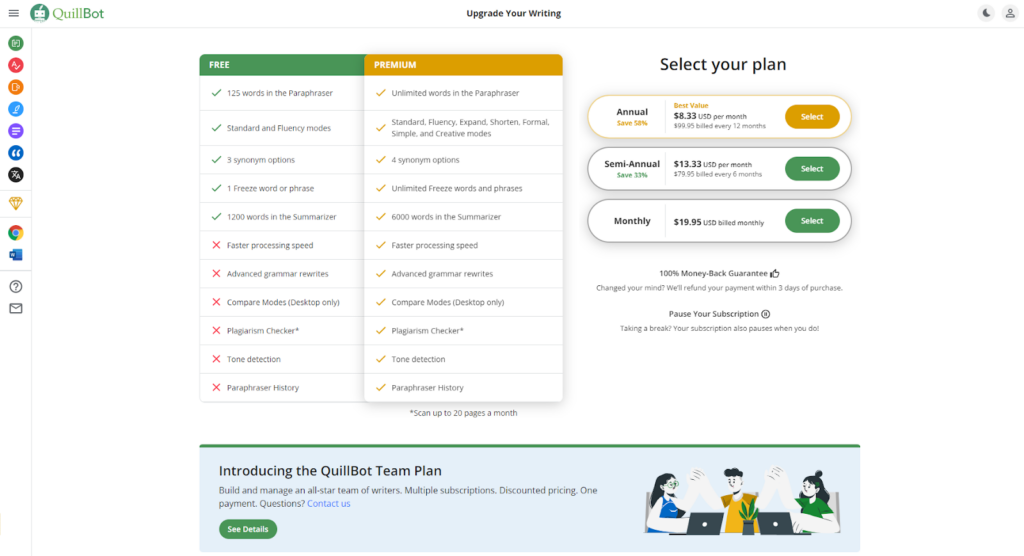
The third tool is Quillbot, a paraphraser that’s making big waves in the industry. It’s capable of rewording and reworking everything from short sentences to large paragraphs, and the tool comes with a whopping 5 modes (plus expand and shorten).
We also want to note that Quillbot can paraphrase in 23 different languages! Speaking of languages, did you know that you can also use Quillbot to translate text, check your grammar, and analyze your content for plagiarism? It can even act as a co-writer, summarizer, and citation generator. With Quillbot, you basically get an all-in-one writing companion!
But we’re here to talk about the paraphraser. Let’s see how Quillbot stands up against our tests.
1. Quality of Results: The Demonstration
Quillbot has a function called “try sample text,” but it seems to generate the same text every time. Instead, we’ll use a sentence Quillbot may not be used to so we can see if it keeps the context. First, we’ll start with a small quote and see what we get.
Here’s what we put into Quillbot:
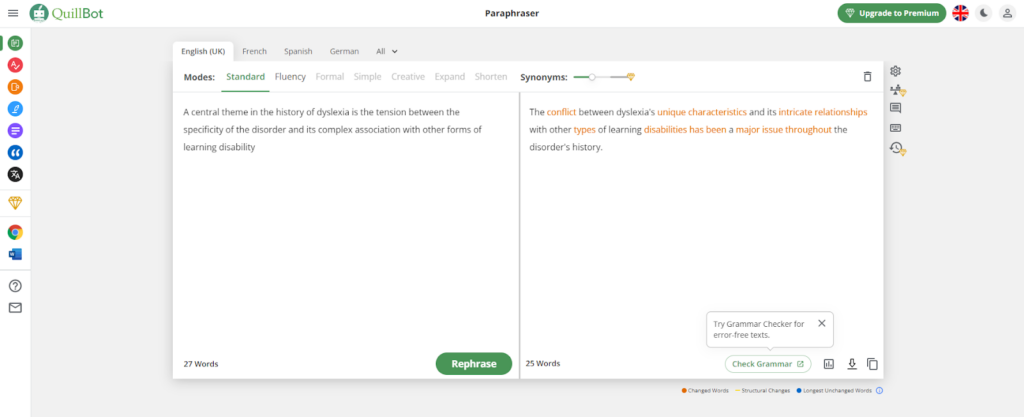
“A central theme in the history of dyslexia is the tension between the specificity of the disorder and its complex association with other forms of learning disability.”
Quillbot was more than capable of changing the entire sentence without throwing away the context. Not only that, but I could check the grammar and for plagiarism in the same tool. That’s important, as I can make sure I’m not unintentionally stealing another person’s work.
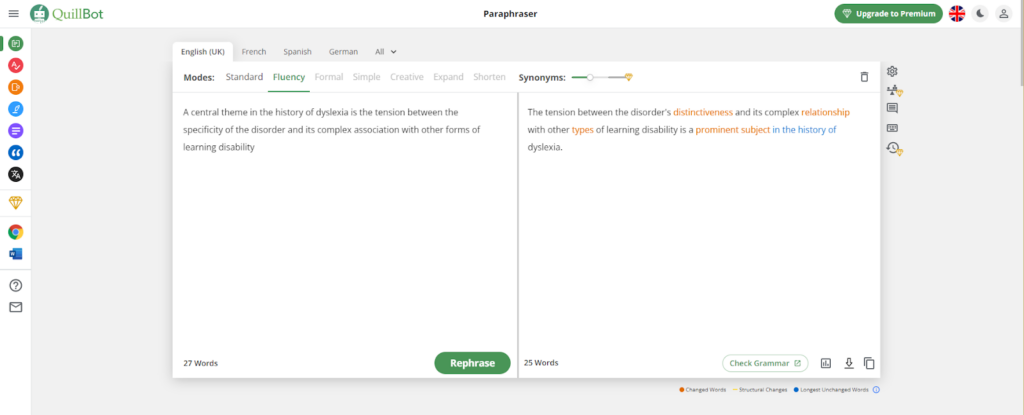
We also checked the fluency mode, and this is what Quillbot came up with:
Whereas standard mode works to change the text and keep its meaning, fluency mode improves language and fixes grammar errors. You can see that there’s a lot less orange (changed words) and one instance of blue (longest unchanged words), but that makes sense, considering the original text was already grammatically sound.
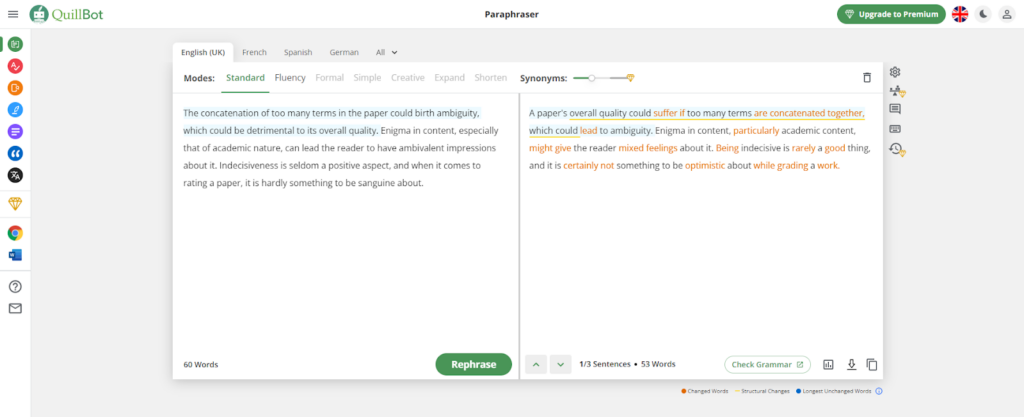
For testing the large paragraph, we’re going to use the same text from Rephrase:
Interestingly, Quillbot produced a different outcome than Rephrase. We feel that Quillbot did a better job at keeping the context and reducing the number of complex words.
2. Features, Pros, and Cons
Quillbots features are similar to the other paraphrasers on this list, but no other tool can compete with the variety it can bring. Here are the tool’s most important features:
Coming up third on our list is Wordtune. Wordtune is a popular name when it comes to paraphrasers because of its distinct style of working. It doesn’t work like normal paraphrasers (such as the two discussed above). Rather, it paraphrases the content line by line. For each line, it provides a lot of different outputs.
Sadly enough, the distinct feature of this tool is also the reason that we’re mentioning it here in the third spot. Since this tool works on a line-by-line basis, it cannot collectively paraphrase a lot of content at once.
We don’t want to paint this tool a bad picture right from the bat. Let’s take a look at the quality of its paraphrasing to find out how well it works.
Quality of Results: The Demonstration
We can’t text this tool out the same way as we did the ones above since Wordtune only processes the input sentence by sentence. So, instead of entering a small piece of text and then entering a larger one, we will just do one round and then analyze the results.
Here is the input that we will be trying out with Wordtune:
“Contumacy compounds ignorance when both of them are found in a man of low intellect.”
This input hardly makes sense, which makes it all the better for trying out the comprehending ability of a tool like Wordtune.
As we said above, Wordtune provides more than one result when the process is started. When we entered the above sentence in the tool, here are the results that we got:
Among the different rewrites that we got, this one was particularly impressive:
“Adding contumacy to ignorance in a man of low intelligence is a recipe for disaster.”
Although this particular rewrite was not exactly a bland statement as the input, it still is a good output that shows how far the tool goes to understand the entered text.
Features, Pros, and Cons
The demonstration section with this tool was a little short, but there isn’t much scope for diversity considering that it works sentence by sentence.
Now, let’s move on to look at its features, pros, and cons. Here are the features:
Free to access (with limited rewrites per day)
Different modes for paraphrasing
Option to shorten or expand the text
Editor Notes for finding and removing imperfections
Comes with formatting options in the online editor version
Moving on with our list, we have the paraphrasing tool by Editpad.org.
Unlike the tools we’ve looked at so far on our list, the paraphrasing tool by Editpad.org has a little clunky and outdated interface. The developers have been…generous with the ads and the whole interface looks very unsightly with all of them floating around.
If it was not for the results that this tool provides, we wouldn’t have mentioned it here on this list. But luckily for itself, the paraphrasing tool is equipped with advanced algorithms, due to which it provides coherent and intelligent outputs.
It also provides multiple modes, much like Rephrase.info and Paraphraser.io
Let’s test this tool out the same way we did the ones above.
Quality of the Results: The Demonstration
Like the other tools discussed above, the paraphrasing tool by Editpad also has multiple modes. We won’t actually test all of them, but we will try and get a couple of them.
To begin with, we will run a small sentence through this paraphraser to get an idea of how well it understands the provided input. For this purpose, we will be using the following sentence:
“The opprobrium disgorged by the person was mere vitriol, with no head nor tail i.e., it was neither here nor there vis-à-vis the topic at hand.”
Output:The opprobrium a person spat out was just venom without a head and a tail, ie. was neither here nor there in relation to the subject at hand.
As far as understanding the context goes, this tool performed well. The changes it made are all in line with the actual context and there aren’t any discrepancies.
But we did find one thing a little disappointing. The word “opprobrium” is a little difficult, but the tool did nothing to improve it. Had we entered this same sentence in any of the other tools above, we’re confident that they would have changed it.
Moving on, let’s put a larger paragraph in the tool to see how well it changes it. Here is the paragraph that we will be trying out:
“Deviating from his regimen, the person decided to take five pills instead of the prescribed two. The next evening found him lolling around his chair, his head drooped to one side. It later transpired that he had eaten 20 pieces of candy instead of the pills, and it was pure felicity that made him loll about.”
The output is a bit long so we won’t paste it here, but you can see what it looks like in the image above.
We used the “Smarter” mode for this test, and the results were not as good compared to the other tools we used above. There wasn’t any nonsense in there, but some of the words were not properly replaced.
Features, Pros, and Cons
Now that we’re done with checking the results, let’s take a look at the features, pros, and cons of the paraphrasing tool by Editpad.
Here are the features that you can enjoy with this tool:
Four different paraphrasing modes (Smooth, Formal, Smart, and Improver)
Although we’re mentioning Paraphraseonline.io at the end of this list, it’s actually one of our personal favorites. The blue and white layout with the no ads interface looks great, and the animated backdrop gives the tool some nice aesthetics that aren’t as easily found in other online tools.
Like the others, Paraphraseonline.io is free to access and it can be used indefinitely without any sort of subscription. It also provides smart results and provides an overall excellent user experience.
One of the most remarkable features that Paraphraseonline.io offers is its large input limit. You can enter 2,500 words in the tool in a single go. Considering the input limits given by the other tools, 2,500 words is quite generous.
Moving on, let’s take a look at how well this tool performs when it comes to actually paraphrasing content.
Quality of Results: The Demonstration
Since this tool doesn’t work like Wordtune and it has multiple modes, we will be running two different pieces of text in order to test it.
This is the first sentence that we will be using:
“Contrary to felicity is grievance, which manifests itself on the occasions when grievance is deemed natural.”
As you can see in the image above, the output is true to the actual context and there aren’t any nonsensical words in there.
One remarkable aspect of the results provided by this tool is that the structure of the first clause is changed entirely. This reflects the ability of the tool to make extensive changes to the content without losing touch with the context.
Moving on, let’s look at how well this tool works with large pieces of text. We did bash Editpad on the quality of its results, so to back that up, let’s take the same content that we used for it and put it into Paraphraseonline.io.
Comparing the results with the ones provided by Editpad, Paraphraseonline.io did a far better job.
Features, Pros, and Cons
Here are some of the features that you can enjoy with Paraphraseonline.io:
Four different modes are available
Multiple languages available
File uploads supported
Copy and download button available
Free to use
No need for registering
Pros
Cons
Easy-to-use interface
Nil
Smart outputs
Multiple modes available
No paid packages
Multiple languages supported
Pricing
No pricing plans for this one. Paraphraseonline.io is completely free to use.
Final Comparison
Before we wrap up this post, here is a table that outlines the main features of the above-mentioned tools. By looking at this table, you will be able to understand the strengths and weaknesses of each tool, which will hopefully help you make a better selection as per your need and requirement.
Tool
Paraphraser.io
Rephrase.info
Wordtune
Editpad.org
Paraphraseonline.io
Availability
Freemium
Freemium
Freemium
Freemium
Free
Number of modes
5
5
5
4
4
Quality of results
5/5
5/5
5/5
4/5
4/5
Input limit for free users
600
500
Limited daily queries for free users
1,000
2,500
Conclusion
So, there you have it.
There are a lot of paraphrasing tools that you can use in 2023, but there are only a few that are actually worth using. Hopefully, after reading the above, you have a good idea about which one you should use according to your particular need and requirement.