This section explains hosting, cloud services, and IT systems in simple language. Topics include web hosting, cloud migration, servers, databases, and managing technical infrastructure.
As the technological landscape diversifies, the coexistence of open-source and proprietary databases becomes evident. The shift towards open-source models is driven by various factors, be it fostering innovation, advocating for code democracy, or controlling costs. A reflection on these aspects is found in Marc Linster’s webinar, “5 Tenets for 2022 Database Planning”.
Having been a stalwart in the industry for nearly a quarter-century, PostgreSQL is synonymous with reliability and maturity. But while PostgreSQL adoption signifies an open-source commitment, it’s essential to recognize that such freedom necessitates responsible decision-making. A real-world scenario, encountered by the DB Serv Support team, elucidates this perspective.
PostgreSQL Support Services: a DB Serv Customer Experience
DB Serv’s interaction with a client facing sporadic performance issues underscores the significance of PostgreSQL support services. The client, a few months into using DB Serv, reported irregular application performance, oscillating between normal and degraded states without discernible patterns.
While initial suspicion might point towards the database, it’s crucial to assess simpler solutions first. Could external factors, such as host or network issues, be culprits? The client’s SolarWinds monitoring did not indicate substantial issues:
Network usage fluctuated between 35% and a peak of 85%.
Other hosts operated as expected.
The application hosts showcased healthy metrics.
However, intriguingly, the performance bottleneck was observed exclusively when the applications communicated with their PostgreSQL databases. Cached information remained efficient, even during database latency periods. Additionally, the database host’s CPU load reached around 53%, and memory usage maxed out during these intervals.
Diving deeper, it emerged that the client had an older 9.4 PostgreSQL version. Various memory-related issues identified in early 9.4 iterations were addressed in subsequent versions. Probing the installation revealed an unconventional approach—the original DBA had compiled PostgreSQL independently instead of using standard methods, resulting in a patchwork of code and extensions without documented reliability measures.
To alleviate the issue, DB Serv advised transitioning to a clean PostgreSQL installation from the community’s repositories. This shift not only circumvented the original haphazard compilation but also updated the software and streamlined the upgrade process. Post-migration, the erratic behavior ceased, underscoring the importance of a robust and standardized PostgreSQL deployment.
Beyond Mere Insurance: The Essence of PostgreSQL Support Services
Many firms adeptly manage their PostgreSQL deployments, with some even contributing to the broader community. While self-reliance is commendable, the benefits of PostgreSQL support services, offered by vendors like DB Serv, are manifold. Such services allow companies to prioritize their core objectives while ensuring their database’s health and performance.
A proficient PostgreSQL support vendor should:
Facilitate a high-performance, reliable implementation.
Guarantee the usage of robust, enterprise-grade software.
Offer continuous assistance, covering challenges and inquiries.
This holistic approach can circumvent potential pitfalls. For instance, a simple query like, “Should I compile my own source?”, when addressed by experts, can avert potential disasters, as illustrated by the aforementioned case study.
In the client’s journey, an initial oversight culminated in a challenging situation. Yet, a single interaction with DB Serv’s PostgreSQL support services transformed their experience. While DB Serv is one among several providers, its dedication and global footprint set it apart. Engaging a vendor, especially one adept in PostgreSQL support services, is a pivotal step for any organization committed to PostgreSQL.
Many companies today generate large amounts of data from their operations. This data contains valuable insight they can use to understand customer behavior, optimize website performance, increase operational efficiency, and strengthen cybersecurity. At the core of this data is log files. Log files record the activities and events that occur within a computer system.
These files keep a historical record of everything in a company’s computer network so managers and computer experts can trace the origin of any problem and give a correct diagnosis. Log files pile up over time and should be managed effectively to achieve the best results. Here are the top 10 log management tools companies can use.
Features of Log Management Tools
Log management tools are essential to every modern organization, and these are the benefits they will gain from using them:
Troubleshooting system issues
Log files contain a chronological timeline of system events which is crucial for troubleshooting system issues and debugging software. Computer experts can analyze these files to identify the root cause of system issues and proffer adequate solutions. Log management tools collect data from multiple sources and store them in a central location. This makes it easy for IT personnel to search, filter, and correlate logs from different devices, which allows them to solve system problems before they escalate.
Performance monitoring
The proactive monitoring system, website, and application performance are vital to keep them operating optimally. Log management tools collect performance-related data for IT support teams to analyze and make necessary improvements. This data includes latency, CPU usage, network activity, latency, response time, and memory utilization. System administrators visualize this data and observe trends to identify performance inhibitors. This allows them to make informed decisions when improving their IT infrastructure.
Enhanced cybersecurity
Modern companies need robust security measures to protect themselves from cyberattacks. Log files are helpful when investigating security incidents because they record unauthorized access attempts, password entries, and system user behavior. Log management tools have real-time monitoring capabilities, so companies can use them to detect data breaches, cyber threats, suspicious activity, and anomalies in their system. These tools collect log data from different sources within an organization to provide a comprehensive overview of its IT infrastructure and security posture.
Regulatory compliance
Log management tools help companies abide by government data protection laws. Companies must safeguard their customer’s personal information and preserve log data for audits. Log management tools make it easy to aggregate log data to detect possible data leaks and generate audit reports. Abiding by government regulations improves a company’s reputation and can attract more customers, thus increasing its revenue.
Forensics and investigation
Cybercriminals frequently upgrade their hacking methods, so they sometimes infiltrate companies successfully and infect their systems with malware. In such cases, forensic analysis of log files is crucial for investigating the incident and preventing its recurrence. Log files keep a detailed account of system events so IT personnel can understand the cause, scope, and impact of all security incidents. Log management tools store all the log data generated within the system and make them available for forensic analysis. During the investigation, the computer experts can use the advanced search features of a log management tool to find the origin of the attack and determine how it affected the system.
Capacity planning and scalability
As companies grow, they need to expand their IT infrastructure to accommodate their new scale of operations. Business owners use log management tools to gain insight into system performance, resource utilization, and capacity trends, so they can allocate their resources optimally as they scale. These tools allow them to analyze their company’s historical log data to identify network usage patterns to help them anticipate periods of peak usage and upgrade their IT infrastructure to meet higher demand. Taking these proactive measures avoids service disruptions, sustains a seamless user experience, and optimizes resource utilization.
Dangers of Neglecting Log Management
Every company that uses computers, cloud computing infrastructure, and the internet for their operations should embrace log management. Neglecting it will cost them in the following ways:
Vulnerability to cyberattacks
The data contained in log files are essential to the detection of threats. By not implementing log management, companies will respond slowly to security incidents and leave themselves vulnerable to cyberattacks. Log management tools have real-time security monitoring capabilities that identify anomalies and alert IT personnel, prompting them to take proactive remedial action. Non-usage of these tools degrades the overall security posture of an organization, which can result in malware infection, data breaches, and service disruption that causes significant financial and reputational damage.
Delayed troubleshooting and extended system downtime
Companies that do not use log management tools take longer to determine the root causes of system or application issues. This is because their IT personnel will have to search the log files manually to diagnose problems, which is inefficient and time-consuming. This inefficiency extends system downtime, which reduces productivity, makes customers unhappy, and can decrease revenue.
Poor scalability planning
Companies will face difficulties when scaling their operations if they neglect log management. This is because they would lack access to historical log data and performance trends they can use to estimate the resources needed to handle the increased load on their system. Scaling without consulting historical data can lead to service disruptions, inadequate resource allocation, and stunted business growth.
Regulatory compliance violations
Whenever security incidents occur because the threats were not proactively detected, the affected company can be at risk of breaking data protection laws. Companies are obliged to secure their customers’ data and prevent leakages and misuse. If hackers break into their database and leak customers’ data, the company may be fined and sanctioned. They are also required to preserve their log data for audits, which is hard to do without log management tools.
Endnote
Log management tools are essential for most companies as it helps them utilize their log data better. Log management allows businesses to optimize operations, proactively identify threats, comply with data privacy regulations, and scale effectively. The efficient use of log data can make a business stand out from its competition, reduce downtime, and increase revenue.
The IT infrastructure is a blend of all necessary components to deliver and manage IT services and their operations. IT infrastructure has multiple interdependent components, and we’ll have an overview of the most significant components in this article.
Worth of IT infrastructure
The IT infrastructure plays a significant role in providing services and products using digital technology. Without it, an organization or company may encounter numerous issues regarding productivity, connectivity and, most of all, security. A secure, suitable and flexible infrastructure helps organizations to chase and meet their goals successfully.
Role of AI in IT infrastructures
AI has invaded almost every field and has boosted performance. In the IT infrastructures, the latest technologies like AI, IoT, sensors, simulations, cloud services and much more bring a revolutionary shift from physical to digital. It has made it more valuable and efficient in performing various tasks, from controlling a public traffic network to the widespread use of businesses. It makes it highly adaptable, sustainable and cost-effective.
Let’s have a look into the core components of IT infrastructure?
IT infrastructure is a mix of multiple components depending on the type and size. In the latest business environment cloud-based infrastructures are highly appreciated. According to Forbes, globally 94% of business enterprises are the users of cloud services.
Because it facilitates easy expansion of your users’ network due to their dynamic nature. It reduces a lot of your effort to enhance your IT infrastructure.
However, the following components are essential for any IT infrastructure, and you should know about them when planning to design an IT system.
Hardware
It includes all the bodily parts such as input/output devices, computers, laptops, storage devices, cameras or screens etc.
Software
The set of instructions responsible for the performance of hardware is software. Two types of software are in practice: system software that makes the hardware work and application software that assists in providing services and products to the end user.
Network
It refers to a collection of hardware and software that enables effective communication among numerous network components such as devices, applications and users.
Datacenter
It is one of the most significant parts of any infrastructure as it is responsible for storing data that is the most sensitive part of a system. It can be a storage device or cloud storage space.
Servers
Servers are the computers part of the system network and hold software and data for processing. It is the backbone of IT infrastructure as it serves all the system users with their required functionality.
\Connectivity
In online IT systems, remote connectivity is highly significant, and the companies designing IT infrastructures pay attention to it. It enables the users to connect with the system, manage and share the data and information along with applications.
Security
In IT infrastructure, security is a crucial concern and needs special attention. Companies designing online or offline IT systems deal with the latest safety measures and tools to ensure it.
Significant factors in hardware selection
Hardware in IT infrastructure is the core component that makes it functional. It consumes the more significant part of the project budget. So, be careful while purchasing hardware. The following factors should be focused on to get the most suitable hardware.
Characteristics
A wide variety of hardware is available in the market and has exceptional quality and features. Knowing and assessing your requirements to buy the most suitable hardware for your project would be cool. For example, it goes in vain if you buy a low-capacity storage device for a large system having big data. Similarly, a processor having less power cannot serve a large number of users effectively. You’ll select the best hardware if you have a good idea of your requirements.
Speed and performance
These two features are highly associated with processors and storage devices because both play significant roles in system performance. If it doesn’t match your system requirements, it’ll slow down the entire system and reduce productivity. You need a powerful processor with good speed to bear a heavy workload.
Freedom of movement
Technology has made the hardware also more innovative and more efficient. Select hardware with the most nominal size and performance according to your system needs. The use of cloud services provides more efficient options.
Financial plan
Hardware components consume most of your budget, and you must make a wise decision to avoid facing budget overrun. To avoid such situations, first recognize your requirements for features and then search for a suitable match within your budget limits.
Similarly, to implement the best IT infrastructure, you must focus on your needs and arrange the components accordingly. You should also be keen and curious about other components to implement an efficient IT infrastructure that boosts your business performance and productivity.
Wrap up
Every business needs to implement IT infrastructure and facilities to move in the modern digital world. To enjoy the best system and services, you need to know the IT infrastructure’s essential and main components. It helps you to get the best of your developers’ team or the company you hire to develop your IT systems. The most important thing, as you may have concluded, is knowing your needs and requirements clearly and making further decisions accordingly.
Cost optimization has emerged as a significant challenge for many engineering teams as businesses create more and more on the cloud. Although cloud service providers like AWS provide flexibility and simple scalability, cloud expenses are sometimes ambiguous and difficult to monitor.
To better understand and manage the costs of their cloud-based systems while increasing cloud efficiency and utilization, many businesses that depend on the cloud are using cloud cost optimization solutions. To assist this initiative, several platforms, best practices, and cloud cost optimization solutions have been developed.
Cloud Cost Optimization: What Is It?
The most suitable and cost-effective cloud resources are assigned to each workload or application thanks to cloud cost optimization. To guarantee that cloud investments are successful and suitable for organizational needs, it balances necessary performance, cost, compliance, and security criteria.
In a cloud deployment, each workload has certain needs that change over time. You should establish performance limits for each task based on domain expertise and real operational indicators to minimize cloud expenditures. The goal of optimization is to keep performance standards in place while lowering expenses.
Optimum Cloud Cost Management Techniques
Best practices for cloud cost optimization decrease the wastage of cloud resources, save costs, increase visibility, raise performance, and maximize business advantages. They consist of:
Create a Cost Awareness Culture
Without the support of all stakeholders, no cloud optimization project will succeed. To develop standardized cloud best practices—Cloud Operating Models—our most prosperous clients have created Cloud Centers of Excellence or FinOps practices.
Businesses can cultivate a culture that prioritizes cost efficiency, maximizes cloud resources, and achieves successful cloud migration by incorporating cloud migration consulting services into their cloud optimization strategies. These services’ expertise enables businesses to make informed decisions, optimize their cloud infrastructure, and align their cloud initiatives with their overall business goals.
Create Budgets
Make sure everyone is aware of the objectives and spending limits for each project to keep expenses under control. Never choose a random number. To better understand cost needs, encourage dialogue between product leadership, engineering leadership, and executives.
Base requirements by the anticipated feature and product packaging and delivery. Decide if it is a free trial or an enterprise package, for instance. You can save money on cloud hosting by switching providers and getting a coupon from sites like Bountii. When planning and developing, consider these criteria as tradeoffs alongside others like speed and resilience.
Track Your Cloud Use
Monitoring your cloud consumption is the first step in optimizing cloud costs. You may use it to find places where you can cut down on your cloud expenditure. To keep an eye on your cloud use, you may use either third-party or monitoring tools offered by your cloud provider. Analyze your cloud investment first. The cost of the cloud must be anticipated depending on your workload and capacity use. Find the areas of the bill that cost more than you anticipated. It will assist you in identifying resources that aren’t being utilized.
Heatmap Use
Heatmaps are one of the most crucial tools that might be useful. Using a heatmap, you can see the fluctuations in computing demand. This knowledge may be used to decide on a start and stop time that will save money.
The ability of a heatmap to determine if development servers can be shut down safely on the weekends is a fantastic illustration of its use. Although this may be done manually, automating the starting and stopping of instances would be preferable to save cloud costs.
Take into Account Azure Reserved VM Instances (RIs) or AWS Reserved Instances (RIs)
You may utilize similar reserved instances and spend up to 75% less than with on-demand capacity. In exchange for a promise to utilize their cloud services for a certain period, such as one to three years, Amazon AWS and Microsoft Azure provide substantial savings. Therefore, paying for RIs in advance enables you to better control your cloud expenses, particularly if your workload is consistent.
Eliminate Wasted Resources
Consolidating and eliminating unneeded technological resources is a crucial part of cost optimization. Even when businesses do not utilize the resources, cloud suppliers charge for them. If your organization only utilizes a CPU at 10% of its potential, think about integrating the CPUs across several systems to better use them and save expenses.
You may increase capacity as needed by using cloud capabilities like on-demand choices, auto-scaling, and load balancing.
Conclusion
Cutting cloud costs is not only the job of IT; it is the responsibility of the whole business. Cloud cost optimization is not a one-time effort but a continuous process.
GitLab is a popular web-based Git repository manager that offers powerful and integrated tools for software development. It is an all-in-one solution that provides everything from source code management to continuous integration and deployment. With its many features, GitLab has become the go-to platform for many software developers, and for a good reason. If your company would like to reach it’s full potential to increase operational efficiency, deliver better products faster, and reduce security and compliance risks, you can use GitLab professional services partner.
This article will explore five benefits of using GitLab for software development.
Centralized Repository Management
GitLab’s centralized repository management is one of its most significant benefits for software development teams. Its user-friendly interface simplifies version control and project management, making creating, storing, and managing source code in a single location easy. This centralized approach helps streamline collaboration among team members, making it easier to track changes, review code, and maintain project history. GitLab provides advanced tools for managing and tracking issues, milestones, and merge requests. These tools make it easier for teams to prioritize and manage work, ensuring everyone is working towards the same goals. Overall, GitLab’s centralized repository management is an essential feature that helps teams to work more efficiently and productively, resulting in better software products.
Continuous Integration and Continuous Deployment Functionality
GitLab’s integrated CI/CD tools provide development teams with several benefits. It allows the creation of pipelines that automate the building, testing, and deployment of code changes as soon as they are made to the repository. This automation minimizes manual errors, saves time, and guarantees that all changes are thoroughly tested before deployment. GitLab’s support for popular tools and platforms, such as Docker, Kubernetes, and AWS, facilitates integration with your current development environment. These features streamline the development process and significantly improve team productivity and efficiency, allowing teams to deliver high-quality software products faster and more reliably. With automated testing and deployment, developers can focus on other essential tasks, such as coding and debugging, accelerating software development and delivery. Additionally, automated testing improves the quality of software products, reducing the chances of errors and security vulnerabilities.
Robust Security Features
Security is a top priority for software developers, and GitLab recognizes this importance. It provides robust security features to safeguard your code and prevent unauthorized access. GitLab’s access controls enable you to manage user permissions and determine who can access your code. Furthermore, the platform includes built-in security testing tools like static code analysis, dynamic application security testing, and dependency scanning. These tools are designed to identify potential vulnerabilities in your code and offer recommendations for addressing them. By integrating these security features, GitLab helps developers to reduce the risk of security breaches and keep their code secure.
Traditionally, the Security SDLC has been perceived as a hindrance to innovation and fast-paced development. However, with the adoption of DevSecOps, the testing code undergoes comprehensive security checks, enabling project teams to mitigate security issues like random attacks, hacks, and system downtime. Read more about DevSecOps best practices.
Built-in DevOps Metrics
GitLab provides teams with built-in DevOps metrics to measure their performance and progress. These metrics cover a range of critical areas, such as deployment frequency, lead time for changes, and time to recovery, providing valuable insights into your team’s efficiency. By tracking these metrics, you can identify areas that need improvement and adjust your strategies accordingly. GitLab offers customizable dashboards that allow you to track and visualize key metrics, making monitoring your team’s progress easy. With these built-in DevOps metrics, GitLab enables teams to measure their progress, identify bottlenecks, and continuously improve their development process, leading to better collaboration and faster delivery of high-quality software.
Open-Source and Community Support
GitLab is a platform that provides various features and tools for software development. It is open-source and free to use, and its source code is accessible to anyone who wants to view and modify it. Moreover, GitLab has an extensive and dynamic community of developers who contribute to the platform and offer support to its users. This community provides various resources, such as forums, documentation, and plugins, to help GitLab users optimize their experience. Therefore, community support benefits users who must resolve issues, learn new skills, and collaborate with other developers.
The collaborative nature of the GitLab community also allows developers to submit code changes and feature requests, which are reviewed and integrated into the platform, ensuring that GitLab is constantly improving and evolving. GitLab’s open-source nature and community support make it an attractive option for developers of all levels.
Final thoughts
GitLab is a powerful and versatile platform that provides numerous benefits for software development. Its centralized repository management, integrated CI/CD tools, robust security features, built-in DevOps metrics, and open-source nature make it an ideal choice for teams of all sizes. Whether you’re working on a small project or a large-scale application, GitLab can help streamline your development process and boost your team’s productivity. GitLab is a reliable and efficient platform that can enhance your software development experience and help you deliver high-quality products more quickly and efficiently.
In today’s digital age, information technology (IT) is the backbone of most businesses. It is the driving force that enables businesses to stay competitive, efficient, and effective in the modern market. However, IT systems are complex and require specialized knowledge to operate effectively. This is where IT support comes in. IT support plays a critical role in ensuring that businesses can operate smoothly and efficiently.
Technical Assistance
The primary role of IT support is to provide technical assistance to businesses. This includes resolving technical issues, installing software, updating systems, and maintaining hardware. IT support is also responsible for ensuring that the IT infrastructure is secure, reliable, and available 24/7. This is essential to ensuring that the business can continue to operate, even when faced with technical challenges. With onsite IT services, businesses can rest assured that their IT infrastructure is being properly maintained. Plus, having a dedicated IT support team provides peace of mind knowing that all IT-related problems can be quickly and effectively resolved.
Providing Training To Employees
IT support is also responsible for ensuring that employees have the necessary training to use the company’s technology effectively. This includes providing training on how to use software, how to access and use the company’s network, and how to use hardware such as printers and scanners. By providing this training, IT support helps employees to work efficiently and productively, thereby increasing the overall productivity of the business. When employees are trained and knowledgeable in the use of technology, they can identify and fix any potential issues with the IT infrastructure faster. This helps businesses to stay ahead of any technical challenges and ensures that their systems remain secure and reliable. Plus, it helps reduce the amount of time and money spent on IT support.
Disaster Recovery
Another critical role of IT support is to provide backup and disaster recovery services. IT support ensures that business data is backed up regularly so that in the event of a disaster, such as a fire or a flood, critical data is not lost. Additionally, IT support ensures that the business can recover from any disaster quickly and efficiently, minimizing downtime and ensuring that the business can continue to operate. When it comes to disaster recovery, IT support is absolutely essential. In addition to backing up data, IT support can also provide failover systems that allow the business to continue operating even if there is an issue with its primary IT infrastructure. This is another example of how IT support can help businesses stay competitive and resilient in today’s digital landscape.
Staying Compliant
IT support also plays a critical role in ensuring that the business is compliant with industry regulations and standards. This includes ensuring that the business meets data protection and security regulations, such as the General Data Protection Regulation (GDPR) and the Payment Card Industry Data Security Standard (PCI DSS). IT support ensures that the business is up to date with the latest regulations and that it is taking the necessary steps to comply with them. Finally, IT support helps businesses to stay competitive by ensuring that they are using the latest technology and software. By staying up to date with the latest technology trends, IT support can help businesses to improve their operations, increase their productivity, and reduce costs. This can help businesses to stay ahead of the competition and to remain relevant in the ever-changing business landscape.
Keeping Up With Technology
Technology is constantly changing. This can be overwhelming for businesses, especially when it comes to managing the IT infrastructure and keeping up with the latest trends. That’s why having a reliable IT support team is so important. They can provide invaluable assistance in ensuring that the business remains competitive and compliant. By staying up to date with the latest trends and technologies, IT support can help businesses to improve their operations and remain successful in today’s market. For example, IT support can help businesses to migrate to cloud-based services, implement AI and machine learning technologies, and utilize the latest cybersecurity measures. In addition to IT support, businesses can also benefit from powerful software asset management tools explored by experts in the field. These tools can help businesses to track and manage their software licenses, optimize software usage, and reduce costs. With a reliable IT support team on hand, businesses can rest assured that they are staying ahead of the competition and making sure their operations run smoothly. Furthermore, IT support can help to reduce costs and improve efficiency. All of this adds up to a more successful business in the long term. It’s clear that IT support is an essential service for businesses of any size.
Improved Security
Finally, IT support is essential for keeping the business’s data secure. IT support helps to protect businesses from malicious attacks and other security threats by implementing strong security measures and staying up to date with the latest cybersecurity trends. This includes regular patching of systems, monitoring for potential breaches, and setting up firewalls and antivirus software. It also includes training staff on how to properly handle sensitive data and implement safe practices. With a reliable IT support team, businesses can rest assured that their data is secure and remain competitive in the digital economy. For example, the IT support team can help to create secure networks and systems that are more difficult for attackers to penetrate. This is crucial in ensuring that businesses remain compliant with industry regulations and don’t suffer any financial losses due to security breaches.
Conclusion
IT support plays a crucial role in ensuring that businesses can operate smoothly and efficiently. By providing technical assistance, ensuring the security and availability of the IT infrastructure, providing employee training, and ensuring regulatory compliance, IT support helps businesses to stay competitive and efficient in the modern market. As businesses continue to rely on technology to operate, the role of IT support will only become more critical, and businesses must ensure that they invest in high-quality IT support services to remain competitive in the digital age.
With the right IT support services, businesses can ensure that their operations run smoothly and remain secure. Running a business without an IT support team can be risky due to potential security threats, inefficient operations, and regulatory compliance issues. Having access to reliable IT support ensures that businesses are able to stay competitive by utilizing the latest technology trends.
For many years I have worked as a DBA focusing on Oracle Database and also dealing with some other databases, such as SQL Server, PostgreSQL, and MySQL. I used several paid and free tools, but most of them did not deliver what I was looking for.
My goals were facilitating and increasing my productivity at work. I tested several tools with different functionality, and always felt the lack of some specific features until I adopted the dbForge products. Today I can say it is the set of tools I use and recommend to the most diverse professionals who work with databases, striving to perform all tasks with one solution and save resources.
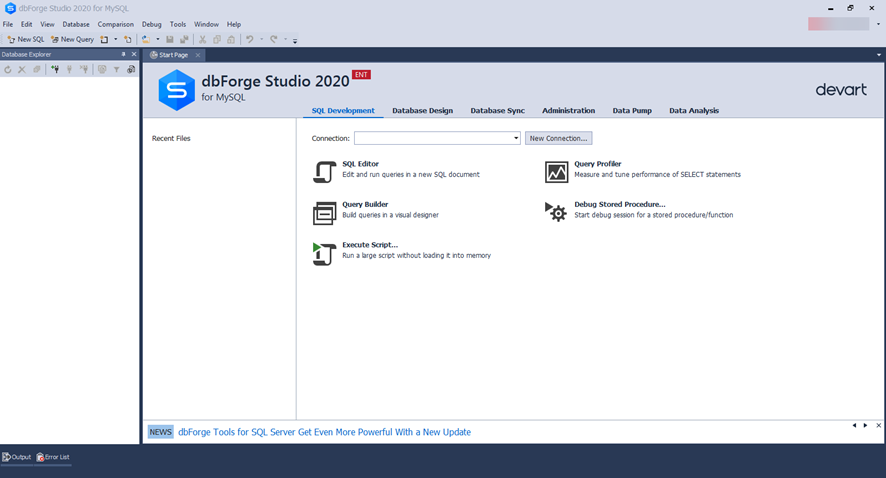
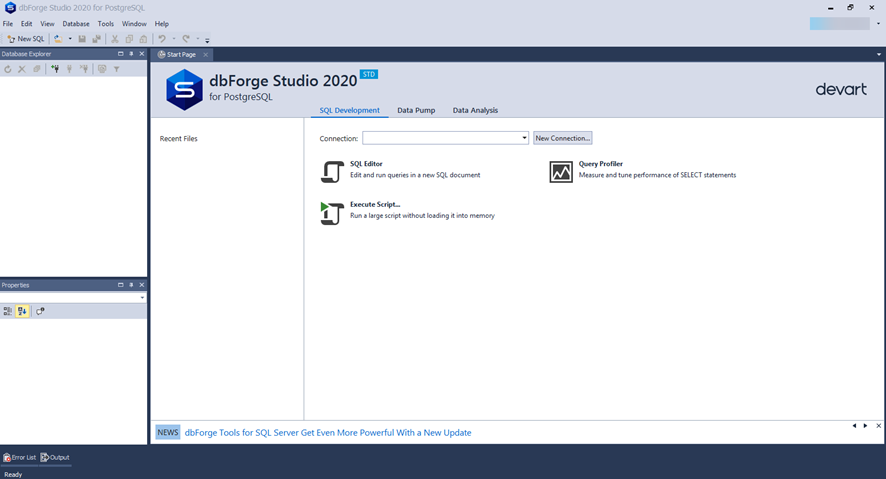
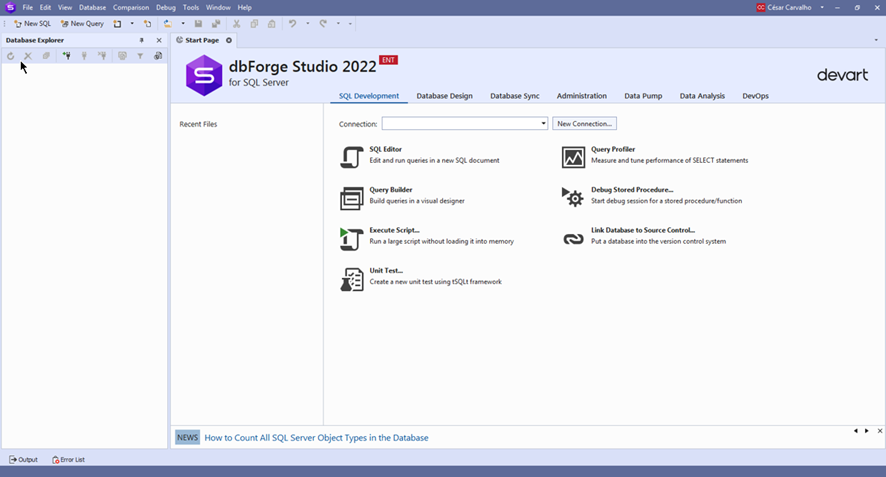
Even using dbForge Studios for Oracle, MySQL, PostgreSQL, and SQL Server separately does not complicate the tasks. The interface of all these products is standardized, thus reducing the adaptation time. Just have a look at the screens of the Studios for different database technologies:
I like its simple and clean interface. You can use seven themes – Visual Studio (blue, light, and dark) and Office (Office 2013, Office 2013 Dark Gray, and Office 2013 Light Grey). These themes are all very light and beautiful. I prefer the blue Visual Studio theme.
The article focuses on dbForge Studio for Oracle – a GUI for Oracle database that I have been using since 2020.
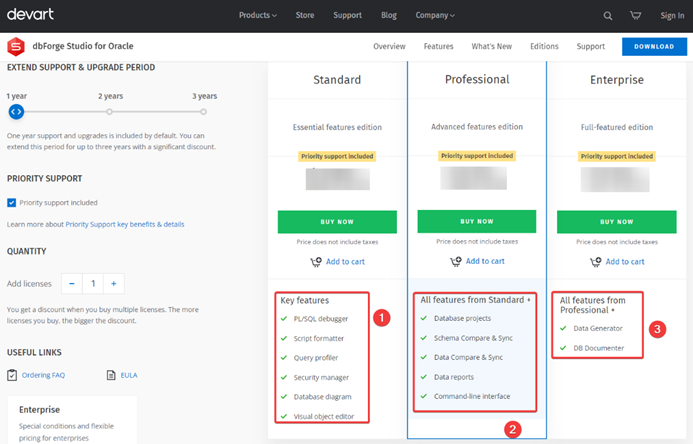
dbForge Studio for Oracle is available in four editions: a free Express Edition with basic functionality and three paid editions – Standard, Professional and Enterprise. Evaluate the list of inbuilt features and choose the edition that meets your requirements best, just clicking here to download dbForge Studio for Oracle and try it free for 30 days.
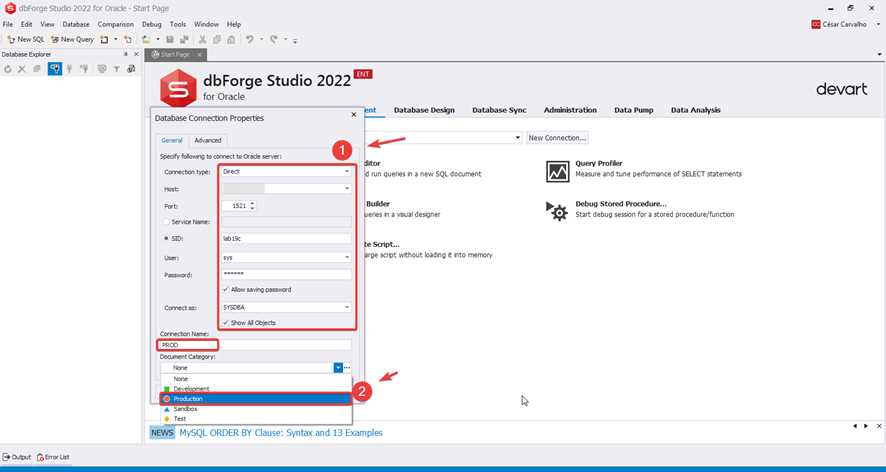
When connecting to databases, you can fill in the data and segment it by color according to each access type. For instance, it can be red for production, green for development, or yellow for the test environment. Or, we can create a category with the color we want.
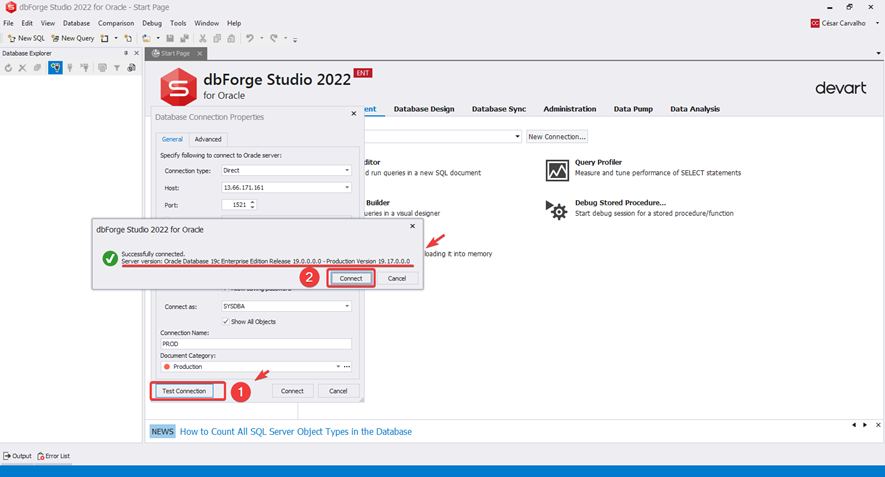
It is simple, but it helps to quickly identify each environment, avoiding errors when connecting to the wrong one. When you click the “Test Connection” button, it will validate access, the database version, and display the edition information on the screen.
Here I am creating a connection with the “Production” category in red:
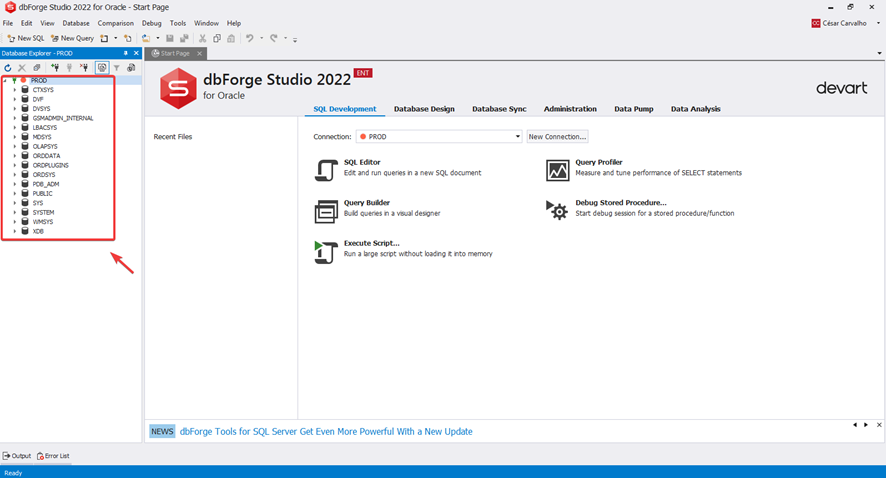
Testing the database access and viewing all schematics:
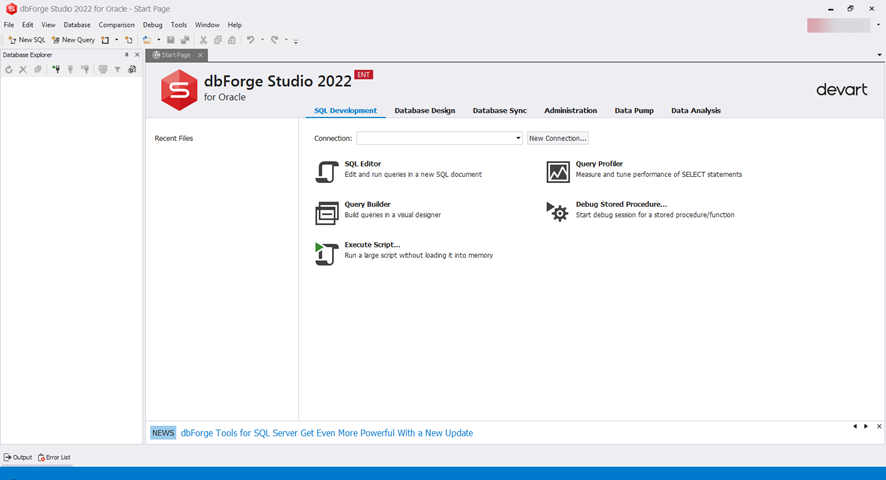
And getting the initial screen of the tool with the main functionalities:
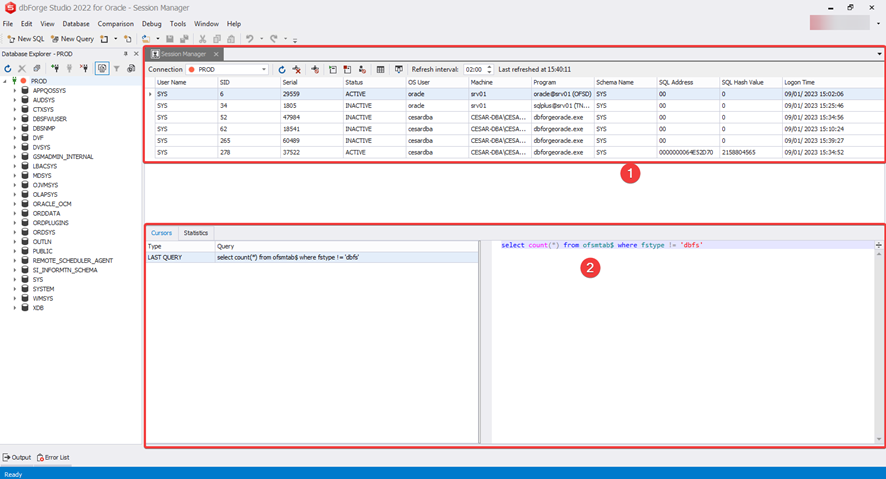
In the session manager, we can view the summary or all sessions related to the database, queries executed, session origin, enable trace, and end sessions, – everything we usually do via terminal using sqlplus. dbForge Studio for Oracle makes it quick and simple. You won’t need to search for scripts to extract and view information, and facilitate the daily activity of monitoring and ending sessions.
Now, let us review the most helpful tools included in the set of dbForge Studio for Oracle.
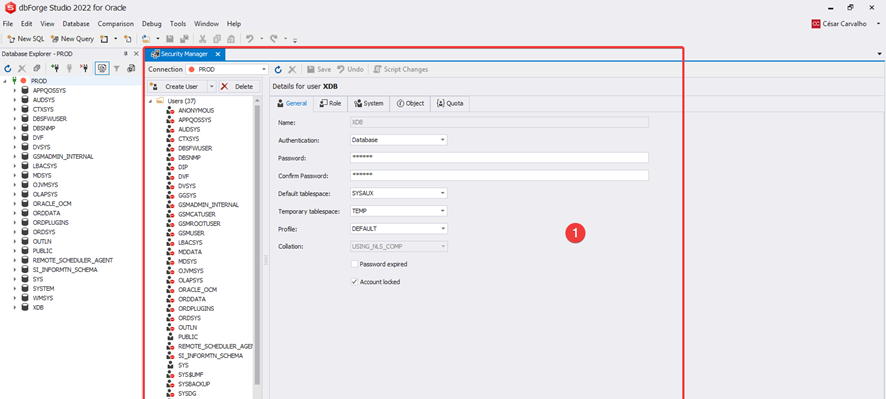
Security Manager. Controlling server security entails working with user accounts as well as managing access rights and privileges. This Oracle administration tool lets you create new user accounts and roles, update existing ones, or delete them at the global or object level. Within the account, you can grant and revoke privileges, and manipulate roles and profiles.
The dbForge Security Manager can work with multiple accounts simultaneously, check permissions, tablespace quota, roles, creation date, block, unlock, and add role schemes, and check objects and their permissions in detail.
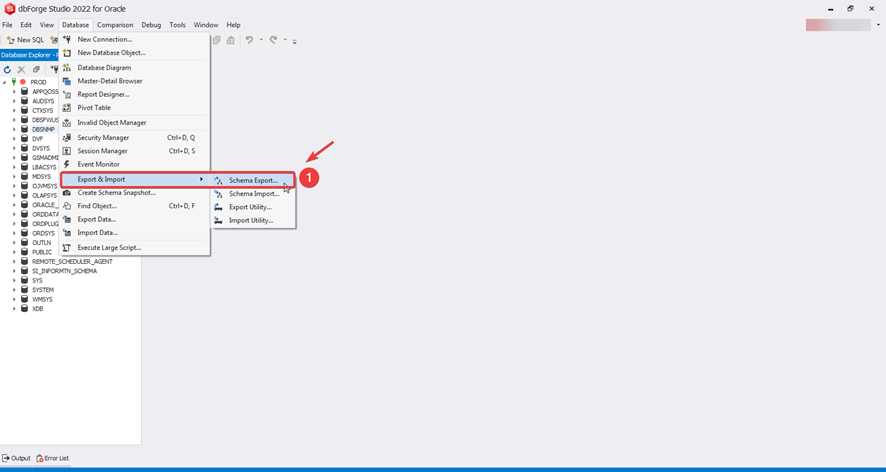
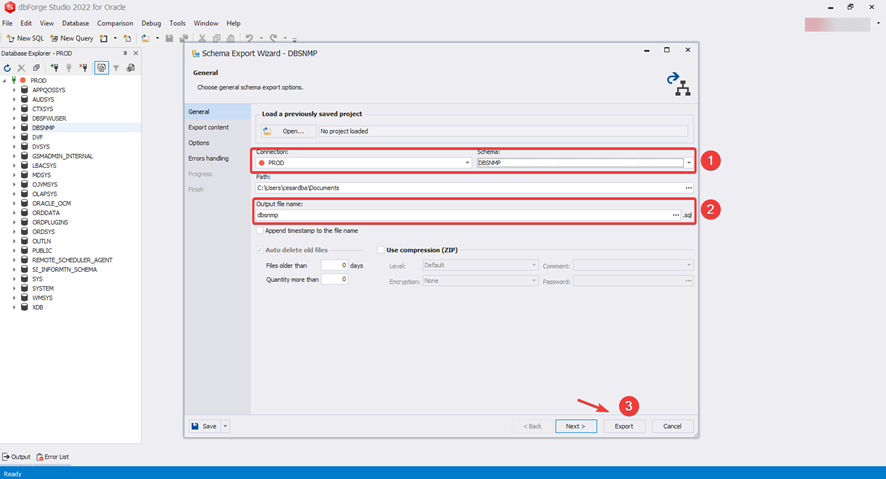
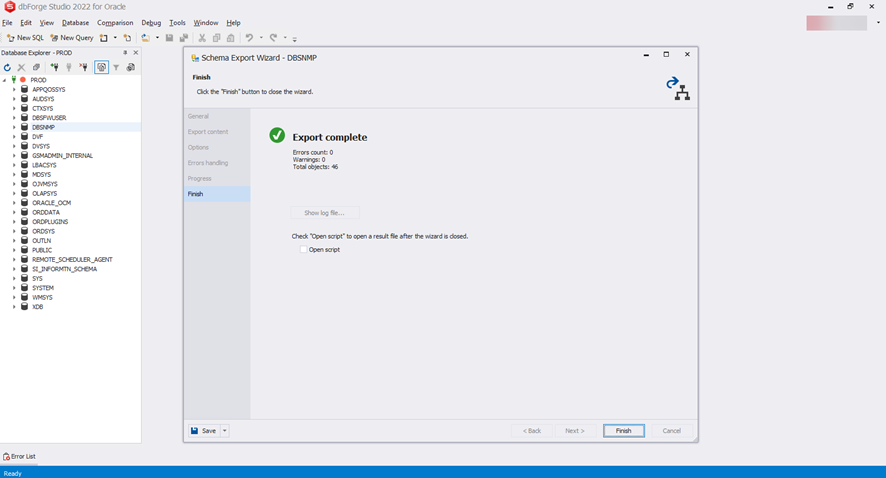
Schema expdp and impdp – it is one of the simplest activities that every Oracle DBA is used to. Usually, the developer requests updating for the testing or approval environment, and we would connect to the database server via SSH and run the expdp and impdp utilities in the terminal. dbForge Studio for Oracle allows us to do it simply and implement several required features including compression.
Migration or import of data in different formats, such as JSON, text, CSV, Excel, Access, XML, etc.
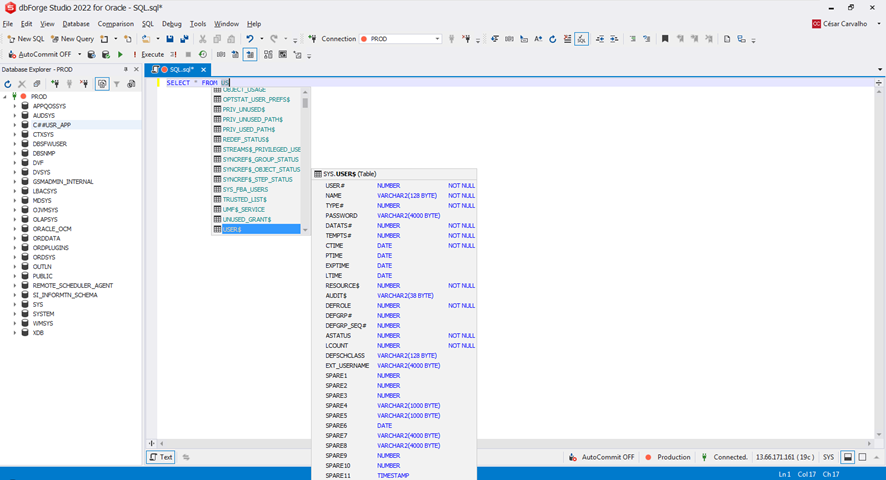
PL/SQL coding assistant – the best support for query writing. It knows all the schemas, tables, columns, and keys. You don’t need to check or remember all the tables or objects existing in databases.
This functionality is essential for database developers, BI analysts, system analysts, or database administrators – anyone who needs to produce high-quality queries. The below screen demonstrates a simple query with tables and column data types:
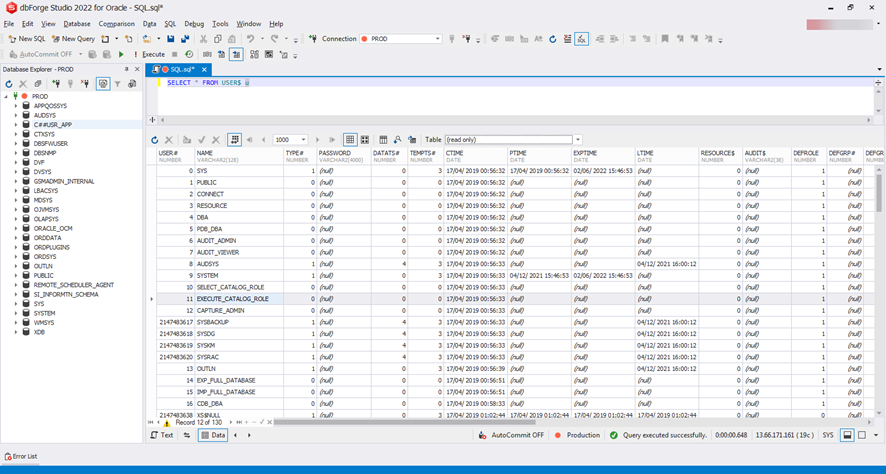
Results in the grid. We can generate SQL scripts, apply filters, export data, generate reports, copy data to CSV, XML, HTML, and JSON formats, paginate the results, etc.
The following screen demonstrates the query results and informs about the execution time, production type connection (in red), the IP address, schema, and type of information format projected in data.
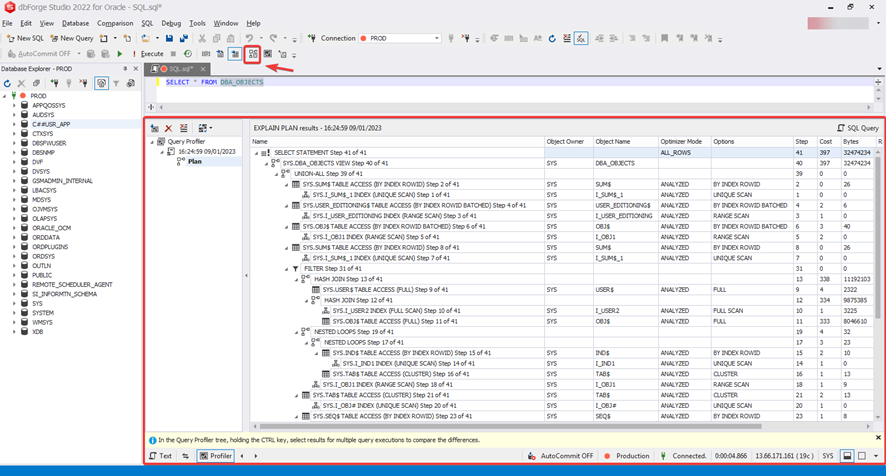
Execution plangeneration. Not every professional who works with Oracle is a DBA. Many developers or system analysts need to evaluate the execution plan to verify query performance before actually running it. This functionality is available in dbForge Studio for Oracle – it only takes a few mouse clicks.
The screen shows the query execution plan in DBA_OBJECTS – you can see how much information it delivers. You won’t need to connect via SSH using the sqlplus text formatting.
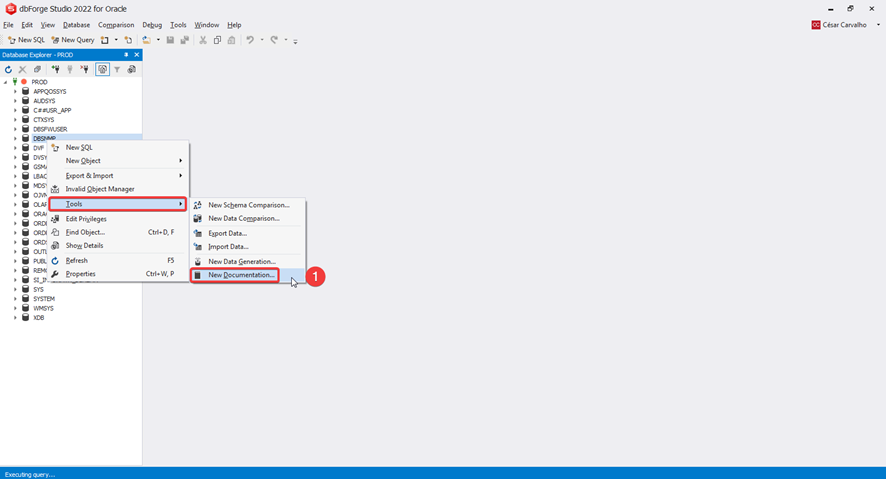
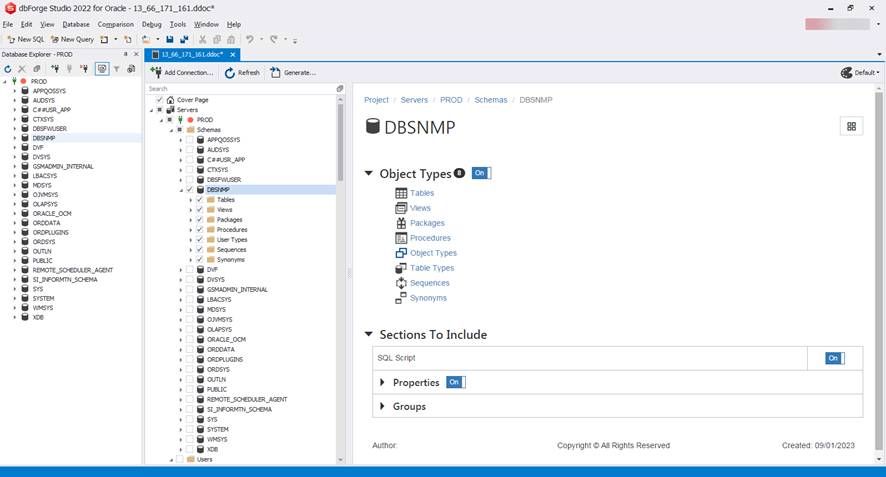
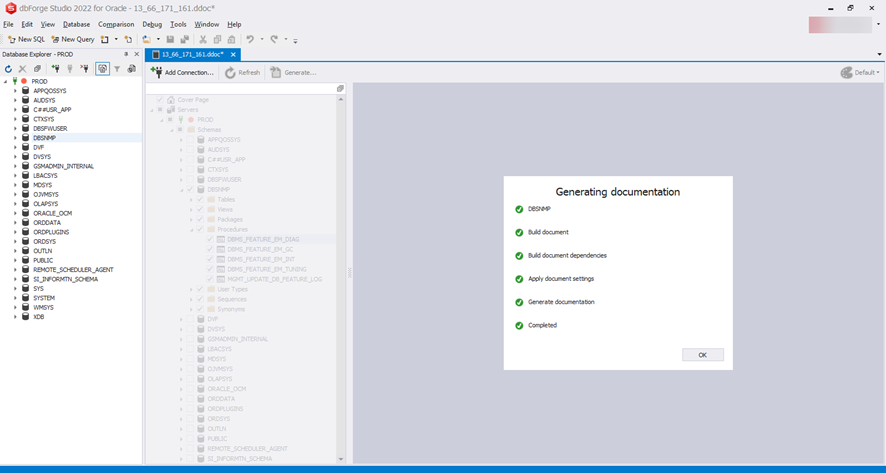
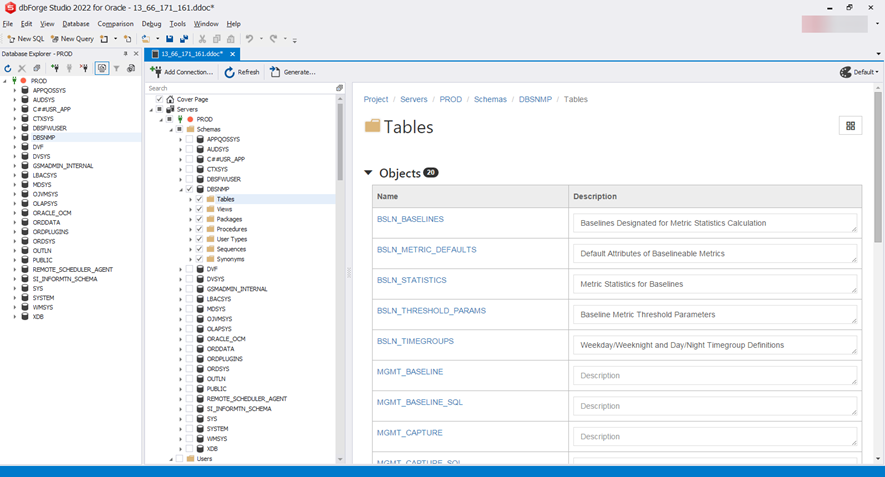
Documentation. We all know how important but tedious it is to document procedures or databases. It is especially complicated when we are not yet familiar with the environment. dbForge Studio for Oracle generates the database documentation simply. It reports all objects that make up the database and exports the results to PDF. You can generate detailed documents in a few clicks.
Here we generate the DBSNMP schema documentation with all objects:
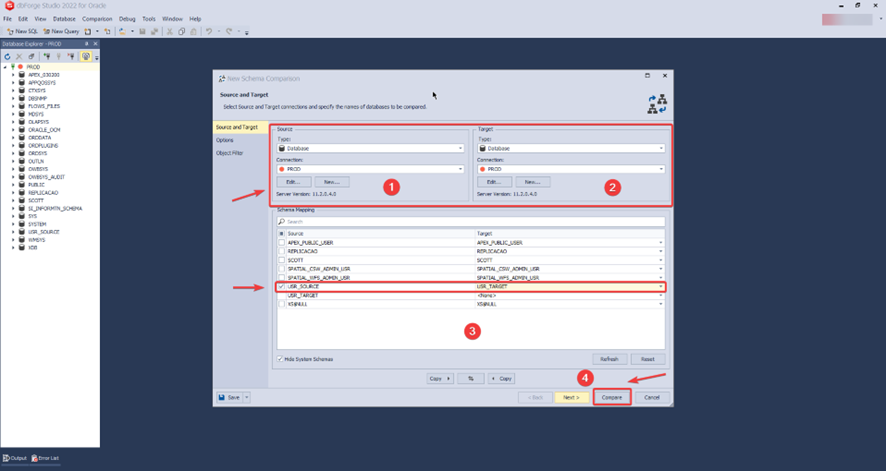
Schema and data comparison. This feature I like most about dbForge Studio for Oracle. I always use it to compare development, approval, and QA environments. Never worked with a tool as practical, simple, and accurate as dbForge Studio for Oracle.
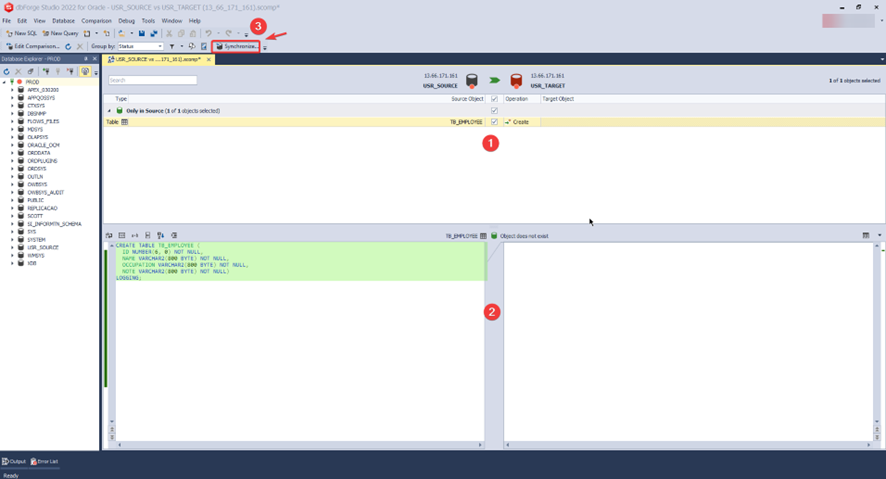
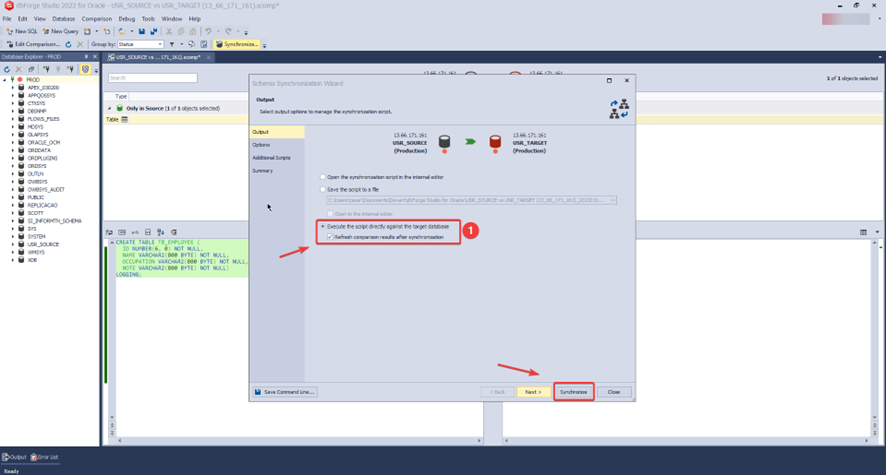
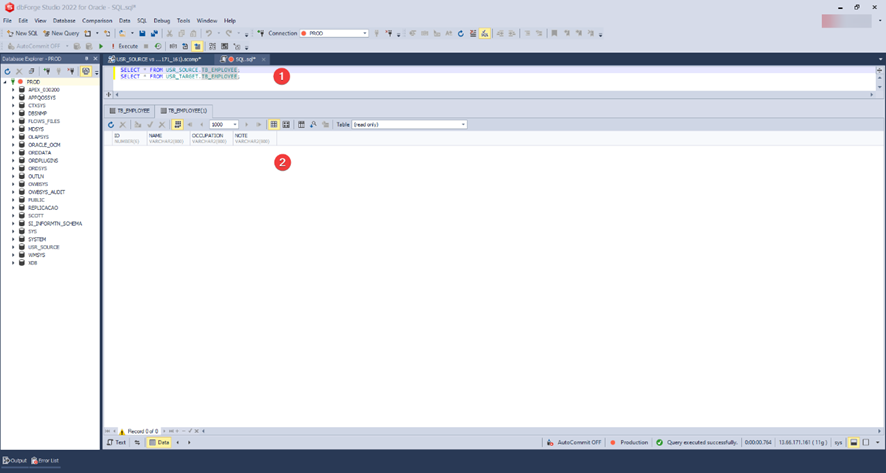
See the screens where I compare the USR_SOURCE and USR_TARGET schemas. The TB_EMPLOYEE table does not exist in one schema. The Studio generates the DDL to synchronize them manually or automatically.
Besides comparing databases, tables, or any object in a granular way, it allows us to generate documentation that differs between environments. Whenever a developer forgets to apply or leaves the DEV and HML environments the same in development, I turn to this option. Otherwise, it would be unfeasible to analyze all objects and their source codes one by one in all databases or schemas.
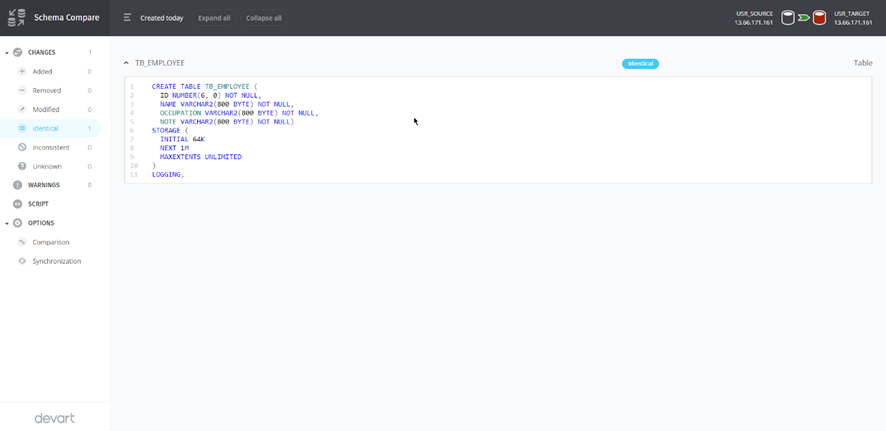
Report generation for the environment comparison in HTML format. We often lose control over the creation and modification of databases during a system update. If problems occur, we are blind without knowing the previous state of objects. I always suggest using this tool to document all objects before the update or migration.
After the update’s successful completion (or failure), we can detect which objects could be affected at once. The report contains details of objects and actions in the comparison. You can see the complete information about the synchronized objects in the source and destination. Check the added, removed, and modified entities.
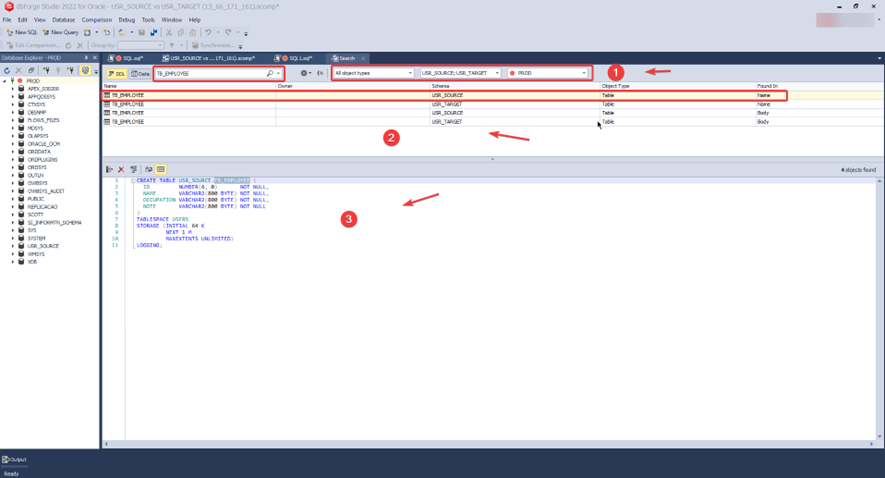
Search for objects. This feature makes life easier for all database developers and users. The usual way to query DBA_OBJECTS becomes simpler. With dbForge Studio for Oracle, we can search for any object in a specific schema or the whole database visualizing the content of each object.
The screen shows the search results for the TB_EMPLOYEE table in the USR_SOURCE and USR_TARGE schemas. It provides details about the object name, owner, schema, object type, and DDL.
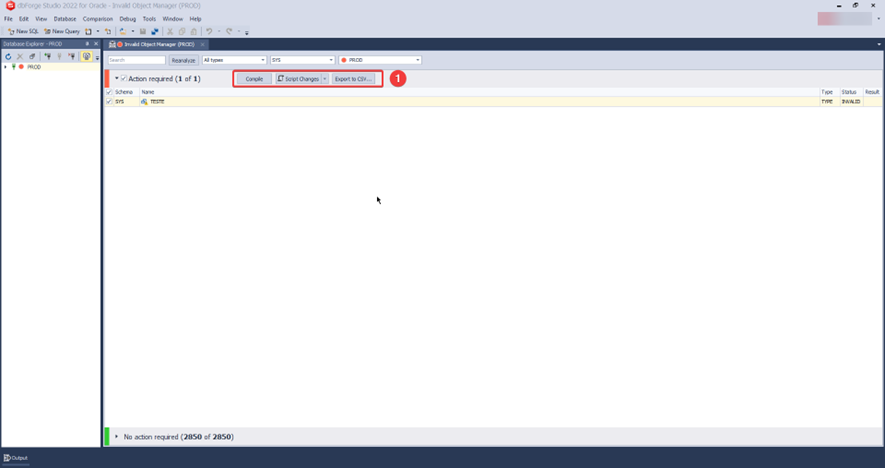
Checking for invalid objects. This functionality lets us view invalid objects to compile, correct them, or document the environment. There is also an option to export to CSV:
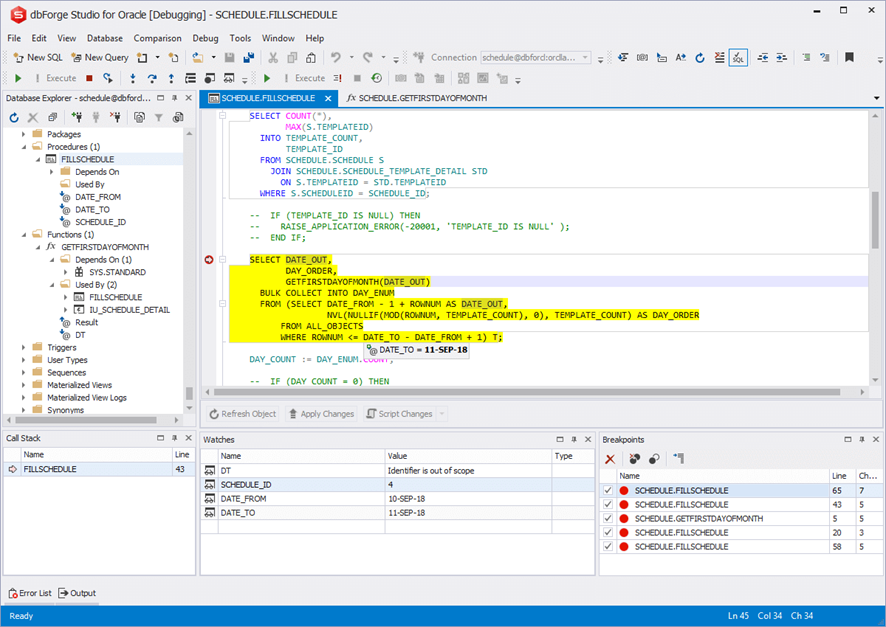
Oracle PL/SQL Debugger. This feature allows you to debug PL/SQL code step by step effectively. You can use various Oracle PL/SQL debugging techniques, such as setting breakpoints, viewing clocks, examining the call stack, and evaluating the variables.
It helps us identify and eliminate runtime code bugs and prevents developers from developing complicated and error-prone applications. This Oracle PL/SQL Debugger lets you easily control the flow of the debugging process.
In conclusion, these features are the most favored for me. I use them all the time to reach the goals I described in the beginning. They help me work productively and save my energy to achieve more.
Besides, there are lots of options ensuring great flexibility of work. You can adjust all processes for your needs and environments and automate routine tasks.
The only downside is the price of the license, mainly for the Brazilian market where the dollar is still very high.
About this article author:
Angelo César Santos De Carvalho is a highly competent Database Administrator with extensive expertise in Oracle, SQL Server, PostgreSQL, and MySQL. His exceptional contributions to the Oracle technology community have earned him the prestigious title of Oracle ACE. With a proven track record of successfully delivering mission-critical projects, Mr. Carvalho excels in managing and tuning complex database systems, ensuring their optimal performance and reliability.
There is a global demand for creating best-in-class apps for the masses. Such a requirement paves the way for other needs like skilled developers’ availability and new technologies’ use. Xamarin and Flutter are the two most popular app development frameworks that have achieved great heights of success in the last few years. If you are unable to decide whether to choose Flutter or Xamarin forms, this article will help you. Keep reading…
What is Xamarin?
Xamarin is a mobile development application for Windows, iOS, and Android. It offers cross-platform usability using a single code. Thus the need to rewrite the code is eliminated. The company started in 2011 and was taken over by Microsoft in 2016. It uses the C# language for app development.
Xamarin: pros and cons
The advantages of using Xamarin are:
Excellent performance
Great user experience
Shared app logic
Comprehensive app development framework
Component store for choosing UI controls, libraries, etc.
The disadvantages are as follows:
Not very efficient with heavy applications
Platform-specific code
Delay in updates
What is Flutter?
A serious contender to Xamarin, Flutter is a great app development framework that uses the Dart language. It is known for creating innovative apps with great ease. You can create apps for mobile, desktop, and the web. Just like Xamarin, it removes the need to rewrite the code multiple times by setting a unified code system. Google started Flutter in 2017, and it has attracted a gigantic customer base over the years.
Flutter: pros and cons
You might be skeptical about which one to choose, Flutter or Xamarin? For finding the answer to this, we have listed some pros and cons of Flutter as well. The advantages of this framework are:
Google backing
Fast working due to the hot-reload feature
Great user interface
No requirement for manually updating the UI content
Disadvantages of using Flutter are:
Inefficient community support
Restricted access to libraries for SDK
Which is better: Flutter or Xamarin forms?
In the league of Xamarin vs Flutter, we have listed some factors below that can help you make a wise decision.
1. Speed
When talking about Xamarin vs. Flutter performance and speed, it is a tough job agreeing on which one is better in this regard. Both frameworks are great contenders and boast some amazing features. However, we can choose Xamarin here since the tools it offers are very convenient to use. Thus the developer will naturally spend less time working with this framework and enjoy a better speed.
2. Developer availability
When comparing Flutter with Xamarin for developer availability, Flutter undoubtedly wins the race here as Flutter developers are much more owing to its popularity and user preference. So if the availability of developers is a critical factor for you, don’t hesitate to choose Flutter over Xamarin.
3. Cost
Flutter is a better option if your app development budget is not very high. It proves to be quite worth the price. On the contrary, Xamarin is very expensive, especially because of the high licensing cost for Microsoft Visual Studio. Thus it is a viable choice for high-budget projects, but we would recommend Flutter because of the cost-effectiveness it offers.
4. Complexity of projects
This comparative parameter focuses on the ventures that demand technical expertise, experience, and great industry knowledge. Such tasks require the use of a framework that can contribute to a competitive app that can capture the market. Flutter steals the show in terms of project complexity by offering some high-end features that can help create good applications.
5. Installation
Another difference between Flutter and Xamarin is the installation criteria. Both have their pros and cons in this respect. Xamarin is dependent on the Visual Studio IDE, and Flutter can be installed using the command line. Downloading the binary for Flutter installation is a task, but installing it is easier than Xamarin installation.
6. App size
Both frameworks offer great app sizes to users. If we were to choose one, we would go with Xamarin since the binaries for Xamarin are smaller than those of Flutter.
Conclusion
You must be thinking about whether to go with Flutter or Xamarin forms. We have discussed the major factors that can help you decide between the two. You have to think according to your requirements. So research well and then make a wise decision.
A network is critical in any modern organization as it connects its different organizational operation sites, devices, and systems. In most cases, organizations invest in network performance monitoring tools to ensure devices, systems, and processes in their network run uninterrupted.
A network performance tool helps monitor the complex mix of the human, software, and hardware to give insight into the health of a network while also helping resolve some common network inefficiencies. If you are facing network issues and looking for a way to solve your problems, here are the best five you may want to check out in 2022.
1. NinjaOne
If you are looking for a network monitoring tool you can access from a wide range of operating systems, the NijaOne, formerly known as NinjaRMM, is the tool for you. Whether you are on Windows, Mac, Linus, Android, or IOS, this tool has your back.
NinjaOne is designed to help users with remote monitoring and management, software deployment, endpoint management, patch management, IT documentation, and IT asset management. However, it is only ideal for small to medium-size enterprises, meaning it may not be the best option if you want to scale soon.
2. Atera
If you are looking for an easy-to-use tool, then Atera is what you need. Like NijaOne, it supports a wide range of platforms; Windows, Linus, Mac, IOS, and Android. It also offers a knowledge base that can help users get the help they need whenever they get stuck.
Atera also allows you to connect as many devices as you need. Its most prominent limitation is that it is cloud-based and does not offer on-premises monitoring. If you do not mind not having an on-premises tool, then Atera is an excellent choice.
3. SolarWinds Network Performance Monitor
This tool packs all the features you would want in a performance monitoring tool, such as a multi-vendor monitoring network, an advanced alerting system for errors and glitches, NetPath, and PerfStack allowing easy troubleshooting and an ability to scale with your growing needs.
Irrespective of the make of your devices, you can trust this tool to properly check, diagnose and resolve some of the most complex network issues. You can get a quote on SolarWinds network performance monitor from their website. The best part is that you can get a fully functional 30-day free trial, meaning you can test it before spending your hard-earned money.
4. Nagios
The strength of this tool is in its flexibility. Also, being an open-source monitoring tool, it has a massive community of users which means you may have an easy time getting helpful resources, and its plugins are pretty easy to write.
On the flip side, it has quite a steep learning curve and is best used by experienced IT experts who can customize it to meet their specific needs. So if you are a novice in network monitoring tools, this may not be the best option. This is the only tool in this list that offers a 60-day trial period, allowing you enough time to determine if it is worth your money.
5. Progress WhatsUp Gold
This tool features a unique and interactive interface that helps you see the general performance of your network at a glance. You can customize the dashboard to get a more detailed status performance of specific aspects of your network.
Its most prominent downside is its inability to detect network anomalies fast enough. However, this tool is quite versatile and works well regardless of the size of the organization. Also, it allows the user to purchase add-ons to expand its features.