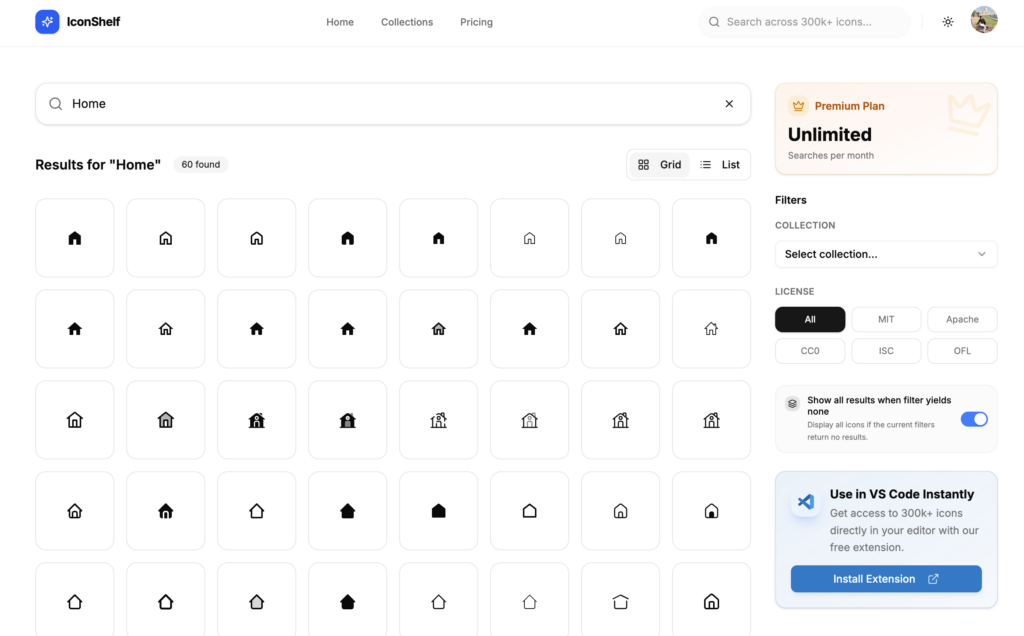
Finding the right SVG icon should take seconds. In reality, it often takes much longer.
You search one icon library, don’t find what you need, open another website, search again, compare styles, download an icon, realise it doesn’t match the rest of your UI, and start over.
If you’ve ever spent more time searching for an icon than building the feature itself, you’re not alone.
This guide shares practical ways to find SVG icons faster, keep your designs consistent, and avoid common mistakes that slow down your workflow.
🎥 Prefer watching?
Watch the video below to see how to search, preview, customize, and copy SVG icons for your next project in just a few clicks.
What Is the Fastest Way to Find SVG Icons?
The fastest way to find SVG icons is to search multiple icon libraries from a single place, use descriptive keywords, stick to one icon style, and save commonly used icons for future projects. These simple habits can reduce the time spent searching from several minutes to just a few seconds.
Instead of opening multiple icon websites, many developers use an icon search platform like IconShelf, which lets you search hundreds of thousands of SVG icons from multiple collections in one place. This makes it easier to compare styles, preview icons, and copy the one you need without constantly switching between websites.
The rest of this guide explains these techniques in more detail and shows how they can help speed up your design and development workflow.
Why Is It So Hard to Find the Right SVG Icon?
There are thousands of excellent SVG icons available online. The problem isn’t the lack of icons; it’s that they’re spread across dozens of different libraries.
Every website has its own search engine, naming conventions, categories, and design style.
For example, the same icon could be called:
User
Person
Profile
Account
Member
Avatar
If one website doesn’t use the keyword you’re searching for, you might incorrectly assume the icon doesn’t exist. That’s why developers often end up opening multiple tabs before finding the right match.
Why SVG Icons Are the Best Choice
Before discussing how to find icons faster, it’s worth understanding why SVG icons have become the standard for modern websites.
SVG icons are:
Lightweight
Infinitely scalable
Easy to customise
Compatible with CSS
Perfect for dark mode
Supported by every modern browser
Unlike PNG images, SVG icons stay sharp across all screen sizes and usually require much less storage.
Start With Better Search Keywords
One of the easiest ways to find icons faster is to improve your search terms. Instead of searching for only one word, think about related meanings.
For example, instead of searching for user, try searching profile, account, member, person and avatar
Different icon libraries describe icons differently. Trying a few related keywords often finds the icon much faster.
Search Multiple Icon Libraries at Once
Opening five or six icon websites every time you need an icon quickly becomes frustrating.
Instead of searching libraries one by one, it’s much faster to search across multiple collections from a single place.
This lets you:
Compare similar icons.
Find missing icons more quickly.
Keep your workflow focused.
Spend less time switching between browser tabs.
If you regularly work with SVG icons, using a unified search tool can save hours over the course of a project.
Keep Your Icons Consistent
One common mistake is mixing icons from several unrelated libraries.
For example:
Outline search icon
Filled home icon
Rounded settings icon
Sharp notification icon
Each icon looks good individually, but together they make the interface feel inconsistent. Before adding a new icon, check whether it matches the style you’re already using. Keeping a consistent icon style creates a more professional user experience.
Choose SVG Instead of PNG Whenever Possible
Some websites still use PNG images for simple interface icons. For modern web applications, SVG is almost always the better option.
SVG icons:
Scale perfectly.
Load quickly.
Can change colour using CSS.
Support animations.
Don’t become blurry.
For UI elements like menus, buttons, dashboards, and navigation, SVG is usually the best choice.
Avoid Downloading Huge Icon Packages
Many developers install an entire icon package just to use a handful of icons.
While modern build tools can remove unused code, downloading and managing large packages isn’t always necessary.
If you only need a few icons, copying optimised SVG code directly into your project is often the simplest approach.
This keeps your project smaller and reduces unnecessary dependencies.
Save Icons You Use Frequently
If you build admin dashboards, SaaS applications, or websites regularly, you’ll notice that the same icons appear again and again.
Examples include:
Search
Home
User
Settings
Calendar
Bell
Download
Upload
Keeping a collection of frequently used icons means you won’t have to search for them every time you start a new project. Small improvements like this can save a surprising amount of time.
Preview Icons Before Using Them
An icon may look perfect in search results but feel completely different once it’s added to your interface.
Before copying an icon, check:
Does it match your existing style?
Is the stroke width consistent?
Does it look good at small sizes?
Will it work in both light and dark themes?
Taking a few extra seconds to preview the icon helps avoid redesign work later.
Optimise Your SVG Icons
Not every SVG is optimised for production. Icons exported from design software often include:
Metadata
Hidden layers
Comments
Unused attributes
Extra XML
All of these increase file size without improving the appearance.
Optimised SVG icons load faster and keep your project cleaner. If you’re creating custom icons, tools like SVGO can remove unnecessary code automatically.
Common Mistakes When Searching for Icons
Many developers accidentally make their workflow slower. Some of the most common mistakes include:
Searching for only one keyword.
Opening multiple icon websites.
Mixing different icon styles.
Downloading huge icon packages.
Using PNG icons instead of SVG.
Forgetting to optimise custom SVG files.
Reusing inconsistent icon sets.
Avoiding these mistakes can save time on every project.
A Faster Way to Search SVG Icons
After trying many different workflows, one of the biggest improvements comes from reducing the amount of searching itself.
Instead of opening multiple websites, many developers prefer using a single search platform that brings together icons from multiple collections.
It lets you search more than 300,000 optimised SVG icons from multiple libraries in one place. You can preview icons, customise them, and copy the SVG code directly into your project without downloading large icon packages.
Whether you’re building with React, Vue, Next.js, Nuxt, Angular, or plain HTML, having one place to search can make finding icons much faster.
Final Thoughts
Finding SVG icons doesn’t have to interrupt your workflow.
Using better search terms, sticking to a consistent icon style, choosing optimised SVG files, and searching multiple icon libraries from one place can save hours over the lifetime of a project.
The less time you spend hunting for icons, the more time you can spend building great products.
Choosing a proxy provider sounds easy. Until you actually start researching options. Suddenly, every website claims to have the largest network. The fastest infrastructure. The highest success rates. The best residential proxies. The best mobile proxies. The best everything.If you’ve ever compared proxy providers, you know how quickly things become confusing.
The reality is that most buyers ask the wrong questions.
Instead of evaluating network quality, they focus on marketing claims.
Instead of examining reliability, they focus on headline pricing.
Instead of understanding their own use case, they compare IP counts.
That’s often where problems begin.
Here are ten questions every buyer should ask before making a decision.
1. What Is My Actual Use Case?
Before comparing providers, define your objective.
Are you collecting public data for web scraping, data collection, or market research?
Different tasks require different infrastructure. Different proxy types fit different business needs.
Some teams need reliable access to website content or geo restricted content depending on the project. Without clarity, every provider will appear similar.
2. What Type of Proxy Do I Need?
Most providers offer several proxy types.
These commonly include:
Datacenter proxies
Residential proxies
ISP proxies
Mobile proxies
Each category has unique strengths. dedicated proxies are often the better fit for consistent long-term use.
Choosing the wrong type often causes more issues than choosing the wrong provider. residential and datacenter proxies serve different needs, with one prioritizing trust and the other speed and scale. A proxy service may also include a proxy server setup, which gives users different performance tradeoffs depending on the workload.
3. How Are Residential IPs Sourced?
This question matters more in 2026 than ever before.
Responsible providers explain how IPs are obtained through ethical sourcing.
Look for transparency around how each residential IP and its underlying IP address are sourced, including the role of the internet service provider, consent mechanisms, and compliance practices.
A trustworthy network should clearly explain where its residential traffic originates, including whether it relies on real residential IPs from legitimate users rather than artificial infrastructure.
Some services also offer static residential proxies for longer-lived sessions, while others rotate more frequently.
4. How Large Is the Useful Network?
Advertised IP counts can be misleading.
A provider may claim millions of IPs.
What matters is whether the IP pool and proxy pool are active, healthy, and available in locations you actually need.
A large residential proxy pool only helps if the residential proxy pool is active and distributed where you need it.
An extensive pool or global network should be judged by usable coverage, not headline size.
Quality usually matters more than raw quantity.
5. How Good Is Geo Targeting?
Many projects depend on location targeting and precise targeting.
Ask whether targeting is available at:
Country level
State level
City level
ISP level
ASN level
Some providers also support specific countries alongside city and ISP filters. The more precise the targeting, the more valuable the network becomes for testing and research. Granular geo targeting improves access accuracy for local testing and research.
6. What Are the Success Rates?
Success rates provide a much clearer picture than marketing slogans, especially when they reflect stable connections rather than just headline claims.
Ask providers whether they publish performance benchmarks.
Buyers should also ask about failed requests, not just average success metrics.
Reliable providers often track success rates across major platforms and continuously monitor network health. High speed and low latency also matter when evaluating real-world performance benchmarks.
7. How Does IP Rotation Work?
Different workflows require different rotation strategies.
Some projects need a new IP on each request, since rotation can assign a fresh address every time to reduce blocking during web scraping.
Others need the same IP address for longer sessions.
Others need sticky sessions lasting hours, and static residential is often a good fit. Some providers, such as SOAX, offer dynamic IP rotation and session management tools for choosing between rotating and persistent sessions.
The best providers offer flexible controls rather than forcing one configuration for every customer, with support for automatic rotation without removing manual control.
8. What Developer Tools Are Included?
Proxy infrastructure is no longer just about IPs.
Modern buyers should evaluate:
APIs
Usage reporting
intuitive dashboard
Monitoring tools
Alerting systems
Strong tooling helps new users get productive faster. Comprehensive api documentation is a core part of developer tooling.
Good tooling often saves more time than a small pricing discount. Some providers also offer browser extensions for quick proxy control.
9. What Happens When Problems Occur?
Every network experiences occasional issues.
The important question is how providers respond.
Evaluate:
Support availability and the responsiveness of the support team
Response times
Documentation quality for faster issue resolution for users
Service transparency
Support quality becomes especially important during large-scale deployments, and enterprise buyers may want a dedicated support team for custom configurations.
10. Can I Test Before Committing?
The best way to evaluate a provider is to sign up and run a real trial or test before committing.
Use actual workloads.
Compare pricing plans and flexible plans during the test period.
Measure speed.
Track success rates.
Monitor block frequency.
Evaluate usability.
For small pilots, pay as you go can help, and some services compete at a lower price point.
Verify unlimited bandwidth claims during testing instead of taking them at face value.
A small test often reveals more than hours of sales conversations.
Final Thoughts
There is no universal best proxy provider, because the best proxy service depends on the situation.
The right choice depends on your goals, traffic patterns, budget, risk tolerance, the anonymity needs of proxy users, and broader business needs.
Organizations that ask better questions usually make better decisions.
Rather than chasing the largest advertised network or the cheapest price, focus on the factors that directly impact performance.
IP quality.
Geo targeting.
Compliance.
Rotation controls.
Support.
Developer experience.
Buyers should compare datacenter ips, dedicated datacenter proxies, and shared datacenter proxies based on workload. Buyers should also assess whether the provider offers a reliable proxy network for web resources at scale, with bright data serving only as a market benchmark example. And cheap residential proxies are not always the right choice if network quality is weak.
Get those right, and you’ll be much closer to finding a proxy provider that can support your projects both today and as the internet continues evolving in the years ahead.
Most people treat their IP address like a street address, something only relevant when someone specifically needs to find you. That assumption is wrong, and the gap between what people think their IP reveals and what it actually reveals is exactly the gap that advertisers, trackers, and data brokers live in.
The problem is not just that your IP is visible. It is that it leaks in ways a basic VPN check does not catch, and that most people have no idea how to verify whether their protection is actually working.
Key Takeaways
Your IP address reveals your approximate location, ISP, and device type to every site you visit
Standard IP checks miss DNS leaks, WebRTC leaks, and IPv6 exposure
Datacenter VPN IPs are flagged and blocked by most platforms, while residential IPs pass through undetected
Free tools exist to run a full leak check in under five minutes
What Your IP Address Actually Reveals
Before getting into how to check for exposure, it helps to understand what is actually at stake.
Every time you load a website, your IP address is logged. That single data point tells the receiving server your approximate geographic location, your internet service provider, whether you are connecting from a home network or a datacenter, and often whether you are using a VPN. That last one surprises people. The assumption is that a VPN hides everything. What it actually does, in most cases, is replace your home IP with a datacenter IP that is immediately recognizable as non-residential traffic.
Websites use IP reputation databases to make decisions about your connection in real time. Netflix blocks you. Google serves a CAPTCHA. A bank flags your session as suspicious. None of this requires a court order or a data breach. It is all automated, and it all happens because your IP address is carrying more information than most people realize.
Beyond location and ISP, your IP can be cross-referenced with other data points. If you have ever logged into an account from your home IP, that association is stored somewhere. Advertisers use it. Data brokers sell it. The IP address is not just a routing mechanism. It is a persistent identifier.
The Four Ways Your IP Gets Exposed
Running a VPN does not mean your IP is hidden. There are four specific failure modes that bypass VPN protection entirely, and most users have never checked for any of them.
DNS leaks happen when your device sends DNS queries outside the VPN tunnel. You might be routing your traffic through a VPN server in another country, but your DNS requests are still going to your ISP’s servers, which means your ISP can see every domain you visit. The VPN gives you the feeling of privacy without the substance of it.
WebRTC leaks are a browser-level problem. WebRTC is a technology that enables real-time communication features in browsers like video calls and voice chat. It establishes direct peer-to-peer connections that can bypass your VPN entirely and expose your real IP address. This affects Chrome, Firefox, and most Chromium-based browsers by default.
IPv6 leaks occur when a VPN only covers IPv4 traffic. Most modern devices have IPv6 addresses assigned by their ISP. If the VPN does not explicitly block or tunnel IPv6, those requests go out unprotected alongside your masked IPv4 traffic, revealing your actual location and ISP.
VPN dropouts are what happens when your VPN connection briefly disconnects. Without a kill switch, your device falls back to your regular connection instantly, and anything you were doing at that moment goes out on your real IP. This is not rare. Connection drops happen constantly on mobile networks, during sleep and wake cycles, and when switching between Wi-Fi and cellular.
How to Check Your IP Exposure Right Now
The following tools are free, require no account, and take less than five minutes total.
Start with ipleak.net. Load the page and let it run. It checks your visible IP address, your DNS servers, and your WebRTC status simultaneously. If your VPN is leaking DNS, you will see your ISP’s DNS servers listed alongside or instead of your VPN’s servers. If WebRTC is exposing you, your real IP appears in the WebRTC section.
For a more detailed DNS leak test, go to dnsleaktest.com and run the extended test. This sends a larger number of queries to expose intermittent leaks that a single-query test might miss.
For browser fingerprinting and WebRTC specifically, browserleaks.com gives you a granular breakdown of everything your browser is exposing, not just your IP. This is useful because even a perfectly functioning VPN does not hide your browser fingerprint, your screen resolution, your installed fonts, or your system language settings, all of which can be used to identify you across sessions.
Finally, run Cover Your Tracks from the Electronic Frontier Foundation. This tool tests whether your browser is uniquely identifiable among the millions of browsers in their dataset. If it tells you that your fingerprint is unique, a VPN is not solving your privacy problem on its own.
Document what you find. If any of these tests shows your real IP, your ISP’s DNS servers, or a unique fingerprint, you have an exposure problem that your current setup is not addressing.
Why a Regular VPN Is Not Enough
Here is the part that most VPN marketing leaves out.
Even if you pass every leak test above, the IP address your VPN assigns you might still be the problem. The vast majority of VPN services route traffic through datacenter servers. These servers have IP addresses that are registered to hosting companies like AWS, DigitalOcean, or Cloudflare, not to residential ISPs. IP reputation databases know this. Streaming platforms know this. Banks know this. Any service that wants to flag VPN traffic can do so by checking whether the IP belongs to a residential ISP or a datacenter.
This is why people using standard VPNs get hit with streaming blocks, CAPTCHA challenges, and account flags even when their VPN is technically working. The VPN is hiding their real IP, but replacing it with an IP that is just as suspicious, only suspicious in a different way.
The solution is not to use a better-hidden datacenter IP. It is to use a residential VPN that routes traffic through IP addresses assigned by real ISPs to real households. These addresses are indistinguishable from ordinary home connections because, structurally, that is what they are. No reputation database flags them as VPN traffic because they are not datacenter traffic.
This distinction matters for anyone who has assumed their VPN is protecting them and has never tested whether it actually is.
What Actually Fixes It
If your leak tests revealed problems, here is what to address and in what order.
Fix WebRTC leaks first since they are browser-level and easy to address. In Firefox, go to about:config and set media.peerconnection.enabled to false. In Chrome, use an extension like WebRTC Leak Prevent. This does not require changing your VPN.
For DNS leaks, switch to a VPN that has DNS leak protection built in and confirm that all DNS queries route through the VPN’s own servers. Verify this with dnsleaktest.com after making the change.
For IPv6 leaks, disable IPv6 at the network adapter level if your VPN does not support IPv6 tunneling. On Windows, this is done through the network adapter settings. On macOS, it is in System Settings under Network. On Linux, it can be handled through sysctl.
Enable your VPN’s kill switch and test it by manually disconnecting the VPN while running ipleak.net in a browser tab. If your real IP appears during the dropout, the kill switch is not working or is not enabled.
If the core issue is that your VPN’s IP addresses are being flagged by platforms, the only fix is switching to a provider that uses residential IPs. Leak protection and kill switches do not change the IP reputation problem. That requires an IP that is classified as residential by ISP databases, not just an IP that is encrypted.
Running these checks takes a few minutes. The alternative is assuming your protection is working and finding out it is not at exactly the wrong moment.
Let’s be honest about something: posting nice-looking photos and waiting for the magic to happen is not a strategy. A real presence on Instagram comes from knowing where you’re headed, posting like you mean it, and understanding the people you’re trying to reach. Because here’s what the app has quietly become the place people go to find businesses, size up services, learn from brands, and decide who’s worth trusting. That puts growth squarely on the radar for small businesses, service providers, creators, and anyone who wants to be more visible online.
There’s no shortcut version, sadly. What there is: a profile that looks like you mean business, content that’s actually worth someone’s time, and a real connection with the right crowd. Get those right and trust starts to build, and attention follows. So let’s walk through the pieces that actually move the needle.
9 Tips to Strengthen Your Instagram Presence
1. Buy an Instagram Growth Service for an Early Push
Initial proof is one of the most important parts of Instagram growth. One practical tip many growing brands use is buy Instagram growth service from Media Mister to give their profile an early engagement boost.
It can help support recent Reels and posts with views, likes, saves, comments, and followers, making the account look more active and credible. The real secret is using it carefully: buy engagement to support visibility, then keep people interested with helpful posts, clear captions, Reels, Stories, and consistent branding. Growth works best when paid support and real strategy work together.
2. Profile people can read in five seconds
First impressions happen fast on Instagram. Before anyone touches your content, they’ve already clocked your photo, your bio, your highlights, the general vibe of the page. So the page has to answer three things almost instantly: who you are, what you offer, why anyone should care.
The bio is where this lives or dies. Keep it simple, direct, and worked through with keywords and please retire the vague stuff. “Helping businesses succeed” could mean anything. “Instagram growth and content strategy for small businesses” tells a stranger exactly what they’ve found. Go specific every time.
Then put your highlights to work backing up the brand: services, testimonials, FAQs, results, tips, behind-the-scenes. A page that’s organized just reads as more professional, more trustworthy. And when people get your business immediately, they tend to stick around and take that next step.
3. Pick a person, not a crowd
Growth gets dramatically easier the moment you stop writing for everybody. That’s the trap most brands fall into broad content aimed at the whole world, which somehow connects with no one in it. Your audience should be steering everything: your topics, your tone, the look, the captions, the offers.
So get specific about one customer. What’s frustrating them? What do they ask before they buy? What would genuinely help them? What are they actually hunting for? Say your people are small business owners they probably want plain-English Instagram tips, content ideas, branding help, a way to get more visible without a marketing degree.
Once you really know them, the fog clears. You stop posting filler and start answering things people actually wonder about, which makes the brand feel relevant instead of forgettable. A strong presence is just the result of talking, over and over, to the folks most likely to need you.
4. Don’t post anything without a reason
Here’s a good gut-check before you hit publish: why does this post exist? Maybe it educates. Maybe it builds trust. Maybe it explains the service or shows a bit of personality. But if the honest answer is “I felt like I should post something,” that’s how a page ends up feeling scattered and a little hollow.
The healthiest feeds run on a mix. Educational posts carry the tips, guides, and what-not-to-do. Trust posts show your process, your experience, a client’s story, what you stand for. Promo posts say plainly what you offer and how to work with you. And personality posts remind everyone there’s a human back there.
Posting with a reason does something sneaky-useful too: it makes consistency easier, because you’re no longer staring at a blank screen wondering what to make. Line your content up behind your actual goals and Instagram quietly graduates from “social app” to “marketing channel that’s pulling its weight.”
5. Reels get to the point
Reels are still one of your strongest tools for reaching new people but not when they’re just trend-chasing for the sake of it. The good ones deliver value fast: explain one idea, make one point, land it in a clip people will actually watch to the end.
Start with a hook. A question, a problem, a slightly bold claim. “Stop making this Instagram mistake.” “One quick way to fix your profile.” Hook them, then hand over the useful bit without dragging it out.
Tips, tutorials, behind-the-scenes, service explainers, product education, a little storytelling all fair game, as long as the message stays easy to follow. Reels can absolutely boost your visibility, but they do their best work when they fit the bigger plan. Clear, valuable, consistent beats jumping on every sound that’s trending this week.
6. Captions that earn the read
A caption is the context your visual can’t give on its own, which makes it a much bigger deal than most people treat it. A good one explains the point, teaches something, and points people toward what’s next. Most brands flub it one of two ways captions so short they’re pointless, or so long and shapeless nobody finishes them. The target is readable and tied to what your audience needs.
Open with a line that makes the second line worth reading. Then make your point simply, in short paragraphs, so it never turns into a brick of text. Drop in a practical tip, an example, or a question that makes people pause and think.
Most of all sound like a human. No keyword-stuffing, no copy that reads like it came off an assembly line. If you sell growth services, captions are a perfect spot to name a problem, offer the fix, and let your expertise show without bragging about it. Done well, they make your content stick in someone’s memory.
7. Show up like you mean it
If there’s one unglamorous tip that quietly outperforms the rest, it’s consistency. And no, that doesn’t mean posting every hour or forcing something out daily until you resent it. It means turning up regularly with content that fits your brand and your people. The more often they see you being useful, the more they trust that you know your stuff.
A plan is what makes this survivable. Instead of scrambling for something to post tonight, sketch out a week or a month ahead. Build it around pillars tips, education, services, brand story, FAQs, customer problems so you keep variety without losing the thread.
A content calendar earns its keep here, too. Prep your captions, visuals, and Reels before crunch time, and the whole thing gets less stressful and more sustainable. Keep that steady rhythm going and your page reads as active and professional, and your presence grows the slow, durable way.
8. Stories and replies do the relationship work
Stories pull different weight than the rest. Feed posts and Reels get you found; Stories keep people close. Use them for updates, behind-the-scenes moments, quick tips, polls, questions, service reminders, the little day-to-day stuff that makes a business feel alive.
And good news they don’t need to be polished. Honestly, the slightly rough, off-the-cuff Stories often feel more real, and they let people see the humans behind the logo. For service businesses trying to build relationships before the sale, that’s worth a lot.
The other half is just… talking to people. Reply to DMs. Answer the questions. Engage like a friendly person rather than a ticketing system. A brand that communicates clearly and often is one people feel safe reaching out to and that’s what turns a static page into a presence with a pulse.
9. Use keywords and hashtags like a human, not a robot
Keywords and hashtags are how a lot of people stumble onto you, since plenty now search topics and services right inside the app. So your content should carry the words your audience would actually type.
Slip those keywords naturally into your name, bio, captions, and topics things like Instagram growth tips, social media strategy, online presence, content marketing, small business branding, Instagram marketing. Naturally being the operative word. Forced is obvious, and it reads badly.
Hashtags can help too, but keep them relevant. Skip the giant pile of trending-but-unrelated tags and pick a tight set tied to your industry, service, audience, and topic. A handful that actually fit beats thirty that don’t. Used sensibly, the whole approach helps Instagram place your content and makes you easier to find.
Conclusion
A stronger Instagram presence really does come down to strategy, patience, and consistency. Clear profile messaging, knowing your audience, content with a purpose, Reels, sharp captions, a plan, Stories, natural keywords, and honest review all of it working together so your brand is easy to understand and easy to trust.
Growth was never about just being active. It’s about being useful, clear, and consistent. When your content actually helps people and serves your goals, your presence gets stronger on its own over time. For small businesses and growing brands, Instagram can be a real engine for visibility, credibility, and long-term growth. Post with purpose, keep refining around what your audience needs, and let the rest compound.
Writing content is easier when you have the right information about your text. Whether you’re a writer creating articles, a student working on assignments, or a marketer preparing campaigns, a free text analysis tool can help you understand your content instantly.
By counting words, characters, sentences, and paragraphs, it provides useful insights that help improve accuracy, readability, and overall writing quality. With real-time results and a simple interface, you can analyse any text in seconds and make better writing decisions with confidence.
The Importance of Accurate Text Analysis
In today’s digital world, written content plays a crucial role in communication, marketing, education, and professional work. Whether you’re drafting a blog post, writing an academic paper, creating social media captions, or preparing business documents, keeping track of your text length is essential. A Smart Word Counter and Character Counter helps users instantly analyze their content and gain valuable insights into its structure and readability.
Text analysis tools have become indispensable for writers, students, marketers, and content creators who need quick, accurate feedback on their writing. Instead of manually counting words or characters, users can rely on intelligent tools that deliver results within seconds.
What Is a Smart Word Counter?
A Smart Word Counter is an advanced online tool designed to measure various text metrics automatically. It calculates the total number of words, characters, sentences, paragraphs, and sometimes even reading time. These tools provide real-time analysis, allowing users to monitor their content as they type or paste text into the editor.
Unlike traditional counting methods, smart counters offer a detailed breakdown of content statistics, helping users optimise their writing for specific requirements and platforms.
Key Features That Enhance Productivity
Modern text analysis tools come with a variety of useful features that go beyond simple word counting. Some of the most valuable functions include:
Real-time word and character counting
Sentence and paragraph analysis
Reading and speaking time estimation
Keyword density tracking
Character count with and without spaces
Readability assessment
Instant content updates
These features save time and eliminate guesswork, making content creation more efficient and accurate.
Benefits for Writers and Content Creators
Writers often work within specific word limits imposed by publishers, clients, or websites. A smart word counter helps maintain these requirements without interrupting the writing process.
Content creators can use the tool to optimize blog posts, articles, and website copy for better engagement. By understanding content length and readability, they can create material that is easier for audiences to consume and enjoy.
Additionally, SEO professionals frequently use character counters to ensure meta titles and descriptions fit search engine display limits, improving click-through rates and search visibility.
Essential for Students and Academic Writing
Students regularly encounter assignments with strict word count requirements. Exceeding or falling short of these limits can negatively impact grades. A Smart Word Counter and Character Counter allows students to verify their work instantly and make necessary adjustments before submission.
Research papers, essays, dissertations, and reports all benefit from accurate text analysis. The tool helps students stay organized and focused on content quality rather than manual calculations.
Supporting Social Media and Digital Marketing
Different social media platforms impose character restrictions on posts, captions, and advertisements. Marketers must carefully craft messages that remain concise while delivering maximum impact.
A character counter enables digital marketers to create content that fits platform guidelines without sacrificing clarity. Whether posting on social networks, sending email campaigns, or creating paid advertisements, accurate character tracking ensures professional and effective communication.
How Smart Analysis Improves Content Quality
Beyond counting words and characters, modern tools help users evaluate overall content structure. They can identify lengthy sentences, estimate reading time, and provide insights into readability.
These metrics help writers produce content that is more engaging and accessible. Readers generally prefer clear, concise, and well-structured text, making smart analysis an important part of the content creation process.
By regularly reviewing content statistics, writers can improve clarity, consistency, and user experience.
Fast, Simple, and User-Friendly
One of the greatest advantages of a Smart Word Counter and Character Counter is its ease of use. Most tools require nothing more than pasting text into a designated box. Results appear instantly, allowing users to make immediate edits and improvements.
The intuitive interface makes these tools accessible to beginners and professionals alike. No technical expertise is required, making text analysis available to anyone who works with written content.
Conclusion
A Smart Word Counter and Character Counter is more than just a counting tool; it is a powerful writing companion that enhances productivity, accuracy, and content quality. From students and bloggers to marketers and professional writers, anyone who creates written content can benefit from instant text analysis.
By providing real-time statistics, readability insights, and detailed content metrics, these tools help users meet requirements, improve communication, and create more effective content in less time. When speed and accuracy matter, a smart text analysis tool is an essential resource for modern writing.
You open an Incognito window, clear your cookies, and maybe even tweak a default setting or two. You feel reasonably hidden. Then, you head to a retail site or a news blog, and within minutes, an ad for the exact product you looked at yesterday follows you to a completely different corner of the web.
Here/s the uncomfortable truth: the moment your browser connects to a website, the data exchange is already over. Before you type a single character into a search bar, your browser has handed over a massive packet of identifying details.
Many of us live inside the browser, assuming that unless we actively type our name or log into an account, we’re just an anonymous face in the crowd. But data brokers and ad networks do not need your name to know exactly who you are. The instant a page loads, a site can see roughly where you sit on a map, what device you’re holding, and enough subtle hardware quirks to recognize you again next week.
This guide dismantles exactly what your browser reveals the moment you hit Enter, and maps out the specific Chrome add-ons that actually narrow that exposure without slowing your machine to a crawl.
See It For Yourself: What a Site Reads on Arrival
Abstract privacy warnings are easy to ignore. Verifiable data is not. If you want to see exactly how much your browser blabs to total strangers, you can audit your own setup in about 10 seconds using free, non-commercial diagnostic scanners.
Tools like BrowserLeaks, AmIUnique, and the EFF’s Cover Your Tracks are built specifically to show you what the web sees. They don’t sell software or harvest your data for lead generation: they simply mirror your browser’s raw output back at you.
When you run one of these scans, you’ll see three distinct layers of exposure:
Network Identity: Your public IP address, your approximate physical location, and the name of your internet service provider (ISP).
Device & Browser Signals: Your operating system, screen resolution, active timezone, system languages, and installed fonts.
Active Probes: Deeper scripts that test your graphics card capabilities (canvas rendering) and live communication protocols (WebRTC).
The most jarring number these scanners produce is your “uniqueness score.” This metric calculates how many other people among millions of scanned browsers share your exact combination of hardware and software traits. Most people expect to blend in. The reality is that your specific machine is likely a one-of-a-kind digital thumbprint.
What Your Browser Gives Away: The Leak Inventory
To fix a leak, you have to find it first. Data brokers treat your browser like a broken faucet, collecting dozens of tiny data points that seem harmless in isolation but create a terrifyingly accurate profile when bundled together.
1. Your IP Address and Location
Your public IP address is a digital mailing address assigned directly by your ISP. It travels with every single request your browser sends. If you click a link, the destination server must know where to send the data back.
Because of this basic architectural requirement, any site you visit instantly learns your approximate city-level location and who you pay for internet every month. It’s the most direct “who and where” signal available, and it acts as a stable anchor that data companies use to link your morning browsing on a laptop to your evening scrolling on a phone if both devices share the same home Wi-Fi network.
If you want to check yours, head over to Windscribe’s free What Is My IP tool.
2. Browser and Device Fingerprint Signals
This is where the tracking industry shifted when users started blocking traditional tracking files. Fingerprinting is a collection technique that gathers a long list of mundane specifications from your machine:
Your user-agent string (the specific version of Chrome and your OS)
Your screen resolution and color depth
The exact list of system fonts installed on your hard drive
Your local timezone and language layout
Your hardware concurrency (how many CPU cores your device has)
Canvas rendering quirks (how your specific graphics card draws a hidden 2D shape)
Individually, knowing that you use English and have an Intel processor tells an advertiser very little. Combined, these variables create a near-unmistakable identifier. Large-scale fingerprinting studies show that over 80% of desktop browsers are completely unique.
Here’s the catch, though: unlike a tracking file, a fingerprint is never actually stored on your device. You cannot go into your settings, click “delete,” and wash it away. The website computes it on the fly every time you arrive by measuring how your machine responds to basic script requests.
3. WebRTC: The Leak That Defeats a Half-Measure
Web Real-Time Communication (WebRTC) is a fantastic, built-in browser technology. It allows applications like Google Meet or Discord to stream voice and video directly inside a webpage without requiring clunky, third-party software installations.
But WebRTC has a structural flaw that online thieves and data miners exploit. To establish a direct, high-speed audio or video connection between two users, WebRTC has to look past basic network shields to find the fastest path. A malicious or overly aggressive webpage can execute WebRTC commands to query your browser for your true, raw public IP and your internal local network IP.
It does this silently in the background. It’s the primary reason why turning on a basic proxy or poorly configured security tool can still leave you completely exposed: the tool changes your superficial address, but WebRTC blurts your real one out the back door.
4. Request Headers and What They Quietly Announce
Every time your browser requests a webpage, it sends a bundle of text known as HTTP request headers. Think of these as the metadata envelope for your web traffic.
These headers announce your user-agent, your preferred language settings, and often the “referrer” header, which tells the destination site exactly which web link you clicked to get there. If you read an article on a forum and click an external link, the new site frequently knows the exact page you just departed.
5. Cookies and Trackers
Chocolate cookies are yummy… but the digital ones? Not so much. Third-party cookies and tracking scripts are small files dropped by ad servers that act as digital breadcrumbs, following you around as you hop across completely unrelated websites.
Cookies are the sloppiest, most primitive form of web tracking. Because they’re physical data fragments left on your machine, they’re highly vulnerable to basic cleanup tools. The tracking industry knows this, which is why they rely on cookies for basic advertising but turn to fingerprints and IP tracking when they want a profile that you cannot easily delete.
Why Incognito and Clearing Cookies Don’t Cover You
The tech industry spent years training users to rely on Incognito mode as a total privacy shield. That framing is a corporate illusion.
Let us look at what Incognito or private browsing actually does: it tells your local browser not to save your search history, your form entries, or your cookies on your own hard drive once you close the window. That’s it.
It protects your privacy from the next person who physically sits down at your computer. It does absolutely nothing to protect your privacy from the websites you visit.
When you open an Incognito tab, your public IP address remains completely unchanged. Your hardware fingerprint stays exactly as unique as it was in a standard window. WebRTC will still hand over your local network coordinates to any script that asks nicely. Your ISP still logs every single domain you connect to, and your office network administrator still sees exactly what you loaded during lunch.
Clearing your cookies is equally incomplete. It resets the easiest tracking layer while your deeper hardware signature remains completely intact. Browser privacy is not a master switch that you can turn on and forget. It requires reducing your exposure across several independent channels, and that is exactly where targeted, single-purpose add-ons come into play.
Before we look at the tools that help, we have to address one incredibly uncomfortable wrinkle: the add-ons people install to fix this mess can quietly become part of the problem.
A Quick Warning: Extensions Are a Leak Vector Too
The internet is full of privacy listicles recommending that you stack 15 different extensions to lock down your browser. That advice is downright dangerous.
First, installed extensions are themselves completely fingerprintable. When a webpage loads, its scripts can test the DOM (Document Object Model) to see if specific extensions are altering the page.
If you’re running an obscure, highly customized cocktail of 10 different privacy tools, your browser becomes so radically distinct that you have effectively handed ad networks a perfect, unique ID. You become easier to track, not harder.
Second, extensions represent a massive data-risk surface. Chrome extensions run with deep privileges, and the ecosystem is plagued by supply-chain hijacks.
For example, the documented 2024 Cyberhaven supply-chain incident highlighted how malicious updates can be pushed to previously benign extensions once an original developer sells their project to a shadowy buyer. Dozens of supposedly helpful utilities and AI-powered add-ons have been caught quietly harvesting browsing histories and shipping them back to third-party brokers.
To keep your browser from turning into an active liability, use a strict selection rule:
Install as few extensions as possible. More code means more risk.
Insist on open-source verifiability. Never trust a closed utility with your traffic.
Audit permissions. If a simple color-picker or text-highlighter requests permission to “read and change all your data on all websites,” deny it and delete it immediately.
With that defensive filter in hand, let us look at which specific add-ons reduce your data exposure, and which ones actually still function after Chrome’s recent architectural changes.
Hiding Your IP and Location: The Browser VPN
So, how do you hide your personal details from your browser? By using a browser VPN extension, like Windscribe for Chrome.
A browser VPN extension functions as a localized proxy. It intercepts the traffic traveling exclusively through your browser app and routes it through a remote, secure server. As far as the websites you visit are concerned, your home address doesn’t exist. They only see the IP address and physical location of that remote server.
We’re obviously biased here, but this specific headache is exactly why we built Windscribe’s Chrome VPN extension.
Windscribe is a privacy toolkit designed to stop ISPs, ad brokers, and network snoops from monitoring your habits. At its core, it encrypts your browser traffic and masks your identity. But instead of just acting as a simple, dumb pipe that changes your location, the extension is explicitly engineered to combat the multi-layered tracking we just broke down.
First, it forces your browser to adopt the remote server’s IP, instantly hiding your city-level coordinates. Second, it natively tackles the sneaky protocol leaks: it includes built-in WebRTC blocking and location-spoofing features. This means when an aggressive script tries to query your browser for your real local network interface behind the scenes, Windscribe feeds it fake data that matches your proxy location.
What Browser Add-Ons Can’t Do: Honest Limits
No single extension or collection of tools provides total, uncompromised invisibility. Anyone selling a “one-click anonymity button” is lying to you to secure a quick download or an affiliate signup.
A browser-scope VPN like Windscribe’s protects the data moving inside that specific browser app. It does not touch your whole device. If you have a chat app, a game launcher, or a torrent client running in the background on your operating system, their traffic travels completely out in the open through your normal ISP connection. To cover those, you need a full-device application, not a browser add-on.
Aside from that, extensions cannot save you from behavioral tracking. If you use an anti-fingerprinting extension, mask your IP, and clear your cookies, but then log straight into your personal Google or Amazon account, your privacy shield evaporates. You have voluntarily handed over your master identity key, and those companies will instantly tie all your masked technical traits straight to your real name and payment history.
Layering a few smart, well-maintained tools reduces what you give away by default. It turns your browser from an open book into an annoying puzzle for data brokers. But reduced exposure is the realistic, pragmatic goal: total digital vanishing acts do not exist on the modern web.
Frequently Asked Questions
Does a VPN stop browser fingerprinting?
No. A VPN like Windscribe masks your public IP address and physical location, which alters your network identity. It does not change your screen resolution, your installed fonts, or your graphics hardware configuration. To combat fingerprinting, you need to pair your network protection with a canvas randomizer or a privacy-focused browser setup.
Is Incognito mode private?
Only from people who share your physical computer. Incognito mode stops Chrome from saving your local browsing history and cookies once the session ends. It does not hide your web traffic from your ISP, your employer, the websites you visit, or the ad networks that use fingerprinting to track your hardware.
Are Chrome extensions safe to use?
Only if you are extremely selective. Extensions run with high browser privileges and are frequent targets for malicious software updates after being acquired by third parties. Stick to open-source utilities created by highly visible, trusted developers, keep your total extension count under five, and regularly review their data permissions.
What happened to uBlock Origin on Chrome?
Google’s transition to the Manifest V3 extension framework removed the technical capabilities required for the original uBlock Origin to run on Chrome. While the full version is no longer available there, its streamlined successor, uBlock Origin Lite, works perfectly fine under the new rules.
What is the difference between a VPN extension and a full VPN app?
A browser extension acts as a proxy that only reroutes the traffic generated inside that specific web browser. A full-device application runs at the operating system level, encrypting and securing all data that leaves your computer, including background software updates, messaging apps, and system queries.
It is easy to post on Instagram. But getting people to share your stuff is hard. That is where reposts can help. When someone reposts your stuff, new people see it. This brings you more views, clicks, and followers if your post helps them. In this guide, you will learn how to use reposts to build momentum on Instagram. I will show you why people share, how to ask them, and how to see if it works. By the end, you can build a repost plan that feels clear and useful.
What Are Instagram Reposts?
A repost is just when someone shares your post with their friends. They might put it in their Story, a Reel, or tag you in a post. A repost helps your content move beyond your own followers. So, a new group of people can see your post without finding your profile first. This matters because shared content often feels more trusted than content seen alone. If a friend or creator shares a post, people may stop and check it. That small action can lead to more views, more visits, and more people learning about your page.
Why Reposts Matter For Instagram Growth
This helps your posts travel far, makes people trust you, and brings them to your page.
Expanded Reach
Every repost gives your post a new place to be seen. Your content can reach someone else’s followers, Story viewers, or a close audience. This helps you move past your current follower list and gives more people a chance to visit your profile.
Increased Social Proof
When people see your post being shared, it feels more trusted. When someone shares your post, it shows they like it. This makes new people stop, read it, and follow you.
Higher Engagement
Shares bring you more likes, comments, and saves. It shows that people really care about what you made. When users keep acting on your content, it can help your post stay active for longer.
Stronger Community Building
Reposts make followers feel part of your page. They are not just watching your posts. They are helping your message reach more people. It helps you get closer to your followers and makes them feel like part of your group.
How To Increase Reposts On Instagram
If you want more shares, make your posts simple and helpful.
Create Content People Want To Share
People share posts that help them, teach them, or say something they already feel. So, start with simple content that gives a clear reason to share. Short tips, quick guides, checklists, before and after posts, quotes, and useful carousels can work well. Reels can also get shared when the idea is clear in the first few seconds. Keep one main point in each post. Do not say too much at the same time. When your post helps someone explain a thought, help a buddy, or save time, they will want to share it.
Increase Your Content’s Shareability
People share things that are quick to read. Use a good first line and short text. Make sure it makes sense right away. For example, a tip post should teach one clear thing. A carousel should make each slide easy to follow. A Reel should show the main idea fast. When a useful post needs more reach, buy Instagram Reposts from GetAFollower to help more people notice it and make it easier for the post to gain sharing activity.
Encourage Followers To Repost Your Content
Many people will share your post when you give them a simple reason. Tell people what to do in your caption. You can say “share this with a friend” or “put this on your Story.” Just keep it simple. Do not use the same line every time. Match the ask to the post. If the post is a tip, ask users to share it with someone who needs help. If you post a quote, ask them to share it on their Story.
Leverage User-Generated Content
This is just content made by your fans and followers. It can be a photo, video, Story, review, or post that mentions your brand. This type of content helps because it comes from real people. When you repost it with clear credit, your page gets fresh content, and the creator feels seen. It can also make other users want to tag your page. Tell them to tag you or use your hashtag. Then, share their posts on your page and say who made it.
Collaborate With Influencers And Creators
Working with creators helps you reach new groups of people. The best choice is not always the biggest account. A smaller creator with an active audience can bring better interest. Find creators who talk to the same people you want to reach. You can share each other’s Stories or Reels. Tell them what you want, but let them say it their own way. This keeps the repost natural. When the post feels real, people are more likely to watch, share, and visit your page.
Post When Your Audience Is Active
Timing matters too. Look at your app stats to see when your followers are online. Try posting at different hours and see what happens. Do not guess based on what works for another page. Your audience may act in a different way. See which posts get the most shares and saves. If your fans are online at night, post then. They will share more if they see it live.
How To Measure The Success Of Your Repost Strategy
You need to watch your numbers to see what works. Some brands connect Instagram Insights to Claude to check their views, shares, saves, and new followers in one place.
Do not judge your plan from one post. Look at many posts over time. Check which topics get shared the most. See whether Reels, carousels, or Story content brings better action. Also, check if reposts lead to real profile visits, not only views. This helps you find content that brings value. Once you see a pattern, make more posts in that style and keep testing small changes.
Common Mistakes To Avoid When Using Reposts
Reposts work best when they feel helpful and clear. One common mistake is sharing someone else’s content without giving credit. Always mention the creator when needed. Another mistake is sharing posts that do not fit your page. Every repost should match your topic and help your audience. Also, do not ask for shares in every caption. It can feel too much. Use calls to action when they fit the post. Keep your page focused on value. A good repost plan is simple. Just make helpful stuff, be nice to other creators, and make it easy to join in.
Final Thoughts
Shares can help your page grow over time. They work best when your posts are simple and helpful. Always think about your audience first. Then guide users with simple calls to action and track what works. GetAFollower can support this plan when you want more reach for posts that already give value. If you post good things at the right time, you will get more clicks and trust.
FAQ
1. What Are Instagram Reposts?
These are just posts, Stories, or Reels that other people share with their own friends.
2. Do Reposts Help Instagram Growth?
Yes. They bring you more views, trust, and visits if your post is helpful.
3. What Type Of Content Gets More Reposts?
Tips, carousels, Reels, quotes, user posts, and simple guides often get more reposts from users.
4. How Can I Track Repost Results?
Use your app stats to see your shares, views, saves, and new followers.
5. Why Should Brands Study Instagram Growth Trends?
Healthcare organizations across the U.S. are facing a difficult balancing act. They are expected to improve patient experiences, streamline operations, strengthen communication, and grow sustainably, all while navigating strict compliance standards and rising administrative pressure. Traditional systems often store data in separate silos, making it harder for teams to act quickly or deliver consistent service.
That challenge is one reason customer relationship management platforms have become increasingly important in healthcare. Modern CRM tools help providers manage patient journeys, automate outreach, improve scheduling, and create stronger connections across every touchpoint. Instead of treating growth and efficiency as competing goals, healthcare organizations are using CRM systems to achieve both.
Creating Better Patient Experiences Through Personalized Communication
Patients now expect the same level of convenience from healthcare providers that they receive from other service industries. They want timely reminders, clear updates, simple booking processes, and communication that feels relevant to their needs. CRM tools help organizations meet these expectations by centralizing patient information and enabling personalized engagement.
With a CRM system, providers can segment audiences based on appointment history, service interest, demographics, or care needs. This allows teams to send the right message at the right time, whether that means wellness reminders, follow-up care instructions, vaccination notices, or educational resources. Personalized communication often leads to stronger trust and higher patient satisfaction.
Healthcare leaders also recognize that retention matters as much as acquisition. A patient who feels informed and supported is more likely to return for future care and recommend the provider to others. That is why many organizations are investing in platforms such as crm marketing automation USA solutions that connect marketing, service, and patient communication into one organized workflow.
Improving Operational Efficiency Across Departments
Many healthcare systems lose valuable time because departments rely on disconnected tools. Scheduling teams may use one platform, marketing another, and patient support another. When data does not flow smoothly, staff members spend extra time switching systems, repeating tasks, or manually updating records.
CRM tools reduce this friction by creating a shared source of truth. Front desk teams can view communication history, marketing teams can track campaign responses, and support staff can access relevant notes without requesting information from multiple departments. This kind of visibility helps employees respond faster and with greater accuracy.
Efficiency gains also come from automation. Routine tasks such as appointment reminders, intake prompts, satisfaction surveys, referral acknowledgments, and lead routing can be handled automatically. Industry experts consistently note that automation frees staff to focus on higher-value work, especially in service-heavy environments like healthcare, where human attention is most needed.
Supporting Growth Through Smarter Patient Acquisition
Growth in healthcare is no longer just about opening new locations or adding more physicians. It also depends on attracting the right patients, responding quickly to inquiries, and building long-term relationships. CRM platforms help organizations manage each stage of that growth process more effectively.
When a prospective patient submits a website form, requests pricing details, or asks about a specialty service, speed matters. CRM systems can instantly capture that inquiry, assign it to the correct team member, and trigger follow-up communication. Faster response times often improve conversion rates because patients tend to choose providers who are accessible and responsive.
CRMs also help marketing teams understand what is working. They can track which campaigns generate appointments, which channels produce quality leads, and where prospective patients drop off in the journey. Instead of guessing where to invest, organizations can make decisions based on real performance data and optimize growth strategies over time.
Strengthening Compliance and Data Oversight
Healthcare organizations must treat data management seriously. Patient trust depends on privacy, security, and responsible communication practices. While no platform removes the need for sound internal policies, modern CRM systems can support stronger governance through structured workflows, permissions, and auditable processes.
Role-based access controls help ensure that employees only see the information relevant to their responsibilities. Activity logs can create clearer records of updates and interactions. Standardized templates also reduce the risk of inconsistent messaging or unauthorized outreach. These features are especially valuable for organizations managing large teams across multiple locations.
Compliance-conscious growth is a major priority in the U.S. healthcare market. Decision-makers increasingly seek technology that helps them scale operations without sacrificing accountability. A well-configured CRM can become part of that foundation by supporting communication discipline and more reliable data handling.
Enabling Better Decisions With Unified Reporting
Leaders need visibility to improve performance. Without clear reporting, it becomes difficult to understand patient demand, campaign outcomes, staff workloads, or service bottlenecks. CRM dashboards give managers a clearer view of operational health and growth opportunities.
For example, administrators can monitor lead response times, appointment conversion rates, referral sources, campaign engagement, and patient satisfaction trends in one place. This reduces dependence on manually assembled spreadsheets and fragmented reporting processes. It also allows leadership teams to spot issues before they become larger problems.
Unified reporting helps organizations become more agile. If one service line is growing quickly, resources can be shifted to meet demand. If outreach campaigns underperform, messaging can be refined. If no-show rates rise, reminder workflows can be adjusted. Better data creates faster, smarter decisions.
Conclusion
Healthcare organizations across the U.S. are adopting CRM tools because they solve real business and service challenges. They improve communication, streamline internal processes, support patient acquisition, and provide stronger visibility into performance. In a competitive and highly regulated environment, those advantages matter.
The most successful providers understand that growth and efficiency are built through better systems, not just harder work. A thoughtfully implemented CRM helps teams spend less time chasing information and more time serving people. That shift can strengthen operations today while creating a more resilient healthcare organization for the future.