Categories
Online Tools & Software Reviews

The Easiest Website Makers That Small Businesses Can Use Without Any Coding Skills 

Building a website for your small business shouldn’t feel like an impossible puzzle. Yet for many small business owners, setting up a website comes with challenges, it can seem overwhelming, expensive, or overly technical. But here’s the good news – modern website builders make it so much easier. You don’t need to understand code or have a background in web design to create a website that looks great and works for your business needs.

For small businesses, finding the best website maker that’s easy to use, not too expensive to maintain, and packed with useful AI features is the first step toward growing your online footprint. We will walk you through what to look for in a website builder, showcase six of the easiest no-code options available, and help you find the perfect fit for your business. 

What Makes a Website Maker Easy to Use?

When you’re running a business, simplicity is everything. You want tools that make your life easier, not ones that take hours to figure out. The best website maker platforms prioritize user-friendly design and intuitive functionality, allowing you to focus on growing your business rather than wrestling with complicated technology. Here are the core elements that define an easy-to-use website maker:

1. Drag-and-Drop Interface

Forget the complicated tech stuff, website makers with drag-and-drop tools allow you to visually arrange your website without needing to touch a single line of code. Want to move an image? Simply drag it into place. Need a contact form? Drop it directly into your layout. It’s as simple as building with digital blocks, making website creation accessible to anyone regardless of their technical background.

2. Pre-Designed Templates 

Starting from a blank page can feel intimidating. Platforms with a wide range of templates help you jumpstart your website. These templates are crafted by designers, and many cater to specific industries like retail, services, or restaurants. 

3. Built-In Features 

A great website builder comes with tools right out of the box. Features such as SEO settings, mobile optimization, and even e-commerce capabilities can save time and streamline your workflow. 

4. Affordable Pricing 

Creating a website shouldn’t break the bank. Many builders offer free or low-cost plans, giving you the flexibility to start small and scale as your business grows. 

With these criteria in mind, here’s a rundown of the no-code website builders that are tailor-made for small business owners. 

The Best No-Code Website Builders for Small Businesses 

1. Wix 

Wix is a household name among website builders, and it’s easy to see why. Its drag-and-drop editor gives you endless creative freedom, paired with features that are beginner-friendly but versatile enough for growing businesses. Wix has great AI features to support content, images and SEO needs. 

Why It Works for Small Businesses 

  • An intuitive, visual editor lets you build pages exactly the way you want. 
  • Wix platform offers hundreds of templates, making it easy to find one that fits your industry and needs. 
  • Built-in AI business tools include appointment scheduling, social integrations, and SEO guidance. 

Perfect For 

Freelancers, service providers, and small business owners who want an approachable and flexible solution. 

2. Squarespace 

If style is what you’re after, Squarespace is the clear winner. Known for its stunning, modern templates, it’s an all-in-one platform that covers web hosting, design, and functionality. 

Why It Works for Small Businesses 

  • Beautiful, professional templates designed to work on any screen size. 
  • Built-in e-commerce tools, blogging capabilities, and analytics. 
  • A streamlined editor that’s simple to use, even for first-timers. 

Perfect For 

Creative entrepreneurs, artists, and anyone who values sleek and polished designs.

3. Shopify 

Shopify is built with one purpose in mind, selling online. If your small business focuses on e-commerce, this builder includes everything you need to set up and manage an online store. 

Why It Works for Small Businesses 

  • Offers tools for managing inventory, processing payments, and even handling shipping. 
  • Integrates directly with platforms like Facebook and Instagram for seamless selling. 
  • A dedicated suite of apps that can expand your store’s functionality. 

Perfect For 

E-commerce stores, product-based businesses, and sellers who want hassle-free tools for managing online orders.

4. Weebly 

Weebly keeps things simple. With an easy-to-use interface and competitive pricing, it’s a great option for business owners who just need the basics. 

Why It Works for Small Businesses 

  • Drag-and-drop customization keeps the design process straightforward. 
  • Affordable pricing makes it accessible for businesses on a tight budget. 
  • Features include basic e-commerce, form builders, and mobile-responsive templates. 

Perfect For 

Budget-conscious small businesses and local shops that want a quick and functional website. 

5. GoDaddy Builder 

GoDaddy’s website builder is all about speed and simplicity. Their AI-powered setup can get your website up and running in minutes. 

Why It Works for Small Businesses 

  • The AI-driven builder makes starting a website quick and hassle-free. 
  • Pre-made sections and templates can be customized in just a few clicks. 
  • Includes marketing tools, such as email campaigns and social media integration. 

Perfect For 

Busy entrepreneurs who need to create a simple website fast, like, same-day fast. 

6. WordPress.com 

For bloggers and small business owners who need a bit more flexibility, WordPress.com is an excellent option. It delivers professional website capabilities while keeping the setup manageable. 

Why It Works for Small Businesses 

  • Designed with bloggers in mind but flexible enough for almost any business. 
  • Plenty of themes with one-click customization options. 
  • Features like built-in SEO tools and simple website management make running your site easy. 

Perfect For 

Freelancers, professional bloggers, and small businesses that want scalable website solutions. 

Comparing Features 

Here’s how these website builders stack up when it comes to ease of use, design, integrations, and support. 

PlatformEase of SetupDesign FlexibilityIntegrations and AppsSupport Options
WixVery easyHighly flexibleExtensive app marketplaceHelp center, live chat
SquarespaceEasyBeautiful, sleek templatesLimited integrations24/7 live chat and email
ShopifyStreamlined for eCommerceFocused on product pagesSeamless eCommerce apps24/7 support
WeeblySimple and beginner-friendlyLimited but functionalBasic integrationsEmail, chat, phone support
GoDaddyVery quick and automatedLimited customizationBuilt-in marketing tools24/7 phone and chat support
WordPress.comSimple, but requires learningFlexible with some effortExtensive plugin libraryForums and email support

How to Choose the Right Builder for Your Business 

The best website builder for your business depends entirely on your goals. Here are some examples to match common needs to the right platforms:

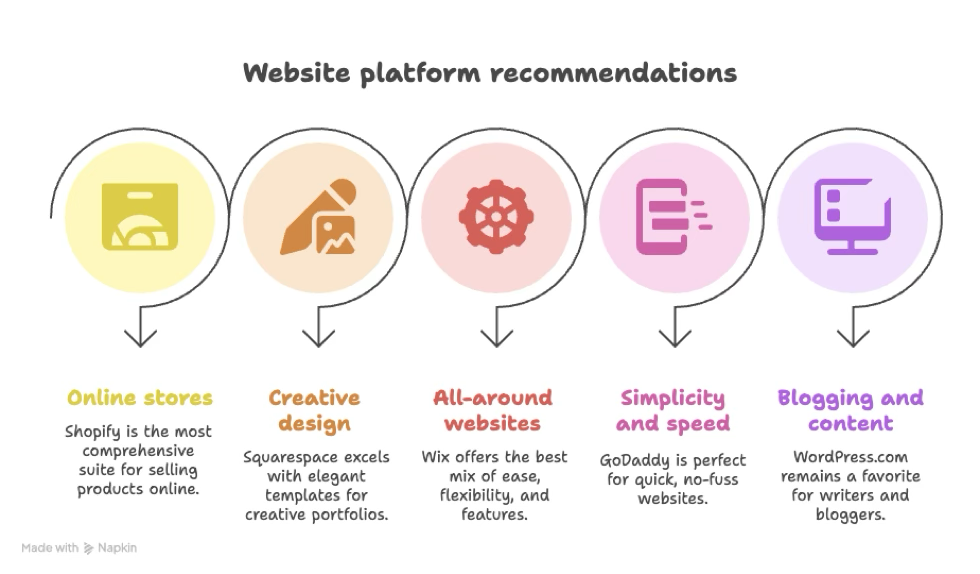
  • For online stores: Shopify, without question, provides the most comprehensive suite for selling products online. 
  • For creative design: Squarespace excels with elegant templates suited for creative portfolios or galleries. 
  • For all-around websites: Wix offers the best mix of ease, flexibility, and features for general business purposes. 
  • For simplicity and speed: GoDaddy is perfect for quick, no-fuss websites. 
  • For blogging and content creation: WordPress.com remains a favorite for writers and bloggers. 


Conclusion 

Building a website should feel empowering, not intimidating. With today’s no-code website builders, small businesses can create professional sites without taking a deep dive into web development. The best part is that these platforms all offer free versions or trials, so you can test them out before making a commitment. 
Remember, your website is a reflection of your business. Choose a builder that helps you put your best foot forward while keeping things simple. Try out a trial or free plan today, and start crafting the site that will help your business grow.


Categories
Online Tools & Software Reviews

How Automated Sales Outreach Tools Save You Time and Money

Sales teams across various industries must juggle multiple tasks and deliver exceptional business results, from generating leads to follow-ups and ultimately converting them. However, these processes require too much time and effort, and can lead to inefficiencies, as personalisation may be sacrificed when scaling the processes.

The best way to handle such tasks is by adopting automated sales outreach tools. These tools are designed to streamline sales operations, improve efficiency, and deliver results at a reduced cost. Statistics show that 74% of salespeople think automation will significantly impact how they perform their roles.

Read on to know how this works.

Streamline Lead Generation

Generating quality leads can be time-consuming as the sales team spends countless hours researching prospects on social media, cross-referencing databases, and following up with previous prospects who didn’t convert. Automated sales outreach tools eliminate this burden by leveraging AI and machine learning to identify prospective customers who match specific criteria.

Automation tools, like ringless voicemail replicating your voice, can reach several prospects through personalized voicemail messages delivered directly to their phones. This enables the sales team to reach a large group of prospects simultaneously without needing to dial them manually.

Additionally, automation tools can analyze large amounts of data to identify high-potential leads. This means that your sales team can focus their energy and resources on targeting prospects who are more likely to convert. This targeted approach not only saves time but also boosts the ROI of your outreach campaigns.

Personalized Messaging at Scale

Personalization is crucial for every sales strategy, but creating tailored messages that speak to each prospect can be challenging. You need to talk to the prospect, address their unique needs, and show how your offer solves their problems—doing this manually when you have an extensive list of leads to reach out to could lead to sending generic messages.

Providers like Drop Cowboy, among other reputable ones, offer tools such as ringless voicemail, instant messaging, and voice cloning that take your personalization efforts even further. With these tools, you can clone your voice to send voicemail messages targeting individual customers. They can also use email marketing tools to send hundreds of emails in a day, each uniquely tailored to the recipient, without spending hours on manual adjustments.

Moreover, these tools track how prospects interact with your messages, providing insights into what resonates most. Analyzing open and click-through rates can help refine their messaging strategies, ensuring future campaigns are even more impactful.

Automate Follow-Ups

Closing a sale takes an average of five follow-ups. But even so, only 66% of salespeople make multiple follow-ups. This could be due to the nature of follow-ups being tedious for the outreach team. Subsequently, several prospects are lost because of a lack of follow-ups.

Automating this procedure can help streamline it and ensure prospects are reminded regularly about the business. It also allows you to schedule and send follow-up messages at optimal times, ensuring no lead falls through the cracks. Some tools enable businesses to create drip campaigns that automatically send follow-ups based on pre-set triggers, such as a prospect opening an email or clicking a link.

This consistency ensures that every lead receives the appropriate attention without requiring manual intervention. Sales teams can focus on high-priority tasks while automation handles the repetitive work, keeping prospects engaged. It also helps maintain a professional image as timely communication signals to prospects that your company is organized, increasing their likelihood of engaging further.

Reduces Human Error

Traditional sales process has many manual processes, which could eventually lead to errors. It’s prone to typos, incorrect data entry, and missed follow-ups, which can easily affect your business credibility and lead to missed opportunities. Automated tools minimize these risks by standardizing processes and ensuring data accuracy.

The right automation tools can sync information across platforms, reducing the likelihood of discrepancies. If prospects see that you’re getting their information right, they will likely engage your business. It also ensures no disconnect or mix-up during your sales campaign.

Additionally, using templates and pre-scheduled messages eliminates the risks of sending messages. You can review the information, remove any errors, ensure it has the right tone, and target the correct segment before scheduling them to send.

Increase Team Productivity

Salespeople spend only 32.5% of their time selling and 65% of their time doing other things. This is because they’re often overwhelmed with duties and tasks that slow them down and affect their productivity. The best way to change this is by automating the outreach process and letting the tools handle mundane administrative functions as they focus on revenue-generating ones.

For example, some tools simplify meeting scheduling by directly integrating email and calendar systems. This eliminates the back-and-forth communication typically required. Similarly, CRM platforms automatically log interactions, ensuring that sales teams don’t waste time entering data manually.

Automation also prevents burnout among sales teams. When tools handle most of the non-selling tasks during the sales process, teams are left with fewer tasks to focus on. This allows them to focus better, give their best, and deliver good results.

Provide Insightful Analytics

Understanding what works and what doesn’t is crucial when refining your sales strategy. That’s why it’s important to work with automation tools that have analytics capabilities to help you understand key performance indicators such as open rates, click-through rates, and conversion rates.

These insights ensure your sales teams make data-driven decisions, improving the effectiveness of their campaigns. A sales outreach tool with a real-time dashboards that track prospect engagement, enables businesses to adjust their strategies on the fly.

In addition to tracking individual campaigns, automated tools can identify broader trends, such as the best times to contact prospects or the types of messages that drive the most engagement. With this data, businesses can continuously optimize their outreach efforts, saving time and maximizing ROI.

Final Thoughts

Sales outreach automation is one of the best ways to increase sales reps’ efficiency and success. By automating repetitive tasks such as sending personalized emails, reps can focus their time and resources on engaging customers, closing sales, and delivering better ROI. If you’re ready to take your sales efforts to the next level, now is the time to explore automation.

Categories
Online Tools & Software Reviews

7  Best Reverse Image Search Tools for Stunning Results

You can’t trust everything you see online. Not every image you find tells the true or at least the whole story. Images can be easily stolen, altered, edited, or misused without giving the creator any credit.

Thus, this results in the spreading of fake news.

Therefore, whether you’re sourcing visuals, fact-checking, or protecting your content, you need a way to dig deeper than just a glance.

But how? A surface look is not enough.

So, in such situations, using a reliable reverse image search tool can be a real help.

Let me explain how. 

These tools are designed to scan your image and identify potential matches across the web. Thus, they can help you trace the origin, spot duplicates, and verify authenticity in seconds. 

7 Best Reverse Image Search Tools You Need To Try

No doubt, there are many image search tools and methods available online, but let’s be honest, not all of them are reliable. As a content creator, if you want to protect your images from being stolen or ensure you only use visuals with verified sources, here is our pick of the 7 best reverse image search tools that you can rely on. So, without wasting any further time, just start reading to find the one that best matches your needs and requirements. 

1. DupliChecker – Image Search Tool

DupliChecker indeed offers one of the most efficient, reliable, and free reverse image search tools available, enabling users to check image context and background information.

The search by image tool is specifically designed to trace the source of an image, identify its duplicates, or verify its originality.

For this, simply upload the image directly to the tool or enter its URL in the designated box. The photo search tool will scan the image and search it across the web to find any potential matches.

The best thing about this image search tool is that it’s entirely free and doesn’t require any sign-up. Therefore, students, bloggers, marketers, and freelancers can use it to verify the authenticity of their images.

Key Features

  • Upload, paste URL, or drag and drop
  • Shows results from top search engines
  • No registration required

Pros

  • User-friendly interface
  • Instant results
  • 100% free

Cons

  • No AI or visual analysis
  • Basic results, no sorting or filters

What is it Best For?

Users who want a simple, free solution to trace image sources without advanced tools.

2. Reversely.ai

Reversely.ai utilises artificial intelligence to surpass the basics of reverse image search. Thus, its capability is not just limited to finding exact duplicates. You can also use the tool to detect similar, cropped, or edited images—all thanks to its advanced deep visual pattern recognition.

This indeed makes it an excellent image search tool for detecting plagiarism in visuals, verifying image authenticity, or uncovering where an image has been reused or repurposed.

What is the best part here?

You can upload images in various formats, and it analyses visuals based on object patterns rather than metadata. This flexibility and accuracy make it a top choice for designers, journalists, and digital content creators who want precision and accuracy in their search results.

Key Features

  • AI-powered visual recognition
  • Finds edited, cropped, or altered images
  • Supports multiple file formats

Pros

  • High precision
  • Modern interface
  • Great for content validation

Cons

  • Some features require a sign-up
  • Limited free searches

What is it Best For?

Professionals need AI-level accuracy to detect visual alterations and content reuse.

3. SearchByImage

SearchByImage is a web-based reverse image search tool that enhances your daily workflow. With just one click, you can upload an image, paste a URL, or even enter keywords to find similar images across the web. 

It integrates with multiple search engines and uses advanced algorithms to deliver quick and accurate results. 

The best feature of this tool is its support for facial recognition. Therefore, you can use it to image verify authenticity, trace sources, and even check the copyright. 

The versatility indeed makes it a perfect tool option for users who frequently deal with online visuals and need fast, reliable results on any device.

Key Features

  • Web-based tool for desktop and mobile
  • Multiple input options (upload, URL, keywords)
  • Facial recognition and advanced filters

Pros

  • Fast and easy to use
  • No sign-up required
  • Works on all devices

Cons

  • Requires an internet connection
  • No browser extension available

What is it Best For?

Users who want a simple yet powerful web-based image search with facial recognition.

4. TinEye

What makes Tineye a reliable reverse image search tool is the fact that, unlike most tools, TinEye doesn’t just rely on the image’s metadata or keywords to find similar visuals. Instead, it uses advanced image recognition to trace where an image appears online.

Therefore, you can conveniently use the tool to detect modified versions. This means the tool enables you to track images even if they are resized, cropped, or colour-edited visuals.

That’s not all.

Do you know what exactly makes it stand out?

Professionals mostly use the tool to protect their image copyrights, confirm image sources, or analyze image history.

Moreover, you can also sort results by oldest appearance, making it easy to find the source. Thus, it’s indeed a robust API for developers and image monitoring for businesses.

Key Features

  • Custom image detection system
  • Sort results by the oldest or newest
  • API and image tracking are available

Pros

  • Reliable and accurate
  • Tracks edited versions
  • No account required for basic use

Cons

  • Limited free searches
  • Doesn’t find similar-looking images

What is it Best For?

Professionals and developers need historical tracking and copyright protection.

5. Google Image Search

If you don’t want to do much experimenting and are looking for a globally trusted image search tool, then Google Image Search is indeed a reliable option for you.

It’s widely known for its simplicity and reach.

It’s easy to use—you just have to upload the image directly, drag it into the search bar, or paste its link. Google then provides visually similar images, web pages containing the image, and multiple image sizes.

However, it lacks advanced filtering or AI recognition, so it may not catch modified or fake visuals. Still, for general use, its speed and extensive index make it a reliable go-to tool.

Key Features

  • Drag-and-drop interface
  • Finds similar images and page links
  • Runs on all devices and browsers

Pros

  • Free and fast
  • Enormous search database
  • No login required

Cons

  • Doesn’t detect edited versions
  • Lacks precision for advanced needs

What is it Best For?

Every day, users need a fast and straightforward image search that is free from technical complexity.

6. Getty Images – Reverse Search

Getty Images is designed to provide users with licensed and royalty-free visuals. However, you can also conveniently use it to perform a quick reverse image search within its library.

For this, simply upload an image to the tool. It will help you find visually similar ones, often with better resolution and detailed licensing options.

Therefore, it is a competent and reliable tool option for designers and marketers to find usable visuals legally while matching a specific style or concept.

The reverse search ensures that what you find is high-quality and ready for professional use, though it only works within Getty’s content.

Key Features

  • Upload to find matching visuals
  • Focused on premium stock content
  • Detailed licensing information

Pros

  • High-resolution and curated results
  • Ensures copyright compliance
  • Trusted source for professionals

Cons

  • Only searches within Getty’s database
  • Not useful for web-wide image tracking

What is it Best For?

Professionals seeking licensed, high-quality visuals for commercial and creative use.

7. Lenso.AI

Lenso.AI is a next-generation reverse image tool specifically designed for professionals who want to verify the authenticity of each image they use in their content.

The feature that makes it a standout option among others is its integration of AI and computer vision technology. Thus, this enables the tool to detect AI-generated images, tampered content, and even the source history of an image.

The tool doesn’t just show matches; however, it also explains patterns, changes, and visual anomalies. Therefore, it is undoubtedly best suited for law firms, content verifiers, and tech-savvy users who need more than just surface-level results.

Key Features

  • AI-based forensic image analysis
  • Detects manipulation and fake content
  • Insightful metadata and visual breakdown

Pros

  • Strong accuracy
  • Detects deep edits
  • Useful for professional investigations

Cons

  • Not beginner-friendly
  • Some features may be premium

What is it Best For?

Advanced users and investigative deep forensic image verification.

Conclusion

Every image tells a story, like they say, a picture is worth a thousand words. However, that doesn’t mean every story it tells is true.

Images can spread misinformation and incorrect information faster than words. Therefore, you can blindly trust them. 

Thus, whether you are a content creator or simply someone who values accuracy, you must ensure that you only use authentic and credible visuals. Therefore, before using any image, verify it using the right reverse image tool. Once you are satisfied with its authenticity, you should incorporate it into your content or share it.

Categories
Online Tools & Software Reviews

10 Best Free Online Tools Every Traveller Should Bookmark

Planning a trip? Whether you’re travelling for fun or work, having the right online tools can make your journey smoother and stress-free. From converting currencies to staying connected on the go, here are 10 free online tools every traveller should bookmark before taking off.

1. Currency Converter

When you’re travelling internationally, it’s hard to keep track of how much things cost in your currency. A currency converter helps you quickly understand prices and avoid overspending.

Why it’s useful:

  • Helps while shopping or booking tours.
  • Gives real-time exchange rates.

2. Timezone Converter

Travelling across time zones? A timezone converter helps you know the local time wherever you are, perfect for scheduling flights, meetings, or video calls with people back home.

Why it’s useful:

  • Avoids confusion while planning your day.
  • Great for international layovers and work calls.

3. Free eSIM for Instant Internet Access

These days, having mobile internet is just as important as having a passport. Instead of searching for a SIM card at the airport, you can install a digital eSIM before you even arrive.

Why it’s useful:

  • No need to change your physical SIM.
  • Start using the internet the moment you land.

4. PDF Compressor

Travel means carrying a lot of documents — tickets, visa forms, ID proofs, and hotel bookings. But sometimes these PDFs are too big to email or upload. A PDF compressor helps you shrink the file size in seconds.

Why it’s useful:

  • Reduces file size without losing quality.
  • Makes it easy to send files over slow internet.

5. QR Code Generator

Want to quickly share your hotel address, contact info, or location with a travel buddy? Create a QR code that can be scanned in seconds, without needing to type long addresses.

Why it’s useful:

  • Works offline once generated.
  • Great for sharing Wi-Fi passwords or links.

Try it: GoOnlineTools QR Code Generator

6. Online Language Translator

If you’re visiting a country where you don’t speak the language, a translator can help a lot. You can translate menus, ask for directions, or even read signs on the go.

Why it’s useful:

  • Instantly translates text, voice, or images.
  • Helps avoid miscommunication.

Try it: Google Translate

7. Unit Converter

You’ll often need to convert things like kilometres to miles or Celsius to Fahrenheit, especially when reading road signs or weather reports.

Why it’s useful:

  • Makes local measurements easier to understand.
  • Good for cooking, driving, and checking temperatures.

8. Screenshot Editor

Planning a trip often means saving screenshots of directions, restaurant menus, and tickets. A screenshot tool lets you capture, crop, and highlight important parts before saving or sharing.

Why it’s useful:

  • Helps you organise visual notes.
  • Works great for mobile and desktop.

Try it: GoOnlineTools Photo Editor

9. Online Notepad or Checklist Tool

Keep track of your packing list, bookings, or day plans using an online notepad. No app required, just open and start typing.

Why it’s useful:

  • Works in any browser.
  • Helps organise thoughts or travel ideas.

Try it: GoOnlineTools Online Notepad

10. Flight Status Tracker

Want to know if your flight is on time or delayed? A flight tracker lets you monitor departures and arrivals in real-time.

Why it’s useful:

  • Helps avoid airport surprises.
  • Good for tracking friends’ or family flights too.

Final Thoughts

Travelling is much easier when you’re prepared. These free tools cover everything from managing files to staying connected, and they all work right from your browser.

Categories
Online Tools & Software Reviews

How Vehicle Inspection Tools Can Reduce Comebacks

Aren’t comebacks a bummer? It’s such a buzzkill when you did a good job inspecting the vehicle and taking care of the repairs, only for the customer to return with a complaint. Almost every auto repair shop struggles with comebacks now and then. When this happens, how do you decide who will be responsible for it? You might start losing money fast when your technicians are questioned about “how well the job was done?” 

While experts are on hand to fix whatever is wrong with the vehicle, AI-powered tools can be more helpful. A tool that takes over vehicle inspection on a technician’s behalf can improve the overall process. An auto repair shop with a streamlined workflow uses smart vehicle inspection tools for further evaluation. 

How? 

Let’s take a closer look at how such tools can reduce comebacks and also improve the overall efficiency of vehicle inspections and repairs. 

Why comebacks occur 

There are multiple reasons why comebacks can occur. The most common reasons are: 

Broken workflow 

The first major point of concern for any auto repair shop is its workflow. Many might not like the idea, but it can be true at times. Any error in the existing workflow can result in loss of time, productivity, and several complaints (and comebacks). 

A broken workflow, such as a lack of space, a slow inventory reordering process, or lots of time breaks for coffee or smoking, can be a root cause for inadequate inspection. Or perhaps the reason a technician might be distracted and not focusing on the task at hand. 

For instance,  a car delivered to the customer suffers an epic engine failure because the disintegrated water pump issue wasn’t taken care of in the first place. Hence the comeback. 

Lack of training 

Each comeback is expensive, costing you time and money, and a frustrated customer. If a technician fails to understand a customer’s concern, then they fail miserably. A wrongly inspected vehicle is one of the most common causes of comebacks. 

Another reason can be the lack of proper training for the employees at hand. A workshop owner must train their technical staff about new vehicles, new technology being used in the shop, and how to ensure a quality check. 

Unable to handle challenging situations 

Another common issue is that technicians or the technical staff try to handle the challenging issues on their own. While they might be expert with the car’s engine and can locate the real root cause, handling a paranoid customer might not be their strongest suit. Mechanics are reluctant to guide customers about the diagnostic issues because they can be looked over as inexperienced or unprofessional. 

Also, sometimes shop managers fail to discuss comebacks with the technician, which can lead to pointing fingers and dismissal of serious concerns. 

What are car inspection tools? 

Any auto repair shop is proud of two things: its manpower and the tools invested in. The right choice of vehicle inspection tools enables them to keep a clean bill of the cars’ health and track their performance too. Digital vehicle inspection helps track other metrics as well, such as in-house and outhouse repairs, check off tasks, etc, in detail, making sure everything is available at a whim of a click. 

Having high-quality vehicle inspection tools (which are also affordable) makes it a lot easier to manage repairs, improve workflow efficiency, and reduce the number of comebacks. 

An in-depth vehicle inspection is mostly mechanical. Previously, it used to take more than a day, two at max, for a thorough inspection. But now the use of modern digital tools has made it a piece of cake, such as the use of:

  • Laptop 
  • Cloud-based software  
  • A tachometer 
  • All the necessary tools 
  • OBD-II scanner or a code reader 
  • Camera systems 

How vehicle inspection tools reduce comebacks 

According to a survey, a comeback can cost around $250-$400 on average. However, modern-day vehicle inspection tools help in the following ways to reduce the comeback costs: 

  1. Double-check repairs 

The aim of using digital vehicle inspection tools is to ensure no follow-ups are required. The series of steps is defined by the technician, who is well-trained to use advanced tools. At every step, a digital sign-off is required (for verifying the inspections). Hence, leading to a quality control system. 

Let’s say a car’s brake was repaired, the vehicle inspection tool can signal a follow-up or suggest a second opinion by the expert on-premise. 

This eliminates the likelihood of missing a crucial step during repair. 

  1. Tracks the repairs 

Using digital inspection tools allows auto shop owners to track the diagnostic codes and even keep vehicle data stored. The whole repair history is stored in the cloud, which allows technicians to view a vehicle’s history. 

Also, the service managers can share the reference to past work done, analyze and identify the recurring and new issues, and also pinpoint any breakdown that might occur. 

  1. Maintains documentation 

Maintaining documents manually can lead to errors and data omission on a busy day. Because vehicle inspection tools are cloud-based, inspection details are easily recorded and stored in the cloud. 

It can include videos, pictures, paperwork, technician notes, time stamps, estimates, and other details. All records and documents are verified as each step is performed during the inspection. It helps to avoid any disputes, miscommunication, and warranty claims. 

  1. Improves customer communication 

One of the major reasons for a comeback is the lack of proper communication between the customer and the technician. Verbal communication may not be their strongest skill, which is why inspection reports can be shared with the client that list the vehicle details. 

Customers can be given real-time updates in case any further repair is required or a comeback is needed. 

  1. Holds the technician accountable 

The technician handling the repairs and inspections is initially accountable for the comeback. It makes the most sense to deduct the hours in the week when the comeback repair is expected. Vehicle inspection tools enable auto shop owners to eliminate broken workflows and keep an eye on mistakes. 

In such scenarios, mistakes are traced to the technician who inspected the vehicle. This also encourages them to repair or inspect the vehicle properly the first time so that standards are met. 

Modern-day inspection tools are worth every penny 

Eliminating delays, correctly diagnosing the issue in the vehicle, and maintaining documents are the most important to a repair shop. You can create a quality control system using modern tools to ensure comebacks are reduced and increase customer retention over time. 

Categories
Online Tools & Software Reviews

10 Essential Tools for Launching a Successful E-commerce Business

The world of e-commerce itself is competitive territory. If you want to build a successful online store, you need the right tools. These tools make processes easier, offer better experience to the customers and lead up to growth. And really without them a business faces issues such as inefficient processes, lack of visibility and low customer retention.

Ecommerce success needs technology that allows you to instantly control marketing, operations, and support. From an all-in-one marketing platform that helps grow online stores to review management tools that help build marketplace credibility, some tools can help transform your ecommerce dream into a doable scalable reality.

What is a Successful E-commerce Business?

Trust, efficiency and marketing power make a successful e-commerce business. It continually finds customers, provides effortless shopping, and creates loyalty for repeat purchases. When businesses can mix awesome products with amazing service and equip themselves with tools to grow, success comes knocking!

This is where Yotpo can be extremely helpful in winning and maintaining this success. Yotpo built their review management tools to help you collect and showcase customer feedback to build trust. Good reviews are social proof, which compels others to purchase. Yotpo also does its part by offering an all-in-one marketing platform. Customized email campaigns, loyalty programs, and incentives will also make customers feel special, encouraging them to stay engaged and loyal.

With Yotpo being integrated into so many systems, you have that seamless integration which frees you up to focus on customer satisfaction. From establishing trust to maintaining lasting relationships, it has features for all levels of e-commerce growth. This paves the way for an efficient, trustworthy, and sustainable online business in a competitive landscape with the implementation of tools and services like Yotpo.

Explore these 10 Essential Tools for Launching a Successful E-commerce Business:

  1. Integrated Solution To Grow Your Online Store

An all-in-one marketing platform combines different aspects of marketing under one roof/channel of communication. It handles email campaigns, social media, analytics, even targeted ads, minimizing the number of tools you need. Which simplifies workflows while saving you a lot of time.

One example of this is automating abandoned cart emails. Users get personalized follow-ups to complete purchases for them in case they leave something in the cart. All-in-one marketing platform for growing online stores allow businesses to drive higher conversions while making use of the integrated functions to build relations with customers.

  1. Tools to Manage Reviews that Build Marketplace Credibility

Reviews from customers are crucial for luring in new buyers. These can consist of customer review management tools that help you can gather and showcase reviews from customers and use that feedback for the product features. These tools simplify credibility-building while driving the purchases.

Automate requests for certified reviews after each sale, for example. They presented future buyers the reliability of the product, boosting up the sales and retention towards the product. Without the review management tools that create credibility in the marketplace, you’re opening your e-commerce brand to a credibility crisis where you losing the trust της your audience and customers.

  1. User-Friendly Website Builder

The foundation of your e-commerce store is your website. A site builder designed for people who aren’t unique building, hand-coding geniuses allow you to develop an impressive website with fighting, mobile responsive, with no such coding skills expected. These builders provide templates, customizable designs and SEO tools to optimize it.

For instance, you can quickly create product pages with a drag-and-drop editor and rich media. The website is responsive to the mobile screen lowering the chances of bounce rates, thus, improving the customer retention rate. Without a business-grade website, they lose opportunities to earn a warm first impression.

  1. Secure Payment Gateway

Secure payment gateways ensure the safety of customer financial information and pragmatically applies a shield against fraudulent threats. As it allows for payment processing encryption while remaining compliant to international standards such as PCI DSS.

For instance, during a transaction, the gateway encrypts the credit card details in order to avoid data theft. And this inspires confidence in customers, increasing the odds of completing checkout. Robust security guarantees customers that you are trustworthy ensuring you avoid losses and keep up with customer loyalty.

  1. Inventory Management Software

Inventory management is an essential part of your business for the successful completion of orders. Real-time inventory management software records stock levels that assist you in avoiding overselling or running out of critical items.

For example, integrated systems remind you of low stock for a product. Refer to inventory levels in your warehouse so that you can bring in stock in good time to avoid lost sales. Moreover, precise inventory systems reduce the risks of mismanagement, which improves the efficiency of operation and the trust of the customer.

  1. Transactional Customer Relationship Management (CRM) Tool

Businesses use CRM tool to record and analyze customer data, including purchase history and preferences. This information allows business to forge more personal relationships that inspire loyalty.

An example would be: you can segment customers based on when they purchased, and provide them with discounts as an incentive. This personalized approach promotes engagement with higher retention rates and repeat sales. The key to having an effective tracking way of CRM tools lies in a customer relationship management (CRM) tool.

  1. Logistics and shipping platform

Order fulfillment that is timely is essential to e-commerce success. Shipping and logistics solutions help simplify processes such as creating labels, managing multiple carriers, and updating customers on tracking.

For example, calculating shipping costs and printing labels for orders. Customers receive tracking links in real-time, bridging the gap between trust and transparency in delivery. These platforms also reduces error and enable a timely and accurate shipment delivery.

  1. Tools for Optimizing Search Engines (SEO)

SEO Tools: SEO tools increase the visibility of a shop by enhancing its search engine rankings. This includes keyword analysis, backlink monitoring, and technical issues affecting website performance.

Example: You can use any SEO tool to check site speed and other optimization areas. Search engines love faster websites, and high ranking means organic traffic. Increased visibility leads to higher conversion rates, which is why SEO Tools are essential for success.

  1. Customer Support Tools

Support affects customer satisfaction and customer loyalty. Live chat systems and ticketing platforms come in handy for providing immediate and efficient answers to customer problems. They simplify how we manage queries and can reduce time taken to respond.

For example, customers can receive instant responses to product queries through live chat. It creates confidence and lessens the chances of abandoning the cart. Good support enriches the shopping experience and leads to reorders and positive feedback.

9. Analytics & Data Reporting Solution

In simple words, it tracks and analyses the most important performance metrics and provides insights that help people in decision making. These solutions are excellent in spotting trends, quantifying success, and illustrating areas for improvement.

For instance, your product performance metrics can tell you which products were more popular and the possible reason it happened. That data allows them to fine-tune their marketing practices along with forecasting what inventory to have in stock which ultimately leads to improved sales. Sound analytics allows you to be one step ahead of the competitors as data-driven decisions are within reach.

Yotpo: The Players Behind Your E-commerce Success

Yotpo is an absolute MUST-HAVE for any e-commerce business looking for sustainable growth. It improves the process of developing trust and engaging customers, as well as streamlining operations. What exactly is Yotpo and why is it essential to e-commerce success? Here are 3 reasons.

  1. Management of Reviews for the Purpose of Credibility

In a world where other companies look to nail that top dog spot, customer reviews are the key to credibility. Yotpo makes it easy to gather and display reviews to prospective customers so they know you can be trusted. It helps automate review requests after purchases, collecting genuine feedback which help to increase marketplace reputation. When new shoppers come to your web shop they will see proof to them of your reliability in the form of positive reviews, this way displaying these reviews on product pages results in increased conversions. Yotpo provides review management tools that establish marketplace credibility while allowing businesses to remain transparent — the key when establishing trust for the long-term.

  1. Smooth Marketing Integration

Yotpo provides an integrated system by acting as your one-stop-shop for marketing channels. Utilize the platform to create targeted email campaigns, highlight your top reviews, and hard sell products directly. This is because targeting marketing according to customer data means that communication will not be generic but it is relevant and valuable. By offering native integrations with platforms such as SMS and email, Yotpo makes it easy to increase engagement while streamlining workflows. It blends reviews and marketing in one platform to provide optimized customer interactions and enables scalable growth.

  1. Loyalty and Rewards Programs

Loyalty programs encourage repeat customers, which you may recall is crucial in an e-commerce business. Yotpo allows brands to design invocative rewards systems to keep customers coming back for more. And from points-based purchases to member-only discounts, Yotpo’s loyalty functionality helps reinforce those buyer bonds. Such as rewarding customers for leaving reviews or referrals, boosts both retention and acquisition. They help in increasing brand communities and reduce dependency of need for new customer acquisition efforts.

The combined powers of managing, marketing and loyalty all under one roof with Yotpo translates to trust, connection and lower costs for businesses leading to unprecedented new levels of sustainable growth. It has all the features to make e-commerce stores competitive in today’s challenging environment.

Conclusion

Launching a live eCommerce business is not easy, but having the right tools makes it easier! All-in-one marketing platforms for growing an online store and review management tools that build marketplace credibility are the building blocks of success.

When you implement these ten tools, you reduce effort, build confidence, and ensure a positive customer experience. Buy into the finest software program for launching, scaling, and preserving a buzzing e-commerce commercial enterprise in 2025.

Categories
Online Tools & Software Reviews

Top 10 Tools for Building Professional Websites in 2025

In 2025, building a business website entails so much more than simply being inspired. It requires effectively binding their tools in order to deliver great performance and aesthetics, along with an exceptional user experience. In recent times, new technologies have rendered this process faster and easier. Regardless of whether you are a professional developer or a first-time entrepreneur, these tools will ensure that you are creating effective, visually appealing, user-friendly, and successful websites.

And the digital space is more competitive than ever. In a competitive setting, you will require platforms with flexibility, optimization tools for velocity, and features for user functionality. 

10 Best Tools for Building Professional Websites in 2025:

  1. An all-in-one platform for building a website

All-in-one website creation platform is crucial for seamless website building experience. It has everything you require, such as drag-and-drop interfaces, content management, and hosting features. This set up makes it easier for users to create websites, even without coding skills.

An absence of an all-in-one website creation tool makes it confusing. To switch between tools for design, coding, and hosting is a time-consuming process that can create errors. It also pushes the launch timeline to discover for non-technical users.

Some examples are templated designs with built-in responsive grids, auto-formatting for text elements, and cloud-based hosting integration. The combination of these elements provides a smooth building experience combined with always up-to-date standards for your website.

  1. Drag-and-Drop Page Builders

Drag-and-drop page builders make it easy to design by visually organizing elements. This makes designing intuitive, removing the complexities of the coding process. Users make professional designs easily by transferring layouts with attention.

Such tools were not available, which made website creation require training or hiring a developer. Making even simple design changes is complex and tends to slow projects down and increase the cost of development markedly.

For example, the drag-and-drop editor allows you to fit your content blocks on grid layouts to make sure that it’s balanced. The plugin provides visual customizations using tools for resizing, alignment adjustments, and spacing in a real-time preview.

  1. Responsive Design Frameworks

Responsive design frameworks are vital for providing favorable viewing on various devices. They allow websites to scale smoothly to fit a variety of screen sizes, ranging from desktops to smartphones.

Websites that haven’t been developed on responsive frameworks don’t serve mobile users properly. Non-responsive designs, compress content, disrupting navigation. Visitors are likely to abandon these sites, hurting traffic and conversions.

To accommodate different screen resolutions, developers can exercise breakpoints through a framework. Grid systems provide some engagement opportunities as they allow you to dynamically control the size of your elements and hence maintain a proper visual hierarchy for the content across devices.

  1. Advanced Cybersecurity Features

Even if a website is on a shared hosting plan, it must have advanced cybersecurity features. They protect sensitive information and offer users a safe space to shop, socialize, or purchase in. Tools such as firewalls, encryption, and malware detection are the basic building blocks for creating trust and sustaining operations. Focusing on these areas reduces risks and stops expensive data breaches.

Without strong cybersecurity, websites are open to being hacked, having data stolen or being shut down for a period of time. Cyberattacks — whether phishing, ransomware, or other payloads — occur when weak systems are exploited, causing data breaches and financial losses at the individual or company level. This can be reputation-damaging and erode user trust to manifest in the long-term unproductivity.

For example, for project connectivity, you require to place a firewall to filter unwanted traffic and restrict access to your servers. Although, encryption protocols like TLS, protect the data transfers between the users of the web and the server, so attackers cannot intercept it. Many of these are automated malware detection systems that keep an eye out for viruses so that issues can be detected in time and threats thwarted before they escalate.

  1. High-Speed Hosting Services

High speed hosting enhancing the overall performance of your website with optimized servers and greater processing. This helps to avoid high response times such as latency. This not only keeps visitors on your website, but it also makes them come back for more, which most definitely bodes well for conversions and growth as well.

With bad hosting, sites go down quite often and load slowly. When servers are slow, users get upset and leave the site too soon. These problems lead to high bounce rates, decreased search visibility and poor customer retention causing more organics flow and eventually pain to the business.

To give you an idea, speed hosting solutions like ours use SSD-driven servers that allow data to be fetched more quickly, and CDN-caching allows for faster loading as well. Even together, they provide continuous uptime and serve pages to users from around the world. Advanced load-balancing systems also distribute traffic spikes and guarantee users a seamless online experience, no matter the demand.

  1. Powerful Image Optimization for Faster Websites

Powerful image optimization for faster websites improves loading times and user experience. Fast loading means increased engagement and increased conversions.

Unless this tool exists, websites languish with slow load times from large, uncompressed images. If pages take too long to render, visitors are probably going to walk away. Search engines penalize slow Web sites as well, driving down discoverability.

Tools that optimize an image do so by compressing the file without losing any quality. For lighter image sizes, formats are great such as WebP. Using lazy loading then makes the performance even better by only loading images as a user scrolls to them.

  1. Tools for SEO Analysis and Optimization

And thus, SEO analysis and optimization tools are a significant solution to increase online visibility to a broader audience. They analyze keywords, content structure, technical elements, and more, to boost search rankings and link businesses to their perfect audience. This optimization enhances web traffic and brings in leads.

Without the help of SEO tools, your website risks being buried beneath your competitors in the search engine results pages. Your discoverability drops, your incoming users go down, and hence, your conversions go down too. Without optimization, businesses may have to depend on paid advertisement(A) to drive traffic.

For example, some tools analyze keyword performance to optimize meta descriptions and headers for better ranking. SEO crawlers also ensure there are no broken links, boosting website health. In essence sitemap generation allows search engines to index your pages efficiently whilst technical audits help perfect loading speed, usability and structure so they can be easily searchable.

  1. Interactive Design Features

Animations or scroll based effects that make an interactive design attractive. These tools offer an immersive experience that ensures longer visitor presence in your website.

Interactive design revamps the websites and make them look appealing. And thus, they do not Furtively impress the audience, constantly providing a poor and outdated browsing experience. This leads to lower traffic retention and diluted brand messaging.

This could be using JavaScript-based animations when the user scrolls or hover effects. Sticky headers or parallax effects help this along by making interfaces dynamic while retaining functionality and navigation.

  1. Performance Monitoring Tools

Performance monitoring tools play a crucial role in ensuring that websites run smoothly and provide an excellent user experience. These tools measure important metrics, including loading speeds, uptime and user interactions, ensuring that companies perform at their best. Such tools help detect any under-performance early on, thus avoiding any kind of disruption and it helps in running the websites in the most optimum way for the end-users.

Failing to monitor performance means the site may be experiencing server outages or slow load times that go unnoticed. These kinds of problems send users away, hurt search engine results and render the sites less discoverable. In the long run, this affects traffic, engagement, and overall growth.

Example: Real-time monitoring tools send alerts when CPU consumption is over certain percentage point, or when a server is slow which can be fixed immediately. One useful example is heat mapping tools, which analyze where users interact on a page, identifying pain points like problematic navigation. This enables businesses to adapt and perfect, leading to higher user pleasure and performance.

  1. Content Personalization with AI

One of the most significant applications of artificial intelligence is AI-powered content personalization. These tools enhance the way audiences relate to websites, boosting relevance and engagement. Personalization keeps users engaged longer on the site and increases the probability of conversion by several folds.

No Dynamic Personalization; Websites are Dead, and Generic to Visitors. This generic content leads to disengagement and higher churn rates. Brands that ignore personalization miss out on an opportunity to build a deeper relationship with their audience, and in turn, erodes loyalty and trust.

For instance, algorithms monitor user activities — clicks or searches — to predict interests. The AI dynamically updates the content on a company’s website, such as displaying targeted product recommendations or personalized banners. When businesses give people choices to customize, they give them a unique experience and ultimately the feeling of ownership and this builds the connection stronger with their target audience.

Final Thoughts

These tools are the best of the best to build professional websites in 2025 Making use of an all-in-one website creation platform or top-notch image optimization for quicker websites encompasses intuitive design and best-in-class speed. With the right solutions, you can achieve security, speed, responsiveness, and user engagement.

To build a truly great website, you need to use good tools and adapt them immediately. These solutions streamline complex journeys. Choosing the accurate mix prepares your site to succeed in a competitive atmosphere. In the digital era, a well-optimized, secure and engaging website will always be your best friend to success.

Categories
Online Tools & Software Reviews

3 Ways to Repair Corrupted Video Files on Mac – [SOLVED]

Introduction

Playing a video on your Mac with an error message is the worst. Damaged video files might cause playing difficulties, frame loss, or inaccessibility. You may encounter “QuickTime Player can’t open the file” or “The file is damaged and cannot be played.” These issues can result from sudden power outages during recording, file format, or compression concerns.

Physical damage to storage devices, incomplete downloads, and inappropriate format conversions can corrupt video data. No matter what the cause, you don’t have to lose your valuable videos permanently. Mac users can fix corrupted video files in many ways. This article covers three efficient methods: using EaseUS Online Video Repair for rapid and easy recovery, repairing with VLC Media Player, and changing file extensions. Follow these steps to fix your videos and have them play smoothly.

Reasons Behind Corrupted or Damaged Video Files

Having an important Mac video that is unplayable due to video file corruption is irritating. Knowing the common reasons for corrupted video files might help you fix them and avoid future problems. The most common causes of video file corruption are:

  1. Sudden Power Outages

A power interruption or abrupt system shutdown during video capture, transfer, or playback can corrupt it. When the power goes off, a video file written to the disc may not save properly, leaving a corrupted or incomplete file. This is frequent when editing or transferring huge video files.

  1. Physical Media Damage

Physical damage to an external hard disc, USB flash drive, or SD card can corrupt footage. Video files can appear corrupted or unusable due to DVD scratches, hard disc sectors, or memory card failure.

  1. Format issues

Not all media players support all video formats. Video files saved in unsupported formats may not play on your Mac or QuickTime Player. Trying to force playing in an incompatible media player can cause minor file corruption, glitches, or missing frames.

  1. Low-Quality Compression or Conversion

Unreliable video converters can degrade quality and corrupt files. Compression errors can cause missing data, choppy playback, or unplayable video files. Video data may be lost if compressed too much to reduce file size, making restoration difficult.

  1. Download Source Problems

Downloading videos from untrustworthy sources or interrupting downloads might also result in corruption. A network disruption may prevent a video file from downloading fully. Untrusted websites can also infect files with malware, destroying the video and your Mac.

Understanding these typical video corruption reasons will help you use a reliable power source, take care of storage devices, and employ high-quality conversion tools. There are techniques to fix corrupted video files. The next sections discuss three successful Mac video file repair solutions.

How to Repair Corrupted or Damaged Video Files on Mac

Corruption or damage to Mac video files, especially those with valuable content, can be irritating. Fortunately, various procedures can restore these files. We discuss three effective methods below:

Method 1: Repair with EaseUS Online Video Repair

EaseUS Online Video Repair is a simple, web-based tool that fixes corrupted videos rapidly. This program uses powerful algorithms to recover videos without reducing quality in many formats. If your videos were damaged during shooting, recording, transferring, or editing, EaseUS Online Video Repair can recover them.

Supported Formats and Features

  • Complete Format Support: The software can repair MP4, MOV, INSV, MTS, TS, M2TS, MKV, 3GP, AVI, FLV, MPG, MPEG, M4V, and other formats, giving customers freedom. 
  • AI-Powered Automatic Repair: EaseUS Online Video Repair uses advanced AI algorithms to detect and fix corrupted videos without operator intervention. 
  • Quality Preservation: The tool upholds clarity, colors, and details to fix videos as closely as possible to the originals. 
  • User-Friendly Design: The platform’s simple design lets users restore their movies with a few clicks, making them accessible to non-technical users. 
  • Secure and Confidential: Videos are handled securely during repair to protect user privacy. 

How to Repair Online Videos with EaseUS:

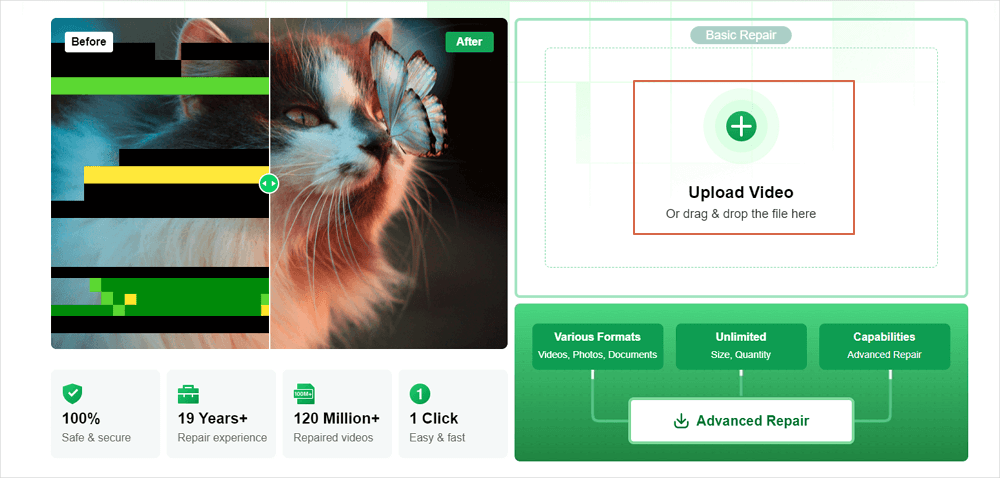
Step 1. Visit the EaseUS Online Video Repair website. Upload the corrupted video.

Step 2. Click the “Upload Video” button or drag and drop the corrupted video file into the relevant section of the webpage. Please provide a valid email address.

Upload video

Step 3. Fill out the form with a valid email address. This email will send you the extraction code required to download the corrected video.

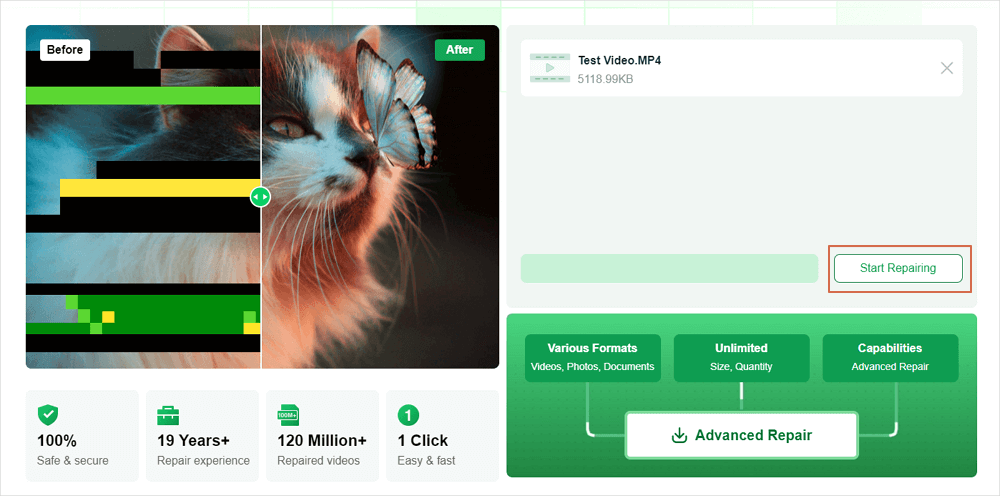
Step 4. Click the “Start Repairing” button to start the automated repair procedure. The utility will upload and analyze the corrupted video and perform any necessary fixes.

select start repairing

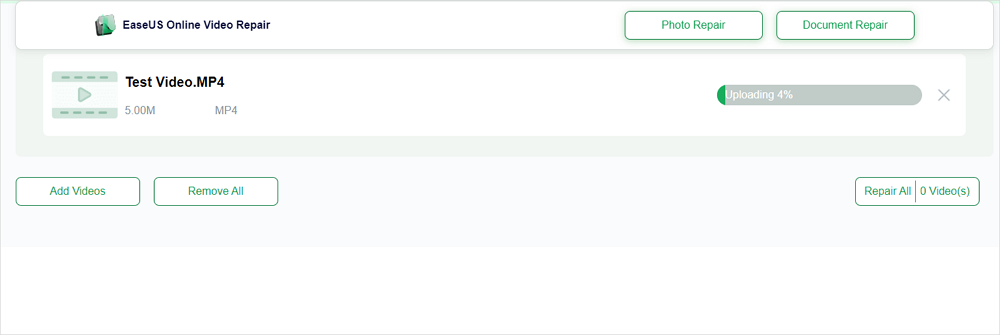
Step 5. Give the tool some time to finish the repair operation. The length may vary according to the video file’s size and complexity.

Uploading and repairing video

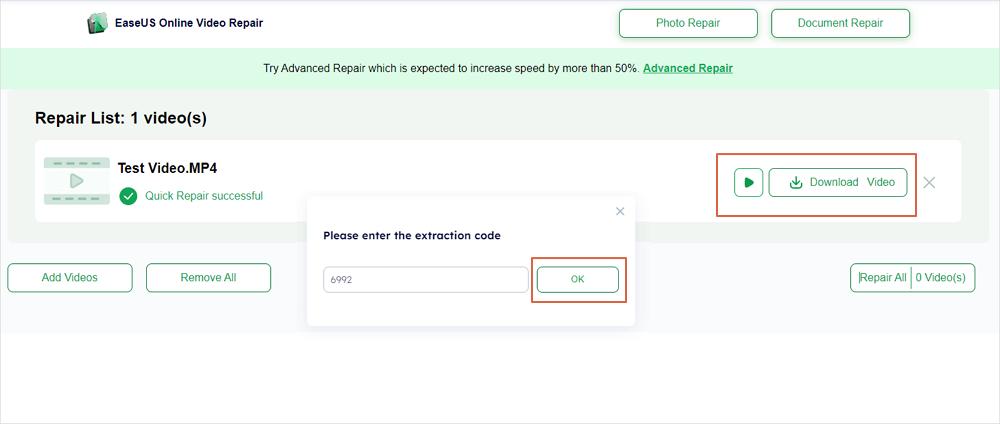
Step 6. On the webpage, you can preview the repaired movie after repair. Click “Download Video” to obtain the repaired video. You will be requested to input the extraction code provided in your email. Entering the right extraction code starts the repaired video download.

Enter extraction code, download the repaired video

By following these simple steps, users may efficiently repair corrupted films with EaseUS Online Video Repair, taking advantage of its powerful features and user-friendly interface.

Method 2: Repair with VLC Media Player

VLC Media Player is a free, open-source multimedia player known for its ability to play a variety of audio and video formats. Aside from playback capabilities, VLC has functionality for repairing broken video files, particularly those in AVI format.

Steps  to Use VLC for Video Repair

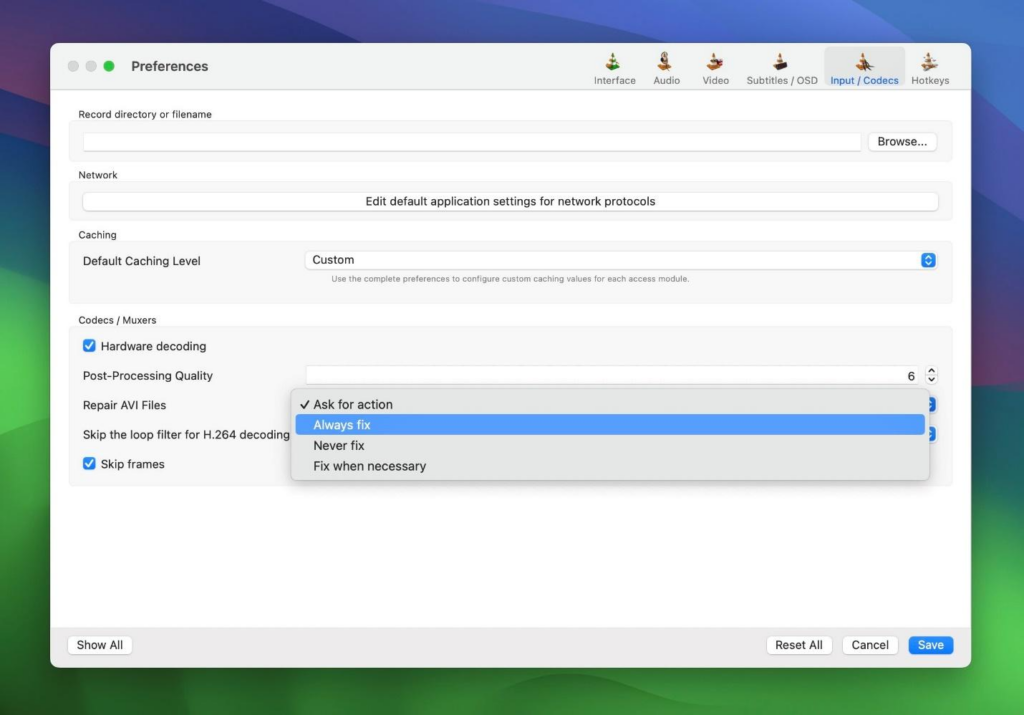
Step 1. Launch the VLC Media Player on your Mac. From the menu bar, choose “VLC” > “Preferences.”

Step 2. In the Preferences box, select the “Input/Codecs” tab.

Step 3. Locate the “Damaged or incomplete AVI file” option. Choose “Always fix” from the adjacent dropdown option.

Set the option to “Always Fix”

Step 4. To apply the changes, click “Save”.

Step 5. Try playing the corrupted video file with VLC. The player will attempt to repair and play the file simultaneously.

Limitations of VLC for Certain Video Formats

While VLC’s repair tool is excellent for AVI files, there are several limitations:

  • Format Restrictions: The repair feature is intended especially for AVI files. VLC may not successfully repair corruption in other formats, such as MP4 or MOV.
  • Corruption Severity: While VLC can handle minor corruption, it may not repair highly damaged files.
  • No Permanent Fix: VLC tries to patch the file during playback but does not preserve a permanently corrected version.

Method 3: Repair by Changing the File Extension

Incorrect or malformed file extensions can cause video files to become unplayable. Changing the file extension may cause media players or repair software to recognize and attempt to fix the file.

Step 1. Find the video file you want to repair on your Mac.

Step 2. To avoid losing data, make a copy of the original file before making any modifications.

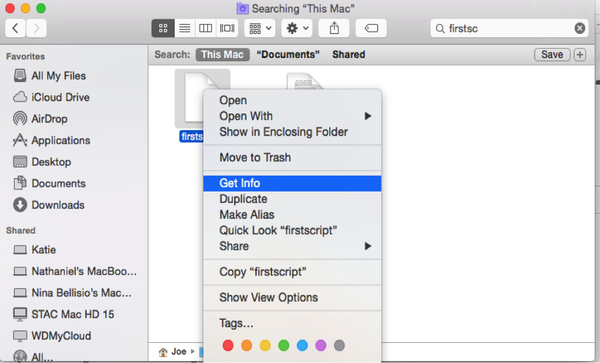
Step 3. Right-click the video file and select “Get Info.”

Picture background

Step 4. In the “Name & Extension” section, change the current file extension to “.avi” (for example, “video.mp4” to “video.avi”).

Step 5. Close the “Get Info” window.

Conclusion

Mac users can use EaseUS Online Video Repair or VLC Media Player’s built-in repair tools to fix corrupted video files. Simple changes like altering file extensions can fix repair corrupted video files mac issues. When one strategy fails, using additional ones boosts recovery chances. Data loss can be avoided using backups and dependable software. If all else fails, professional data recovery may be needed. These techniques help restore your crucial videos and prevent permanent loss.

FAQs

The following faqs answer the most common questions asked about how to repair corrupted video files on Mac:

  1. How do I fix a corrupt MP4 file on Mac?

Repair a corrupted MP4 file on your Mac using these methods:

Media Player VLC: Change MP4 file extensions to ‘.avi’ to use this flexible media player’s AVI repair capability. After renaming, open the file in VLC; it may ask for a fix.

Professional Video Repair Tools: EaseUS Data Recovery Wizard and Wondershare Recoverit have MP4 file repair features. Video file analysis and repair applications sometimes work better for badly corrupted files.

  1. How to fix a corrupt video on Mac?

The following Mac methods can fix general video corruption:

Change File Extension: Sometimes, changing the file extension fixes playing issues. Renaming a ‘.mp4’ file to ‘.avi’ may make it watchable in some media players.

Professional Video Fix Tools: EaseUS Video Online Repair can automatically detect and fix corrupted video files in many formats.

  1. How to fix video problems on Mac?

Mac video playback issues can arise from many causes. To fix these:

  • Ensure your internet connection is consistent when streaming videos to avoid buffering and playback issues.
  • MacOS and media player updates often fix compatibility and performance concerns.
  • Clear browser cache to fix online video loading or playback issues.
  • VLC’s wider codec support may fix a video file that won’t play in one player.
  • Specialized video repair tools can restore functionality to corrupted video files.
Categories
Online Tools & Software Reviews

5 Functions in Envato Elements That Help Web Developers Save Time

Elementor designers now have access to over 19 million digital assets that can change our development process completely. The massive collection of available tools can make many developers feel overwhelmed when they look for the quickest way to manage their projects.

Envato Elements offers WordPress Elementor designers more than just an extensive asset library. With over 200 designer-made templates and blocks, along with unlimited downloads during the subscription period, the platform helps streamline workflows and significantly reduce development time. This article explores five essential functions of Envato Elements that have transformed web development. For those looking to maximize their access, an envato elements shared account can be a cost-effective solution.

Understanding Envato Elements for Developers

Envato Elements is a subscription-based creative toolkit that boasts over 19 million high-quality digital assets. The platform uses a simple monthly or yearly subscription model that gives you unlimited access to all resources, unlike traditional marketplaces where you need to buy items individually.

What makes it different from other platforms

The platform stands out with its complete approach to web development resources. You get access to code snippets, WordPress themes, and responsive designs – all carefully checked through quality control. The platform’s licensing structure makes it unique, with a single commercial license that works the same way for everything you download.

There’s another reason why this platform stands out – its shared features. Organizations can save 35% compared to individual rates through the team plan. The platform also has powerful search and filtering tools that help you find specific assets quickly.

Key features for web development

Web developers will find several features that boost their workflow:

  • Code-Ready Resources: You get clean, well-commented code and responsive designs that help you prototype and deploy websites quickly.
  • WordPress Integration: The free Envato Elements WordPress plugin lets you import stock photos and template kits right into your editor. These template kits naturally work with prominent page builders like Elementor and Beaver Builder.
  • Scene Generators: These tools help you create unique header or landing page images by placing objects in pre-designed scenes. This feature works great especially when you have text-heavy content that needs visual breaks.
  • Development Asset Organization: The platform has tools that help organize project resources effectively. To cite an instance, see pattern libraries that create responsive backgrounds working on all screen sizes without affecting other design elements.

The platform adds new content to its library regularly, so you always have access to the latest resources and design trends. The future-proof licensing lets you keep using downloaded and registered elements even after your subscription ends. These features and regular updates to the large bundle are a great way to get your development process moving faster.

Code-Ready Templates and Components

Envato Elements has a rich collection of development resources that make website creation easier. Here’s a look at the key components that make it valuable for web developers.

Pre-built code snippets

The platform has clean, well-commented code snippets that speed up development. These snippets come with detailed documentation and support that makes implementation easy. The code’s modular structure lets us remove components we don’t need while keeping everything working.

Customizable website templates

The template library has over 6,100 site templates and 3,162 landing page designs. Each template comes with:

  • Responsive Design: Over 5,749 templates work naturally on all devices
  • Retina Support: More than 4,066 templates look crystal-clear on high-resolution screens
  • File Compatibility: Templates come with PSD and Sketch files for deeper customization

Ready-to-use UI components

The platform hosts 6,774 UI components with essential elements for modern web interfaces. These components have:

  • Dashboard widgets
  • Form elements
  • Navigation systems
  • Data visualization tools
  • Modal windows
  • Pricing tables

These components stand out because they blend well with popular development frameworks and have built-in responsive features. Many components also come with dark mode options, which gives you more design flexibility.

One of the best features is how the components are organized. Like code snippets, you can mix and match UI elements as building blocks to create unique layouts. This cuts down development time while keeping your projects consistent.

The platform also has specialized components for industries like fintech, healthcare, and e-commerce. These pre-built elements follow industry standards and best practices to ensure everything works properly.

Elementor designers will find template kits made specifically for their page builder. These kits have essential components like headers, footers, and content blocks that work naturally with existing WordPress setups.

Development Asset Management

Digital asset management is crucial to web development success. Envato Elements offers powerful tools that optimize our resource organization and version control processes.

Organizing project resources

‘My Projects’ is a game-changing feature that helps us organize licensed assets for specific end products. This system lets us:

  • Create dedicated project spaces for each end product
  • Re-download assets and existing licenses directly from project pages
  • Generate license certificates to prove usage rights
  • Add new items to existing projects with ease

The Collections feature works as our digital bookmark system. We can save and categorize resources for different projects. This approach is a great way to get insights because Envato Elements adds thousands of graphic assets every week.

Version tracking system

The platform’s version tracking goes beyond simple file management. The digital asset management (DAM) system allows us to:

  • Centralize storage of all project files
  • Implement metadata and taxonomy to retrieve files faster
  • Scale storage capacity based on project requirements
  • Use AI-powered search functionality

The version tracking system shines through its collaborative features. The platform makes shared workflows possible through:

  • Comment systems
  • Tag functionality
  • Chat integration
  • Emoji reactions
  • Approval workflows

The system handles routine tasks like tagging, categorizing, and removing duplicate assets automatically. This automation reduces administrative time by a lot. We can focus more on core development tasks.

WordPress elementor designers will find that the platform’s version tracking blends with popular page builders. Template kits and assets maintain version consistency throughout different project stages.

The ‘My Downloads’ page gives us access to our complete asset history. This feature helps us track assets across different client projects that we manage at the same time.

Workflow Integration Tools

Optimized development workflows are vital for modern web projects. Envato’s innovative integration tools have helped us find powerful ways to boost our development process.

IDE plugins and extensions

The Adobe Creative Cloud Extension has transformed our design workflow. This extension lets us:

  • Search and download assets directly within Adobe applications
  • Use AI-assisted search to match project frames with relevant assets
  • Access unwatermarked assets through Elements subscriptions

Elementor designers find the platform’s integration with Adobe applications a great way to get efficiency. Users no longer need to switch between multiple windows. The extension works with Premiere Pro, After Effects, Photoshop, Illustrator, and InDesign.

Local development setup

The platform provides adaptable solutions for local development environments. The licensing system allows us to:

  • Develop projects locally without immediate activation
  • Test themes and plugins in development environments
  • Move licenses naturally between development and production servers

The platform’s approach to localhost development gives us an edge. We can work on projects locally and activate licenses when deploying. This flexibility helps elementor webdesign professionals who manage multiple client projects at once.

Version control compatibility

The platform’s version control features support modern development practices through:

  • Automated routine tasks for asset organization
  • AI-powered automations for context understanding
  • Integration with popular creative collaboration tools

Team collaboration improves with features like comments, tags, chat functionality, and approval workflows. The platform’s AI capabilities include image recognition that sorts assets naturally.

WordPress elementor designers can use specialized plugins that combine smoothly with existing development tools. These integrations work with various development scenarios, from single-page applications to complex multi-site setups.

Conclusion

Envato Elements serves as a powerful toolkit for web developers, particularly those who work with Elementor. Its extensive library of code-ready resources and UI components has simplified our development process without compromising professional quality standards.

The platform helps developers track versions and manage assets effectively. Resource access becomes quick and seamless through integrated workflow tools. On top of that, the WordPress plugin and Adobe Creative Cloud extension show how the platform streamlines daily development tasks.

These features make Envato Elements a vital resource for web developers who want to build professional websites faster. Unlimited downloads, commercial licensing, and team collaboration options create a complete package. This comprehensive solution supports both individual developers and larger teams throughout their projects.

Categories
Online Tools & Software Reviews

Best Online Tools to Boost Your TikTok Side Hustle

TikTok has rapidly become a platform where creativity meets opportunity. It offers entrepreneurs, content creators, and small business owners an incredible chance to grow an audience and generate income.

However, as the platform grows in complexity, so does the challenge of standing out. Utilizing the right online tools can make all the difference in turning a TikTok side hustle into a thriving enterprise.

From video editing to analytics, these tools can help creators enhance their content, reach more viewers, and boost engagement. For those exploring broader avenues, learning how to boost sales on Etsy could complement your TikTok strategy by providing a seamless way to monetize your content.

Elevating Content with Video Editing Tools

Great content forms the core of every successful TikTok strategy. Basic TikTok editing works well for simple changes, yet professional video tools help your content stand out. Video editing tools from Adobe Premiere Rush and CapCut help creators apply advanced visual effects while fixing lighting problems and matching music to their needs. Video editing tools let you adapt your work to current trends while giving you diverse editing options.

InShot helps you edit videos right from your mobile device. This app allows you to adjust video speed while combining clips and setting dynamic transitions to grab viewers’ attention. Your content needs to look great to get attention and become viral, leading to monetization possibilities.

Leveraging Analytics and Trend Tracking

Understanding how your audience reacts to your content and who they are will help you develop. The analytics tools from TikTok plus Hootsuite or Sprout Social show creators which content succeeds and needs improvement. These tools help creators see how many people watch their videos, interact with their content, and learn about their followers’ details to produce more compelling content.

Keeping watch over trendy topics represents a key method to achieve better results. Social media tools Trendpop and Tokboard show creators which hashtags and audio tracks are trending so they can prepare beforehand. By spotting upcoming trends, you can put them into your content earlier and stay ahead of competitors. Your audience will remain interested when you deliver new content before trends peak.

Simplifying Workflows with Automation Tools

Operating your TikTok side business requires heavy work commitments. They need to make new content regularly, maintain their posting schedule, and talk to their followers while keeping up with emerging social trends. When you lack organization, your work piles up quickly, making it harder to keep your audience engaged and your business growing. Automation tools let creators make content without interrupting their online posting schedule. For those looking to expand their reach, services like SocialBoosting can help them get TikTok views and maintain steady audience growth alongside their organic efforts.

Later and Buffer simplify content planning because users can set their posts in the queue ahead of time. Instead of uploading videos daily, creators can plan their content for when their audience is most active. The schedule keeps content flowing without needing a constant online presence. Using scheduling tools, TikTok users create steady posting patterns that help the algorithm recognize their content and boost engagement results.

Automation helps creators maintain their visual identity by keeping design elements the same on multiple social networks. Creators need Canva to design visuals that boost their TikTok videos and drive social media promotion. A straightforward visual design builds brand recognition, letting followers find and connect with content from a single creator across various social channels. Canva simplifies design creation, and its user-friendly tools help new users produce professional results that match their branding needs.

Conclusion

You need thoughtful planning and the proper software tools to create real income from your TikTok side project. Using professional video editing tools, analytics platforms, plus automation tools helps creators generate better content and reach more people. You must keep up with current trends and make regular strategy updates if you want permanent success in this quick-paced platform. As TikTok develops further, the creators who use these tools will lead new opportunities and stay successful at earning money from their secondary jobs.