
There is a folder on almost every enterprise server that nobody talks about. It contains XML files from a system that was replaced three years ago, or a data exchange from a partner that stopped sending updates in 2019, or a batch export from an ERP migration that was supposed to be temporary. That folder has been sitting there ever since.
The data inside it is not worthless. Often it contains years of transaction history, customer records, or operational data that would be genuinely valuable if anyone could actually use it. The problem is that the analytics infrastructure the organisation runs today cannot read it.
That is the XML migration problem in its simplest form. And in 2026, with cloud data warehouses sitting at the centre of most analytics strategies, it is a problem more teams are finally deciding to solve.
Why XML Data Cannot Stay Where It Is
XML served as the backbone of enterprise data exchange for nearly two decades. Healthcare, finance, insurance, supply chain, and government all built their data pipelines around XML standards because it was flexible, extensible, and universally supported. Those properties made it excellent for data exchange. They did not make it easy to analyse.
The core issue is structural. XML organises data hierarchically, with nested elements and parent-child relationships that represent complex real-world structures. A cloud data warehouse like Snowflake, BigQuery, or Databricks expects flat, tabular data as input. Those two formats are fundamentally incompatible without a preprocessing step.
Leaving legacy XML on an on-premise server creates three problems that compound over time. First, the data is invisible to any analytics tool the organisation uses. Reports and dashboards are built on incomplete history. Second, regulated industries face increasing pressure to produce audit trails and data lineage documentation — raw XML files do not satisfy those requirements. Third, every month the backlog grows, and so does the cost of eventually addressing it.
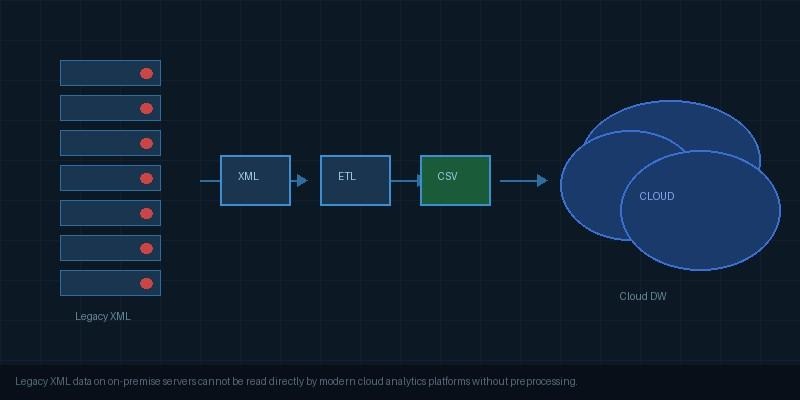
Legacy XML data sitting on on-premise servers cannot be read directly by modern cloud analytics platforms without a preprocessing step. | Image: Free for commercial use
What XML Migration Actually Involves
XML migration is not moving files from one server to another. It is a structured process with three distinct stages, and understanding them before you start saves a significant amount of rework later.
Stage 1 is extraction. This means reading the XML files and building a clear picture of their structure. For simple flat XML with predictable elements, this is quick. For deeply nested XML with XSD schema files, hundreds of element types, and complex parent-child chains, it requires careful analysis before any transformation begins.
Stage 2 is transformation. This is where the technical weight of the migration sits. Hierarchical XML must be correctly flattened into a relational structure without losing the relationships between parent and child records. A migration that collapses parent-child relationships into single rows produces data that looks complete but is analytically wrong.
Stage 3 is loading. Once the data is in a flat format, getting it into the cloud platform of choice is generally the easiest part of the process. Every major cloud data warehouse has efficient, well-documented import tooling.
For organisations planning a wider cloud modernisation programme, the data warehouse migration guide on GoOnlineTools covers the strategic considerations involved in moving from on-premise systems to cloud platforms, which provides useful context for teams approaching XML migration as part of a larger initiative.
Three Approaches to XML Migration
The right approach depends on the volume of data, the complexity of the XML schema, and the technical resources available.
Manual scripting using Python or XSLT is the most common starting point. Python with lxml or xmltodict can extract and transform XML into CSV or JSON for cloud loading. It works well for simple, stable schemas and small file volumes. The maintenance problem arrives when schemas change or when the number of files grows beyond what a team can manage manually.
ETL platform integration through tools like Informatica, Talend, or MuleSoft provides more scalability. These platforms include XML connectors that handle extraction and transformation as part of a broader pipeline. They are powerful but expensive, and generally only practical for organisations that already have these platforms in use for other integrations.
Dedicated XML conversion tools sit between those two options. For teams handling XML migration without existing ETL infrastructure, tools that convert XML directly into flat CSV or SQL output remove the custom scripting requirement.
Converting XML into flat CSV is the most common first step before cloud loading, since CSV is the standard import format accepted by every major cloud data warehouse. Sonra’s XML to CSV converter handles this conversion automatically, reading hierarchical XML structures and producing clean, normalised CSV output that can be loaded directly into Snowflake, BigQuery, or Databricks without custom scripting.
Before You Migrate: What to Check First
A migration that starts without preparation tends to discover its problems halfway through, which is the most expensive time to find them.
Start by auditing the XML files themselves. Understand how many files exist, what schemas they follow, and whether XSD schema files are available. Schema files make the transformation stage significantly more reliable because they define the exact structure and data types the conversion tool needs to produce correct output.
Before migrating, inspecting your XML structure is a useful first step. GoOnlineTools provides a free XML parser that allows you to paste XML content and visualise its structure, which helps teams understand nesting depth and element relationships before committing to a migration approach.
Next, identify the parent-child relationships in the data. These are the relationships that must survive the transformation stage intact. A customer record that contains multiple orders, each containing multiple line items, needs to produce three correctly linked output tables, not one flattened row that merges everything together.
Finally, decide on the output format before starting. CSV works for most cloud warehouses and analytics tools. SQL output is better when loading directly into a relational database. Some migrations need both. Making this decision upfront avoids having to run the transformation twice.
Getting Transformed Data Into the Cloud
Once XML data is converted to a flat format, the cloud loading step is well-documented and generally smooth.
Snowflake loads CSV directly from local files or cloud storage using the COPY INTO command. Files can be staged in S3, GCS, or Azure Blob before loading, which works well for large file volumes.
BigQuery accepts CSV via the bq load command or through the Cloud Console import interface. For very large migrations, loading through Google Cloud Storage is more reliable than direct uploads.
Databricks reads CSV into Delta tables using spark.read.csv. For ongoing XML pipelines, the converted CSV files can be written directly to cloud storage and picked up by Databricks on a scheduled basis.
The key at this stage is ensuring the flat output from the conversion step is correctly structured. Column names, data types, and delimiter choices all affect how cleanly the data loads into the target platform. A quick validation pass on a sample of the converted files before loading the full dataset saves time if adjustments are needed.
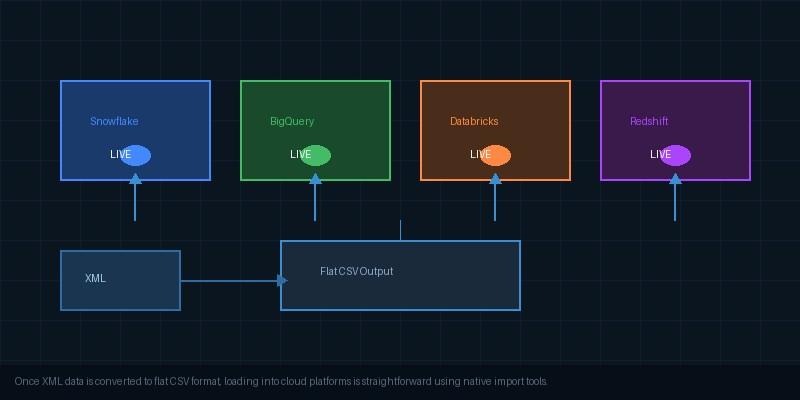
Once XML data is converted to flat CSV format, loading into cloud platforms like Snowflake, BigQuery, and Databricks is straightforward using native import tools. | Image: Free for commercial use
Wrapping Up
XML migration has a reputation for being complex, and in some cases it is. But the complexity lives almost entirely in the transformation stage, and it is a solvable problem with the right preparation and tooling. Understanding what your XML files actually contain before you start, choosing a conversion approach matched to your volume and schema complexity, and validating a sample before loading the full dataset removes most of the risk.
The organisations that clear their XML backlog now will enter their next phase of analytics and AI work with a complete, auditable data estate behind them. That is an advantage worth the effort.
