Categories
SEO & Search Optimization

Tips on SEO for Roofers: How to Increase Online Visibility

In the digital age, a robust online presence is the pillar for businesses across all industries to thrive, including roofing. As a roofer, leveraging search engine optimization (SEO) techniques is crucial to ensure your company is easily discovered by potential customers searching for roofing services online. This comprehensive guide will explore tips and strategies tailored to the roofing industry, helping you enhance your website’s SEO and increase online visibility.

Create a Roofing-Specific Keyword Strategy

One of the most important aspects of effective SEO for roofers is developing a targeted keyword strategy. Consider the services your business offers, your location, and the specific needs of your intended customers. Roofing-related keywords might include terms like “roof repair,” “roof installation,” “emergency roof services,” and “local roofing company.” Explore the internet, where you may find a guide for roofers from reputable digital marketers. From there, you will have an insight into utilizing keyword research tools for identifying high-volume and relevant keywords in your industry. Long-tail keywords can also be advantageous. These are the more specific phrases used by people to look for what they need. For example, instead of targeting “roof repair,” you might optimize for “emergency roof leak repair in [your city].”

Optimize Your Website’s On-Page SEO

Optimizing on-page elements is crucial for communicating your website’s content to search engines. Here are critical on-page SEO tips for roofers:

  • Meta Titles and Descriptions: Craft compelling meta titles as well as descriptions for each of the pages on your site. Incorporate your targeted keywords naturally and ensure each description is unique and relevant to the content on that specific page.
  • Header Tags: Structure your content using header tags (H1, H2, H3, etc.). The H1 tag should be composed of the primary keyword for the page and represent the main topic. Subsequent header tags can be used to organize content under subtopics.
  • Content Optimization: Create informative and valuable content for your audience. Include your targeted keywords naturally within the content, focusing on user intent. Google values content that addresses users’ queries effectively.
  • Image Alt Text: Add descriptive alt text with relevant keywords when including images on your website. This not only improves accessibility but also provides additional context to search engines.

Develop a Local SEO Strategy

Local SEO is especially crucial for roofers, as your services are location-dependent. Local SEO strategies can also boost your online visibility within your service area. Here’s how you can optimize for local searches:

  • Google My Business (GMB): Claim and optimize your Google My Business listing. Ensure your business information, including your name, address, phone number, and business hours, is up-to-date and accurate. Encourage satisfied customers to leave positive reviews.
  • Local Citations: Consistency is vital regarding your business information across online directories. Ensure your name, address, and phone number (NAP) are consistent across platforms like Yelp, Yellowpages, and industry-specific directories.
  • Local Keywords: Incorporate local keywords naturally throughout your website’s content. This includes mentioning your city, neighborhood, or service areas in meta tags, headers, and content.

Invest in High-Quality Content Marketing

Content marketing is a potent tool for SEO, providing valuable information to your audience while signaling to search engine platforms that your website is a reliable data source. Start a blog on your site and publish articles that address common roofing concerns, industry trends, and maintenance tips routinely. This engages your audience and provides opportunities to incorporate relevant keywords naturally.

Create videos that showcase your expertise and offer practical advice. Video content is majorly engaging and can be an excellent way to demonstrate your roofing knowledge. Develop visually appealing infographics that simplify complex roofing concepts or provide step-by-step guides. Share these graphics on your website and social media platforms to increase visibility.

Utilize Social Media to Amplify Your Reach

While social media signals may not be direct ranking factors, a strong presence can indirectly contribute to your SEO efforts. Engage with your audience on several platforms like Facebook, Instagram, and Twitter, and share valuable content. Social media can also drive traffic to your website to increase its authority for search engines. Showcase your roofing projects through before-and-after photos, videos, and behind-the-scenes glimpses. Visual content is very shareable, attracting attention on social media. Encourage satisfied customers to share their positive experiences on social media. User-generated content, especially testimonials, builds trust and credibility.

Monitor and Analyze Your SEO Performance

Regularly monitoring and analyzing your SEO performance is vital for ongoing improvement. Utilize analytics tools to know metrics such as your website’s traffic, user behavior, and keyword performance.

  • Traffic Sources: Analyze the effectiveness of different channels, including organic search, direct traffic, and referrals.
  • Keyword Performance: Monitor the performance of your targeted keywords. 
  • User Behavior: Identify high-performing pages, pages with high bounce rates, and areas for improvement. Adjust your content and website structure based on these insights.
  • Backlink Profile: Regularly assess your backlink profile, monitoring the quality as well as the quantity of backlinks to your website. Hinder any toxic or spammy backlinks that may negatively impact your SEO.

In the competitive roofing field, a strategic SEO approach can be a game-changer for your business. Understanding and implementing these tips tailored to the roofing industry can enhance your website’s visibility, attract more customers, and solidify your position in the digital landscape. Remember that SEO is a continuous process, and being on top of industry trends and algorithm updates will position your roofing business for long-term success online.


Categories
SEO & Search Optimization

Everything You Should Know Before Your Website Goes Live

Once you’ve finished developing your website, the next big step is to publish it on the internet. Going live is always a special moment for any web developer, but it can also be daunting and filled with setbacks. The final product should run without glitches, and it should therefore be tested thoroughly before launch. 

The web development process generally includes prototyping, development, testing, and deployment or launch. In this article, we’ll walk you through the after-code process of going live,  from testing and debugging to ensuring that your website SEO works. 

Testing and Debugging

This is the most crucial part of the preliminaries before going live. You need to test the code thoroughly and ensure that it is bug-free and works as expected. This includes testing all of the features, functionality, and user flows. You should also test your app or website on different devices and browsers to make sure it’s compatible.

Security Testing

The security of your website is your responsibility. Your data and that of your website visitors should be secured. The first step is to gain an SSL certification which means that your website is HTTPS-compliant. That’s the green padlock symbol right next to the browser URL. By the way, Google may soon stop ranking unsecured websites, so you must get on the right side of Google here. 

Other measures to beef up your web security include:

  • Employing virus-detection.
  • Using RPA to automate security checks, including automated rollout and patching. 
  • Ensuring that the system reacts to invalid login credentials. 
  • Integrate Multi-Factor Authentication to add an extra security layer. 

As you build up your web security, build it for the long term in an evolving fashion – security risks always mutate and it’s important to stay ahead of the curve. 

Optimize Your Website For Search Engines

If you want people to find your website, that means making sure it’s optimized for search engines. This means using the right keywords and phrases in your content and metadata. You should also make sure your app or website is mobile-friendly.

Here are a few tips for optimizing your app or website for search engines:

Research your target keywords. Use a keyword research tool to identify the keywords and phrases that your target audience is searching for. For example, if your website is a “do my dissertation for me” type of service, you can use these exact keywords throughout your content and metadata. This includes your title tags, meta descriptions, and header tags. Be careful not to keyword spam or use very short-tail keywords that might deny your website visibility. 

Depending on the objectives of your website you can also optimize for Google-rich snippets, which is especially important for discoverability online, location-based websites and businesses. 

93% of people access the internet through smart devices such as mobile phones and tablets. You have little choice but to make sure your website is mobile-friendly. Ensure that your website looks good and functions well on mobile devices.

Set up Analytics

Once your app or website is live, tracking traffic and user engagement becomes essential. This will help you to understand what’s working well and what needs improvement. There are many different analytics tools available, so choose one that suits your needs.

You can also set up tracking codes on your website to monitor traffic and user engagement. Once you’ve done this, set up reports to track your progress and identify areas for improvement. 

Test All links 

Links redirect users to your website or other destinations from your website. Internal links connect different web pages or resources within your website to each other. External links redirect from your website to outside websites. Outgoing links are backlinks from other sites that redirect users to your website. Test all these processes to ensure that they are working flawlessly. 

Test Your Website Cookies 

You’ve likely come across that famous “We use cookies to improve your experience on our website”. But what are cookies? Cookies are just small text snippets sent to your browser by a website that you visit. The overall objective is to reduce the time taken to customize your experience. By helping the website remember your information, cookies can provide a more seamless browsing experience.

Remember to test for stats after user sessions (let’s say during testing), and monitor the performance of your website with or without cookies disabled. Also, check whether the application security is affected in case cookies are deleted. 

Marketing and Promotion 

This depends on the objectives of your website. If this is a vital resource in your marketing efforts, then it needs to be properly promoted. An example here is an interactive e-commerce website that needs proper visibility to attract customers. Here are a few tips for marketing and promoting your app or website:

  • Create a marketing plan. This will help you to identify your target audience and develop a strategy for reaching them.
  • Use social media. Social media is a great way to connect with your target audience and promote your app or website. 
  • Create content. Create high-quality content that is relevant to your target audience. For example, let’s assume you run essaywriter.org, a professional writing website. You can promote your services using content like blog posts, articles, infographics, or videos.  
  • Use paid advertising. Paid advertising such as PPC ads can be a great way to drive traffic to your app or website.

You can promote your website in different ways, for example, through social media, PPC ads, or even through a comprehensive content marketing strategy. 

Wrapping Up

So now you know what the important steps are before pressing that launch button and publishing your website. As this article has emphasized, a website launch will only be deemed successful if the user experience exceeds expectations. That means that the website should be properly secured, tested and debugged, and optimized for search engines and user experience. 

As your web development journey grows, you’ll discover other insights to build more powerful websites for single-use or multiple-use applications. While this development journey has a substantial learning curve, the result will certainly be worth it.

Categories
SEO & Search Optimization

How to Optimize Your Website for Better Marketing Results: 4 Essential Steps

By now, it ought to be abundantly apparent that your business needs some kind of online presence in varying degrees of complexity, depending on the type of business you operate. Nonetheless, what tends to be more elusive to most novice entrepreneurs is what needs to be done over and above the standard get a domain name, get hosting, and make a homepage” workflow. In fact, there are several steps one must take to ensure their website delivers if you want to make sure it is visible to their target audience. There are typically only a few easy steps to follow, even though this can frequently seem complicated and convoluted. Moreover, more often than not, the lowest-hanging fruit can yield the most immediate results. So let’s take a look at four of the most straightforward steps you can take if you want to optimize your website and bring on the crowds of customers that you know you deserve!

Conduct A Thorough Website Audit

Your first action after you’ve built your site should be to implement an in-depth audit of the site. Sound scary? That’s because, to the untrained business owner, it is! It takes a keen understanding of the nuances of website optimization and search engine guidelines to dig deep and understand where issues and potential quick wins might lie. In order to find such problems and/ or possible results, it might be prudent (read, beneficial) to hire a dedicated search engine marketing company with staff trained in the dark arts of website optimization and SEO to trawl through your property and generate a detailed report that you can use to maximum effect. However, it’s worth spending some time researching the myriad of companies that exist out in the wild before settling on the first one you come across because this step will serve as the foundation for all subsequent choices you make.

Optimize Your Website Structure

Once you have identified the various steps necessary to bring your website up to par, it is time to start putting them into practice and improving the structure as a whole. A well-structured website is like a city map for search engines – it helps them navigate your content smoothly, understand it better, and ultimately rank you higher. Plus, a clean layout makes life easier for users, too, helping them quickly find what they’re looking for on your site. So how do you make sure your website structure is up to scratch? Start by building an organized hierarchy of pages – think of this as the blueprint of your virtual property. Group similar pages into dedicated categories that are easy to grasp. Ensure each category and page label speaks clearly about its content, with no vague or complex jargon! Each webpage should also sport a unique title tag that shouts out loud what’s in there.

Eliminate Unnecessary Website Elements

Page speed has long been a relatively important factor in optimization. Even though engines like Google have recently dropped it as a specific ranking factor, it can still affect how your users interact with your site and, thus, how many conversions you make. Consequently, the more unnecessary elements you have on a page (images, links, formatting, styling, etc.), the more likely your site will begin to slow down to a crawl, resulting in disastrous effects on user participation. So do yourself a favor and rid yourself of the early 2000s CSS that you think looks amazing but actually results in a diminished user experience.

Implement Clear Calls-To-Action

Do you know what really cranks up your website’s marketing game? Clear calls-to-action or CTAs. Think of them as road signs on your webpage directing visitors to take specific actions like subscribing to a newsletter, filling out forms, or, better yet – making purchases. Without persuasive and standout CTAs, people browsing through your site might just end up feeling lost or even annoyed that they are unable to take a desired action. Here’s how you avoid that:

  • Position those CTAs where they’re hard to miss.
  • Use strong action-oriented language that tells users precisely what they stand to gain by clicking that button.
  • Add a dash of urgency in the mix for good measure.

Getting your website up to snuff need not be a complicated or convoluted task, only available to those with deep knowledge of the human psyche. As long as you follow a few basic rules and are open to hiring a dedicated agency for the more complex actions, you can create a site that not only ranks highly but keeps your users engaged enough to convert them into a final sale.

Categories
SEO & Search Optimization

Outsourcing SEO to ChatGPT: The Pros and Cons

As businesses continue to expand their online presence, search engine optimization becomes more important than ever. The right SEO strategies can help your website rank higher in SERPs, attract more traffic, build personal brand credibility and awareness, and increase your company’s visibility.

The Head of SEO at https://mjseo.agency/ and most SEO experts remark that to get the best outcome from the optimization, it is better to opt for professional services. Otherwise, businesses should have the necessary expertise and resources to handle SEO in-house. However, there is another widespread solution, like outsourcing. Currently, the question that is on everyone’s lips is whether it is possible to outsource SEO to ChatGPT. In this article, we will discuss the pros and cons of resorting to this popular tool.

What Is ChatGPT?

ChatGPT is a large language model. It is developed by OpenAI and based on the GPT-3.5 architecture. It is a chatbot designed to generate almost anything, from human-like responses to text-based prompts, making it a valuable tool for a wide range of applications.

In fact, ChatGPT gives text based on data that is available online. It can compose full pieces of content or assist users in rendering exciting ideas. The content produced by this AI system is thought to be exceptionally precise and advanced, to the point that scripts written by it may even fool scientists.

According to an investigation by the Swiss bank UBS, ChatGPT is the fastest-growing application of all time. The study estimates that this AI model had 100 million active users in January, which is only two months after its launch. ChatGPT is now regarded as one of the most efficient computer programs. It is not surprising, as it can remember past responses, filter out any potentially obscene information, and allows users to make edits to their algorithm or fixes to the generative text if needed.

Pros of Resorting to ChatGPT with SEO Tasks

Considering all the above, there are some potential advantages to using the popular AI model when it comes to search engine optimization.

Time-Saving Tool

One of the most significant advantages of outsourcing SEO tasks to ChatGPT is the time-saving aspect. This AI system can handle a large volume of assignments and processes in a short amount of time. It is particularly useful for companies that do not have the resources or staffing to manage all the work in-house. Outsourcing several objectives of the SEO strategy to ChatGPT frees up valuable time and resources that can be redirected toward other core business purposes and functions.

Cost-Effective Solution

Delivering some SEO aspects to ChatGPT can be cost-effective for some businesses, especially those operating on a tight budget. Hiring a consultant or expert to perform tasks may be an expensive option, particularly for startups. ChatGPT can accomplish many of the jobs included in the SEO plan, such as:

  • assist with content creation (writing SEO-oriented blog posts, texts for landing pages, and articles);
  • brainstorming ideas for a glossary of terms or phrases related to your keywords;
  • offering categories and subcategories related to your goods or services;
  • presenting questions that a potential client might ask;
  • composing title tags, headers, and meta descriptions;
  • producing product descriptions (a valuable feature for eCommerce stores).

Given how much importance Google places on the content, you may be concerned about whether this search engine cares about the content generated by ChatGPT. However, you may rest assured that Google doesn’t care if artificial intelligence makes your texts. Moreover, this search engine giant has even posted its guidelines for utilizing AI.

Provides Advanced Analytics

ChatGPT’s advanced analytics abilities make it an ideal tool for SEO needs. This AI is capable of analyzing vast amounts of data and generating insights that can help businesses make informed decisions and identify potential areas for improvement.

Cons to Expect in the Case of Outsourcing SEO to AI

Despite the benefits the well-known AI system delivers, there are some drawbacks to expect from using it.

Limited Human Interaction

One of the downsides of outsourcing SEO to ChatGPT is the lack of human interaction. This is an AI language model, which means it does not have the same level of personalization and communication skills as a human SEO expert. It may lead to miscommunications or misunderstandings.

This AI is still considered an up-and-coming technology. At the same time, despite covering large language models, it still has its limitations and restrictions. While ChatGPT undoubtedly has many helpful and beneficial applications in terms of executing SEO tasks, it is necessary to pay attention to the fact that certain services may yet require a human touch to be done correctly.

Limited Knowledge

While ChatGPT is capable of giving human-like responses, it does not have the same level of contextual understanding as a human professional. It can limit its ability to understand the nuances and peculiarities of your business and the specific SEO challenges you may be facing.

On top of that, this artificial intelligence is limited in terms of its knowledge base. In other words, what was current in 2021 is still popular nowadays. It implies that, for instance, there is no way for it to sync with updated data from SEO resources like Semrush or Ahrefs.

Low Creativity Level

SEO optimization is not just about technical skills; it also requires a degree of creativity for some content-related tasks. ChatGPT can provide you with diverse types of content. It can write text on various topics of different sizes and give catchy headings to structure them. You can also ask it to rewrite certain passages if you need to make them shorter or longer.

However, it may lack the needed creativity and originality that a human writer can deliver. It can result in generic content lacking the personality and voice that set your brand apart.

Moreover, the texts may not be highly unique, which is a great concern for SEO content. There can be overspamming with some words, so the overall word density will be higher than recommended, and the whole article may appear hard to read. Also, the information written by the AI can be simply inaccurate. Ultimately, the entire work will need to be fact-checked and edited to be used for SEO purposes.

Closing Thoughts

Outsourcing SEO to ChatGPT has its pros and cons, and deciding whether to resort to an AI language model depends on your business’s specific needs and goals. It’s essential to note that relying on it does not mean completely replacing real specialists. ChatGPT can be used in conjunction with human expertise to provide a more comprehensive SEO strategy.

Categories
SEO & Search Optimization

6 Ways To Optimize Your Website 

Today, most customers are taking advantage of technological advancement to shop online. This shift has necessitated business owners to establish their brands online by creating company websites.  

But with millions of websites on the internet, how can one ensure their brands stand out? The solution to this is website optimization. You want to optimize your business website to appear at the top of online searches.   

An Overview Of The Website Optimization   

Website optimization boosts your site’s performance, further drives traffic, improves conversions and increases sales. In other words, it’s a set of actions or strategies you can take to improve user experience, attract a larger target audience and let them remain engaged with your brand.   

Search engine optimization (SEO) is the backbone of website optimization. When done right, it helps your web pages to rank high in search engine results pages. It also ensures that people visiting your site will have the best user experience, encouraging them to take the desired action, such as signing up, subscribing to your email list, and purchasing.  

Therefore, website optimization is one of the most important aspects of growing your business.  

How To Optimize Your Website   

Website optimization is easier said than done. The online search algorithm is evolving quickly, and you must keep up. So, here are effective ways to optimize your website:   

1. Increase Web Page Load Time   

One of the ways to optimize the website is to increase page load time. No client would want to take ages to find what they’re looking for on your website. If your site is slow, most prospects will likely jump onto your competitors, negatively impacting your brand visibility.   

Also, most search engine tools are starting to punish slow websites. For this reason, ensure your web pages always load quickly. You can use some website testing tools to know your site speed and identify elements slowing the load time.  

Additionally, you can use the recommendations below to improve website speed:    

  • Compress images  
  • Minify JavaScript files  
  • Reduce Redirects  
  • Use a content delivery network  
  • Find a reliable website host   

2. Research The Right Keywords   

Keyword research is another critical element of website optimization because consumers usually use certain words or phrases when searching for specific information online.  

You’ll have to understand the keyword research landscape to identify the right keywords for your content. The right keywords will help your page to rank high on search engine result pages and make more people consume your content.    

Putting yourself into your customers’ shoes is a great way to research for the right keywords. List all the phrases you’d use to retrieve specific content from your website. Besides, you can use keyword research tools which will give a range of words or phrases and how often customers search for them.   

Also, you can visit your competitor’s websites to see which keywords they’ve integrated with their content. And since you target the same audience, you will go right by including similar keywords in yours. Once you identify those keywords, use them evenly in your content.   

3. Post Relevant And High-Quality Content On Your Website   

A company website is a great way to connect with a global audience. However, your website will barely attract any customers if it doesn’t have content. The major reason why customers visit a website is to search for information to help address their problems.  

Publishing content will help your website show up on more online searches. However, the content must be relevant to your target clients. For instance, if you provide online classes, your content should be about education. Otherwise, you won’t attract any potential customers if your content talks about something different.   

Aside from the relevance of the content, ensure it’s of high quality. And for a good reason, high-quality content will attract more people to your website. Besides, quality is one of the metrics SEO tools use when ranking websites. Therefore, high-quality content will help your website to become more visible.  

In summary, here are the components of great content:   

  • Unique  
  • Engaging  
  • Has the right tone for your target audience  
  • The content should be evergreen  
  • Free from grammar and spelling mistakes   

4. Make Your Website Mobile Friendly  

Mobile devices form an integral part of daily living. Not only do people use them to communicate, but they also utilize these devices to shop online. Today, most online searches happen through mobile devices. It makes perfect sense to optimize your website for mobile and connect with many online customers.   

It’s also good to know that SEO tools are beginning to consider mobile-friendliness when ranking websites. But you don’t have to build a new website from scratch. You can use a WordPress tool to add a mobile-friendly feature to your old website.   

5. Provide A Search Bar On Your Website

A search bar is a field that allows users to type in keywords when retrieving information on your website. It ensures web visitors aren’t scrolling between pages when searching for specific information. Most visitors will likely walk away if they realize your website doesn’t have it.

In connection with that, consider optimizing your website for voice searches. Today, some customers prefer to use their voice instead of typing in keywords when searching for information online. Therefore, providing a search bar and optimizing your website for voice searches will help drive more traffic to your online store and improve your visibility. 

6. Leverage Backlinking  

Lastly, consider building backlinks to optimize your website. Backlinking is a process of generating links from other websites to yours. Linking your content with other resources allows your customers to find more information about your content.   

One advantage of backlinking is that it allows you to generate new traffic from referral sites. It helps more new prospects know about your business’s existence and ensures your website ranks high on online searches. Therefore, make sure you get quality backlinks from highly authoritative sites.   

Takeaway  

Optimizing your website is one of the practical ways to ensure your business thrives well for the foreseeable future. It makes your brand more visible online so customers looking for what you sell can easily find you. However, it would help if you did it correctly. With the strategies in this article, your website will rank high and deliver the best results.   

Categories
SEO & Search Optimization

Learn 10 SEO Practices to Attract Visitors to Your Blog: Basic to Advanced Guide

So you’ve been hit by a lightning bolt of inspiration. You know exactly what you want to tell the world. You probably plan to start a business, build your brand, or simply want to create content but your mind goes blank on how to do it.

Creating a blog is one of the answers, but it isn’t as simple as you might think. While the content might come flowing out, many aspects of building a blog need to be considered. Search engine optimization (SEO) is one such hot topic, and knowing how to do it properly will make a massive difference to your blog’s performance.

In this article, you’ll learn 10 SEO practices for improving your blog performance on search engines. We’ll cover on-page SEO tactics such as keyword research, link building, and mobile optimization, as well as off-page SEO methods such as meta descriptions, featured snippets, and other ranking factors. 

By the end, you’ll know exactly how to make the search engine work for you. And if you’d like to learn more about how to start a blog from scratch, click here!

A Basic Guide to Blog SEO

SEO doesn’t have to be confusing. You can make various simple adjustments to your blog that will immediately make a difference in your search engine rankings. Let’s dive in.

1. Keyword Research and Planning

Appearing on organic search results when people make search queries is essential. You want people to find your blog, which involves knowing how search engines understand the data on your website. Search engines will prioritize websites that feature a lot of relevant keywords. Google’s algorithm needs to understand the content quickly to direct visitors to you. 

It is crucial to know what essential words people use on search engines to find what they’re looking for. This is called keyword research, and it’s necessary to do it as much as possible. Use analytical tools such as Google Analytics or WordSteam to discover what kinds of related keywords you need to focus on.

With this knowledge, you can create content to meet the needs of your visitors. When writing a new blog post, you’ll know what words will help you reach the right people.

2. Add Keywords to Blog Content

So you’ve done your keyword research. Now it’s time to put it into practice. 

If your blog is about gardening, and you use sentences such as ‘how to cut a lawn’ or ‘planting a tree,’ it will tell search engines that your website features valuable information for keen gardeners. If your blog aims to create a community around surfing in Los Angeles, then it’s a no-brainer to include text that will be found by anyone using Google to search for the same thing.

You can add keywords in more subtle ways to improve your Google search rankings. For example, adding keywords to alt text on photos will help your blog site appear in image search results too.

3. Use Meta Titles and Descriptions

A meta description is an element of your blog page containing a short page summary. It’s visible on the Google search engine underneath the site’s title.  

Here’s an example of a meta description:

A meta description has an optimal length and should be snappy to make visitors want to click. A good meta description will boost your search ranking because, like the other tips we’ve covered so far, it’s about making the whole experience for the visitor as worthwhile as possible.

The above example also contains a meta title that you should also set up – it’s the name for the page displayed on search results. Keep it interesting, topical, and between 50-60 characters to make sure your content is easily discoverable.

4. Build Internal Linking

An internal link points to another page on your website. It fulfills two purposes. It allows the readers of your pages to seamlessly navigate your website and find other content. It also gives Google an idea of the structure of your website. Search engines find your pages quicker when they link to and from. 

Internal linking helps create a hierarchy. The most important pages on your site lead to more specialist pages. It helps Google determine what your website is about and who to show it to.

5. Optimize the Blog for Mobile Devices

It’s likely that most of your site’s visitors access it on mobile. By 2025, more than 75% of all people are expected to use a smartphone to access the internet. Search engines prioritize websites that are optimized for mobile, so it should be a priority for you to make sure your website functions well in your hand. That means making it mobile-responsive.

There are plenty of ways to do so. Look at your site and consider how a user would experience visiting it on their phone. Make it easy to scroll through your pages, improve the page speed, and ensure your website’s fonts can be read on smaller screens. This might seem obvious, but many websites are not mobile-optimized.

Advanced Guides for Blog SEO

Now you’ve got some SEO basics you can employ to improve your website quickly. We will dig a little deeper and examine some advanced search engine optimization techniques. Check out this guide for a comprehensive overview of advanced SEO techniques.

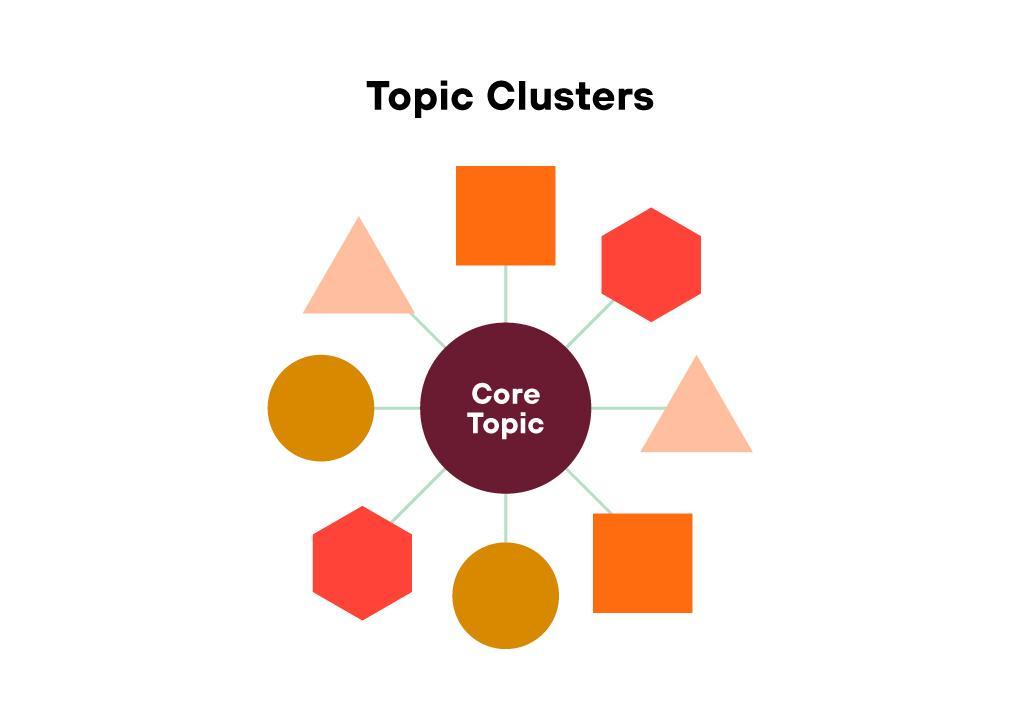
6. Organize Topic Clusters

Creating topic clusters is one of the biggest ranking factors that can add a significant boost to your Google rankings. It’s essentially doing an audit of your blog’s existing content and reorganizing it in a way that makes more sense. 

Here’s an illustration of a topic cluster:

Source

A topic cluster is like a house. Your website should be arranged in a way that’s easy to navigate. Rooms should come off from the main hallway, and the kitchen and bathroom should be easy to locate. Your website should be intuitive, both for the user and Google. 

How do you do this? Organize your blog site around a central ‘master’ page and consider it the place to which the other pages link. Make it logical and effortless to navigate. It’s highly valued by Google, and search engine algorithms will reward you for it.

7. Submit a Blog Sitemap

Submitting a blog sitemap takes the idea of topic clusters one step further. You can submit a detailed map to your website via the Google Search Console. You can use a plugin such as Yoast to create a sitemap for you. 

Your blog’s sitemap lists the most important pages to make it easier for Google to crawl your website. Having a sitemap for a new website can dramatically improve your rankings. 

8. Conduct an SEO Audit

What if you do something that negatively affects website rankings? Conducting a full technical SEO audit using a full range of SEO tools can highlight issues that might make the Google algorithm turn its back on you. 

An SEO audit ensures your site is properly crawled and indexed by search engines. It identifies ranking factors and suggests how to get more organic traffic to your website. 

You might lose out on traffic due to one or two issues. An SEO audit can help tame Google’s algorithm and bump you up the search engine results. We recommend reading this SEO audit guide.

9. Optimize Content for Google Featured Snippets

Featured snippets are specific search results found at the top of Google. These snippets answer frequently asked questions, such as how tall Everest is or what the best things to do in Berlin are. They can be lists, sentences, or entire paragraphs, provided they answer the question.


Optimizing your own site so it becomes one of the search results that answer the question is highly prized. How do you do it? Check out SEO tools such as Ahrefs or SEMrush and adhere to SEO best practices, such as the ones listed in this article.

10. Avoid Keyword Cannibalization

The right keywords and their usage are extra important for search engine optimization. Search engine algorithms often have very little to go on when crawling a web page, so it is crucial to use the correct language. 

However, it’s not about stuffing your content with as many keywords as possible. Overuse can do you more harm than good on search engine results pages because of keyword cannibalization. 

Targeting a specific keyword across multiple pages will only confuse Google’s algorithm. Which page should it display? Which one is most relevant? Are other sites offering more quality content? Cleaning up your pages and focusing your keywords will allow the algorithm to work better with your site. 

Conclusion

We’ve covered a wide range of SEO tips that will help improve the chances of your blog appearing on the search engine results pages. These tricks range from basic to advanced, and knowing them will help you stay ahead of the competition.

Topics covered:

  • Keyword Research and Planning
  • Adding Keywords to Blog Content
  • Using Meta Titles and Descriptions
  • Building Internal Linking
  • Optimizing the Blog for Mobile Devices
  • Organizing Topic Clusters
  • Submitting Blog Sitemap
  • Conducting an SEO Audit
  • Optimizing Content for Google Featured Snippets
  • Avoiding Keyword Cannibalization
Categories
SEO & Search Optimization

4 Steps to Optimize Images for Your Blog

If you want to know how to optimize images for your blog then this article is especially for you.

Image Optimization: What? Why? How?

What is image optimization? Actually, it’s a process of resizing and compressing images to the smallest possible size and weight without reducing the overall image quality.

So, why is image optimization so important for your blog? Here are some facts and statistics to demonstrate why it’s vital for your site. The very first thing to know is that delays are killing. Really. Thus, according to the studies, even a 1-second delay in page load can harm and result in:

  • 11% fewer page views;
  • 16% decrease in user satisfaction;
  • 7% loss in conversions.

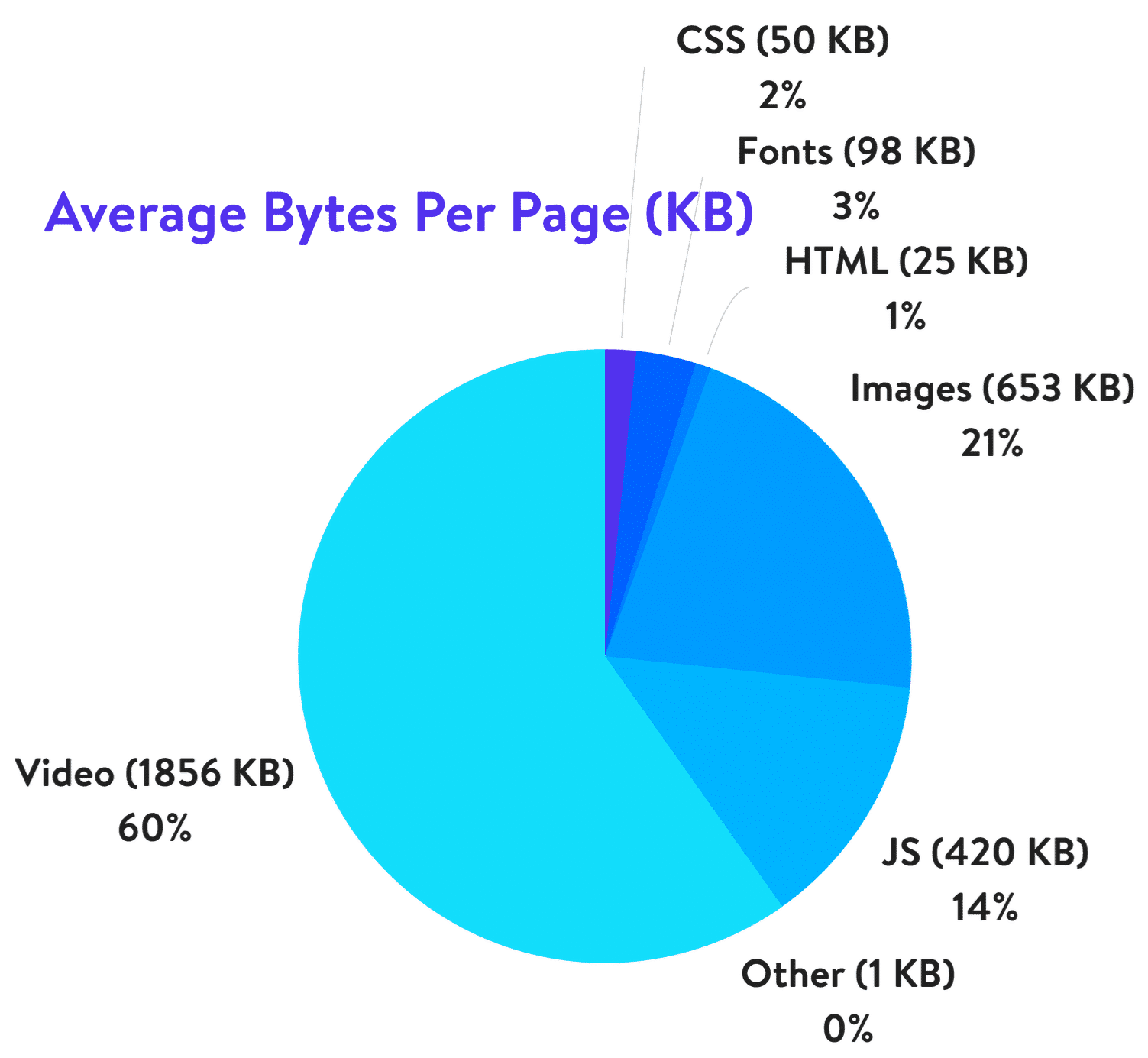
In its turn, 21% of a total webpage’s weight averagely is made up of images. Yes! Thereby, when it comes to optimizing your blog, it’s the images to start with.

Yes, big and bright visuals properly used can boost your blog but they can make things even worse if using them wrong.

How to optimize images? Below you’ll find 4 easy steps to do for image optimization and improving your blog, making it faster and much more user-friendly. 

Step 1: Acquire Imagery Legally

The very first thing is to get high-quality images and photos for your blog. Another crucial thing is that you should do that legally. There are 2 ways to choose from:

  1. Make a photo/image by yourself;
  2. Go to the photo stock or photo editors.

Today there is no need to grab any images because there are such services as Canva, crello with millions of ready designs, images, photos of any themes, purposes on offer. Using it, you can also create your own visuals for any event and goal. The highlight of the service is that there you can find tons of free visuals along with paid imagery. Choose an option that suits your blog and use it for your site.

Step 2: Choose the Right File Format

There are 3 file formats commonly used for web sites. Here they are:

  • PNG is the best for logos, graphics, text-heavy designs, screenshots. Also, the format is used for images with transparent backgrounds. It has a larger file size, but it produces higher quality images.
  • JPEG is used for photographs and images with people, places, etc. Images and photos of the format can be adjusted with the perfect balance of quality and file size.
  • GIF uses 256 colors only and is the best for animated images.

Herewith, remember 2 things that JPEG is used for photos and PNG for graphics/text, GIF animations. Definitely, besides the aforementioned formats, there are a lot of others, but not all the browsers adequately support them. So, it’s better to choose out of these 3 options. Also, before you start to modify blog images, check the format, and change it if needed.

Step 3: Mind Image Dimensions

There is always the temptation to use the best of the best and the largest of the largest. But you should be careful with your image dimensions. The truth is that there is no point in adding enormously large and heavy photos to your blog. It’s reasonable to choose the size of the images depending on the CMS and the theme used for your site. Commonly, the following sizes are used for blog websites:

  • 1,200 px X 630 px for blog graphics; 
  • 500 px X 500 px for headshot; 
  • 250 px X 300 px for sidebar.

So, when you download the image or photo with high resolution and large dimension, make sure to scale it to the proper size and weight. Thus, you can optimize the image 94% from 1.8 MB up to 103 KB only, for example.

Step 4: Compress Images

The next thing to do is to compress your images. Compression plays a critical role in image optimization. However, you should be careful when compressing images not to overdo it. Let’s see the widespread ways to compress images for blog sites. Mind that the settings depend a lot on a tool you use for the purpose.

Way 1. The most common ones like Adobe Photoshop, GIMP, On1 Photo, Affinity Photo, and others have built-in compression features all you need to choose the option that suits you most of all.

Way 2. Also, you can save the needed images as usual and go to third-party services like TinyPNG, JPEG Mini, and others for much easier compression.

Way 3. Use the plugins of your CMS. If you use WordPress, for example, there you can install the plugins that will compress all the images loaded automatically.

Bottom Line

It’s no secret that the visuals and images included are crucial for your blog. Due to the fact that the human brain processes visuals 60,000 times faster than text, images are perfect for attracting attention and boosting user engagement. However, without optimization, large and heavy images can bring to nought all your efforts. Now you know how you can solve the problem in 4 easy steps:

  1. Go to the trusted photo stocks;
  2. Choose the right file format;
  3. Size your image;
  4. Compress the visuals without a quality loss.

Follow the advice and watch how visuals do magic with your blog!